RadMenuItem
The following controls are used to create a menu structure:
-
RadMenuItem
-
RadMenuHeaderItem
-
RadMenuComboItem
-
RadMenuSeparatorItem
-
RadMenuContentItem
RadMenuItem
The RadMenuItem represents a standard menu item. Some of its properties include:
| Properties | Description |
|---|---|
| AutoSizeMode | Indicates how the menu item will be sized and can be FitToAvailableSize, WrapAroundChildren or Auto. |
| AngleTransform | Sets the angle offset from horizontal with which the item will be displayed. |
| CommandBinding | Allows you to configure keyboard shortcuts to fire a given menu item. See the Getting Started topic for an example. |
| DisplayStyle | Lets you choose whether to show an image, text, or both on the item. |
| DescriptionText | Contains the text for the description that appears just below the Text. DescriptionFont controls the font characteristics of the DescriptionText display. See the example menu item in the figure below. 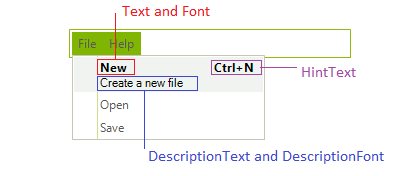 |
| Enabled | When set to false shows the menu item as grayed out and does not react to mouse clicks. To allow non-standard painting when the menu item is not enabled set the UseDefaultDisabledPaint property to false and then use the Visual Style Builder to customize the appearance of this state. |
| FlipText | Flips the text of the item vertically if set to true. |
| BackColor and ForeColor | Set the colors of the background and text. |
| Font | Sets the font and size of the item text. |
| HintText | Sets the text to appear at the right side of the menu item, such as Ctrl+N for New. |
| Image, ImageIndex, and ImageKey | Let you assign an image to display on the item. |
| IsChecked | Controls whether a check mark is displayed on the item. |
| TextImageRelation | Controls the relationship between the text and image displayed on the item. |
| Text | Specifies the text to show on the item. |
| TextOrientation | Allows you to choose vertical or horizontal text display. |
| CheckOnClick | Indicates whether selecting the item should set a check mark. |
| HasTwoColumnDropDown | Lets you add a drop-down menu that contains two columns. |
| IsMainMenuItem | Indicates that the menu item is an item on the main menu, rather than an item on a drop-down menu. |
| PopupDirection | Indicates whether the direction in which the drop-down menu will open will be to the left, right, up, or down. |
| ShowArrow | Displays an arrow button on the drop-down menu. |
| StringAlignment | Formats the alignment of the text string so it is positioned near, center, or far from the left border of the menu item. |
Sizing Menu Items
Use the AutoSizeMode property to choose whether the item fits the available size, wraps around its children, or uses the automatic sizing behavior. If you need all items in a RadMenu to have the same height, use the AllItemsEqualHeight property on the owning RadMenu. For more information, see Menu Item Height.
RadMenuComboItem
The RadMenuComboItem allows you to put a drop-down list on a menu. To add items to the combo box work with the Items collection of the RadMenuComboItem.ComboBoxElement property. Since the ComboBoxElement returns a RadDropDownListElement, you can also use data binding to put items in the drop-down list from any data source.
RadMenuContentItem
The RadMenuContentItem is a container control that allows you to build up custom menu items from other controls. You can assign any RadElement based control to the ContentElement property of a RadMenuContentItem. See Nesting Controls in Menu Items for an example.
RadMenuSeparatorItem
The RadMenuSeparatorItem is used to add a horizontal line for visual separation between successive items on a menu.
RadMenuSeparatorItem defines a TextVisibility property and it needs to be set to Visible in order the text set to the item to be displayed.