New to Telerik Reporting? Start a free 30-day trial
Aligning Legend Items Vertically in Telerik Reporting
Environment
| Product | Reporting |
Description
I want the legend items in my chart to appear vertically, with one item per line, instead of multiple items on the same line. Adding spaces did not work as the whitespace gets trimmed, and the items still align horizontally.
This knowledge base article also answers the following questions:
- How to vertically align legend items in Telerik Reporting?
- How to use non-breaking spaces in legend items for vertical arrangement?
- How to create a custom legend layout in Telerik Reporting?
Solution
To align legend items vertically so that each item appears on a separate line, follow these solutions:
Using Non-Breaking Spaces
- Use a string of Narrow Non-breaking spaces (
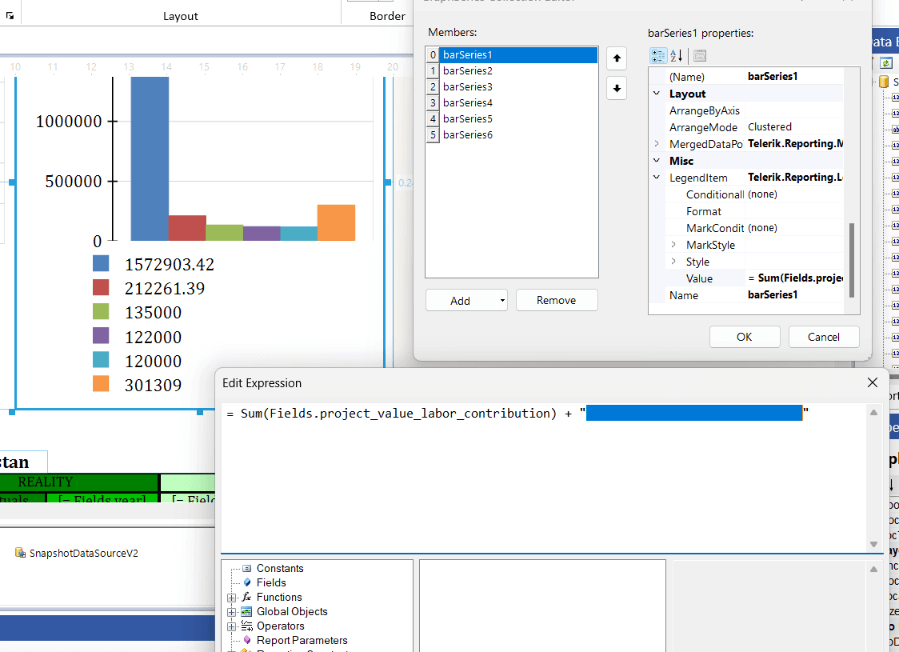
- Update the legend item value with these spaces, ensuring enough spaces are added to the end for alignment. Non-breaking spaces prevent trimming and help space out items.
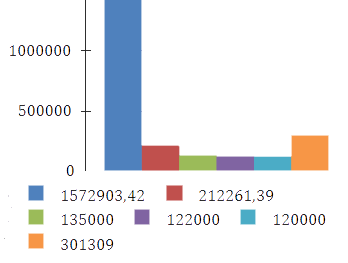
Here is the Graph layout with the default legend:
And the steps and the layout after applying the non-breaking spaces:
Creating a Custom Legend
- Place a
ListorTablereport item next to the chart. - Bind the
ListorTablerepresenting the legend to the corresponding data. - Configure the Table/List cells to display the required marks and text. For the former, you may use PictureBox or Shape. Consider also Conditional Formatting and Bindings for the styles.
Using a User Function
- Create a user function to pad legend item text to equal lengths. Refer to the User Functions documentation.
- Apply the function to each legend item to adjust alignment. Note that this option does not guarantee vertical stacking but may improve the layout.