Welcome to Telerik Reporting
Progress Telerik Reporting is a .NET reporting solution for designing, processing, exporting, and embedding reports in web, desktop, and cloud-based applications. It gives development teams the tools to build pixel-perfect reports and the viewers and services required to deliver those reports inside business applications.
Use Telerik Reporting when you need to create operational reports, invoices, statements, dashboards, or printable business documents that pull data from multiple sources and render consistently across technologies.
Telerik Reporting includes report designers, report viewers, report processing services, and export formats. Desktop components and services run on .NET or .NET Framework, while the HTML5-based integration options let you embed reporting in modern web applications.
With Telerik Reporting, you can retrieve and process data from relational, multidimensional, ORM-based, and custom data sources. End users can view reports in dedicated viewers or export them to formats such as PDF, Microsoft Word, Microsoft Excel, and Microsoft PowerPoint.
 New to Telerik Reporting?Start Free Trial
Key Features
Telerik Reporting helps you build a complete reporting workflow:
- Design reports visually in desktop or web-based designers.
- Connect reports to business data from common enterprise data sources.
- Preview, print, and export reports in multiple document formats.
- Embed report viewers in ASP.NET Core, Angular, React, Blazor, WPF, WinForms, WinUI, and other applications.
- Host report processing in services that support web and desktop reporting scenarios.
Supported Platforms
Telerik Reporting supports report design, processing, or viewing across the following operating systems, depending on the component you use:
| Operating System | Typical Telerik Reporting Scenarios |
|---|---|
| Windows | Full support for all components: the Standalone Report Designer, desktop report viewers, report service hosting, and web application integration. |
| Linux | Hosting report processing services and embedding HTML5-based viewers and designers in web applications. |
| macOS | Hosting report processing services and embedding HTML5-based viewers and designers in web applications. |
Supported Frameworks
You can integrate Telerik Reporting into multiple web and desktop frameworks:
| Supported Framework | App Type | Typical Use |
|---|---|---|
| ASP.NET Core | Web | Host reporting services and embed HTML5-based viewers and designers in your application. |
| ASP.NET MVC | Web | Add server-side MVC wrappers around the HTML5 Report Viewer. |
| ASP.NET WebForms | Web | Integrate the HTML5 Report Viewer in existing WebForms applications. |
| Angular | Web | Embed the native Angular Report Viewer or the HTML5 Report Viewer Angular wrapper. |
| React | Web | Integrate the React Report Viewer component in React applications. |
| Blazor | Web | Use the Native Blazor Report Viewer or the Blazor wrapper around the HTML5 Report Viewer. |
| WinForms | Desktop | Display reports in WinForms applications using the WinForms Report Viewer. |
| WPF | Desktop | Display reports in WPF applications using the WPF Report Viewer. |
| WinUI | Desktop | Display reports in WinUI 3 applications using the WinUI Report Viewer. |
The web integration story centers on HTML5-based viewers and designers, while the desktop integration story centers on native viewers and design tools for Windows development environments.
Key Components
The lifecycle of a Telerik report usually has three stages: designing the report, processing and rendering the report with data, and exporting or displaying the final output.
The main Telerik Reporting components map directly to those stages.
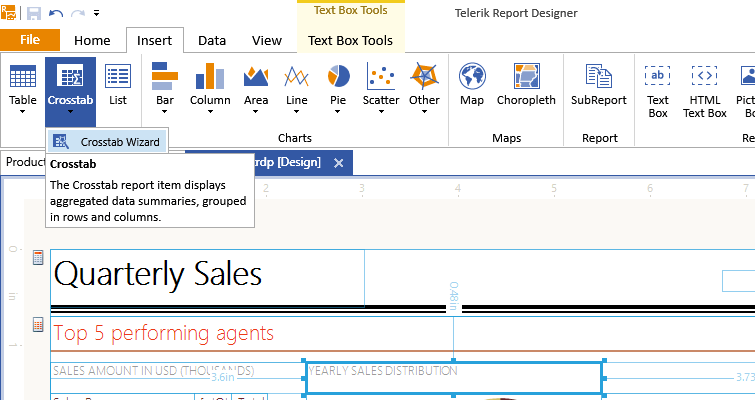
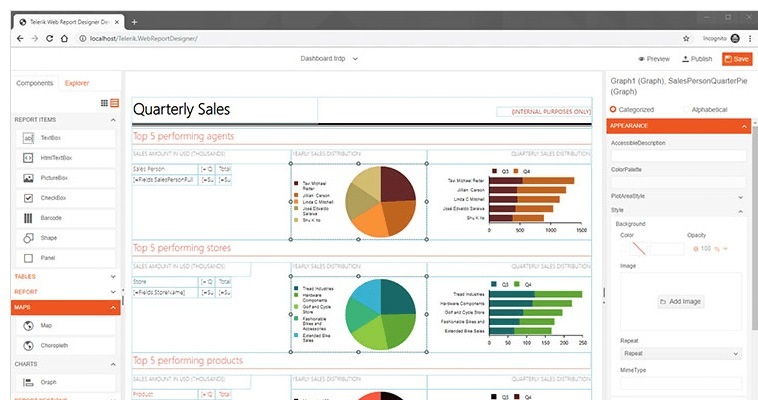
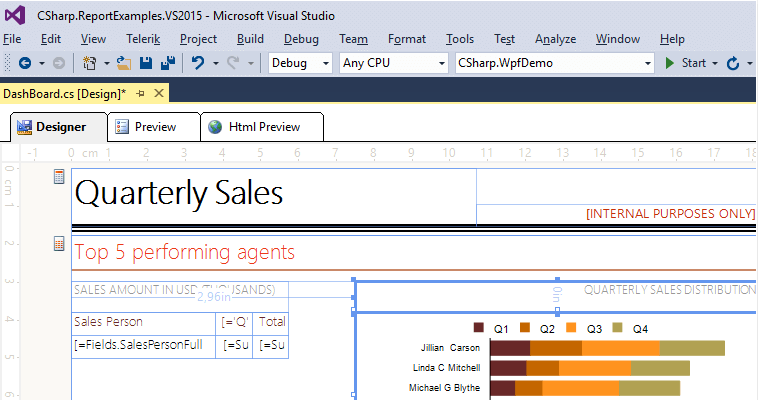
Report Designers
Use a report designer when you create report layout, configure data sources, define grouping and aggregation, and style the final output.
Choose the designer based on where report authors work and whether they need a desktop tool, a web-based tool, or Visual Studio integration.
Report Viewers
Use a report viewer to display, print, search, navigate, and export reports inside an application.
Choose the viewer that matches the technology stack of the application where end users consume reports.
| Report Viewer | App Type | Essentials |
|---|---|---|
| HTML5 Report Viewer | Web | An HTML, CSS, JavaScript, and jQuery client-side viewer targeting all web applications. |
| HTML5 MVC Report Viewer | Web | A server-side wrapper allowing you to configure the HTML5 Report Viewer in MVC applications. |
| HTML5 WebForms Report Viewer | Web | A server-side wrapper allowing you to configure the HTML5 Report Viewer in WebForms applications. |
| Native Angular Report Viewer | Web | A fully native Angular widget built with Telerik UI for Angular components. |
| Angular Report Viewer | Web | An Angular component wrapping the HTML5 Report Viewer. |
| ReactJS Report Viewer | Web | A React component wrapping the HTML5 Report Viewer. |
| Blazor Report Viewer | Web | A Blazor component wrapping the HTML5 Report Viewer. |
| Native Blazor Report Viewer | Web | A fully native Blazor widget built with Telerik UI for Blazor components. |
| WinForms Report Viewer | Desktop | A composite of standard Windows Forms controls targeting WinForms and WPF projects. |
| WPF Report Viewer | Desktop | A composite of Telerik UI for WPF controls targeting WPF and WinForms projects. |
| WinUI Report Viewer | Desktop | A composite of Telerik UI for WinUI controls targeting WinUI3 projects. |
Export Formats
Web viewers and web designers typically work with a reporting service that processes report definitions and returns document output. You host this service in an ASP.NET Core application. The service receives a report definition, processes it with data, and returns the rendered result to the viewer or the export pipeline.
Export formats let users save the resulting report in the format that fits their workflow. Common output formats include:
- PDF — for print-ready and archivable documents.
- Microsoft Word and Microsoft Excel
- Microsoft PowerPoint — for presentation-ready reports.
- Image formats such as PNG and TIFF — for embedding report output in other applications.
- CSV
How to Choose the Right Starting Point
Start with the workflow that matches your role:
| Your Role | Recommended Starting Point |
|---|---|
| Evaluating Telerik Reporting | Review the Telerik Reporting live demos and the supported framework table on this page to confirm product fit before installation. |
| Developer embedding reports | Start with the Telerik Reporting installation guide and licensing, then pick the viewer or designer that matches your framework. |
| Report author | Start with the Standalone Report Designer or the Web Report Designer based on your preferred authoring environment. |
| Setting up a team environment | Review licensing, installation, and the reporting service hosting guidance before you build the integration. |
About the Demos
The Telerik Reporting online demos provide live examples of reporting scenarios and the web report designer. They are a good starting point when you want to see how the product behaves before you integrate it into an application.
If you install Telerik Reporting by using the MSI installer or the Control Panel, sample reports are also available as Visual Studio projects. The examples cover multiple supported platforms. To open the projects:
- Navigate to the Start menu.
- Select Telerik > Reporting > Visual Studio Examples > C#/VB.NET Solution.
Support Options
If you run into issues while working with Telerik Reporting, use the support channel that best matches the type of question.
Sharing detailed feedback also helps improve the product and documentation.
- Use the Telerik Reporting support system when you have an active license and need product support.
- Use the Telerik Reporting forum for general questions and community discussion.
- Use the Telerik Reporting feedback portal and the Telerik Reporting product roadmap to review planned work and suggest new ideas.
- Use the Telerik Reporting release history to review delivered features and changes.
- Use the article feedback form and the Improve this article link to report documentation issues or suggest improvements.
- Use Progress Services if you need a custom solution or implementation support.
Learning Resources
Use these resources to learn the product, evaluate features, and solve common setup issues:
- Video onboarding for registered users
- Online demos for Telerik Reporting
- Telerik Reporting videos
- Telerik blog posts about Reporting
- Telerik Reporting webinars
- Knowledge Base documentation hub
Next Steps
- First Steps with Telerik Reporting
- Setting Up Your Telerik Reporting License Key
- Licensing Frequently Asked Questions