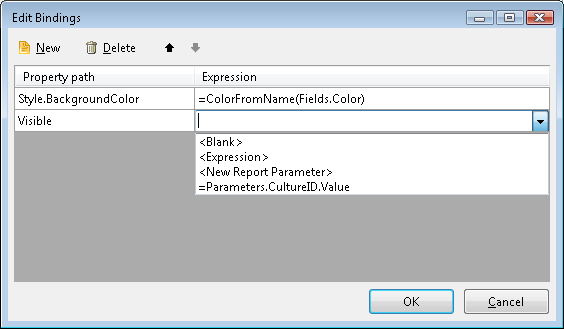
Bindings Overview
Bindings allow you to dynamically set report item properties using expressions. While only certain properties support expressions natively (like the TextBox Value property), bindings extend this capability to any write-enabled property.
When the report renders, the expression is evaluated and assigned to the bound property. For example, you can bind Style.BackgroundColor to =Fields.CarColor to set colors dynamically from your data.
Bindings vs. Other Approaches
| Scenario | Use This | Reason |
|---|---|---|
| Displaying field values in text boxes | Value expressions (e.g., =Fields.Total) | The Value property supports expressions natively. |
| Styling multiple properties based on conditions | Conditional Formatting Rules | User-friendly interface, one rule can set multiple style properties. |
| Complex expressions for styling | Bindings | Full expression flexibility, cleaner for complex logic like IIF(Fields.Amount > 1000, 'Red', 'Green'). |
| Setting DataSource, Visible, or other properties without native expression support | Bindings | Only bindings can dynamically set these properties. |
Prefer Conditional Formatting over Bindings for Presentational Style Logic When a runtime value only affects how a report item looks, for example, the background color, font color, font weight, or border width, prefer a conditional formatting rule over an expression binding. Bindings rely on reflection at runtime to resolve and assign the target property, which adds processing overhead. Conditional Formatting rules are evaluated through a more efficient code path and typically perform noticeably better in dense, data-bound sections that re-evaluate styling on every rendered row.
Reserve expression bindings for properties that do not accept report expressions directly. Properties that already support Expressions—such as the
TextBox.Value—should be set with an Expression, because wiring a Binding to them adds the reflection overhead without providing any additional capability.
Common Binding Scenarios
| Property | Expression Example | Purpose |
|---|---|---|
Style.BackgroundColor | =IIF(Fields.Amount > 1000, 'Red', 'Green') | Change background color based on value |
Visible | =Fields.ShowDetails | Show/hide items based on data |
DataSource | =Fields.NestedData | Dynamically assign nested data from a JSON field |
Style.Font.Bold | =Fields.IsHighlight | Conditionally format text |
DocumentMapText | =Fields.CategoryName | Set document map entries |
How to Create a Binding
- Select the report item and locate the
Bindingsproperty in the Properties window. - Click the ellipsis button [...] to open the Edit Bindings dialog.
- Click New to add a new binding.
- From the Property path dropdown, select the property to bind (for example,
DataSource). Only write-enabled properties can be bound. - Enter the expression in the Expression field. The expression must return a value compatible with the property type.
- Click OK to apply the bindings.
Not all item properties support expression bindings. Refer to the Telerik Reporting API reference to verify if a specific property supports binding.