.NET MAUI SmartPasteButton Command
The Telerik .NET MAUI SmartPasteButton exposes the SmartPasteRequestCommand (ICommand) which executes when a smart paste operation is requested. The command parameter is of type Telerik.Maui.Controls.SmartPasteButton.SmartPasteButtonRequestContext.
This is an example of how to bind the SmartPasteRequestCommand to a command in the ViewModel:
1. Define the editors on the page with two buttons one for copying the text to the clipboard and another one for the smart paste operation:
<Grid RowDefinitions="Auto, Auto"
      RowSpacing="10">
    <VerticalStackLayout>
        <HorizontalStackLayout>
            <Label Text="Name: " />
            <telerik:RadEntry Text="{Binding Name}" />
        </HorizontalStackLayout>
        <HorizontalStackLayout>
            <Label Text="City: " />
            <telerik:RadEntry Text="{Binding City}" />
        </HorizontalStackLayout>
        <VerticalStackLayout>
            <Label Text="Description: " />
            <telerik:RadEditor Text="{Binding Description}"
                               AutoSize="TextChanges" />
        </VerticalStackLayout>
    </VerticalStackLayout>
    <VerticalStackLayout Grid.Row="1">
        <Label Text="{Binding CopyText}"/>
        <telerik:RadTemplatedButton Content="Copy To Clipboard"
                                    Command="{Binding CopyToClipboardCommand}" />
        <telerik:RadSmartPasteButton Provider="{Binding .}"
                                     SmartPasteRequestCommand="{Binding SmartPasteRequestCommand}" />
    </VerticalStackLayout>
</Grid>
2. Add the telerik namespace:
xmlns:telerik="http://schemas.telerik.com/2022/xaml/maui"3. Define a ViewModel that implements the ISmartPasteButtonProvider interface for the fields used by the SmartPasteButton, the SmartPasteRequestCommand and CopyToClipboardCommand:
public class ViewModel : NotifyPropertyChangedBase, ISmartPasteButtonProvider
{
    private static readonly HttpClient HttpClient = new HttpClient();
    private string name;
    private string city;
    private string description;
    private string email;
    private string copyText = "Jane Smith is a Senior Back-End Engineer based in downtown Austin, Texas, USA. She designs scalable REST APIs, manages cloud infrastructure, mentors junior developers, and drives performance improvements across distributed systems. Her email is jane.smith@techcorp.io.";

    public ViewModel()
    {
        this.SmartPasteRequestCommand = new Command<object>(async obj => await this.OnSmartPasteRequestAsync(obj));
        this.CopyToClipboardCommand = new Command(async () => await this.OnCopyToClipboard());
    }

    public string Name
    {
        get => this.name;
        set => this.UpdateValue(ref this.name, value);
    }

    public string City
    {
        get => this.city;
        set => this.UpdateValue(ref this.city, value);
    }

    public string Description
    {
        get => this.description;
        set => this.UpdateValue(ref this.description, value);
    }

    public string Email
    {
        get => this.email;
        set => this.UpdateValue(ref this.email, value);
    }

    public string CopyText
    {
        get => this.copyText;
        set => this.UpdateValue(ref this.copyText, value);
    }

    public ICommand SmartPasteRequestCommand { get; }

    public ICommand CopyToClipboardCommand { get; }

    public IEnumerable<SmartPasteButtonField> GetFields()
    {
        yield return new SmartPasteButtonField { Field = nameof(this.Name), Description = "Full Name" };
        yield return new SmartPasteButtonField { Field = nameof(this.City), Description = "City" };
        yield return new SmartPasteButtonField { Field = nameof(this.Description), Description = "Description for job position, email address and daily work" };
        yield return new SmartPasteButtonField { Field = nameof(this.Email), Description = "Email address" };
    }

    public void SetFieldValue(string field, object value)
    {
        switch (field)
        {
            case nameof(this.Name):
                this.Name = (string)value;
                break;
            case nameof(this.City):
                this.City = (string)value;
                break;
            case nameof(this.Description):
                this.Description = (string)value;
                break;
            case nameof(this.Email):
                this.Email = (string)value;
                break;
        }
    }

    private async Task OnSmartPasteRequestAsync(object obj)
    {
        var context = (SmartPasteButtonRequestContext)obj;

        try
        {
            var request = new { Content = context.Content, FormFields = context.Fields };
            var httpResponse = await HttpClient.PostAsJsonAsync(
                "https://demos.telerik.com/service/v2/ai/smartpaste/smartpaste",
                request,
                context.CancellationToken);
            httpResponse.EnsureSuccessStatusCode();

            var response = await httpResponse.Content.ReadFromJsonAsync<SmartPasteResponse>(context.CancellationToken);
            context.SetResponse(response.FieldValues);
        }
        catch (OperationCanceledException)
        {
            context.Cancel();
        }
        catch (Exception ex)
        {
            context.SetError(ex);
        }
    }

    private async Task OnCopyToClipboard()
    {
        await Clipboard.SetTextAsync(this.CopyText);
    }
}
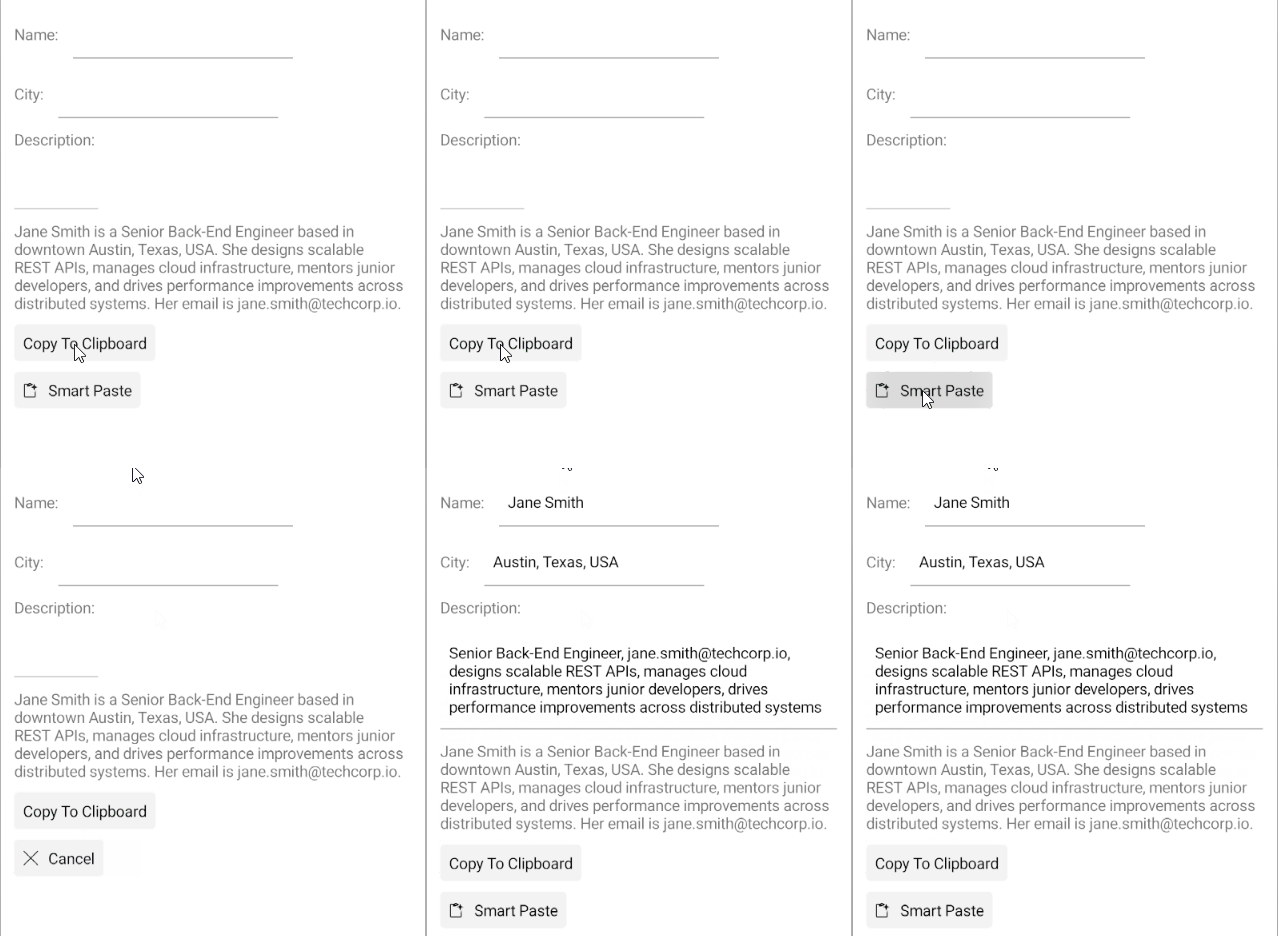
This is the result on Android:
The SmartPasteButton examples in the SDKBrowser Demo Application use a Telerik-hosted AI service for demonstration purposes only.
To use the smart paste functionality in your application, you must configure your own AI service.
How to do that is described in the Configuration article.