New to Telerik UI for .NET MAUI? Start a free 30-day trial
.NET MAUI PromptInput Visual Structure
Updated on Aug 11, 2026
The visual structure of the .NET MAUI PromptInput represents the anatomy of the UI control. Being familiar with the visual elements of the PromptInput allows you to quickly find the information required to configure them.
The images in this article show the anatomy of the PromptInput and its building blocks.
PromptInput Structure
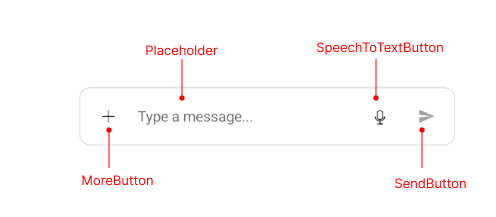
- MoreButton—Represents the 'More' button, which opens a menu with additional actions.
- Placeholder—Represents the placeholder text displayed when the input area is empty.
- SpeechToTextButton—Represents the button that activates the speech-to-text functionality.
- SendButton—Represents the button used to send the message.
Attached Files View Structure and Messages Structure
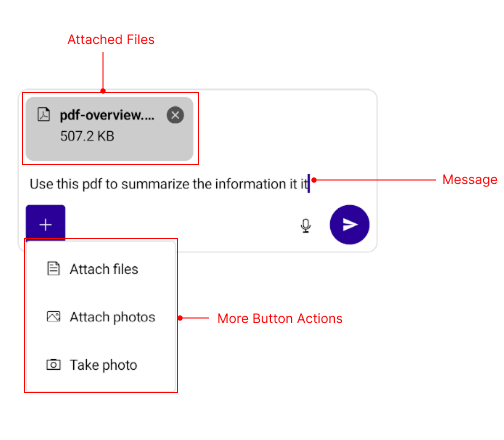
- Attached Files—Represents the view that displays the files attached to the prompt.
- Message—Represents the message typed in the input area.
- More Button Actions—Represents the actions available through the 'More' button—Attach files, Attach photos and Take photo.