.NET MAUI DataGrid AI Smart Assistant Templates
The .NET MAUI DataGrid control allows you to override the built-in templates for the AI Smart Assistant feature to create a customized user experience.
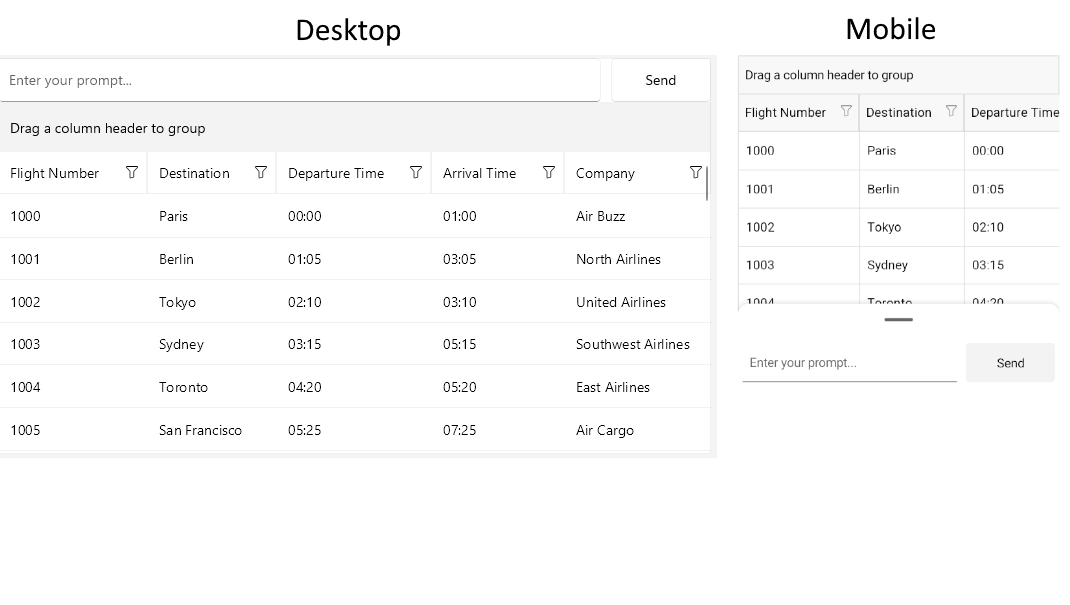
Use the AIViewTemplate (DataTemplate) property on DataGrid level to override the default template for the DataGridAIPromptInput.
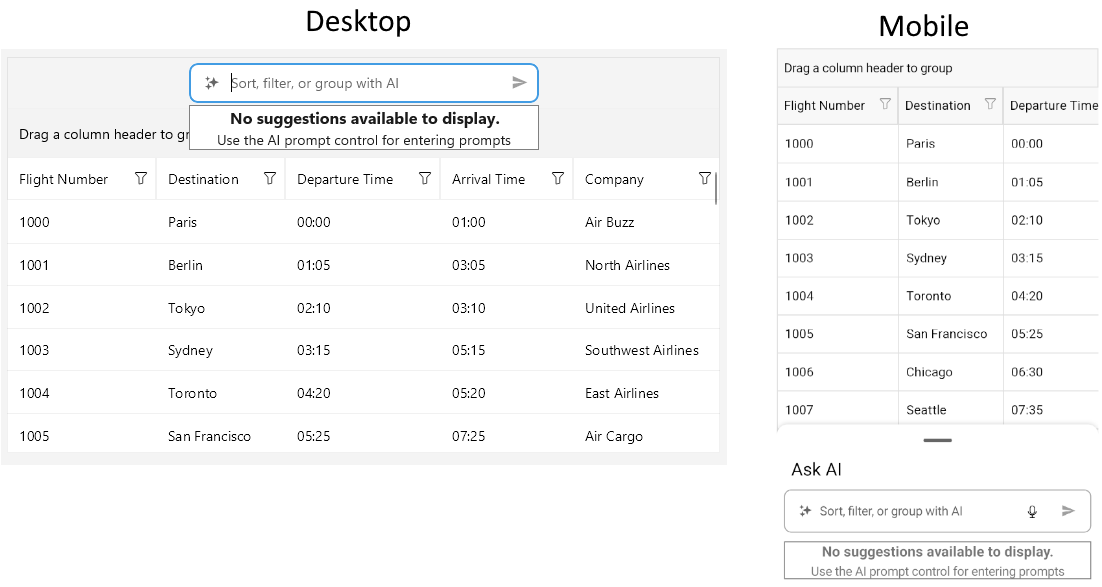
Use the EmptyContentTemplate (DataTemplate) property on AISettings level to override the default template for the empty content view displayed when there are no suggestions available.
When you define both templates, the
AIViewTemplatetakes precedence over theEmptyContentTemplate.
Here is an example of how to define custom templates for the AI Smart Assistant feature.
An example of AIViewTemplate:
<DataTemplate x:Key="AIViewTemplate">
    <Grid ColumnDefinitions="*, 100"
          RowDefinitions="44"
          ColumnSpacing="10"
          Padding="{OnPlatform Android='5, 24', iOS='5, 24'}"
          BindingContext="{Binding AISettings, Source={RelativeSource AncestorType={Type telerik:RadDataGrid}}}">
        <telerik:RadEntry Text="{Binding InputText, Mode=TwoWay}"
                          telerik:KeyboardHelper.IsTranslationPivot="{OnPlatform Default=False, Android=True, iOS=True}"
                          telerik:KeyboardHelper.IsTranslationSource="{OnPlatform Default=False, Android=True, iOS=True}"
                          Placeholder="Enter your prompt..." />
        <telerik:RadTemplatedButton Content="Send"
                                    Command="{Binding PromptRequestCommand}"
                                    CommandParameter="{Binding InputText}"
                                    Grid.Column="1" />
    </Grid>
</DataTemplate>
This is how the custom AIViewTemplate looks like when applied:
An example of EmptyContentTemplate:
<DataTemplate x:Key="EmptyContentTemplate">
    <telerik:RadBorder BorderBrush="Gray"
                       BorderThickness="1"
                       BackgroundColor="White">
        <VerticalStackLayout HorizontalOptions="Center"
                             VerticalOptions="Center"
                             Spacing="2">
            <Label Text="No suggestions available to display."
                   FontAttributes="Bold"
                   FontSize="16"
                   HorizontalOptions="Center" />
            <Label Text="Use the AI prompt control for entering prompts"
                   FontSize="14"
                   HorizontalOptions="Center" />
        </VerticalStackLayout>
    </telerik:RadBorder>
</DataTemplate>
This is how the custom EmptyContentTemplate looks like when applied:
The DataGrid AI Smart Assistant examples in the SDKBrowser Demo Application use a Telerik-hosted AI service for demonstration purposes only. You have to configure your own AI service for the AI Smart Assistant to work in your application. How to do that is described in the Getting Started with the AI Smart Assistant article.
For a runnable example demonstrating custom templates, see the SDKBrowser Demo Application and go to the DataGrid > AI Smart Assistant category.