New to Telerik UI for .NET MAUI? Start a free 30-day trial
.NET MAUI CollectionView Drop Indicator Styling
Updated on Sep 14, 2026
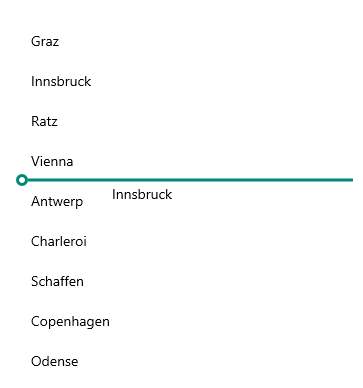
The drop indicator appears while dragging an item inside the CollectionView to notify the end user where the item can be dropped. To style the drop indicator, create an implicit style and set its TargetType to CollectionViewDropIndicator.
Check a quick example with a modified CollectionViewDropIndicator:
1. Add the following sample implicit style to the page's resources:
XAML
            <Style TargetType="telerik:CollectionViewDropIndicator">
   <Setter Property="StrokeThickness" Value="3" />
   <Setter Property="StrokeColor" Value="#00897B" />
            </Style>
2. Add the RadCollectionView instance to the page:
XAML
<telerik:RadCollectionView x:Name="collectionView"
                           ItemsSource="{Binding Locations}"
                           DisplayMemberPath="City"
                           IsDragDropEnabled="True"
                           SelectionMode="Single">
    <telerik:RadCollectionView.BindingContext>
        <local:ViewModel />
    </telerik:RadCollectionView.BindingContext>
</telerik:RadCollectionView>
For the purpose of the example, use the ViewModel and DataModel classes from the Drag and Drop Overview topic.
Check the result below: