New to Telerik UI for .NET MAUI? Start a free 30-day trial
Drag and Drop between CollectionViews
Updated on Aug 20, 2026
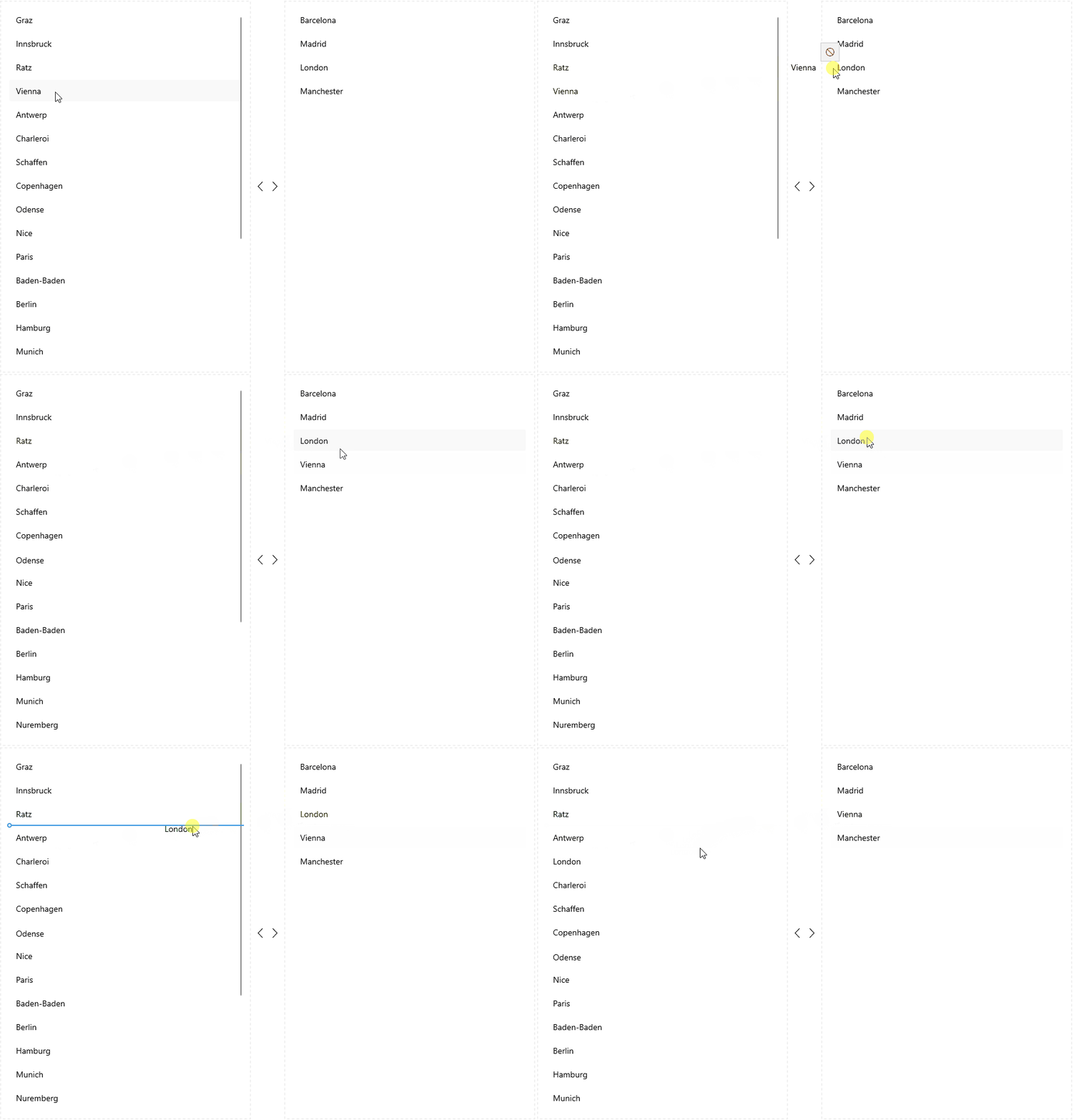
The app user can directly move items from one CollectionView to another CollectionView through drag-and-drop if the source collection of both instances contains items of the same type.
Check an example on drag and drop between two CollectionViews:
1. Add two RadCollectionView instances to the page:
XAML
<Grid RowDefinitions="{OnIdiom Default='*, Auto, *', Desktop='*'}"
      ColumnDefinitions="{OnIdiom Default='*', Desktop='*, Auto, *'}"
      Padding="8">
    <Border Style="{StaticResource DragDropAreaBorderStyle}"
            WidthRequest="{OnPlatform MacCatalyst=424, WinUI=424}"
            HorizontalOptions="{OnPlatform MacCatalyst=End, WinUI=End}" />
    <telerik:RadCollectionView x:Name="firstCollectionView"
                               ItemsSource="{Binding LocationsLeft}"
                               IsDragDropEnabled="True"
                               DisplayMemberPath="City"
                               HorizontalOptions="{OnPlatform MacCatalyst=End, WinUI=End}"
                               Margin="12" />
    <StackLayout Grid.Row="{OnIdiom Default=1, Desktop=0}"
                 Grid.Column="{OnIdiom Default=0, Desktop=1}"
                 Orientation="{OnIdiom Default=Vertical, Desktop=Horizontal}"
                 HorizontalOptions="Center"
                 VerticalOptions="Center"
                 Margin="8">
        <Label FontFamily="TelerikFont"
               FontSize="20"
               Text="{OnIdiom Default={x:Static telerik:TelerikFont.IconUpArrow}, Desktop={x:Static telerik:TelerikFont.IconLeftArrow}}" />
        <Label FontFamily="TelerikFont"
               FontSize="20"
               Text="{OnIdiom Default={x:Static telerik:TelerikFont.IconDownArrow}, Desktop={x:Static telerik:TelerikFont.IconRightArrow}}" />
    </StackLayout>
    <Border Grid.Row="{OnIdiom Default=2, Desktop=0}"
            Grid.Column="{OnIdiom Default=0, Desktop=2}"
            Style="{StaticResource DragDropAreaBorderStyle}"
            WidthRequest="{OnPlatform MacCatalyst=424, WinUI=424}"
            HorizontalOptions="{OnPlatform MacCatalyst=Start, WinUI=Start}" />
    <telerik:RadCollectionView x:Name="secondCollectionView"
                               Grid.Row="{OnIdiom Default=2, Desktop=0}"
                               Grid.Column="{OnIdiom Default=0, Desktop=2}"
                               IsDragDropEnabled="True"
                               ItemsSource="{Binding LocationsRight}"
                               DisplayMemberPath="City"
                               HorizontalOptions="{OnPlatform MacCatalyst=Start, WinUI=Start}"
                               Margin="12" />
</Grid>
2. Add a sample ViewModel class:
C#
public class ViewModel : NotifyPropertyChangedBase
{
    public ViewModel()
    {
        this.LocationsLeft = new ObservableCollection<DataModel>
        {
            new DataModel { Continent = "Europe", Country = "Austria", City = "Graz", Id = 1 },
            new DataModel { Continent = "Europe", Country = "Austria", City = "Innsbruck", Id = 2 },
            new DataModel { Continent = "Europe", Country = "Austria", City = "Ratz", Id = 3 },
            new DataModel { Continent = "Europe", Country = "Austria", City = "Vienna", Id = 4 },
            new DataModel { Continent = "Europe", Country = "Belgium", City = "Antwerp", Id = 5 },
            new DataModel { Continent = "Europe", Country = "Belgium", City = "Charleroi", Id = 6 },
            new DataModel { Continent = "Europe", Country = "Belgium", City = "Schaffen", Id = 7 },
            new DataModel { Continent = "Europe", Country = "Denmark", City = "Copenhagen", Id = 8 },
            new DataModel { Continent = "Europe", Country = "Denmark", City = "Odense", Id = 9 },
            new DataModel { Continent = "Europe", Country = "France", City = "Nice", Id = 10 },
            new DataModel { Continent = "Europe", Country = "France", City = "Paris", Id = 11 },
            new DataModel { Continent = "Europe", Country = "Germany", City = "Baden-Baden", Id = 12 },
            new DataModel { Continent = "Europe", Country = "Germany", City = "Berlin", Id = 13 },
            new DataModel { Continent = "Europe", Country = "Germany", City = "Hamburg", Id = 14 },
            new DataModel { Continent = "Europe", Country = "Germany", City = "Munich", Id = 15 },
            new DataModel { Continent = "Europe", Country = "Germany", City = "Nuremberg", Id = 16 },
            new DataModel { Continent = "Europe", Country = "Italy", City = "Bari", Id = 17 },
            new DataModel { Continent = "Europe", Country = "Italy", City = "Rome", Id = 18 },
            new DataModel { Continent = "Europe", Country = "Netherlands", City = "Amsterdam", Id = 19 },
            new DataModel { Continent = "Europe", Country = "Netherlands", City = "Eindhoven", Id = 20 },
            new DataModel { Continent = "Europe", Country = "Netherlands", City = "Rotterdam", Id = 21 },
            new DataModel { Continent = "Europe", Country = "Portugal", City = "Lisbon", Id = 22 },
            new DataModel { Continent = "Europe", Country = "Portugal", City = "Porto", Id = 23 }
        };

        this.LocationsRight = new ObservableCollection<DataModel>
        {
            new DataModel { Continent = "Europe", Country = "Spain", City = "Barcelona", Id = 24 },
            new DataModel { Continent = "Europe", Country = "Spain", City = "Madrid", Id = 25 },
            new DataModel { Continent = "Europe", Country = "United Kingdom", City = "London", Id = 26 },
            new DataModel { Continent = "Europe", Country = "United Kingdom", City = "Manchester", Id = 27 }
        };
    }

    public ObservableCollection<DataModel> LocationsLeft { get; set; }

    public ObservableCollection<DataModel> LocationsRight { get; set; }
}
3. Add a sample DataModel class:
C#
public class DataModel : NotifyPropertyChangedBase
{
    private string continent;
    private string country;
    private string city;
    private int id;

    public string Continent
    {
        get => this.continent;
        set => this.UpdateValue(ref this.continent, value);
    }

    public string Country
    {
        get => this.country;
        set => this.UpdateValue(ref this.country, value);
    }

    public string City
    {
        get => this.city;
        set => this.UpdateValue(ref this.city, value);
    }

    public int Id
    {
        get => this.id;
        set => this.UpdateValue(ref this.id, value);
    }
}
Here is the result: