New to Telerik UI for .NET MAUI? Start a free 30-day trial
.NET MAUI CircularSlider Range Track
Updated on Aug 20, 2026
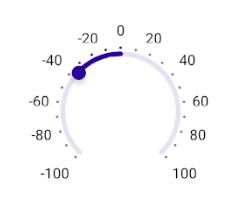
The range track refers to that part of the backtrack between the CircularSlider's OriginValue and the currently set Value.
By default, the range track starts at the backtrack minimum and runs along to the value thumb's position. You can define a different initial position of the range track through the CircularSlider's OriginValue property:
OriginValue(double)—Specifies the value across the backtrack where the range track starts.
Here is a quick example on how to define the OriginValue property, so that the range track starts at the center of the backtrack:
XAML
<telerik:RadCircularSlider Minimum="-100"
                           Maximum="100"
                           OriginValue="0"
                           Value="-35"
                           RadiusFactor="0.6"
                           TicksPlacement="End"
                           TickStep="10"
                           LabelsPlacement="End"
                           LabelStep="20"
                           HorizontalOptions="Fill"
                           VerticalOptions="Start"
                           MinimumHeightRequest="300" />
This is the result:
For a runnable example demonstrating the CircularSlider range track, see the SDKBrowser Demo Application and go to the CircularSlider > Features category.