or
1 answer
107 views
I have a database with approximately 4,000 entries. I have created a grid that loops through the data, hides the expansion icon for items with no children and expands automatically creating an exploded bill of material. I used your demos to build this.
The grid is now giving me "System.OutOfMemoryException" in the design view when trying to display the grid. The page seems to work fine, but it just does not render in the design view. I think the problem may be that I have it set to HierarchyDefaultExpanded="True" for 9 details grids. I am assuming that it is exceeded the display limits of the the grid in design mode.
The grid is now giving me "System.OutOfMemoryException" in the design view when trying to display the grid. The page seems to work fine, but it just does not render in the design view. I think the problem may be that I have it set to HierarchyDefaultExpanded="True" for 9 details grids. I am assuming that it is exceeded the display limits of the the grid in design mode.

Pavel
Telerik team

answered
on
15 May 2009
2 answers
138 views
I have tried to get your example (http://www.telerik.com/help/aspnet-ajax/printingcontentwithstyles.html) to work in Firefox but it is not working.
When I click the custom print button, the iframe is created and then nothing happens and the status of the browser is reporting "stopped" rather than done.
It all works fine in IE 7.
I'm using Telerik version 2009.1.402.35 and Firefox 3.0.10
I have tried it on a different machine with the same version of Firefox.
Any suggestions would be helpful.
Karl
When I click the custom print button, the iframe is created and then nothing happens and the status of the browser is reporting "stopped" rather than done.
It all works fine in IE 7.
I'm using Telerik version 2009.1.402.35 and Firefox 3.0.10
I have tried it on a different machine with the same version of Firefox.
Any suggestions would be helpful.
Karl
Karl Wigart
Top achievements
 Rank 1
Rank 1
answered
on
15 May 2009
16 answers
898 views
I'm using an EditForm in my radGrid, and I'm handling SQL Server errors using the technique shown in the example here http://www.telerik.com/help/aspnet-ajax/grderrorhandling.html
This works ok, except that the error message is displayed at the very bottom of the grid.
How can I display the message in the EditForm itself? I tried adapting the code for the DisplayMessage sub, passing e.Item as below, but it doesn't work. No error, but the message isn't visible:
Can anyone help please?
Many thanks, Steve
This works ok, except that the error message is displayed at the very bottom of the grid.
How can I display the message in the EditForm itself? I tried adapting the code for the DisplayMessage sub, passing e.Item as below, but it doesn't work. No error, but the message isn't visible:
| Private Sub DisplayMessage(ByVal text As String, ByVal theItem As GridEditableItem) |
| If (TypeOf theItem Is GridEditableItem) Then |
| 'cast the item to GridEditFormItem |
| Dim formItem As GridEditFormItem = CType(theItem, GridEditFormItem) |
| 'get the cell which wraps the controls inside the edit form |
| Dim cell As TableCell = CType(formItem.EditFormCell, TableCell) |
| ' Add a control with the error message |
| cell.Controls.Add(New LiteralControl([text])) |
| End If |
| End Sub |
Can anyone help please?
Many thanks, Steve
Georgi Krustev
Telerik team
answered
on
15 May 2009
2 answers
162 views
Hi
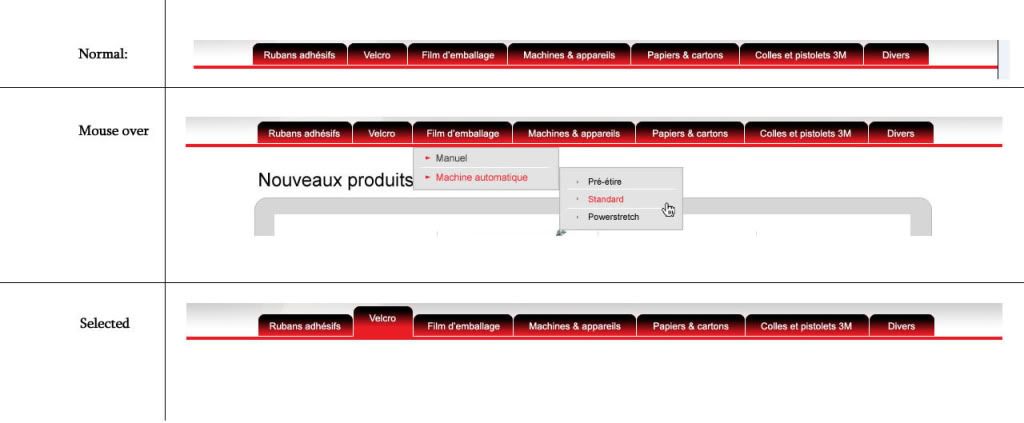
I want to create a custom skin for the RadMenu. The Menu look exactly like this:
http://i577.photobucket.com/albums/ss220/maidinhnga/Menu.jpg?t=1242378813
I'm not good at css. So is there anyone can help me?
Thank you
I want to create a custom skin for the RadMenu. The Menu look exactly like this:
http://i577.photobucket.com/albums/ss220/maidinhnga/Menu.jpg?t=1242378813
I'm not good at css. So is there anyone can help me?
Thank you
0 answers
95 views
Hi!
Some phones support only vCalendar version 1.0 for the calendar. Can you export in this format or you have to do this manually?
A common ics file works well in some phones that support for version 2.0
/Thanks
/Thanks

Philip Saltskog
Top achievements
 Rank 2
Rank 2
asked
on
15 May 2009
2 answers
168 views
Hi,
I tried opening a support ticket regarding this issue, but I keep getting an error message saying "
I have declared a TabStrip like this to enable horizontal scrolling:
However, the scrolling is not applied - no scroll buttons or anything. The tabs just "disappear" when they go beyond the length of the div (400px). When I look into the rendered HTML, I can see that the <ul> containing the tabs does not have the tsScrolling css class. How can this be?
The tabs are loaded client side - does this have something to say?
Best regards,
Henrik
I tried opening a support ticket regarding this issue, but I keep getting an error message saying "
It seems there was a problem with our server."
So I hope you will reply this thread in short time, since this problem is very urgent.I have declared a TabStrip like this to enable horizontal scrolling:
| <div style="float: left; width: 400px;"> | |
| <tel:RadTabStrip ID="tsSubTabs" ScrollChildren="true" Width="400px" MultiPageID="mpPages" SelectedIndex="0" runat="server" /> | |
| </div> |
However, the scrolling is not applied - no scroll buttons or anything. The tabs just "disappear" when they go beyond the length of the div (400px). When I look into the rendered HTML, I can see that the <ul> containing the tabs does not have the tsScrolling css class. How can this be?
The tabs are loaded client side - does this have something to say?
Best regards,
Henrik
2 answers
151 views
Hi I'm having some problems with having two rad grids and one radajaxmanager on the same page.
The structure of my page is:
Page contains Panel A which contains UserControl A that contains text and a usercontrol B that contains RadGrid1
Page contains Panel B which contains a usercontrol C that contains RadGrid2
Page is a content page. The Master page contains RadAjaxManager.
So in UserControl B I add RadAjaxManagerProxy and have the Initiator and UpdatedControls both set to RadGrid1
This works. whenever we click on a button inside RadGrid1 to add row. the RadGrid1 and RadAjaxManager1SU are updated Panels. (1 is this normal to have RadAjaxManager1SU as updated panel)
However, when i set up on the Page via RadAjaxManagerProxy to have Panel B both as initiator and UpdatedControls. I click on a button inside RadGrid2. I see that UserControl C AND RadGrid1 as well as RadAjaxManager1SU are updated Panels. (2nd issue: why is RadGrid1 being updated).
Also, when i set up Panel A to be UpdatedControl by Panel B. My Button click on RadGrid1 now Updates Panel A completely. Even after I set ChildrenAsTriggers = false. It seems to interpret my button clicks within the grids originate from both Radgrids?! ( 3rd issue: i don't want the entire panel A to be updated just RadGrid1
Is something blaringly wrong in my set up? is there an attribute i haven't set up correctly?
EDIT: also, i use Page.ClientScript.GetPostBackEventReference( btnInput, "" ) to initiate the postback from my buttons on the form. where btnInput= GetInputControl( item ) and item is GridDataItem
Iana Tsolova
Telerik team
answered
on
15 May 2009
1 answer
92 views
can u please send me the javascript code for deleting the appointment
i am not able to delete an aapointmnet by the code behind o f the telerik in C#.net
so will i am able to delete it through javascript ..
please if anyone has some idea about this can u send me it is very urgent
i am not able to delete an aapointmnet by the code behind o f the telerik in C#.net
so will i am able to delete it through javascript ..
please if anyone has some idea about this can u send me it is very urgent

1 answer
147 views
Dear sir,
I am dock dynamically and it contain user control.
I am creating a Dashboard and dont wants to create duplicate user control on that.
once we load a user control and if we again load that perticular control then it shows a msg "Already loaded" . how is it possible.
when I closed a dock it also contain the value of that user control..
I am sending u a code and plz tell me where is the mistake..
aspx. page........
aspx.cs page.........
I am dock dynamically and it contain user control.
I am creating a Dashboard and dont wants to create duplicate user control on that.
once we load a user control and if we again load that perticular control then it shows a msg "Already loaded" . how is it possible.
when I closed a dock it also contain the value of that user control..
I am sending u a code and plz tell me where is the mistake..
aspx. page........
<
table width="100%" border="0" cellpadding="1" cellspacing="0" class="aspxMainTable">
<tr>
<th class="tdMainHeader1">
<img alt="Customer" src="Images/dashboard.gif" />
Dashboard
Objects
<telerik:RadComboBox ID="cmbSelectDock" runat="server" Skin="Office2007" >
<Items>
<telerik:RadComboBoxItem Text="Case Summary" Value="CaseSummary" />
<telerik:RadComboBoxItem Text="Task Summary" Value="TaskSummary" />
<telerik:RadComboBoxItem Text="Pending Tasks" Value="MyTask" />
<telerik:RadComboBoxItem Text="Pending Cases" Value="MyCase" />
<telerik:RadComboBoxItem Text="Overdue Cases" Value="OverdueCases" />
</Items>
</telerik:RadComboBox>
<telerik:RadComboBox ID="cmbZone" runat="server" Skin="Office2007" DataSource="<%#GetZones() %>"
DataTextField="ID" DataValueField="ClientID">
</telerik:RadComboBox>
<asp:Button ID="btnAddDock" runat="server" Text="Add" Width="100px" OnClientClick="return ValidateSave();"
OnClick="btnAddDock_Click" />
</th>
</tr>
<tr>
<td colspan="5">
<asp:UpdatePanel runat="server" ID="UpdatePanel1">
<ContentTemplate>
<telerik:RadDockLayout runat="server" ID="rdDockLayout" OnSaveDockLayout="rdDockLayout_SaveDockLayout"
Skin="Office2007" OnLoadDockLayout="rdDockLayout_LoadDockLayout">
<table id="TableLayout" border="0" width="100%">
<tr>
<td style="width: 50%;" align="left" valign="top">
<table width="100%" border="0">
<tr>
<td>
<telerik:RadDockZone runat="server" ID="RadDockZone1" Width="360" MinHeight="250"
Orientation="Vertical" Style="background: #f5f4e8; float: right;" Skin="Office2007"
FitDocks="true">
</telerik:RadDockZone>
</td>
<%
--Style="float: left; margin-right: 5px; background: #f5f4e8;"--%>
</tr>
</table>
</td>
<td style="width: 50%;" align="left" valign="top">
<table width="100%" border="0">
<tr>
<td>
<telerik:RadDockZone runat="server" ID="RadDockZone2" Width="360" MinHeight="250"
Orientation="Horizontal" Style="background: #d5f0fa; float: left;" FitDocks="true"
Skin="Office2007">
</telerik:RadDockZone>
</td>
<%
--Style="background: #d5f0fa; float: left;" --%>
</tr>
</table>
</td>
</tr>
</table>
</telerik:RadDockLayout>
</ContentTemplate>
<Triggers>
<asp:AsyncPostBackTrigger ControlID="btnAddDock" EventName="Click" />
</Triggers>
</asp:UpdatePanel>
</td>
</tr>
<tr>
<td>
<asp:Label ID="lblMessage" runat="server"></asp:Label>
</td>
</tr>
</table>
aspx.cs page.........
DockStateWS
objDockStateWS;
DataSet dsDataSet;
List<DockState> stateList;
StringBuilder serializedList = new StringBuilder();
private bool _dockStateCleared = false;
protected void Page_InIt(object sender, EventArgs e)
{
System.Web.Script.Serialization.
JavaScriptSerializer serializer = new System.Web.Script.Serialization.JavaScriptSerializer();
dsDataSet =
new DataSet();
DataTable dt1 = new DataTable();
try
{
objDockStateWS =
new DockStateWS();
dsDataSet = objDockStateWS.Fetch_Dock_State(0, 2);
if (dsDataSet.Tables["DockState"].Rows.Count > 0)
{
dockState =
Convert.ToString(dsDataSet.Tables["DockState"].Rows[0]["dock_state"]);
string[] currentDockStates = dockState.Split('|');
_count = currentDockStates.Length;
//Recreate the docks in order to ensure their proper operation
for (int i = 0; i < _count; i++)
{
if (currentDockStates[i].Trim() != string.Empty)
{
RadDock dock = CreateRadDockFromState(currentDockStates[i]);
rdDockLayout.Controls.Add(dock);
//We want to save the dock state every time a dock is moved.
CreateSaveStateTrigger(dock);
LoadWidget(dock);
}
}
}
}
catch (Exception ex)
{
ScriptManager.RegisterStartupScript(Page, Page.GetType(), "errMsg", "javascript:alert(\"Error:-Method -> 'Page_Init' \\n Description:- \\n" + ex.Message + "\");", true);
return;
}
}
protected void Page_Load(object sender, EventArgs e)
{
Session[
"LoggedInContactID"] = TB_nEmployeeID;
Session[
"LoggedInContactDeptID"] = TB_nDepartmentID;
Session[
"LoggedInContactDesigLevel"] = TB_nDesignationLevel;
Session[
"LoggedInContactAccountID"] = TB_nAccountID;
if (!Page.IsPostBack)
{
cmbZone.DataBind();
}
}
private List<DockState> CurrentDockStates
{
get
{
JavaScriptSerializer serializer = new JavaScriptSerializer();
List<DockState> _currentDockStates = (List<DockState>)Session["CurrentDockStatesMyPortal"];
if (Object.Equals(_currentDockStates, null))
{
_currentDockStates =
new List<DockState>();
Session[
"CurrentDockStatesMyPortal"] = _currentDockStates;
}
return _currentDockStates;
}
set
{
Session[
"CurrentDockStatesMyPortal"] = value;
}
}
public ArrayList GetZones()
{
ArrayList zones = new ArrayList();
zones.Add(RadDockZone1);
zones.Add(RadDockZone2);
return zones;
}
protected void rdDockLayout_LoadDockLayout(object sender, DockLayoutEventArgs e)
{
DataTable dt = new DataTable();
System.Web.Script.Serialization.
JavaScriptSerializer serializer = new System.Web.Script.Serialization.JavaScriptSerializer();
//Get saved state string from the database - set it to dockState variable for example
try
{
objDockStateWS =
new DockStateWS();
dsDataSet =
new DataSet();
dsDataSet = objDockStateWS.Fetch_Dock_State(0, 2);
if (dsDataSet.Tables["DockState"].Rows.Count > 0)
{
dockState =
Convert.ToString(dsDataSet.Tables["DockState"].Rows[0]["dock_state"]);
string[] currentDockStates = dockState.Split('|');
foreach (string stringState in currentDockStates)
{
if (stringState.Trim() != string.Empty)
{
DockState state = serializer.Deserialize<DockState>(stringState);
e.Positions[state.UniqueName] = state.DockZoneID;
e.Indices[state.UniqueName] = state.Index;
}
}
}
}
catch (Exception ex)
{
LogMessage(ex, 1);
}
}
protected void rdDockLayout_SaveDockLayout(object sender, DockLayoutEventArgs e)
{
try
{
//--Save Dock states in Database
System.Web.Script.Serialization.
JavaScriptSerializer serializer = new System.Web.Script.Serialization.JavaScriptSerializer();
stateList = rdDockLayout.GetRegisteredDocksState();
while (i < stateList.Count)
{
serializedList.Append(serializer.Serialize(stateList[i]));
serializedList.Append(
"|");
i++;
}
dockState = serializedList.ToString();
if (dockState.Trim() != String.Empty)
{
objDockStateWS =
new DockStateWS();
dsDataSet =
new DataSet();
dsDataSet = objDockStateWS.Save_Dock_State(0, 2, dockState);
}
}
catch (Exception ex)
{
LogMessage(ex, 1);
}
}
private RadDock CreateRadDockFromState(string stringState)
{
System.Web.Script.Serialization.
JavaScriptSerializer serializer = new System.Web.Script.Serialization.JavaScriptSerializer();
DockState state = serializer.Deserialize<DockState>(stringState);
RadDock dock = new RadDock();
dock.ID =
string.Format("RadDock{0}", state.UniqueName);
dock.ApplyState(state);
dock.Command +=
new DockCommandEventHandler(dock_Command);
dock.Commands.Add(
new DockCloseCommand());
dock.Commands.Add(
new DockExpandCollapseCommand());
return dock;
}
void dock_Command(object sender, DockCommandEventArgs e)
{
if (e.Command.Name == "Close")
{
ScriptManager.RegisterStartupScript(UpdatePanel1, this.GetType(), "RemoveDock", string.Format(@"function _removeDock() {{ Sys.Application.remove_load(_removeDock);$find('{0}').undock(); $get('{1}').appendChild($get('{0}')); $find('{0}').doPostBack('DockPositionChanged');}};Sys.Application.add_load(_removeDock);", ((RadDock)sender).ClientID, UpdatePanel1.ClientID), true);
CurrentDockStates.Clear();
_dockStateCleared =
true;
}
}
private RadDock CreateRadDock()
{
int docksCount = CurrentDockStates.Count;
RadDock dock = new RadDock();
dock.DockMode =
DockMode.Docked;
dock.UniqueName =
Guid.NewGuid().ToString();
dock.ID =
string.Format("RadDock{0}", dock.UniqueName);
dock.Title = cmbSelectDock.SelectedItem.Text;
dock.Width =
Unit.Pixel(360);
dock.Height =
Unit.Pixel(250);
dock.Resizable =
true;
dock.Commands.Add(
new DockCloseCommand());
dock.Commands.Add(
new DockExpandCollapseCommand());
return dock;
}
private void CreateSaveStateTrigger(RadDock dock)
{
dock.AutoPostBack =
true;
dock.CommandsAutoPostBack =
true;
AsyncPostBackTrigger saveStateTrigger = new AsyncPostBackTrigger();
saveStateTrigger.ControlID = dock.ID;
saveStateTrigger.EventName =
"DockPositionChanged";
UpdatePanel1.Triggers.Add(saveStateTrigger);
saveStateTrigger =
new AsyncPostBackTrigger();
saveStateTrigger.ControlID = dock.ID;
saveStateTrigger.EventName =
"Command";
UpdatePanel1.Triggers.Add(saveStateTrigger);
}
private void LoadWidget(RadDock dock)
{
if (string.IsNullOrEmpty(dock.Tag))
{
return;
}
Control widget = LoadControl(dock.Tag);
dock.ContentContainer.Controls.Add(widget);
}
protected void btnAddDock_Click(object sender, EventArgs e)
{
System.Web.Script.Serialization.
JavaScriptSerializer serializer = new System.Web.Script.Serialization.JavaScriptSerializer();
objDockStateWS =
new DockStateWS();
dsDataSet =
new DataSet();
string strControlID = string.Empty;
string strDockTagName = string.Empty;
try
{
dsDataSet = objDockStateWS.Fetch_Dock_State(0, 2);
if (dsDataSet.Tables["DockState"].Rows.Count > 0)
{
dockState =
Convert.ToString(dsDataSet.Tables["DockState"].Rows[0]["dock_state"]);
string[] currentDockStates = dockState.Split('|');
foreach (string stringState in currentDockStates)
{
if (stringState.Trim() != string.Empty)
{
DockState state = serializer.Deserialize<DockState>(stringState);
if (cmbSelectDock.SelectedItem.Text == state.Title)
{
ScriptManager.RegisterStartupScript(Page, Page.GetType(), "AlreadyExist", "javascript:alert('Object already exist');", true);
return;
}
}
}
}
if (cmbSelectDock.SelectedValue == "CaseSummary")
{
UserControls_Case_Summary_CustCateg_Chart uclCaseSummary_Chart = (UserControls_Case_Summary_CustCateg_Chart)Page.LoadControl("~/UserControls/Case_Summary_CustCateg_Chart.ascx");
strControlID =
"uclCaseSummary_Chart" + TB_nUserID;
uclCaseSummary_Chart.GetCaseSummary();
strDockTag =
"UserControls/Case_Summary_CustCateg_Chart.ascx";
}
else if (cmbSelectDock.SelectedValue == "TaskSummary")
{
UserControls_Task_Summary_Chart uclTaskSummary_Chart = (UserControls_Task_Summary_Chart)Page.LoadControl("~/UserControls/Task_Summary_Chart.ascx");
strControlID =
"uclTaskSummary_Chart" + TB_nUserID;
uclTaskSummary_Chart.GetTaskSummary();
strDockTag =
"~/UserControls/Task_Summary_Chart.ascx";
}
else if (cmbSelectDock.SelectedValue == "MyTask")
{
UserControls_MyTask uclMyTask = (UserControls_MyTask)Page.LoadControl("~/UserControls/MyTask.ascx");
strControlID =
"uclTask" + TB_nUserID;
uclMyTask.GetTasks();
strDockTag =
"~/UserControls/MyTask.ascx";
}
else if (cmbSelectDock.SelectedValue == "MyCase")
{
UserControls_MyCase uclMyCase = (UserControls_MyCase)Page.LoadControl("~/UserControls/MyCase.ascx");
strControlID =
"uclCase" + TB_nUserID;
uclMyCase.GetCases();
strDockTag =
"~/UserControls/MyCase.ascx";
}
else if (cmbSelectDock.SelectedValue == "OverdueCases")
{
UserControls_OverdueCases uclOverdueCases = (UserControls_OverdueCases)Page.LoadControl("~/UserControls/OverdueCases.ascx");
strControlID =
"uclOverdueCase" + TB_nUserID;
uclOverdueCases.GetOverDueCases();
strDockTag =
"~/UserControls/OverdueCases.ascx";
}
}
catch (Exception ex)
{
LogMessage(ex, 1);
}
try
{
RadDock dock = CreateRadDock();
//find the target zone and add the new dock there
RadDockZone dz = (RadDockZone)FindControl(cmbZone.SelectedItem.Text);
//dz.Width = Unit.Percentage(50);
dz.Controls.Add(dock);
CreateSaveStateTrigger(dock);
//Load the selected widget in the RadDock control
//dock.Tag = cmbSelectDock.SelectedValue;
dock.Tag = strDockTag;
LoadWidget(dock);
}
catch (Exception ex)
{
LogMessage(ex, 1);
}
}
void LogMessage(Exception e, Int32 param)
{
if (param == 1)
{
lblMessage.Text = e.Message;
lblMessage.CssClass =
"error";
}
else
{
lblMessage.Text = e.Message;
lblMessage.CssClass =
"success";
}
}
and also set the height & width in percentange
thanks and regards
Obi-Wan Kenobi
Top achievements
Rank 1
Rank 1
answered
on
15 May 2009
1 answer
82 views
Hi,
I have a UserControl which holds an Editor i have made my settings for the toolfile and no more.
When i test this usercontrol in the following browsers the result are totally different:
- Mozilla 3 does show the control only i can not do anything with it
- IE7 shows the control and i am able to work with it
- Google Chrome and Safari have the same result it does show the control and i am able to click on the toolbar and it reacts to it. Clicking bold -> highlight it. Only i can not put any content in the control.
For FireFox i have checked the comments of the minimal font size setting to none
Please advise, we need this control and we need all those browser supports.
Ronald
I have a UserControl which holds an Editor i have made my settings for the toolfile and no more.
When i test this usercontrol in the following browsers the result are totally different:
- Mozilla 3 does show the control only i can not do anything with it
- IE7 shows the control and i am able to work with it
- Google Chrome and Safari have the same result it does show the control and i am able to click on the toolbar and it reacts to it. Clicking bold -> highlight it. Only i can not put any content in the control.
For FireFox i have checked the comments of the minimal font size setting to none
Please advise, we need this control and we need all those browser supports.
Ronald

Rumen
Telerik team
answered
on
15 May 2009