or
0 answers
400 views
We discovered a few issues with the JavaScript IntelliSense of RadControls for ASP.NET AJAX in the Q1 2010 release.
1. The JavaScript IntelliSense breaks when you include script references to the embedded jQuery:
One solution would be to reference the jQuery scripts from an external location, for example placing them in the root of your web site/web application:
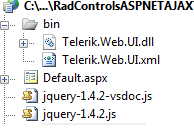
2. The to<ControlName> JavaScript IntelliSense helper method causes run time error for the following controls: AsyncUpload, TabStrip, ToolBar, Upload, Scheduler, TreeView, ListBox, ComboBox, PanelBar.
As a workaround you can use the find<ControlName> method instead:
The problems have been addressed in the latest internal build of RadControls (upgrade instructions are available here). The issues will be fixed officially in the Q1 2010 SP1 release of the suite, expected in mid April.
1. The JavaScript IntelliSense breaks when you include script references to the embedded jQuery:
| <asp:ScriptManager ID="ScriptManager1" runat="server"> |
| <Scripts> |
| <asp:ScriptReference Assembly="Telerik.Web.UI" Name="Telerik.Web.UI.Common.Core.js" /> |
| <asp:ScriptReference Assembly="Telerik.Web.UI" Name="Telerik.Web.UI.Common.jQuery.js" /> |
| <asp:ScriptReference Assembly="Telerik.Web.UI" Name="Telerik.Web.UI.Common.jQueryInclude.js" /> |
| </Scripts> |
| </asp:ScriptManager> |
One solution would be to reference the jQuery scripts from an external location, for example placing them in the root of your web site/web application:
| <asp:ScriptManager runat="server" ID="ScriptManager1"> |
| <Scripts> |
| <asp:ScriptReference Assembly="Telerik.Web.UI" Name="Telerik.Web.UI.Common.Core.js" /> |
| <asp:ScriptReference Path="~/jquery-1.4.2.js" /> |
| </Scripts> |
| </asp:ScriptManager> |
2. The to<ControlName> JavaScript IntelliSense helper method causes run time error for the following controls: AsyncUpload, TabStrip, ToolBar, Upload, Scheduler, TreeView, ListBox, ComboBox, PanelBar.
As a workaround you can use the find<ControlName> method instead:
function itemClicked(sender, args) { //the normal approach which is broken in Q1 2010 official release //var listBox = $telerik.toListBox(sender); var listBox = $telerik.findListBox(sender.get_id());}The problems have been addressed in the latest internal build of RadControls (upgrade instructions are available here). The issues will be fixed officially in the Q1 2010 SP1 release of the suite, expected in mid April.

Telerik Admin
Top achievements
 Rank 1
 Iron
Iron
Rank 1
Iron
asked
on
12 Mar 2010
2 answers
110 views
Hi,
I followed your example from the code library here: http://www.telerik.com/community/code-library/aspnet-ajax/docking/save-dockstate-in-database-using-radajaxmanager.aspx
Everything works as expected. Great example. I just wanted you to know that there is an unexpected behaviour (no bug severity, just layout).
To reproduce:
I followed your example from the code library here: http://www.telerik.com/community/code-library/aspnet-ajax/docking/save-dockstate-in-database-using-radajaxmanager.aspx
Everything works as expected. Great example. I just wanted you to know that there is an unexpected behaviour (no bug severity, just layout).
To reproduce:
- Add some docks to both zones
- Drag and drop some docks. You will see the dotted line as indicator of where the dock will be docked. This is as expected
- Drag all docks you added to the left zone.
- Drag 1 to the right zone. Dont drop yet. You will see there is no dotted indicator. Background highlighting of the zone works as expected though.
So not a major bug. Just an inconsistency in layout when a zone is completely empty.
/Yeroon


1 answer
243 views
My application was developed using telerik 2009 Q3 and I updated telerik version from 2009 to trial version 2010 Q1. I cannot launch my aplication any more.
How come there is no bin folder under "C:\Program Files\Telerik\RadControls for ASP.NET AJAX Q1 2010". I see Bin20 and Bin35 folders instead.
Please help.
HEre is the error I get. I searched for Version=2009.3.1314.20 in my entire asp code and there is no reference to this. WHere is this reference coming from and how can I change it to 2010. BY the way I was successfull in using gacutil.exe and picking up Telerik.Web.UI.dll from bin20 folder.
Source File: /Default.Master Line: 1
Assembly Load Trace: The following information can be helpful to determine why the assembly 'Telerik.Web.UI, Version=2009.3.1314.20, Culture=neutral, PublicKeyToken=121fae78165ba3d4' could not be loaded.
How come there is no bin folder under "C:\Program Files\Telerik\RadControls for ASP.NET AJAX Q1 2010". I see Bin20 and Bin35 folders instead.
Please help.
HEre is the error I get. I searched for Version=2009.3.1314.20 in my entire asp code and there is no reference to this. WHere is this reference coming from and how can I change it to 2010. BY the way I was successfull in using gacutil.exe and picking up Telerik.Web.UI.dll from bin20 folder.
Parser Error
Description: An error occurred during the parsing of a resource required to service this request. Please review the following specific parse error details and modify your source file appropriately.
Parser Error Message: Could not load file or assembly 'Telerik.Web.UI, Version=2009.3.1314.20, Culture=neutral, PublicKeyToken=121fae78165ba3d4' or one of its dependencies. The located assembly's manifest definition does not match the assembly reference. (Exception from HRESULT: 0x80131040)
Source Error:
|
Source File: /Default.Master Line: 1
Assembly Load Trace: The following information can be helpful to determine why the assembly 'Telerik.Web.UI, Version=2009.3.1314.20, Culture=neutral, PublicKeyToken=121fae78165ba3d4' could not be loaded.
|

Erjan Gavalji
Telerik team

answered
on
12 Mar 2010
1 answer
127 views
Hi all,
I create radgrid and radajaxpanel then i put the radgrid in the radajaxpanel(programmatically in Init phase).
this is the code:
RadAjaxPanel ajaxPanel = new RadAjaxPanel();
ajaxPanel.Controls.Add(grid);
controlList.Add(ajaxPanel);
when i click on the Add New Record of the radgrid it works fine on the default sharepoint masterpage,but on other sharepoint master pages like: BlackBand.master,BlueTabs.master clicking on Add New Record didn't works and the radgrid didn't transform into edit mode to enter data.
what is the problem?
Thanks for any help.
Regards,
Ahmad Atat
I create radgrid and radajaxpanel then i put the radgrid in the radajaxpanel(programmatically in Init phase).
this is the code:
RadAjaxPanel ajaxPanel = new RadAjaxPanel();
ajaxPanel.Controls.Add(grid);
controlList.Add(ajaxPanel);
when i click on the Add New Record of the radgrid it works fine on the default sharepoint masterpage,but on other sharepoint master pages like: BlackBand.master,BlueTabs.master clicking on Add New Record didn't works and the radgrid didn't transform into edit mode to enter data.
what is the problem?
Thanks for any help.
Regards,
Ahmad Atat
Iana Tsolova
Telerik team
answered
on
12 Mar 2010
2 answers
172 views
Hi.
I want to use a RadMaskedTextBox to have my users force to use a valus in certain way. The input I am expecting is in the format <number>.<number>. Either side of the . has numerical value and there is no restriction on the length of the number, it can be as low as 1 and as high as 999,999,999.
I tried using Mask="<1..999999999>.<1..999999999>" but this will show up as 000000001.000000001 in the textbox when the page loads. If users want to type in 44.44, they will have to skip the first seven 0s to enter the 44 on each side of the period.
I also tried Mask="<#|##|###|####|#####|######|#######>.<#|##|###|####|#####|######|#######>" but this doesn't render properly as well; shows up as #______.#______ in the textbox.
Is there any way to solve this problem? Or is my scenario best handled with RadTextBox and asp RegularExpressionValidator?
Thanks.
Gaurab
I want to use a RadMaskedTextBox to have my users force to use a valus in certain way. The input I am expecting is in the format <number>.<number>. Either side of the . has numerical value and there is no restriction on the length of the number, it can be as low as 1 and as high as 999,999,999.
I tried using Mask="<1..999999999>.<1..999999999>" but this will show up as 000000001.000000001 in the textbox when the page loads. If users want to type in 44.44, they will have to skip the first seven 0s to enter the 44 on each side of the period.
I also tried Mask="<#|##|###|####|#####|######|#######>.<#|##|###|####|#####|######|#######>" but this doesn't render properly as well; shows up as #______.#______ in the textbox.
Is there any way to solve this problem? Or is my scenario best handled with RadTextBox and asp RegularExpressionValidator?
Thanks.
Gaurab
1 answer
116 views
I have a RadGrid, that uses Paging in Slider Mode. In the Client Settings I have an OnRowClick Event and an OnCommand Event. When the OnCommand event is added, I get the following error, each time I page the grid forward with the clider.
Message: Sys.WebForms.PageRequestManagerServerErrorException: Unable to cast object of type 'Telerik.Web.UI.GridTHead' to type 'Telerik.Web.UI.RadSlider'.
If I change the mode to anything other than Slider it seems to work fine. Also, If I remove the OnCommand event, it works fine. Am I missing something, or is this a know bug? Below is a snippet of my RadGrid.<rad
:RadGrid ID="grdPeople" runat="server" DataSourceID="dsPerson" GridLines="None"
AllowPaging="True" AllowSorting="True" AutoGenerateColumns="False" PageSize="25"
OnItemCommand="grdPeople_ItemCommand" OnItemDataBound="grdPeople_ItemDataBound" >
<ClientSettings EnableRowHoverStyle="true" >
<ClientEvents OnRowClick="grdPeople_RowClick" OnCommand="grdPeople_Command" />
</ClientSettings>
<PagerStyle Mode="Slider" Position="Top" />
Thanks
Veli
Telerik team
answered
on
12 Mar 2010
1 answer
96 views
Hi
I'm using a radscheduler in resource view and I'm finding that the resource names are all right justified and some of them are being truncated.
I've tried changing the rowheaderwidth and rowheight properties but this to make no difference.
See the attached file for an example.
I'm using a radscheduler in resource view and I'm finding that the resource names are all right justified and some of them are being truncated.
I've tried changing the rowheaderwidth and rowheight properties but this to make no difference.
See the attached file for an example.

Kamen Bundev
Telerik team
answered
on
12 Mar 2010
1 answer
160 views
| <style type="text/css"> |
| .rcRefreshImage |
| { |
| padding-left: 25px; |
| padding-right: 25px; |
| background-image: url(~/Upload/Image/Food/food accueil.jpg); |
| background-color:transparent; |
| } |
| </style> |
| <telerik:RadCaptcha ID="RadCaptcha1" runat="server" |
| CaptchaLinkButtonText="Refresh" CssClass="rcRefreshImage" |
| EnableRefreshImage="True"> |
| </telerik:RadCaptcha> |
need help tq...
Pero
Telerik team
answered
on
12 Mar 2010
1 answer
103 views
Hi all,
I have a custom css which is like that :
I have a custom css which is like that :
body
{
font: 11px arial, 'Arial Black';
}
.ItemHeader
{
font-size: 10px;
font-weight: bold;
}
and ItemHeader is apply to some of the <td> item in the form.
When the page is rendered within a RadWindow, the effect is lost. I used to have the same result when using 2008Q3, but after upgraded to 2009Q3, it changed.
Georgi Tunev
Telerik team
answered
on
12 Mar 2010
2 answers
162 views
Hi,
Is it possible to have a single image (sprite) and load the individual button images using CSS?
I have tried using .rtbIcon, but if the property ImageUrl is not set on the button, the element <img class="rtbIcon" .../> is not rendered.
Thanks.
T. Tsonev
Telerik team
answered
on
12 Mar 2010




