or
2 answers
131 views
I have 3 RadGrids each binded to a RadTab. I would like to know how I could get the RowCount for each RadGrid to show up in each Tab next to the Tab name I assigned.
A working example of what I am looking for can be seen on this link: http://www.myfxbook.com/members/forexwallstreet/wallstreet-forex-robot-real/95290 Then scroll down to TRADING ACTIVITY.
A working example of what I am looking for can be seen on this link: http://www.myfxbook.com/members/forexwallstreet/wallstreet-forex-robot-real/95290 Then scroll down to TRADING ACTIVITY.

Nencho
Telerik team

answered
on
10 Sep 2013
3 answers
408 views
I have a TreeList that contains a grid of values and I want to display a single footer at the end of the TreeList for showing the column totals for all columns that have a
Note that the TreeList footers on Telerik's website have multiple levels for each hierarchy level. I would like to hide the footers doing something like this, but it's not working:
Note that
FooterTemplate.
Note that the TreeList footers on Telerik's website have multiple levels for each hierarchy level. I would like to hide the footers doing something like this, but it's not working:
protected void rtlRshItems_ItemDatabound(object sender, TreeListItemDataBoundEventArgs e)
    {
        TreeListDataItem item = e.Item as TreeListDataItem;

        if (e.Item is TreeListDataItem)
        {
            var workItemId = (int) item.GetDataKeyValue("WorkItemId");
            parentId = GetParentId(workItemId);

            if (parentId == null)
                item.OwnerTreeList.ShowFooter = true;
            else
                item.OwnerTreeList.ShowFooter = false;
        }
    }
Note that
GetParentId() returns null if there is no parent for the current item, meaning that I want to show a footer for that level only.


4 answers
221 views
Hi,
I have been using the RadScheduler along with the ExchangeSchedulerProvider (from the SDK) to synchronize my outlook calendar with the application. The synchronization fails in the following scenario :
From a series of recurring appointments, if a single event is deleted, the intended change is reflected in the Outlook Calendar, but even after page reload, this deletion isn't reflected in the RadScheduler. It works fine when the complete series is deleted.
I would like to know if there is a way to have the change reflected as soon as the event is deleted without having to reload the page as for the deletion of a single non recurrent event or a complete recurring series, it worked fine without page reload.
The following are the sample code snippets:
I have been using the RadScheduler along with the ExchangeSchedulerProvider (from the SDK) to synchronize my outlook calendar with the application. The synchronization fails in the following scenario :
From a series of recurring appointments, if a single event is deleted, the intended change is reflected in the Outlook Calendar, but even after page reload, this deletion isn't reflected in the RadScheduler. It works fine when the complete series is deleted.
I would like to know if there is a way to have the change reflected as soon as the event is deleted without having to reload the page as for the deletion of a single non recurrent event or a complete recurring series, it worked fine without page reload.
The following are the sample code snippets:
<%@ Page Language="C#" AutoEventWireup="true" CodeFile="Default.aspx.cs" Inherits="_Default" %><!DOCTYPE html PUBLIC "-//W3C//DTD XHTML 1.0 Transitional//EN" "http://www.w3.org/TR/xhtml1/DTD/xhtml1-transitional.dtd"><html xmlns="http://www.w3.org/1999/xhtml"><head runat="server"> <title></title></head><telerik:RadScriptBlock ID="radScriptBlock" runat="server"> <script type="text/javascript"> </script></telerik:RadScriptBlock><body> <form id="form1" runat="server"> <div id="wrapper"> <telerik:RadScriptManager ID="RadScriptManager" runat="server" /> <telerik:RadStyleSheetManager ID="RadStyleSheetManager" runat="server" /> <telerik:RadAjaxManager runat="server" ID="RadAjaxManager1"> <AjaxSettings> <telerik:AjaxSetting AjaxControlID="RadSchedulerCalendar"> <UpdatedControls> <telerik:AjaxUpdatedControl ControlID="RadSchedulerCalendar" /> </UpdatedControls> </telerik:AjaxSetting> </AjaxSettings> </telerik:RadAjaxManager> <div id="content"> <div id="calendar"> <h2 class="caption">My Calendar:</h2> <telerik:RadScheduler runat="server" ID="RadSchedulerCalendar" OverflowBehavior="Expand" Skin="Metro" AppointmentStyleMode="Default" CustomAttributeNames="Class,AppointmentID" TimeZoneOffset="-04:00:00" ShowAllDayRow="False" ShowViewTabs="False" SelectedView="WeekView" FirstDayOfWeek="Monday" LastDayOfWeek="Friday" TimeZoneID="Eastern Standard Time"> </telerik:RadScheduler> </div> </div> </div> </form></body></html>public partial class _Default : System.Web.UI.Page{ protected void Page_Init(object sender, EventArgs e) { RadSchedulerCalendar.Provider = new ExchangeSchedulerProvider(@"https://outlook.office365.com/EWS/Exchange.asmx", "username", "password", "domain"); } protected void Page_Load(object sender, EventArgs e) { RadSchedulerCalendar.Rebind(); }}
Plamen
Telerik team
answered
on
10 Sep 2013
1 answer
103 views
Editor: in the table properties the textbox width is too short for rtl.
You can see the problem in telerik's demo:
http://demos.telerik.com/aspnet-ajax/editor/examples/righttoleft/defaultcs.aspx
Scenario to reproduce:
1. In the editor (RTL support), Add a table
2. Right click on one of the cells and choose table properties
3. You can see that all textbox's width is too short. for example: When entering 3 digits or more, some of the digits are hidden.
*How can I fix this problem?
You can see the problem in telerik's demo:
http://demos.telerik.com/aspnet-ajax/editor/examples/righttoleft/defaultcs.aspx
Scenario to reproduce:
1. In the editor (RTL support), Add a table
2. Right click on one of the cells and choose table properties
3. You can see that all textbox's width is too short. for example: When entering 3 digits or more, some of the digits are hidden.
*How can I fix this problem?

Bozhidar
Telerik team
answered
on
10 Sep 2013
1 answer
258 views
In a UserControl I have RadWindow with a CheckBox and RadButton - see attached image.
The UserControl sits in the sidebar contenplaceholder and is included in the RadAjaxManagerProxy control
The code for the RadWindow:
In the OnClick of the button I read out the value of the CheckBox.Checked:
But the value don't change if I check or uncheck the CheckBox.
Please help - What do I do wrong?
Thanks in advance
Anders
The UserControl sits in the sidebar contenplaceholder and is included in the RadAjaxManagerProxy control
<telerik:AjaxUpdatedControl ControlID="paSidebar" LoadingPanelID="raLoadingPanel"></telerik:AjaxUpdatedControl>The code for the RadWindow:
<telerik:RadAjaxPanel ID="RadAjaxPanel1" runat="server"> <telerik:RadWindow ID="modalPopup" runat="server" Width="400px" Height="275px" Title="Subscription" Modal="true"> <ContentTemplate> <div style="padding: 0 8px 8px 8px;"> <h2>Email messages from dealer network</h2> <p>You can here subscribe or unsubscribe to the dealer network mailings list.</p> <p>From the network mailings list you receive messages of used trucks for sale or request for a truck from your colleague.</p> <p> <asp:CheckBox Text="Subscribed" runat="server" ID="cbSubscribed" /> </p> <p> <telerik:RadButton ID="buSaveSubscribtion" runat="server" Text="Save" OnClick="BuSaveSubscribtion_Click" /> </p> </div> </ContentTemplate> </telerik:RadWindow> </telerik:RadAjaxPanel>In the OnClick of the button I read out the value of the CheckBox.Checked:
protected void BuSaveSubscribtion_Click(object sender, EventArgs e) { GetUserID(); NMHG.Data.Truck_marketplace.Users.Users mailListUser = new NMHG.Data.Truck_marketplace.Users.Users(); mailListUser.UserID = userID; mailListUser.MailMessages = cbSubscribed.Checked; mailListUser.Update2(); if (mailListUser.Archived && cbSubscribed.Checked) { mailListUser.Archived = false; mailListUser.Archive(); } }But the value don't change if I check or uncheck the CheckBox.
Please help - What do I do wrong?
Thanks in advance
Anders

1 answer
115 views
Hi
There is an issue with Telerik RadTextbox on IE 9.
Background:
I am using a telerik radnumeric textbox in grid template column in a radgrid.I am connecting to SQL Server to bind the grid with data based on an SP, and when I enter numeric values into these textboxes I want them to be saved.I am using this in a RadTab setup with 3 user controls embedded in the aspx page. i.e. as shown attached. Now when I click on the save button , after changing the amount values, I expect it to connect to sql server, insert data into it and bind to it.
Issue: Clicking the save button in IE9 (only when deployed to a production environment) causes the Internet explorer to hang. The issue does not exist if turn on the compatibility mode. Also , It does not exist locally or while connecting to the production database from Visual Studio and running the solution. I used Fiddler and found out that there was a http protocol violation, and I get this message " Content length mismatch: Request header indicated 141,200 bytes, but client sent 0 bytes". Please see below the radgrid I use in my usercontrol page.
Could you tell me if there is something I need to be aware of with regard to this set up ? Also, as to why there is the text box data binding issue in IE 9 ?
Please help.
Thanks
Dushyanth
There is an issue with Telerik RadTextbox on IE 9.
Background:
I am using a telerik radnumeric textbox in grid template column in a radgrid.I am connecting to SQL Server to bind the grid with data based on an SP, and when I enter numeric values into these textboxes I want them to be saved.I am using this in a RadTab setup with 3 user controls embedded in the aspx page. i.e. as shown attached. Now when I click on the save button , after changing the amount values, I expect it to connect to sql server, insert data into it and bind to it.
Issue: Clicking the save button in IE9 (only when deployed to a production environment) causes the Internet explorer to hang. The issue does not exist if turn on the compatibility mode. Also , It does not exist locally or while connecting to the production database from Visual Studio and running the solution. I used Fiddler and found out that there was a http protocol violation, and I get this message " Content length mismatch: Request header indicated 141,200 bytes, but client sent 0 bytes". Please see below the radgrid I use in my usercontrol page.
<telerik:RadGrid ID="rgStateLines" runat="server" AutoGenerateColumns="False" AllowMultiRowSelection="False" enableajax="True" enableajaxloadingtemplate="True" GroupHeaderItemStyle-VerticalAlign="Bottom" Width="800px" ItemStyle-HorizontalAlign="left" GridLines="None" AllowFilteringByColumn="false" HeaderStyle-HorizontalAlign="Center" OnNeedDataSource="rgStateLines_NeedDataSource" OnItemDataBound="rgStateLines_ItemDataBound"> <HeaderStyle Font-Size="X-Small" /> <ItemStyle HorizontalAlign="Right" VerticalAlign="Bottom" /> <AlternatingItemStyle HorizontalAlign="Right" VerticalAlign="Bottom" /> <MasterTableView AutoGenerateColumns="false" DataKeyNames="DatalistId"> <Columns> <telerik:GridBoundColumn SortExpression="DatalistId" DataField="DatalistId" Visible="false"> </telerik:GridBoundColumn> <telerik:GridTemplateColumn HeaderText="Description" UniqueName="Description" HeaderStyle-Width="19%" SortExpression="Description" Visible="true" AllowFiltering="false" ItemStyle-Font-Size="X-Small" ShowFilterIcon="false" HeaderStyle-HorizontalAlign="center"> <ItemTemplate> <asp:Label ID="lblDescription" runat="server" Text='<%# DataBinder.Eval(Container.DataItem, "Description")%>'></asp:Label> </ItemTemplate> </telerik:GridTemplateColumn> <telerik:GridTemplateColumn ItemStyle-HorizontalAlign="right" HeaderText="Amount" UniqueName="Amount" HeaderStyle-Width="7%" SortExpression="Amount" Visible="true" AllowFiltering="false" ShowFilterIcon="false" HeaderStyle-HorizontalAlign="Center"> <ItemTemplate> <telerik:RadNumericTextBox ID="txtAmount" Type="Number" NumberFormat-AllowRounding="false" Width="80px" DataType="System.Double" SelectionOnFocus="None" NumberFormat-DecimalDigits="0" IncrementSettings-InterceptArrowKeys="false" IncrementSettings-InterceptMouseWheel="false" EnabledStyle-HorizontalAlign="Right" runat="server" Value='<%# DataBinder.Eval(Container.DataItem, "Amount")%>' onfocus="fnOnfocus(this)" onblur="fnOnBlur(this)"> </telerik:RadNumericTextBox> </ItemTemplate> </telerik:GridTemplateColumn> </Columns> </MasterTableView> <ClientSettings> <Scrolling AllowScroll="True" UseStaticHeaders="True" SaveScrollPosition="True" FrozenColumnsCount="1"> </Scrolling> </ClientSettings> </telerik:RadGrid>Could you tell me if there is something I need to be aware of with regard to this set up ? Also, as to why there is the text box data binding issue in IE 9 ?
Please help.
Thanks
Dushyanth
Marin
Telerik team
answered
on
10 Sep 2013
2 answers
328 views
Hello
I am having 2013.1.413.45 version of Telerik DLL, which works prefect on VS 2012. But due to some other need, I have to use VS 2010. When I refer this (2013.1.413.45) version DLL in VS 2010. It doesn't work. From where I can download the older version which is compatible for VS 2010 which will work for me.
Thanks
Ashwin
I am having 2013.1.413.45 version of Telerik DLL, which works prefect on VS 2012. But due to some other need, I have to use VS 2010. When I refer this (2013.1.413.45) version DLL in VS 2010. It doesn't work. From where I can download the older version which is compatible for VS 2010 which will work for me.
Thanks
Ashwin

Rumen
Telerik team
answered
on
10 Sep 2013
3 answers
208 views
Hi
In the following image, we can see all appointments from April 15 to April 20 (7 columns for 7 days) BUT in the header is showing "apr-15 - apr-20". ALSO when I add the "All-Day row" the header is now showing April 15 to April 21. Can you explain the internal logic of the end-date in the header?
Thanks
Phil
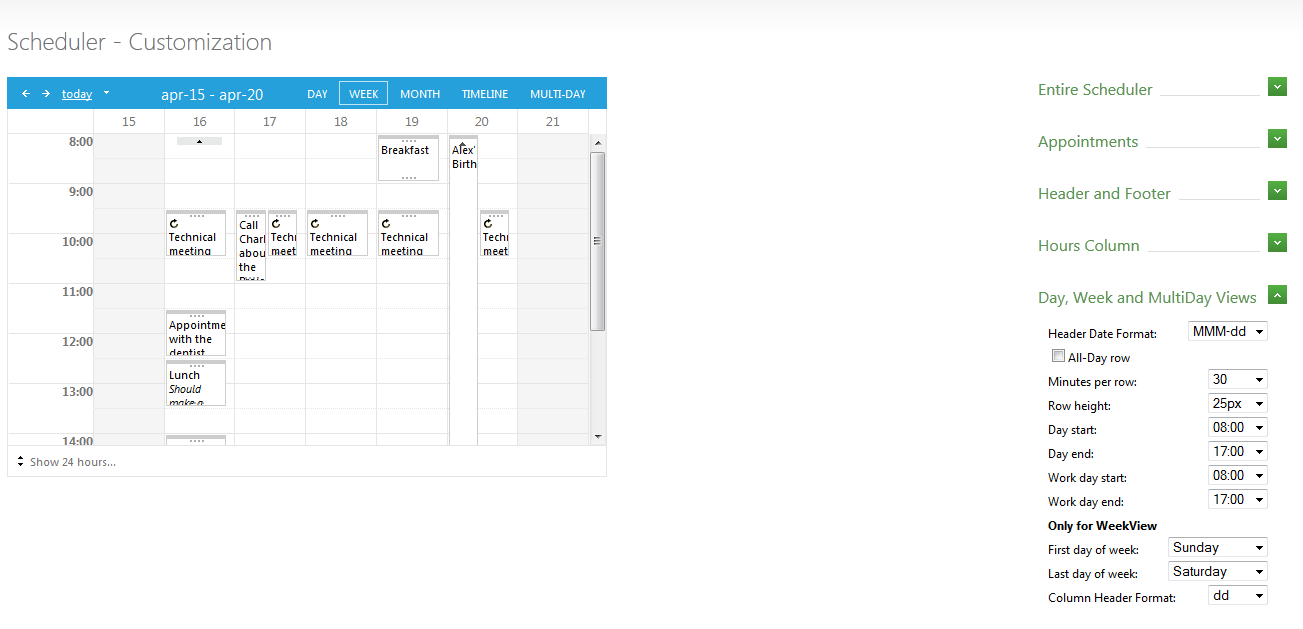
In the following image, we can see all appointments from April 15 to April 20 (7 columns for 7 days) BUT in the header is showing "apr-15 - apr-20". ALSO when I add the "All-Day row" the header is now showing April 15 to April 21. Can you explain the internal logic of the end-date in the header?
Thanks
Phil
Bozhidar
Telerik team
answered
on
10 Sep 2013
1 answer
134 views
Hello,
I am trying out the asp.net Telerik controls and have started a new project using them. Once I purchase the control set can I keep the existing project and just update to the registered controls? I don't want to start over with the project.
Thanks,
Warren
I am trying out the asp.net Telerik controls and have started a new project using them. Once I purchase the control set can I keep the existing project and just update to the registered controls? I don't want to start over with the project.
Thanks,
Warren
Rumen
Telerik team
answered
on
10 Sep 2013
3 answers
91 views
Hi team,
Recently we start using the application on IE10, earlier we were using IE8. but when we are running the application on IE10 then date picker appearing wide when they are enabled on page and appearing sort when they disabled on page, also grid showing white space at the end of the column.Suddently i found application showing a unexpected behaviour when running on IE10
We are using telerik 3.5 toolkit also below code was used earlier for IE8 on web config
<httpProtocol>
<customHeaders>
<add name="X-UA-Compatible" value="IE=8" />
</customHeaders>
</httpProtocol>
Could you please help me to rid this issue, it is very important in business point of view
Thanks
Afroz
Recently we start using the application on IE10, earlier we were using IE8. but when we are running the application on IE10 then date picker appearing wide when they are enabled on page and appearing sort when they disabled on page, also grid showing white space at the end of the column.Suddently i found application showing a unexpected behaviour when running on IE10
We are using telerik 3.5 toolkit also below code was used earlier for IE8 on web config
<httpProtocol>
<customHeaders>
<add name="X-UA-Compatible" value="IE=8" />
</customHeaders>
</httpProtocol>
Could you please help me to rid this issue, it is very important in business point of view
Thanks
Afroz
Venelin
Telerik team
answered
on
10 Sep 2013





