REST to tRPC Migration in NestJS Monorepos

Summarize with AI:
Convert a shared monorepo with a NestJS REST API and Next.js to tRPC. Replace NestJS controllers with typed tRPC routers that expose procedures instead of endpoints, updating the frontend to consume those procedures with fully typed hooks and no manual type definitions.
This post covers how to convert a shared monorepo with a NestJS REST API and Next.js to tRPC.
We’ll replace NestJS controllers with typed tRPC routers that expose procedures instead of endpoints, and update our frontend to consume those procedures with fully typed hooks and no manual type definitions. By the end, you’ll learn how to prevent backend-to-frontend API mismatches at compile time rather than in production.
Prerequisites
- Basic knowledge of NestJS and TypeScript
- Familiarity with REST APIs and how HTTP requests work
- Node.js and pnpm installed
- Basic knowledge of Next.js
Why Choose tRPC Over REST
In a REST setup, you have type safety on the server and on the client, but there’s a blind spot at the boundary between them. In a REST API, when the client fetches data, it has to manually define the response type. This is typically done by copying API specifications from the backend. However, because these definitions are copies, if changes are made on the backend without updating the client, no problems are noticed immediately, the builds still pass, but users encounter errors in production.
tRPC solves this by sharing the router type directly from the server to the client. The client uses the same type definitions as the backend. nestjs-trpc creates the AppRouter type using our Zod output schemas, and the client imports this type directly.
If the backend changes, the type changes, and TypeScript immediately flags the call sites.
Project Setup
This guide assumes you already have a NestJS REST API and a Next.js app running together in a pnpm monorepo. If you need a starting point, you can clone the starter repo here and run the install command at the root:
pnpm install
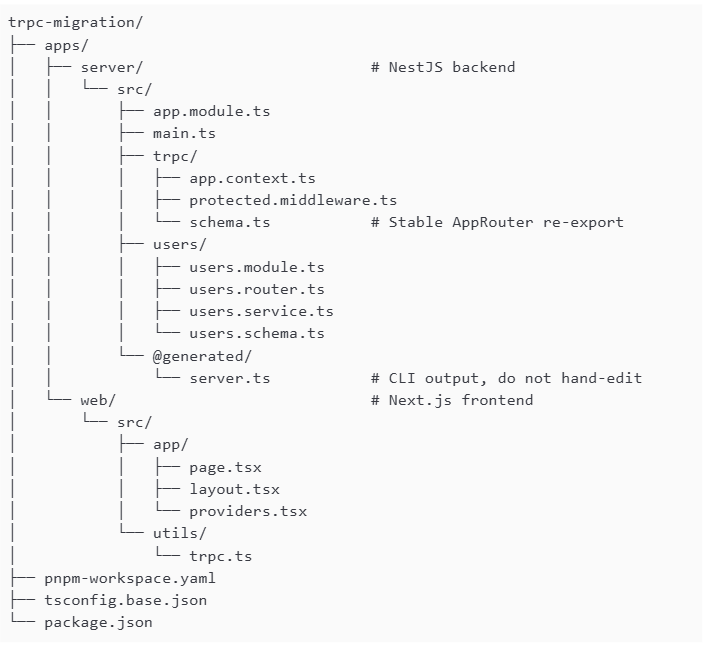
We will be migrating the NestJS backend from REST to tRPC and updating the frontend to consume it with typed hooks. Here is what the structure will look like at the end:
Monorepo Foundation
Since you already have a pnpm monorepo set up, there are just two things to add before we start the migration.
First, add the @api/* path alias to the existing tsconfig.base.json file:
{
  "compilerOptions": {
    "baseUrl": ".",
    "paths": {
      "@api/*": ["apps/server/src/*"]
    }
  }
}
This alias allows the frontend to import types directly from the backend source without having to create and publish a package for sharing types.
Next, let’s add scripts to our root package.json file so we can run commands more conveniently:
{
"scripts": {
    "types:generate": "pnpm --filter server exec nestjs-trpc generate --entrypoint src/app.module.ts",
    "typecheck:web": "pnpm --filter web run typecheck",
    "verify:types": "pnpm run types:generate && pnpm run typecheck:web",
    "dev:server": "pnpm --filter server run start:dev",
    "dev:web": "pnpm --filter web run dev"
  }
}
In the snippet above, types:generate runs the nestjs-trpc CLI to create the AppRouter type using our backend routers. typecheck:web runs tsc --noEmit on the Next.js app. verify:types combines both of them. We’ll use these scripts in the type safety section. dev:server and dev:web are used to start the server and frontend, respectively.
Backend Setup
Run the command below to install the dependencies we’ll need for this project:
cd apps/server
pnpm add nestjs-trpc @trpc/server zod superjson express
pnpm add -D @types/express
In the snippet above:
- nestjs-trpc: Integrates tRPC into NestJS’s module and DI system
- @trpc/server: The core tRPC server library
- zod: Handles input and output schema validation for each procedure
- superjson: The serializer that handles data types JSON can’t handle natively, like dates, maps and sets
- express and @types/express: Used to properly type the request and response objects from Express
Next, update your app.module.ts file with the following:
import { Module } from '@nestjs/common';
import { TRPCModule } from 'nestjs-trpc';
import superjson from 'superjson';
import { AppContext } from './trpc/app.context';
import { ProtectedMiddleware } from './trpc/protected.middleware';
import { UsersModule } from './users/users.module';

@Module({
  imports: [
    TRPCModule.forRoot({
      context: AppContext,
      transformer: superjson,
    }),
    UsersModule,
  ],
  providers: [AppContext, ProtectedMiddleware],
})
export class AppModule {}
In the code snippet above, TRPCModule.forRoot wires tRPC into NestJS. The context option points to the class responsible for building the per-request context object, which is AppContext (we’ll build this in the next section). The transformer option handles serialization: superjson extends JSON to correctly handle dates, maps, sets and undefined values across the wire. UsersModule is imported just as it would be in a REST app, we’re still using the standard NestJS module structure.
Next, let’s create a src/trpc/app.context.ts file and add the following to it:
import { Injectable } from '@nestjs/common';
import type { CreateExpressContextOptions } from '@trpc/server/adapters/express';

export type AppRequestContext = {
  req: CreateExpressContextOptions['req'];
  res: CreateExpressContextOptions['res'];
};

@Injectable()
export class AppContext {
  async create({
    req,
    res,
  }: CreateExpressContextOptions): Promise<AppRequestContext> {
    return { req, res };
  }
}
While in REST NestJS the request is readily available via the @Req decorator or guards, in tRPC, context is the mechanism that carries per-request data, the raw request, the current user or anything a procedure might need. Procedures are individual callable endpoints defined inside a router (e.g., getUser and createUser in UsersRouter).
AppRequestContext defines the shape of the context object that each procedure will receive. It has req and res, which are typed using CreateExpressContextOptions, which is a type that gives us the raw Express req and res objects from the incoming HTTP request.
The create method is called automatically by nestjs-trpc on every incoming request, and its return value becomes the context object. Notice it’s only returning req and res. This is intentional, because context isn’t where we guard the endpoints, but where we make the request data available to the middleware that will do the guarding. We’ll show how this works in ProtectedMiddleware.
The flow is: AppContext creates the context, ProtectedMiddleware inspects it, and procedures run if the middleware allows them through.
Creating Our Router
Next, a new file src/users/users.schema.ts and add the following to it:
import { z } from 'zod';

export const userNameSchema = z.string();

export const getUserOutputSchema = z.object({
  id: z.string(),
  name: userNameSchema,
});

export const createUserOutputSchema = z.object({
  id: z.string(),
  username: z.string(),
  email: z.string(),
});

export type GetUserOutput = z.infer<typeof getUserOutputSchema>;
export type CreateUserOutput = z.infer<typeof createUserOutputSchema>;
These schemas serve two purposes: runtime validation via Zod and type generation via the nestjs-trpc CLI. The output schemas are what the frontend’s AppRouter types will be derived from after we run types:generate.
Next, update the src/users/users.service.ts file with the following:
import { Injectable } from '@nestjs/common';
import type { CreateUserOutput, GetUserOutput } from './users.schema';

export type CreateUserInput = { username: string; email: string };

@Injectable()
export class UsersService {
  findById(id: string): GetUserOutput {
    return { id, name: 'John Doe' };
  }

  create(data: CreateUserInput): CreateUserOutput {
    return { id: '1', ...data };
  }
}
Our user service remains relatively unchanged. The business logic layer doesn’t care whether it’s being called by a REST controller or a tRPC router. We keep the same layered architecture we’re used to in NestJS.
Create src/users/users.router.ts file and add the following to it:
import { Router, Query, Mutation, Input, UseMiddlewares } from 'nestjs-trpc';
import { z } from 'zod';
import { ProtectedMiddleware } from '../trpc/protected.middleware';
import { UsersService } from './users.service';
import { createUserOutputSchema, getUserOutputSchema } from './users.schema';

@Router({ alias: 'users' })
export class UsersRouter {
  constructor(private readonly usersService: UsersService) {}

  @Query({
    input: z.object({ id: z.string() }),
    output: getUserOutputSchema,
  })
  getUser(@Input('id') id: string) {
    return this.usersService.findById(id);
  }

  @Mutation({
    input: z.object({
      username: z.string().min(3),
      email: z.string().email(),
    }),
    output: createUserOutputSchema,
  })
  @UseMiddlewares(ProtectedMiddleware)
  createUser(@Input() data: { username: string; email: string }) {
    return this.usersService.create(data);
  }
}
In a regular REST controller, we’d have @Get('id'). But in tRPC, we have @Query, and @Post() becomes @Mutation().
Although the decorators look similar, the difference is in the input and output Zod schemas attached to each procedure. We use the input schema for validation, so the procedure only receives data in the exact shape it expects. The output schema determines the shape that the frontend will expect for the response body. @UseMiddlewares(ProtectedMiddleware) is a per-procedure guard applied to createUser. We’ll discuss this next.
Update your src/users/users.module.ts file to register the router and export the service:
import { Module } from '@nestjs/common';
import { UsersRouter } from './users.router';
import { UsersService } from './users.service';

@Module({
  providers: [UsersRouter, UsersService],
  exports: [UsersService],
})
export class UsersModule {}
UsersRouter and UsersService are registered as providers above. nestjs-trpc discovers UsersRouter automatically because it’s decorated with @Router. Every module registers its routers in this same way.
We can now delete users.controller.ts, as it’s no longer being referenced.
Protected Procedures
Just like guards, we can add protection to an individual procedure or to the router as a whole.
Create a src/trpc/protected.middleware.ts file and add the following to it:
import { Injectable } from '@nestjs/common';
import { TRPCError } from '@trpc/server';
import type { Request } from 'express';
import type { MiddlewareOptions, TRPCMiddleware } from 'nestjs-trpc';

type AuthUser = { id: string };

function parseBearerToken(header: string | undefined): string | null {
  if (!header?.startsWith('Bearer ')) return null;
  const token = header.slice('Bearer '.length).trim();
  return token.length > 0 ? token : null;
}

@Injectable()
export class ProtectedMiddleware implements TRPCMiddleware {
  async use(opts: MiddlewareOptions<object, Record<string, unknown>>) {
    const { ctx, next } = opts;
    const req = (ctx as { req?: Request }).req;

    if (!req) {
      throw new TRPCError({
        code: 'INTERNAL_SERVER_ERROR',
        message: 'Request missing from context.',
      });
    }

    const token = parseBearerToken(req.headers.authorization);
    if (token !== 'demo-token') {
      throw new TRPCError({
        code: 'UNAUTHORIZED',
        message: 'Authentication required.',
      });
    }

    const user: AuthUser = { id: '1' };
    return next({ ctx: { ...ctx, user } });
  }
}
In the code above, ProtectedMiddleware is a class that implements TRPCMiddleware, and gives it a use method that runs automatically before any procedure it’s applied to.
MiddlewareOptions gives us ctx (the context object from AppContext) and next (which we call to pass control to the procedure). parseBearerToken pulls the token from the Authorization header. If the token check fails, a TRPCError with code UNAUTHORIZED is thrown and the procedure doesn’t run. If it passes, we call next() with an enriched context that now includes the user.
That user object is now accessible inside the procedure through ctx, which is the same concept as req.user in a NestJS Guard.
Generating the AppRouter
With our router and output schemas in place, run the CLI generator from the monorepo root:
npm run types:generate
This produces apps/server/src/@generated/server.ts, a file that contains the AppRouter type derived from our routers and Zod schemas. Do not manually edit this file, as it will be overwritten on every generation.
Next, create src/trpc/schema.ts to use as the stable re-export path for clients:
export type { AppRouter } from '../@generated/server';
Frontend Setup
Let’s install the dependencies we’ll need for this project:
cd apps/web
pnpm add @trpc/client @trpc/server @trpc/react-query @tanstack/react-query superjson
Now, update your tsconfig.json file to add the @api/* path alias pointing to the server source, extend the base config, and set baseUrl to . so the path aliases resolve correctly. Merge this with your existing tsconfig.json instead of replacing it:
{
  "extends": "../../tsconfig.base.json",
  "compilerOptions": {
    "baseUrl": ".",
    "paths": {
      "@/*": ["./src/*"],
      "@api/*": ["../server/src/*"]
    }
  }
}
Next, create a src/utils/trpc.ts file and add the following to it:
'use client';

import { createTRPCReact } from '@trpc/react-query';
import type { AppRouter } from '@api/trpc/schema';

export const trpc = createTRPCReact<AppRouter>();
In the code above, the AppRouter type import from @api/trpc/schema connects the frontend to the backend’s type definitions. Every hook we call using trpc will have its input and output types pulled directly from the backend router.
Next, create a src/app/providers.tsx file and add the following to it:
'use client';

import { useState } from 'react';
import { QueryClient, QueryClientProvider } from '@tanstack/react-query';
import { httpBatchLink } from '@trpc/client';
import superjson from 'superjson';
import { trpc } from '@/utils/trpc';

export function Providers({ children }: { children: React.ReactNode }) {
  const [queryClient] = useState(() => new QueryClient());
  const [trpcClient] = useState(() =>
    trpc.createClient({
      links: [
        httpBatchLink({
          url: 'http://localhost:3000/trpc',
          transformer: superjson,
        }),
      ],
    }),
  );

  return (
    <trpc.Provider client={trpcClient} queryClient={queryClient}>
      <QueryClientProvider client={queryClient}>{children}</QueryClientProvider>
    </trpc.Provider>
  );
}
In the code above, Providers sets up a React Query QueryClient for caching and a tRPC client configured with httpBatchLink, which points to the NestJS server and uses superjson for serialization. This matches the transformer we set on the backend.
Both clients are initialized with useState so they’re created once per render tree. To make tRPC hooks available throughout our app, we wrap the root layout with Providers.
Update the src/app/layout.tsx to wrap children with Providers:
import type { Metadata } from 'next';
import { Providers } from './providers';

export const metadata: Metadata = {
  title: 'NestJS tRPC Migration',
};

export default function RootLayout({
  children,
}: {
  children: React.ReactNode;
}) {
  return (
    <html lang="en">
      <body>
        <Providers>{children}</Providers>
      </body>
    </html>
  );
}
Let’s now update the src/app/page.tsx to consume the tRPC query:
'use client';

import { trpc } from '@/utils/trpc';

export default function Home() {
  const { data, isLoading } = trpc.users.getUser.useQuery({ id: '1' });

  if (isLoading) return <p>Loading...</p>;

  return (
    <div style={{ padding: '2rem' }}>
      <h1>{data?.name ?? ''}</h1>
    </div>
  );
}
Compared to REST, there’s no manual User type definition and no risk of backend mismatches. If the name field doesn’t exist on the output schema, TypeScript tells us immediately.
Proving End-To-End Type Safety
To test, we’ll make a change to the backend definition and see if TypeScript flags the call site. In your users.schema.ts file, change userNameSchema from a plain string to a structured object:
// Before
export const userNameSchema = z.string();

// After
export const userNameSchema = z.object({
  firstName: z.string(),
  lastName: z.string(),
});
Then, from the monorepo root, regenerate and typecheck:
npm run types:generate
npm run typecheck:web
Without touching the page.tsx, TypeScript will error. data?.name in page.tsx is no longer a string, it’s { firstName: string; lastName: string }, and TypeScript will flag every call site that references the old shape.
Conclusion
In this post, we migrated a NestJS REST API to tRPC. Controllers were replaced with typed routers, we handled auth with middleware, and wired up our Next.js frontend to share types directly with the backend. With this setup, we’ve learned how to reliably prevent backend-to-frontend API mismatches.
Possible next steps you can take include adding more routers, chaining verify:types with nest build and next build into a single pre-merge script, or using tRPC subscriptions.

Christian Nwamba
Chris Nwamba is a Senior Developer Advocate at AWS focusing on AWS Amplify. He is also a teacher with years of experience building products and communities.
Related Posts
Comments
All articles
Topics
Web MobileMobile
Desktop
Design
Productivity
People