A Developer’s Guide to State Management with Effector

Summarize with AI:
Learn to build a simple app that shows how Effector handles state, async operations and UI updates. The app will allow users add, update, delete and load todos from an API.
State management in React can get complicated quickly. Most libraries make you choose between simple and powerful. Simple tools break as your app grows or become difficult to manage. Powerful tools require you to write a lot of setup/config code before anything works. And when you need to handle async operations or derive state from multiple sources, you’re writing custom logic from scratch all over again.
Effector works differently. It is event-driven in the sense that you tell the app what happened (an event), the data updates in the store and the UI updates accordingly. Side effects are handled cleanly, and TypeScript works without extra setup. Instead of dispatching actions and writing reducers, you simply fire events that your stores react to.
Prerequisites
- Understanding of JavaScript/TypeScript
- Basic familiarity with React
Project Setup
We’re going to build a to-do app to see how Effector handles state, async operations and UI updates. The app will let users add, update, delete and load todos from an API. We’ll use Vite to set up a React + TypeScript project.
Open your terminal and run the following command:
npm create vite@latest effector-todo -- --template react-ts
Once that is done, run the following command to navigate into your project:
cd effector-todo
npm install
Run this command to install Effector dependencies:
npm install effector effector-react
Effector works with any framework, but we need effector-react to connect it to React. The core effector package handles state management, while effector-react provides hooks like useUnit to access state in components.
What Is Effector?
Effector is built around events. All you need to do is describe what happened and the store updates, and the UI will follow. If we compare that to Redux, you need an action, a reducer and a type constant to update a single value in a component.
Zustand made this simpler by letting us call functions directly on the store, which felt like a relief. But async operations are where things get complicated. Suppose we want to save a todo to a database before updating the screen. The fetch call, the loading flag and error handling will all end up in one place, making the function grow messy.
Effector handles async operations differently. We wrap them in an effect, and the loading, success and failure states are all tracked automatically. With this, there is no need for manual flag management.
Then we also have React Context. If you change anything in a provider, your entire component tree re-renders. Effector avoids this by only updating the specific components subscribed to the store that actually changed. TypeScript also works out of the box. If you define types once in the store, they are known everywhere in the codebase.
The powerful thing about Effector is that it isn’t tied to React alone. It gives you the flexibility to work with Vue, Svelte or any other framework.
The 3 Building Blocks
As mentioned earlier, Effector is built around three primitives called units: stores, events and effects. Everything in your app is one of these three things.
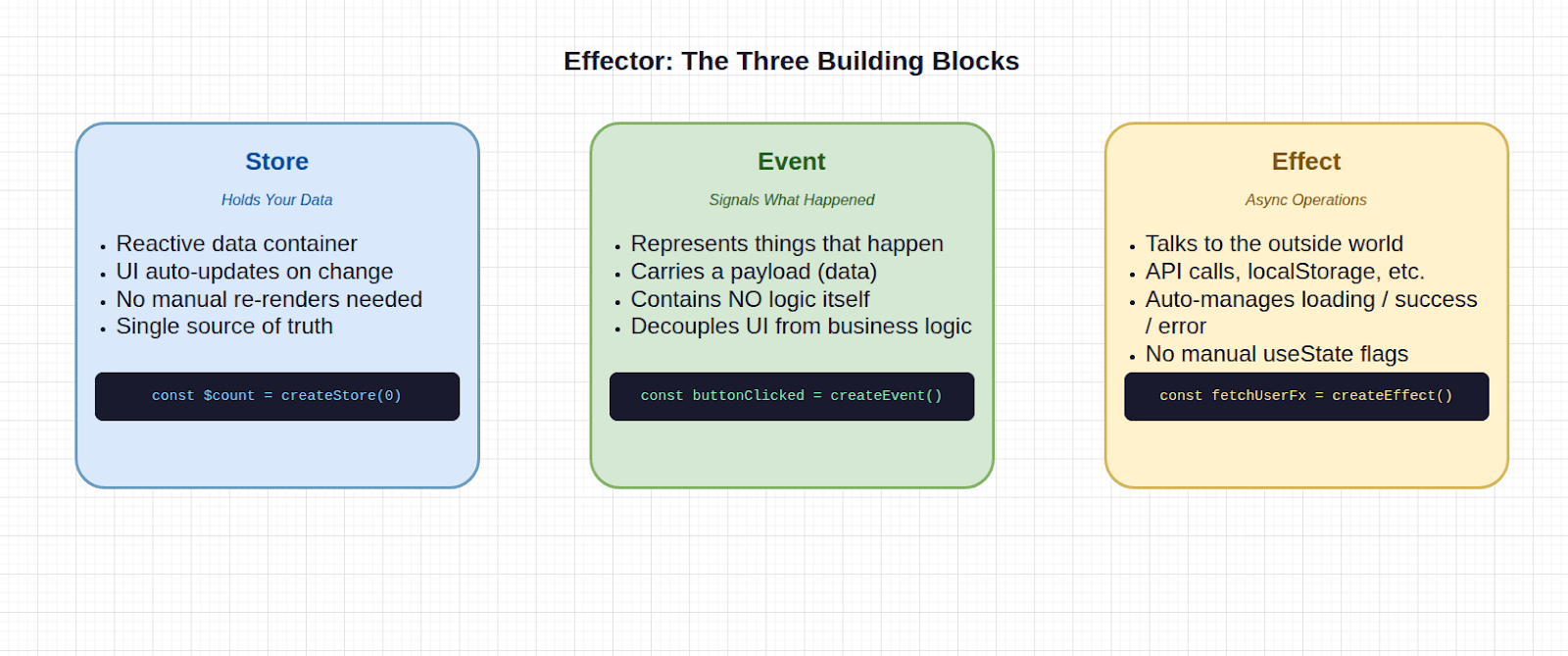
- A store holds your data, and it is a reactive container. When it changes, every component subscribed to it updates automatically. More precisely, every part of your UI that depends on it updates automatically. You never have to tell React that something has changed or trigger a re-render. The store handles that.
- Events are signals. They represent things that happen in your app, such as a button being clicked, a form being submitted or a user typing something. An event doesn’t contain logic itself, it just announces what happened and carries the relevant data (the payload). This separation is intentional. Because an event is just a signal, you can wire it to any store or effect without the UI caring. The React button just triggers the event, so it doesn’t need to know what happens next. That’s the store’s job.
- Effects are where async operations live. Anytime your app needs to talk to the outside world (fetch data, write to an API or read from localStorage), that goes in an effect. The reason effects exist as a separate primitive is that async operations have a lifecycle. They start, they either succeed or fail, and the UI needs to reflect each of those states. In most libraries, you manage this yourself with
useStatehooks andtry/catchblocks scattered across your component. Effector handles it automatically. Every effect gives you aloadingstate, asuccessstate and anerrorstate out of the box. All you need to do is connect them, and you’re done.
Building the Todo Store
Create a src/store.ts file and add the following to it:
import { createStore } from "effector";

type Todo = {
  id: number;
  text: string;
  done: boolean;
};

export const $todos = createStore<Todo[]>([]);
In the code above, we have a Todo type for TypeScript, which is just the shape of one item in our todos array, a single todo. The $ prefix is Effector’s convention for signaling that this is a store, not a regular variable. Because we passed Todo[] as the type, everywhere we use $todos, TypeScript already knows exactly what’s inside it. The code above is our entire data layer for todos.
Creating the Events
A store on its own doesn’t do much. We mentioned earlier that events are one of the three building blocks in Effector, and this is where we create them. Update your src/store.ts file with the following:
import { createStore, createEvent } from "effector";

export const addTodo = createEvent<string>();
export const toggleTodo = createEvent<number>();
export const deleteTodo = createEvent<number>();
Here we have three events that can happen in the app. addTodo carries a string, which is the text of the new todo. toggleTodo and deleteTodo carry a number which is the ID of the todo to act on.
One thing to notice here is that there’s no logic. addTodo doesn’t know how todos are stored or what happens when it fires. It’s just a signal. This is what we described earlier when we said that the button that fires the event doesn’t need to know what happens next.
Connecting Events to the Store
Right now, the store and the events exist independently, nothing connects them. That’s what .on() does. Update your src/store.ts with the following:
$todos
.on(addTodo, (state, text) => [
  ...state,
  { id: Date.now(), text, done: false },
])
.on(toggleTodo, (state, id) =>
  state.map((todo) =>
    todo.id === id? { ...todo, done: !todo.done } : todo
  )
)
.on(deleteTodo, (state, id) =>
  state.filter((todo) => todo.id !== id)
);
Each .on() method takes two parameters: the event to listen for, and a function that describes how the state should change. The function receives the current state and the event payload, then returns a new state. It never mutates the previous state; instead, it always returns a new value.
In the code above, when addTodo fires, we spread the existing todos and add a new one. When toggleTodo fires, we find the todo with that ID and toggle its done value. When deleteTodo fires, we filter that todo out of the array.
That’s the complete data layer for our todo app. There are no classes and no reducers. Just a store, three events and three .on() handlers describing exactly what changes when each event fires.
Connecting to React
Our store exists, the events are wired up, but our UI doesn’t know any of that yet. This is where effector-react comes in. It gives you a single hook, useUnit, that connects your components to your stores.
Reading State with useUnit
import { useUnit } from "effector-react";
import { $todos } from "./store";

function App() {
  const todos = useUnit($todos);
}
useUnit subscribes the component to $todos. When the store changes, the component re-renders with the new value. If nothing changes, it doesn’t re-render.
We don’t have context providers wrapping our app here. Compare this to how you would do the same with Context:
<TodoContext.Provider value={{ todos, setTodos }}>
  <App />
</TodoContext.Provider>
const { todos } = useContext(TodoContext);
Every time setTodos is called, every component inside that provider re-renders. As you can see, Effector gives us a much cleaner approach. With Effector, there’s no provider. All we have to do is just import the store and call useUnit.
Create an App.tsx file in your src directory if you haven’t already, and add the following to it:
import { useState } from "react";
import { useUnit } from "effector-react";
import { $todos, addTodo, toggleTodo, deleteTodo } from "./store";

function App() {
  const todos = useUnit($todos);
  const [input, setInput] = useState("");

  const handleAdd = () => {
    if (input.trim()) {
      addTodo(input);
      setInput("");
    }
  };

  return (
    <div className="min-h-screen bg-gray-50 p-8">
      <div className="max-w-2xl mx-auto">
        <h1 className="text-3xl font-bold text-gray-900 mb-8">
          Effector Todo
        </h1>
        <div className="bg-white rounded-lg shadow p-6 mb-6">
          <div className="flex gap-2">
            <input
              type="text"
              value={input}
              onChange={(e) => setInput(e.target.value)}
              onKeyPress={(e) => e.key === "Enter" && handleAdd()}
              placeholder="Add a new todo..."
              className="flex-1 px-4 py-2 border border-gray-300 rounded-lg focus:outline-none focus:ring-2 focus:ring-blue-500"
            />
            <button
              onClick={handleAdd}
              className="px-6 py-2 bg-blue-600 text-white rounded-lg hover:bg-blue-700 transition-colors"
            >
              Add
            </button>
          </div>
        </div>
        <div className="bg-white rounded-lg shadow divide-y">
          {todos.length === 0 ? (
            <div className="p-4 text-gray-500 text-center">
              No todos yet. Add one above!
            </div>
          ) : (
            todos.map((todo) => (
              <div key={todo.id} className="p-4 flex items-center gap-3">
                <input
                  type="checkbox"
                  checked={todo.done}
                  onChange={() => toggleTodo(todo.id)}
                  className="w-5 h-5 text-blue-600 rounded"
                />
                <span className={`flex-1 ${todo.done ? "line-through text-gray-400" : "text-gray-900"}`}>
                  {todo.text}
                </span>
                <button
                  onClick={() => deleteTodo(todo.id)}
                  className="px-3 py-1 text-sm text-red-600 hover:bg-red-50 rounded"
                >
                  Delete
                </button>
              </div>
            ))
          )}
        </div>
      </div>
    </div>
  );
}`
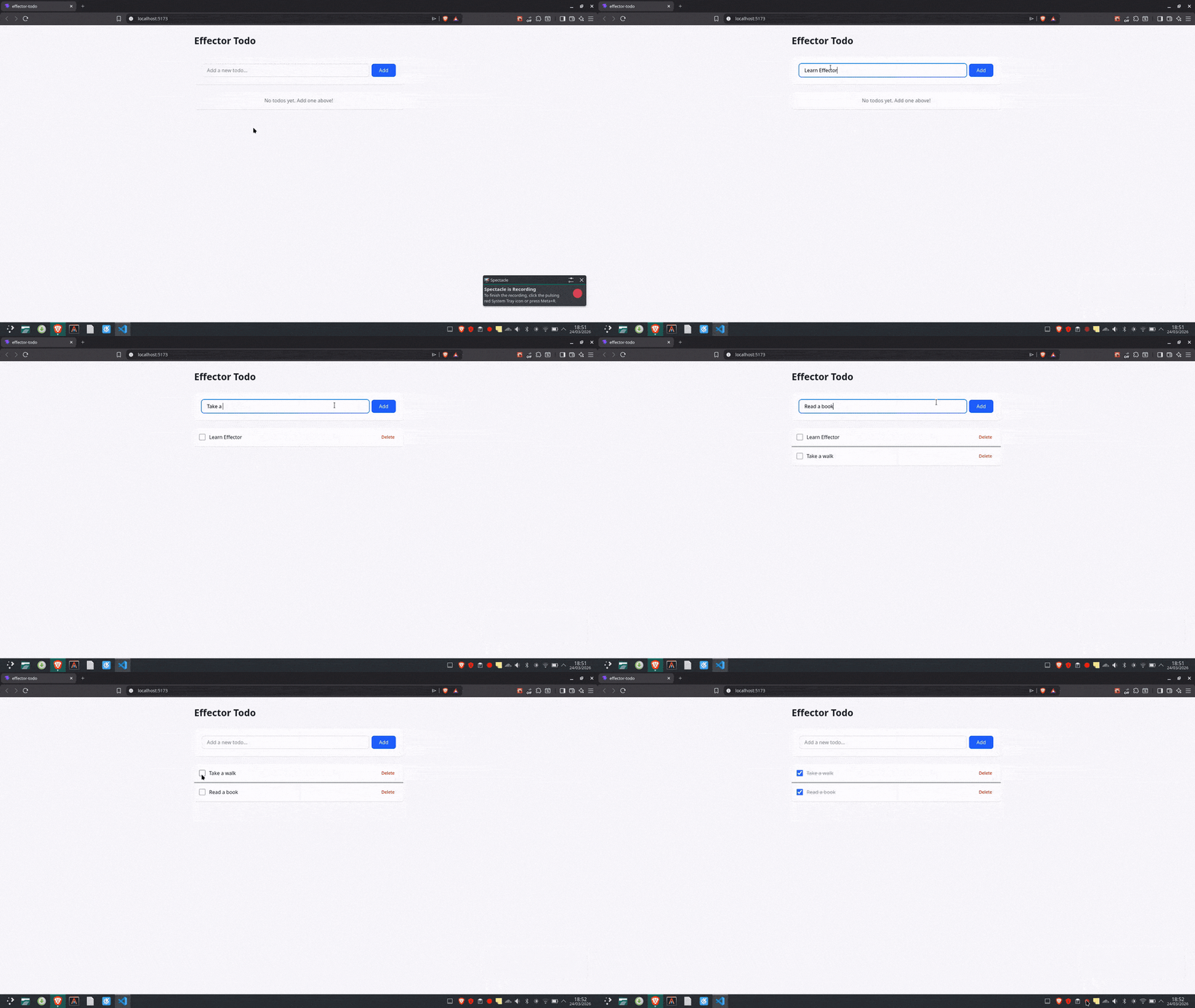
In the code above, you’ll notice we’re not attaching any state logic in our App component, all thanks to Effector. It doesn’t care how todos are stored, added or deleted. All it does is read $todos and trigger events when something happens.
The only place we’re using useState is for the input field, which makes sense since that’s just local UI state which doesn’t need to live in the store.
Derived Store with .map()
Our store works, and the UI is connected, but most apps aren’t as straightforward as our todo app currently is. At some point, you might want to show only completed todos in one place, count remaining tasks somewhere else or filter by priority in another component. You can already see where this is heading.
What comes to mind first is filtering inside each component. That works until you need to change how something works and realize your logic is scattered across the app, where changing one thing breaks another.
Effector handles this with derived states. Instead of rewriting the same logic or recomputing values across components, you derive them once.
Let’s update our store.ts file with these derived stores:
export const $completedTodos = $todos.map((todos) =>
  todos.filter((todo) => todo.done)
);
export const $activeTodos = $todos.map((todos) =>
  todos.filter((todo) => !todo.done)
);
export const $remainingCount = $todos.map(
  (todos) => todos.filter((todo) => !todo.done).length
);
$todos.map() is a method we call on a store. This might look familiar, but it’s not the same as JavaScript’s array.map(). When this one is called on a store, it returns a new store.
In Effector, when you call .map() on a store, it creates a new store that watches the original one. Whenever $todos updates, the derived store runs your transformation function and updates itself. This way, everything stays in sync automatically.
Effector also follows immutability. Nothing gets changed in place. Every time you derive something, you’re creating a new value instead of modifying the existing one, and the transformation function handles that for you.
Let’s see this in action by updating our App.tsx file to look like so:
//App.tsx

import { useState } from "react";
import { useUnit } from "effector-react";
import {
  $activeTodos,
  $completedTodos,
  $remainingCount,
  addTodo,
  toggleTodo,
  deleteTodo,
} from "./store";

export function App() {
  const activeTodos = useUnit($activeTodos);
  const completedTodos = useUnit($completedTodos);
  const remainingCount = useUnit($remainingCount);
  const [input, setInput] = useState("");

  const handleAdd = () => {
    if (input.trim()) {
      addTodo(input);
      setInput("");
    }
  };

  return (
    <div className="min-h-screen bg-gray-50 p-8">
      <div className="max-w-2xl mx-auto">
        <div className="flex items-center justify-between mb-8">
          <h1 className="text-3xl font-bold text-gray-900">Effector Todo</h1>
          <span className="text-gray-500 text-sm">
            {remainingCount} {remainingCount === 1 ? "task" : "tasks"} remaining
          </span>
        </div>

        <div className="bg-white rounded-lg shadow p-6 mb-6">
          <div className="flex gap-2">
            <input
              type="text"
              value={input}
              onChange={(e) => setInput(e.target.value)}
              onKeyPress={(e) => e.key === "Enter" && handleAdd()}
              placeholder="Add a new todo..."
              className="flex-1 px-4 py-2 border border-gray-300 rounded-lg focus:outline-none focus:ring-2 focus:ring-blue-500"
            />
            <button
              onClick={handleAdd}
              className="px-6 py-2 bg-blue-600 text-white rounded-lg hover:bg-blue-700 transition-colors"
            >
              Add
            </button>
          </div>
        </div>

        {activeTodos.length > 0 && (
          <div className="bg-white rounded-lg shadow divide-y mb-6">
            {activeTodos.map((todo) => (
              <div key={todo.id} className="p-4 flex items-center gap-3">
                <input
                  type="checkbox"
                  checked={todo.done}
                  onChange={() => toggleTodo(todo.id)}
                  className="w-5 h-5 text-blue-600 rounded"
                />
                <span className="flex-1 text-gray-900">{todo.text}</span>
                <button
                  onClick={() => deleteTodo(todo.id)}
                  className="px-3 py-1 text-sm text-red-600 hover:bg-red-50 rounded"
                >
                  Delete
                </button>
              </div>
            ))}
          </div>
        )}

        {completedTodos.length > 0 && (
          <div>
            <h2 className="text-sm font-medium text-gray-500 mb-2">
              Completed
            </h2>
            <div className="bg-white rounded-lg shadow divide-y opacity-60">
              {completedTodos.map((todo) => (
                <div key={todo.id} className="p-4 flex items-center gap-3">
                  <input
                    type="checkbox"
                    checked={todo.done}
                    onChange={() => toggleTodo(todo.id)}
                    className="w-5 h-5 text-blue-600 rounded"
                  />
                  <span className="flex-1 line-through text-gray-400">
                    {todo.text}
                  </span>
                  <button
                    onClick={() => deleteTodo(todo.id)}
                    className="px-3 py-1 text-sm text-red-600 hover:bg-red-50 rounded"
                  >
                    Delete
                  </button>
                </div>
              ))}
            </div>
          </div>
        )}
      </div>
    </div>
  );
}
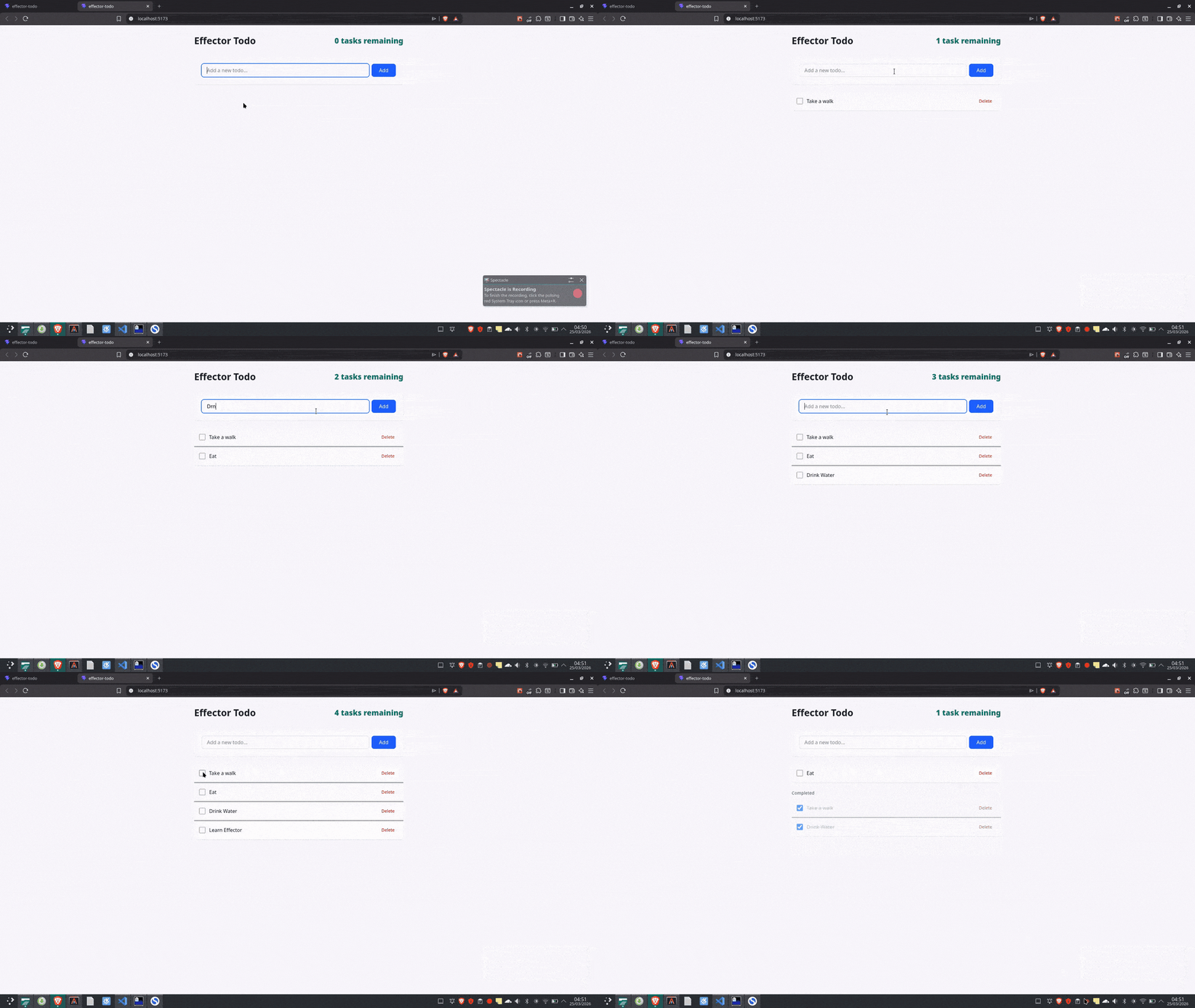
As seen above, the app component stays clean and just does what it is supposed to do.
Async Operations with Effects
Every app eventually needs to talk to the outside world, and it may be through fetching data, saving something to a server or reading from storage. This is where most state management solutions make you manually create a loading flag, set it to true before the request, set it back to false when it finishes, handle the error case and clean up if the component unmounts. You end up writing the same boilerplate every time.
The good thing about Effector is that it has a dedicated concept for this called Effects.
Creating an Effect
Let’s update our store.ts file by first adding a new import called createEffect. This handles fetching data and, more generally, any kind of side effect.
We’ll also use a dummy API to fetch some todos and define the type of each todo we expect back.
import { createStore, createEvent, createEffect } from "effector";

type ApiTodo = {
  id: number;
  todo: string;
  completed: boolean;
  userId: number;
};

export const loadTodosFx = createEffect(async () => {
  const response = await fetch("https://dummyjson.com/todos?limit=5");
  const data = await response.json();
  return data.todos.map((todo: ApiTodo) => ({
    id: todo.id,
    text: todo.todo,
    done: todo.completed,
  }));
});
In the code above, createEffect wraps an async function. The Fx suffix is an Effector convention in the sense that just as $ signals a store, Fx signals an effect. Anyone reading the code immediately knows what they’re dealing with.
The function inside is just a regular async function that fetches data, transforms it and returns it.
Effector offers three things out of the box:
loadTodosFx.pending: A store that is true while the effect is running and false when it finishesloadTodosFx.doneData: An event that fires with the return value when the effect succeedsloadTodosFx.fail: An event that fires with the error if something goes wrong
We don’t write any of this, and you’ll see it in action when we connect the effects to the store.
Connecting the Effect to the Store
We’ll wire doneData to $todos the same way we wired events with .on().
In your store.ts file, update the $todos connection to include the effect:
$todos
  .on(addTodo, (state, text) => [
    ...state,
    {
      id: Date.now(),
      text,
      done: false,
    },
  ])
  .on(toggleTodo, (state, id) =>
    state.map((todo) =>
      todo.id === id ? { ...todo, done: !todo.done } : todo,
    ),
  )
  .on(deleteTodo, (state, id) => state.filter((todo) => todo.id !== id))
  .on(loadTodosFx.doneData, (_, todos: Todo[]) => todos);
The only new thing in the code above is the last .on() call. Before now, the store was reacting to events we triggered manually. Now it’s also reacting to the result of an async operation.
When loadTodosFx.doneData fires (which happens when the request succeeds), the store replaces the current todos with whatever came back from the API.
Using the Fx in the Component
Now update your App.tsx to import loadTodosFx and read the loading state:
import { useState } from "react";
import { useUnit } from "effector-react";
import {
  $activeTodos,
  $completedTodos,
  $remainingCount,
  addTodo,
  toggleTodo,
  deleteTodo,
  loadTodosFx,
} from "./store";

export function App() {
  const activeTodos = useUnit($activeTodos);
  const completedTodos = useUnit($completedTodos);
  const remainingCount = useUnit($remainingCount);

  const loadTodos = useUnit(loadTodosFx);
  const isLoading = useUnit(loadTodosFx.pending);

  const [input, setInput] = useState("");

  const handleAdd = () => {
    if (input.trim()) {
      addTodo(input);
      setInput("");
    }
  };

  return (
    <div className="min-h-screen bg-gray-50 p-8">
      <div className="max-w-2xl mx-auto">
        <div className="flex items-center justify-between mb-8">
          <h1 className="text-3xl font-bold text-gray-900">Effector Todo</h1>

          <div className="flex items-center gap-4">
            <span className="text-teal-700 text-2xl font-extrabold">
              {remainingCount} {remainingCount === 1 ? "task" : "tasks"}{" "}
              remaining
            </span>

            <button
              onClick={() => loadTodos()}
              disabled={isLoading}
              className="px-4 py-2 bg-green-600 text-white rounded-lg hover:bg-green-700 disabled:opacity-50"
            >
              {isLoading ? "Loading..." : "Fetch Todos"}
            </button>
          </div>
        </div>

        <div className="bg-white rounded-lg shadow p-6 mb-6">
          <div className="flex gap-2">
            <input
              type="text"
              value={input}
              onChange={(e) => setInput(e.target.value)}
              onKeyPress={(e) => e.key === "Enter" && handleAdd()}
              placeholder="Add a new todo..."
              className="flex-1 px-4 py-2 border border-gray-300 rounded-lg focus:outline-none focus:ring-2 focus:ring-blue-500"
            />
            <button
              onClick={handleAdd}
              className="px-6 py-2 bg-blue-600 text-white rounded-lg hover:bg-blue-700 transition-colors"
            >
              Add
            </button>
          </div>
        </div>

        {activeTodos.length > 0 && (
          <div className="bg-white rounded-lg shadow divide-y mb-6">
            {activeTodos.map((todo) => (
              <div key={todo.id} className="p-4 flex items-center gap-3">
                <input
                  type="checkbox"
                  checked={todo.done}
                  onChange={() => toggleTodo(todo.id)}
                  className="w-5 h-5 text-blue-600 rounded"
                />
                <span className="flex-1 text-gray-900">{todo.text}</span>
                <button
                  onClick={() => deleteTodo(todo.id)}
                  className="px-3 py-1 text-sm text-red-600 hover:bg-red-50 rounded"
                >
                  Delete
                </button>
              </div>
            ))}
          </div>
        )}

        {completedTodos.length > 0 && (
          <div>
            <h2 className="text-sm font-medium text-gray-500 mb-2">
              Completed
            </h2>
            <div className="bg-white rounded-lg shadow divide-y opacity-60">
              {completedTodos.map((todo) => (
                <div key={todo.id} className="p-4 flex items-center gap-3">
                  <input
                    type="checkbox"
                    checked={todo.done}
                    onChange={() => toggleTodo(todo.id)}
                    className="w-5 h-5 text-blue-600 rounded"
                  />
                  <span className="flex-1 line-through text-gray-400">
                    {todo.text}
                  </span>
                  <button
                    onClick={() => deleteTodo(todo.id)}
                    className="px-3 py-1 text-sm text-red-600 hover:bg-red-50 rounded"
                  >
                    Delete
                  </button>
                </div>
              ))}
            </div>
          </div>
        )}
      </div>
    </div>
  );
}
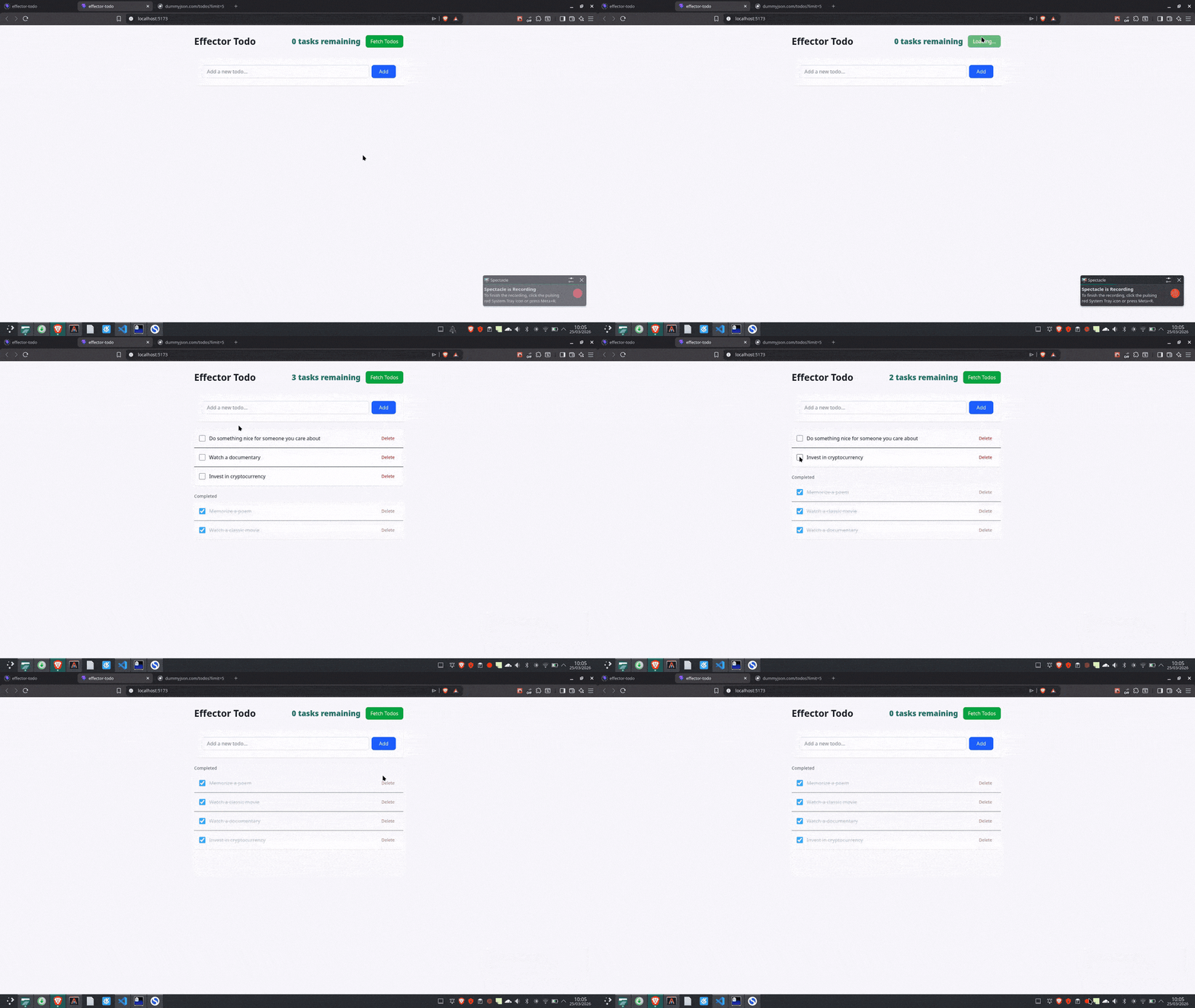
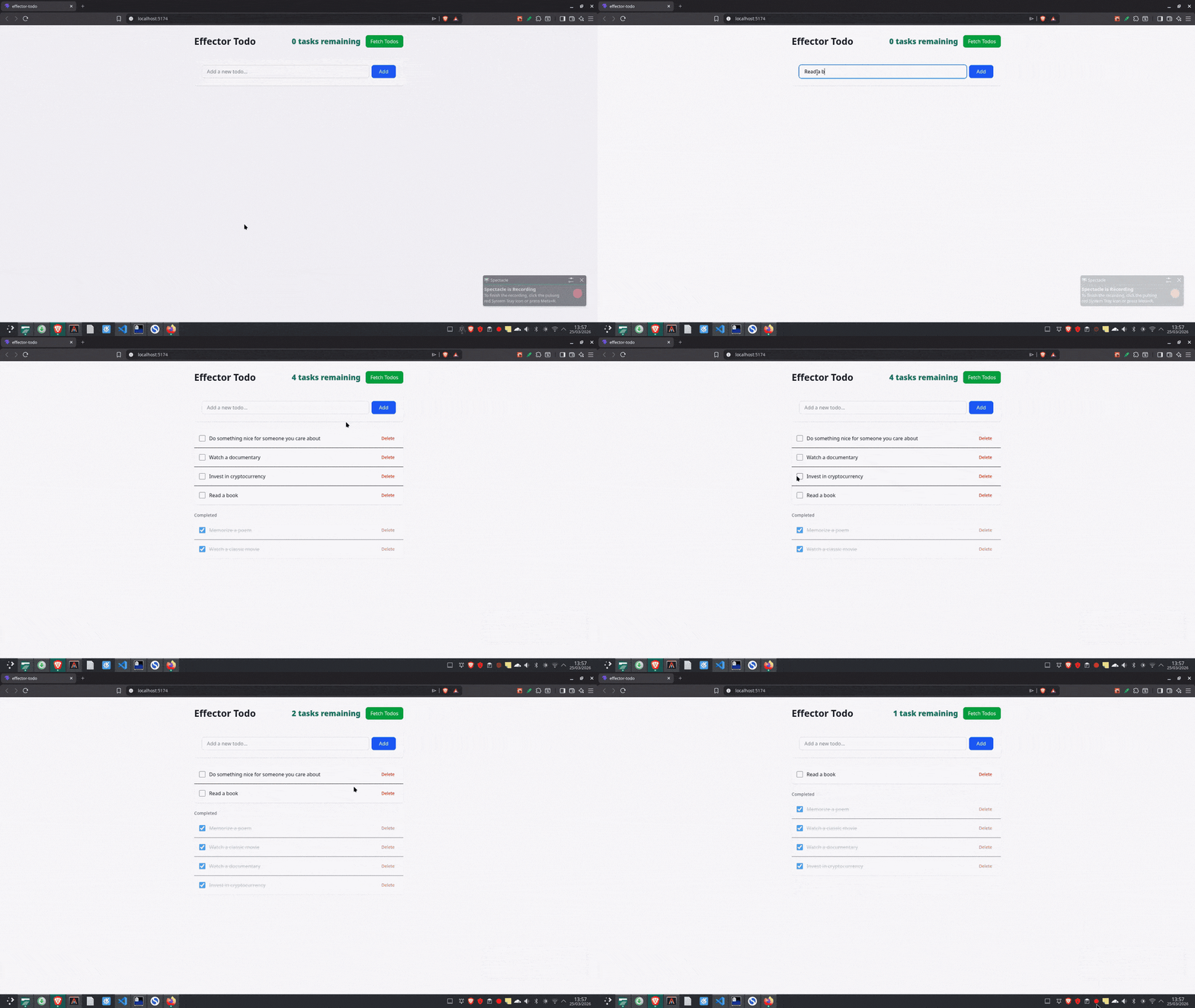
Two things changed in this component. First, we imported loadTodosFx, which is now called when the “Load Todos” button is clicked. Second, loadTodosFx.pending is read with useUnit, which automatically gives us the loading state. The button disables itself while loading, the label switches and todos appear when the fetch is complete.
Connecting Units with Sample
We have stores, events and effects, but sometimes you need them to talk to each other. When one thing happens, it triggers something else. That’s what sample is for. The idea here is straightforward: when a clock fires, read from a source, optionally transform the data and send it to a target.
Before we look at the code, let’s break down what each of those terms actually means:
- clock – The trigger. This is what starts everything. It can be an event, an effect or even another store. When it fires, everything else follows.
- source – The data you want to read at that moment. Usually a store.
- fn – An optional function to transform the data before it goes anywhere. If you don’t need to transform anything, you can skip it.
- target – Where the result goes. Can be a store, an event or an effect.
Here is an example:
import { sample } from "effector";

sample({
  clock: someEvent,    // when this fires...
  source: $someStore,  // grab the current value of this store...
  fn: (sourceValue, clockPayload) => ..., // optionally transform...
  target: anotherEvent // and send it here
});
Now, let’s go through a real example from our todo app. Right now, when you add a todo, the list updates locally. But in a real app, you’d want to reload from the server after adding so everything is in sync. Without sample, you’d handle that inside the component by calling addTodo, then manually calling loadTodosFx right after. That works, but now that logic is tied to one specific button in one specific component.
Add this to your store.ts file:
Import {sample} from “effector”;
sample({
  clock: addTodo,
  target: loadTodosFx,
});
Now, instead of completely replacing the todos when the request finishes, we’ll merge the data from the API with what we already have locally.
In your store.ts file, update the last .on() call to look like this:
.on(loadTodosFx.doneData, (state, apiTodos: Todo[]) => {
    const apiIds = new Set(apiTodos.map((t) => t.id));
    const localTodos = state.filter((t) => !apiIds.has(t.id));
    return [...apiTodos, ...localTodos];
  });
Every time addTodo fires from anywhere in our app, from any component, loadTodosFx runs automatically. The component has no idea this is happening. It just calls addTodo, and Effector handles the rest.
Conclusion
Honestly, Effector isn’t the right tool for every project. If you’re building something small with just a few components and basic state, stick with useState and useContext. Save Effector for when your app genuinely starts getting messy.
It shines in specific scenarios like when you’re dealing with async operations that need proper loading and error handling, when multiple unrelated components need to access the same state, when you’re computing the same derived data all over the place, or when you catch yourself copy-pasting the same async logic everywhere.
We’ve only scratched the surface here. Effector can do much more, but we’ve covered the basics and core concepts, which are the foundation for everything else. If you want to go deeper, check out the Effector documentation.

Christian Nwamba
Chris Nwamba is a Senior Developer Advocate at AWS focusing on AWS Amplify. He is also a teacher with years of experience building products and communities.
Related Posts
Comments
All articles
Topics
Web MobileMobile
Desktop
Design
Productivity
People