What Are the Biggest Time Wasters for Web Designers & Developers?

Summarize with AI:
Feel as though you should have plenty of time to get your work done, yet you always seem to be coming up on deadlines too quickly? If you want to remove the obstacles to success and improve your time management, keep reading.
We’ve all done it. We look at our calendar and list of tasks and think, “There’s plenty of time to get everything done.” But next thing you know, you have a client breathing down your neck about a milestone or a coworker wondering where an asset is.
Where did the time go?
In many cases, it’s not as simple as someone lacking time management skills. Often, there’s something about the nature of the work in web design that prohibits focus and efficiency. Like being responsible for creative design work and administrative tasks. Or having to navigate all the competing wants and needs of everyone else involved.
In this post, we’ll take a look at some of the more common time wasters and how to deal with them so you can be more efficient and effective with the time you have.
Common Time Wasters in Web Design and Development
Let’s have a look at the kinds of things that have a tendency to pull you away from the work you should be doing:
Administrative and Operational Tasks
I used to run a design agency where we installed time tracking software on everyone’s computers. The goal was to find out why we were constantly running over budget and missing deadlines.
Aside from a few stragglers who used social media during work, what I found was that the biggest time wasters weren’t from external distractions. Instead, I saw employees getting caught up in non-design tasks, including things like:
- Prepping for meetings
- Attending meetings
- Drawing up proposals
- Replying to emails
- Managing and organizing files
- Troubleshooting technical issues within the company
- Trying out new software/apps
This 2025 survey from freelancermap asked freelance designers about how many working hours they spent each week on “non-billable” tasks like these.
On average, around 5 of their 40 hours went to non-billable work.
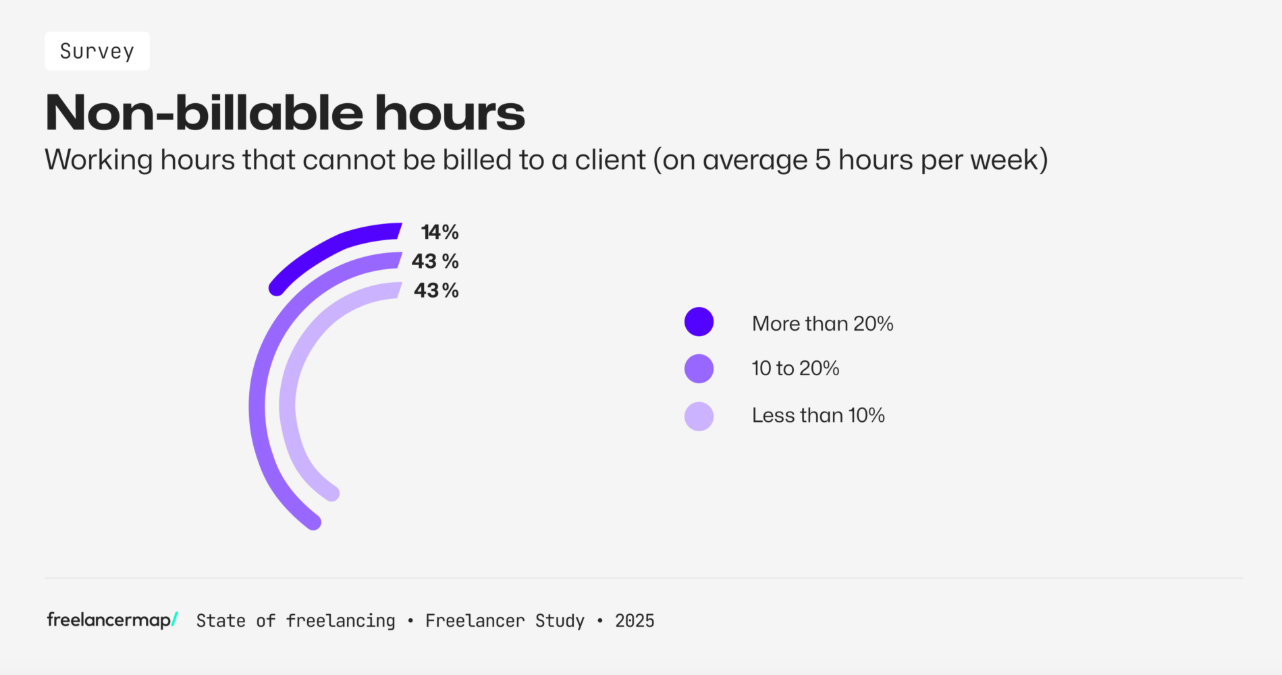
Here is the full breakdown from the report:
- 14% spent more than 20% of their time on non-billable work (more than 8 hours)
- 43% spent 10% to 20% (between 4 and 8 hours)
- 43% spent less than 10% (less than 4 hours)
A 2025 Atlassian report found that developers were losing even more time.
According to their research, 90% of developers lose 6 or more hours a week to administrative or operational tasks. A whopping 50% lose over 10 hours. This is attributed to organizational inefficiencies.
Five or six hours of a 40-hour workweek essentially means you’re going to lose more than half a day to non-design work. If that number is closer to 10 hours, you can kiss an entire workday (and maybe even more) goodbye.
What’s worse is that these operational time wasters don’t usually happen in big chunks.
Instead, you have to jump from design/dev work to administrative tasks, and back again. Recent research suggests that this doesn’t hugely impact the amount of time it takes to complete your work. However, it does greatly increase the stress, frustration, effort and time pressure. This can then impact your focus, motivation and energy levels—which can slow things down for you overall.
So, how do you fix this issue? It’s not like you can start saying “no” to meetings, proposal generation, responding to client emails and so on.
Here are some practical time and project management solutions you can try:
- Use a task management tool to oversee and control your workload.
- Add small time blocks to your schedule each day to handle things like checking emails as well as time-sensitive tasks.
- Add a big time block to one or two days that allow people to schedule meetings with you or to ask for help with bigger research/prep tasks.
- Avoid multi-tasking/task-switching as much as possible.
- Set a priority level for each task and tackle the most important stuff first.
- Automate where you can—like creating canned responses to send to clients.
Although administrative tasks may be part of the job, you can’t allow them to get in the way of the work clients are actually paying you to do. You also have to be careful about how you manage them as they can increase stress and anxiety, which can lead to burnout.
Collaboration Challenges
Unless you’re a solopreneur building websites and apps on your own, collaboration is an inherent part of the work you do as a web designer or developer.
On any given project, you might collaborate with management, coworkers, clients, vendors or third-party service providers. As you weave in between these different parties and interactions, the hope is that it will increase your momentum and not hinder it.
Unfortunately, collaboration can lead to some challenges when it comes to design and development. Here are some examples:
The under-deliverer: Your client agrees to a lower project cost in return for providing you with all of the images and copy for the website. Without that content, you cannot begin working on the project. It’s now been three weeks and the client continues to promise you’ll have it soon.
If you continually run up against people who under-deliver, then change your process. With the example of the client who fails to deliver content, you could remove that as an option altogether. Instead of negotiating a lower project price (which is sometimes a red flag in and of itself), you offer a flat fee that covers the cost of creating content internally. And apply it to every client.
You could also work something into your contract about this kind of thing. For clients who fail to deliver what you need (e.g., content, feedback, milestone payments), you’re entitled to put the project on hold and resume it at a later date.
The micromanager: Your manager insists that every iteration of the app be reviewed by the design and development team before it’s sent to the client. However, you’re now three rounds into revisions internally and likely to have a few more once it reaches the client.
A 2022 Forbes article reveals why management are so often the bottleneck when it comes to collaboration:
“Unfortunately, some business leaders assume that ‘collaboration’ simply means spending time communicating back and forth with other team members. While email, video calls and meetings can certainly facilitate some collaborative efforts, too much of a focus on these can become a distraction from actually performing collaborative work.”
If you have managers or clients getting over-involved and spending more time talking about the work instead of doing it, then a conversation needs to be had. Suggest trying an approach that doesn’t involve a collective review or constant oversight to see if the end result remains positive.
You of course want your entire team to be on the same page about everything. However, if these additional check-ins, meetings or review rounds are doing nothing but increasing tension within the team and wasting time, then they’re not serving you well.
The inefficient tech stack: In some agencies, design and development teams don’t use the same platforms. Because of this, design handoff can take a while as specifications need to be drawn up for the developer. You might also end up with multiple rounds of questions to get clarity on what was mocked up and how it needs to be executed.
This may be the most difficult collaboration bottleneck to address as management will have to sign off on any changes. While you might not be able to change your design and development tech stack or handoff process, you could ease the situation and save time in other ways.
For example, digital collaboration tools can help increase team productivity by 30%. So, even just finding a way to simplify and speed up communication between team members or clients could help you take back some of that wasted time.
As you can see, there are so many different reasons why collaboration can become a big time suck for designers and developers. To address these issues, you’ll have to pinpoint which ones your agency suffers from the most and tailor-make a solution for it.
Rushing or Overcomplicating Projects
I think of this as a problem of extremes.
The problem with rushing projects: On the one hand, you have projects that get pushed too quickly through the pipeline (or with too many other projects competing for priority). For whatever reason, the deadline is set and the creative team is left having to make it work.
So, what likely happens? They cut corners.
Maybe they do a whole lot of vibe coding and don’t spend as much time reviewing, rewriting and repairing the code as they normally would.
Maybe they rush through design and development, not bothering to draw up a style guide or design system. And while the client is mostly satisfied with how the app works, they hate the color palette. So now every element needs to be reskinned and it’s difficult to keep things straight without a set style guide.
Or it could just be the problem of completing every step at two or three times the usual speed. The product was built in record time, but now you have to make up for it with tons of revisions.
This is something called technical debt.
Technical debt is the idea that the time and money saved upfront when cutting corners will eventually have to be repaid later. You’ve compromised the integrity of your process, which usually means making up for it by spending time debugging and revising.
Not only does technical debt tack on extra time after you’re “done,” it creates added stress and also hurts team morale.
The solution to this? Pushing back on unreasonable timelines.
The problem with overcomplicating projects: Now let’s look at this from the other end of the spectrum. Instead of rushing through the job, you go overboard with it. This could be due to a perfectionist mindset and not wanting to ship the product off until you’re 110% satisfied with it. It could also be due to someone dreaming way too big and being unable or unwilling to start small.
Now, perfectionism has its advantages. By paying close attention to details, you are less likely to get the dreaded email or call from the client to let you know they discovered a bunch of bugs, broken links and the like.
At the same time, perfectionism eventually stops being a benefit. There’s this 2024 post called Perfectionism - One of the Biggest Productivity Killers in the Engineering Industry that was co-written by Pinterest software engineer Jordan Cutler.
At the very top is this graph:
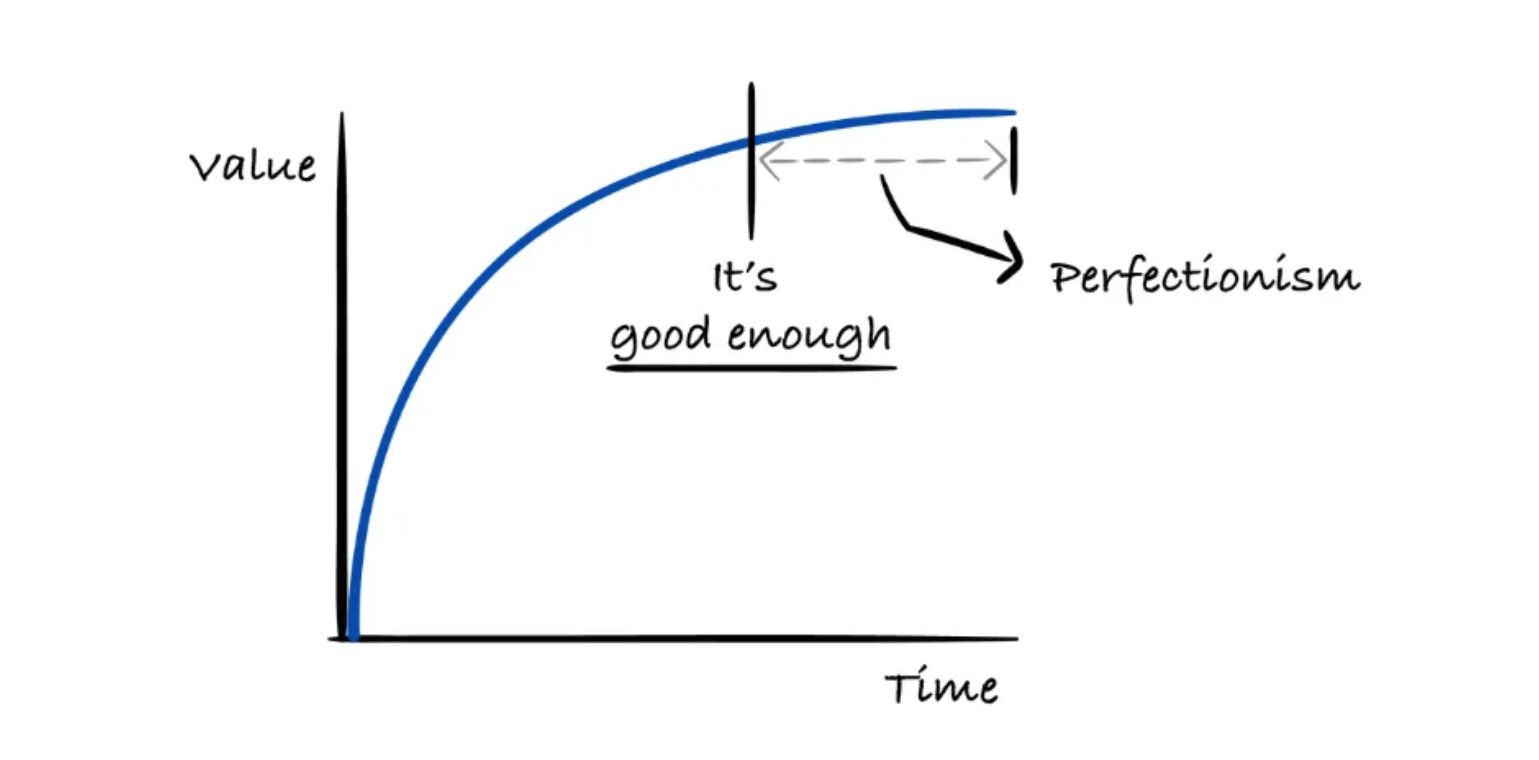
It’s a spot-on depiction of how perfectionism so often gets in the way.
As you spend more time working on the design and development of a product, it naturally follows that what you build will turn out good. However, you’re eventually going to reach a point where the product and experience is good enough. When ego and perfectionism push you past that point, the value you get in return will be negligible.
Similar time wastage happens when trying to fulfill someone’s lofty dreams. But not for the same reasons.
Let’s say you’re building a new social media app. Your agency pitched the concept to the client as the old school Facebook experience. However, now that the project is underway, the client wants to know why there aren’t Reels, Stories and Lives. And why there isn’t a Marketplace area or a place for Dating. They insist that you build all these features in.
Instead of running with a minimum viable concept (MVP) to see if your target users want a scaled-back, old-school social media experience, you spend tons of time building out a Facebook lookalike. And guess what? Your users don’t want all of that … because they already have it. So, now you have to cut out the features you hadn’t initially included in order to see if your original concept works.
MVPs allow you to be smarter with your time. By starting with something basic, it gives you the time and space to incrementally enhance the experience over time. And it allows you to slowly trickle out new concepts and features to users, using their valuable input to carefully shape the experience to their actual needs.
Wrapping Up
In many cases in web design and development, you’re working on a strict time table. It’s very rare that a project will fall in your lap and the assignee or client says, “Take your time.”
The problem is, there are some aspects of your job that inherently “waste” time. By that I mean tasks that contribute to the success of your projects as well as the organization, but that somehow slow down your web design or development work.
And with wasted time comes unfortunate consequences like:
- Missed deadlines
- Loss of client trust
- Lower profit margins
- Increased stress and burnout
- Lower team morale
If you find that any of the things I mentioned above have become an impediment to getting things done on time, there are ways to lessen the side effects. Setting aside time for administrative chores is one way. Streamlining communications is another. And taking a more realistic approach to project completion is yet another.

Suzanne Scacca
A former project manager and web design agency manager, Suzanne Scacca now writes about the changing landscape of design, development and software.
Related Posts
Comments
All articles
Topics
Web MobileMobile
Desktop
Design
Productivity
People