
Telerik UI for WPF
What's New August 2026
What's New HistoryTelerik UI for WPF: AI-Powered Querying and Summarization in Spreadsheet
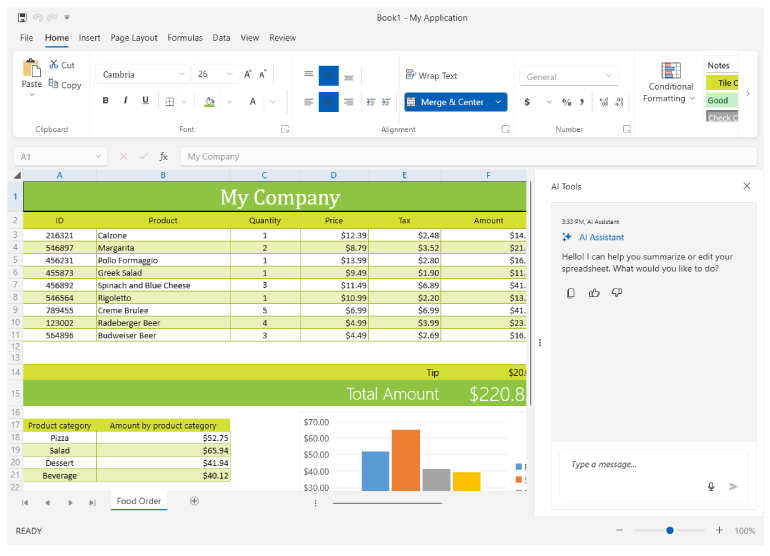
Extracting insights from spreadsheet data today requires advanced formula knowledge or manual review of large ranges. Telerik Spreadsheet for WPF now integrates an AI assistant that lets users ask natural-language questions about a selection, worksheet, or workbook, returning grounded summaries with references back to the exact cells behind each answer. The result — users uncover trends and outliers in plain language, no formulas required.
See the Telerik UIK for WPF: AI-Powered Querying and Summarization in Spreadsheet Documentation
Telerik UI for WPF: Smart Paste
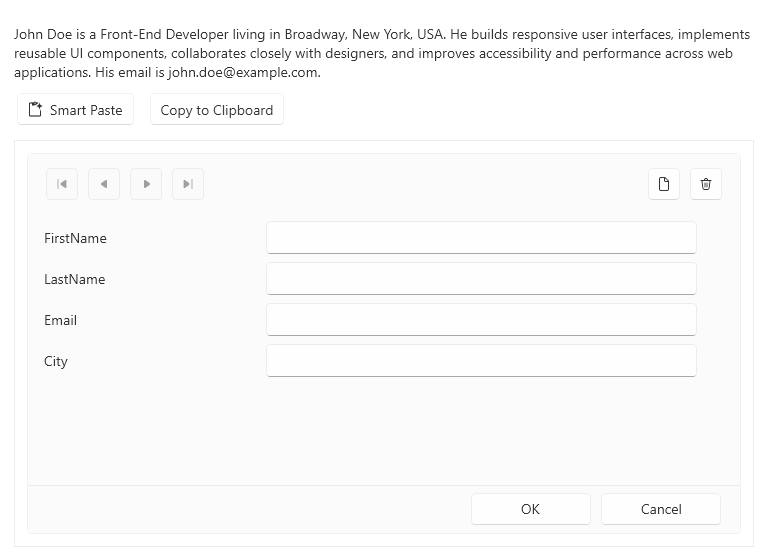
Populating data-heavy forms from emails, tickets, or documents today means manually reading unstructured content and retyping it field by field. Telerik UI for WPF now introduces the SmartPasteButton, letting users copy unstructured text and populate an entire form — including RadDataForm — in one action, with AI mapping values to the right fields while existing validation still applies. The result — minutes of data entry reduced to a single paste.
See the Telerik UI for WPF: Smart Paste documentation
Telerik UI for WPF: Telerik Version Upgrade Tool
Upgrading Telerik WPF applications today means running a separate API Analyzer, then manually applying an Upgrade Wizard, with no single guided path to a working build. Telerik UI for WPF now introduces the Telerik Version Upgrade Tool, detecting Telerik products and versions in a solution, previewing and applying safe changes automatically, and guiding developers through anything needing manual review. The result — one guided workflow from compatibility analysis to a validated, building solution.
See the Telerik UI for WPF: Telerik Version Upgrade Tool Documentation



Next Steps
See Telerik UI for WPF in action.
Purchase individual products or any of the bundles.
With dedicated technical support.