Visual Structure
This section defines terms and concepts used in the scope of the RadInlineAIAssistant control, with which you have to get familiar before you continue to read its documentation. They can also be helpful when contacting our support service in order to describe your issue better.
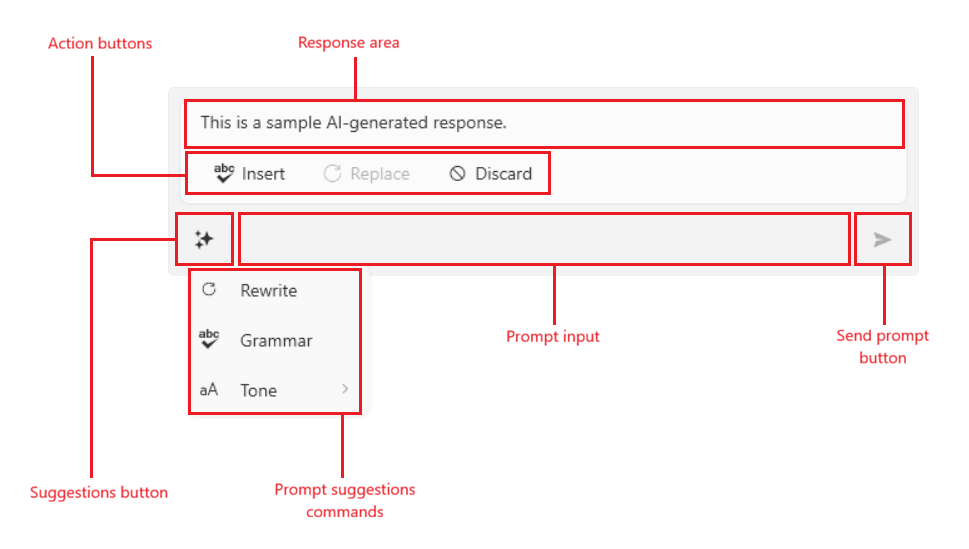
RadInlineAIAssistant is hosted in its own popup and is made up of an input area and, once a response has been requested, a response area shown above it.
RadInlineAIAssistant Visual Structure
-
Suggestions button—A button displayed at the start of the input area. It is visible only when the
Commandscollection has items, and clicking it opens a dropdown listing the configured commands/suggestions. Read more in the Configuring Commands article. -
Prompt input—A text input where the end user types a custom request. Pressing its send action raises the
PromptRequestevent. -
Response area—Displayed above the input area once a response is available.
-
Action buttons— Insert, Replace, and Discard buttons that act on the response.
-
Send prompt button—Pressing the button sends action that raises the
PromptRequestevent. -
Prompt suggestions commands—User defined commands that allows you to setup a predefined prompt suggestions.
Get started with the control with its Getting Started help article that shows how to use it in a basic scenario.