WinForms Spreadsheet Overview
Thank you for choosing Telerik RadSpreadsheet!
RadSpreadsheet is a control that allows editing tabular data utilizing a variety of cell formatting options, styles and themes.
 Start Free Trial
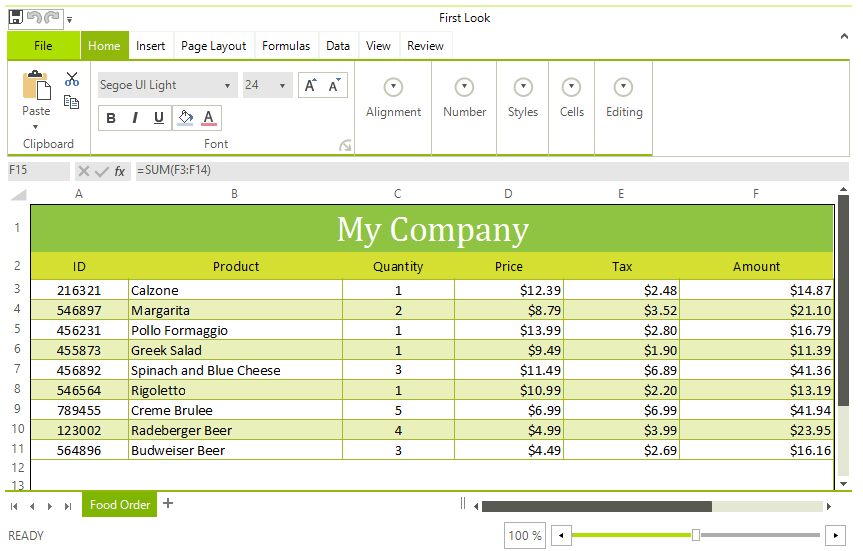
RadSpreadsheet requires .NET Framework 4.0 and cannot be used with an older version.
Some of its features are:
-
Named Ranges
-
Protection: Different options available for protecting the workbook and its worksheets from modifications.
-
Shapes and Images: The UI enables you to work with images. API for insertion, positioning and deletion of images in worksheets.
-
Document themes
-
Create and use multiple sheets, each one with its own history stack
-
Selection and active cell
-
Scrolling - there are two scrolling modes - ItemBased and PixelBased. The first one ensures that the whole content of the top left cell is visible, the latter designed for smoother interaction
-
Insert and delete cells, rows and columns
-
Merge cells, merge cells across columns and unmerge
-
Resize rows and columns, auto fit
-
Use different cell formatting
-
Various fonts and font sizes
-
ForeColor and background color
-
Bold, italics and underline
-
Vertical and horizontal cell alignment
-
Text wrapping
-
Cell borders
-
Use cell styles and themes for a more consistent look.
-
-
A battery of data formatting options:
-
Number
-
Currency
-
Accounting
-
Date
-
Time
-
Percentage
-
Fraction
-
Scientific
-
Text
-
Special
-
Custom
-
-
Auto fill and Series - fill cells automatically with data following a specific pattern
-
Data Validation: Enables you to control the type of data or the values that users enter into a cell. Different data validation rules are available, including list, number, date, text length or custom rules.
-
A broad range of formulas in different categories: Logical, Text, Date and Time, Math and Trigonometry. RadSpreadsheet comes with more than 200 built-in functions. The API enables you to easily plug custom ones as well. For more information, refer to the Formulas section for SpreadProcessing.
-
Filtering worksheet data.
-
Sorting the data in the worksheet.
-
Copy/Paste: Add or copy worksheets within or across workbooks. Of course, copying and pasting of cells is supported as well.
-
Customize row/column headings.
-
Show/Hide grid lines and headers.
-
Zoom in and out each sheet separately.
-
Named Ranges: You can use the named ranges on workbook and worksheet levels.
-
Headers and Footers: The functionality enables you to add rich text content in the page margins when laying out a worksheet to pages.
-
Selection and active cell
-
Easy integration with RadSpreadSheetRibbonBar
-
Localization: You can easily translate the string resources of RadSpreadsheet.
Telerik UI for WinForms Learning Resources
- Telerik UI for WinForms Spreadsheet Homepage
- Get Started with the Telerik UI for WinForms Spreadsheet
- Telerik UI for WinForms API Reference
- Getting Started with Telerik UI for WinForms Components
- Telerik UI for WinForms Virtual Classroom (Training Courses for Registered Users)
- Telerik UI for WinForms Forum
- Telerik UI for WinForms Knowledge Base
Telerik UI for WinForms Additional Resources
- Telerik UI for WinForms Product Overview
- Telerik UI for WinForms Blog
- Telerik UI for WinForms Videos
- Telerik UI for WinForms Roadmap
- Telerik UI for WinForms Pricing
- Telerik UI for WinForms Code Library
- Telerik UI for WinForms Support
- What’s New in Telerik UI for WinForms