Customize Selection
SpreadsheetElement exposes several properties that enable you to control the way the selection in the control is rendered. This article describes the available properties and shows you how to work with them.
-
SelectionStroke: A property of type Brush that gets or sets the stroke of the selection.
-
SelectionStrokeThickness: A property of type double that gets or sets the stroke thickness of the selection.
-
SelectionFill: A property of type Brush that gets or sets the fill of the selection.
-
FillHandleSelectionStroke: A property of type Brush that gets or sets the fill handle selection stroke.
Figure 1: Customized selection in RadSpreadsheet
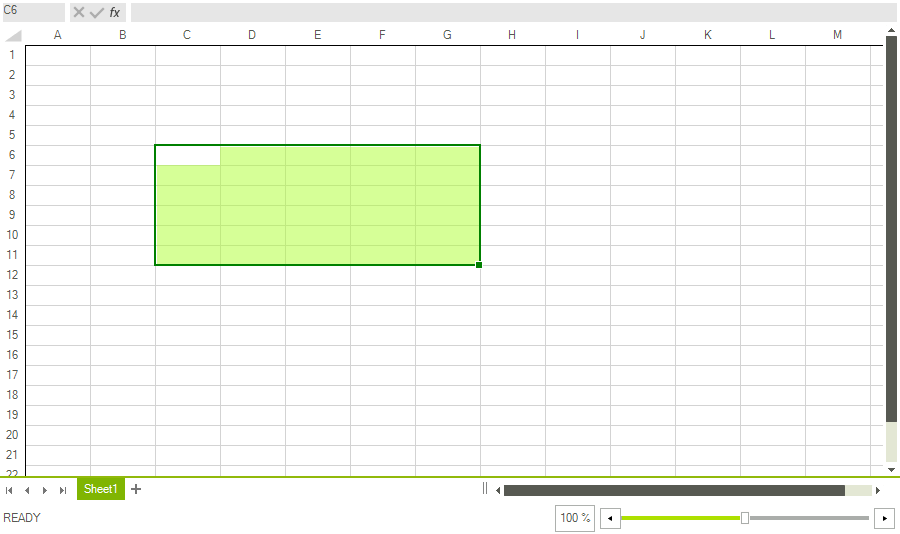
Example 1 demonstrate how you could customize the properties of the selection in code to achieve the result shown in Figure 1.
Example 2: Customizing selection
Brush strokeBrush = Brushes.Green;
Brush fillBrush = new SolidBrush(Color.FromArgb(128, 173, 255, 47));

radSpreadsheet.SpreadsheetElement.SelectionFill = fillBrush;
radSpreadsheet.SpreadsheetElement.SelectionStroke = strokeBrush;
radSpreadsheet.SpreadsheetElement.SelectionStrokeThickness = 2;Brush strokeBrush = Brushes.Green;
Brush fillBrush = new SolidBrush(Color.FromArgb(128, 173, 255, 47));
radSpreadsheet.SpreadsheetElement.SelectionFill = fillBrush;
radSpreadsheet.SpreadsheetElement.SelectionStroke = strokeBrush;
radSpreadsheet.SpreadsheetElement.SelectionStrokeThickness = 2;