WinForms Panel Overview
Updated on Aug 27, 2026
The RadPanel control comes with all the features of a standard panel and the additional ability to customize the appearance. You can refer to the HTML-like Text Formatting article to understand how to set a border, border width, background with a linear gradient, and Html-like formatted text. You can also use Smart Tags and set Properties.
 Start Free Trial
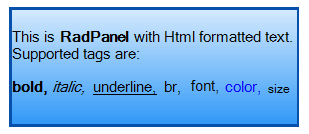
In the related Getting Started article you can find how to use the control with a sample scenario.
Download and check out the online demo at demos.telerik.com
Telerik UI for WinForms Learning Resources
- Telerik UI for WinForms Panel Homepage
- Get Started with the Telerik UI for WinForms Panel
- Telerik UI for WinForms API Reference
- Getting Started with Telerik UI for WinForms Components
- Telerik UI for WinForms Virtual Classroom (Training Courses for Registered Users)
- Telerik UI for WinForms Forum
- Telerik UI for WinForms Knowledge Base
Telerik UI for WinForms Additional Resources
- Telerik UI for WinForms Product Overview
- Telerik UI for WinForms Blog
- Telerik UI for WinForms Videos
- Telerik UI for WinForms Roadmap
- Telerik UI for WinForms Pricing
- Telerik UI for WinForms Code Library
- Telerik UI for WinForms Support
- What’s New in Telerik UI for WinForms