New to Telerik UI for WinForms? Start a free 30-day trial
AllowedDockStates
Updated on Aug 27, 2026
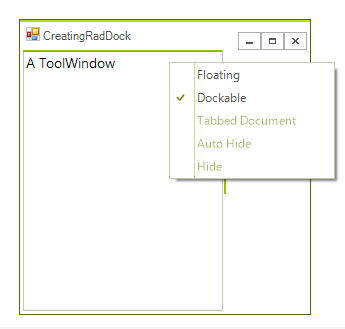
AllowedDockState property gives you the ability to determine the available dock states per ToolWindow. There are several options for this properties which can be combined by bitwise operations. For example:
Allow two states only.
C#
toolWindow1.AllowedDockState = AllowedDockState.Docked | AllowedDockState.Floating;This automatically will remove the caption buttons that may be responsible for an unwanted state, for example Closed. In addition, the unwanted menu items from the context menu will be disabled:
The following setting will disable the Floating option:
Disable the floating dock state
C#
toolWindow1.AllowedDockState = ~AllowedDockState.Floating; 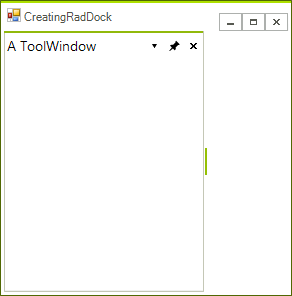
See Also
- Accessing DockWindows
- Creating a RadDock at Runtime
- Creating ToolWindow and DocumentWindow at Runtime
- Customizing Floating Windows
- Customizing TabStrip Items
- Building an Advanced Layout at Runtime
- RadDock Properties and Methods
- Removing ToolWindow and DocumentWindow at Runtime
- Tabs and Captions
- ToolWindow and DocumentWindow Properties and Methods
- Tracking the ActiveWindow