Customizing TabStrip Items
This article demonstrates how you can customize or replace the TabStrip items.
Using the TabStripItemCreating event
The above examples are using the TabStripItemCreating event. This event cannot be accessed via the RadDock instance. You can subscribe to the event by using the static RadDockEvents class. You should do that before the InitializeComponent method call:
public CustomizingTabStripItems()
{
    RadDockEvents.TabStripItemCreating += RadDockEvents_TabStripItemCreating;
    InitializeComponent();
}Please note that when such static events are used it is mandatory to unsubscribe from the event. If you do not do that the form would not be disposed properly:
protected override void OnClosed(EventArgs e)
{
    RadDockEvents.TabStripItemCreating -= RadDockEvents_TabStripItemCreating;
    base.OnClosed(e);
}Adding element to the TabStrip item
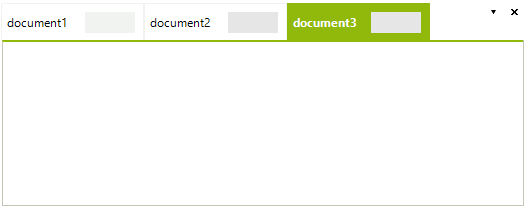
The TabStripItemCreating event can be used for adding any kind of RadElements to the TabStrip. For example, the following code adds text box to each TabStrip item:
void RadDockEvents_TabStripItemCreating1(object sender, TabStripItemCreatingEventArgs args)
{
    RadTextBoxControlElement textbox = new RadTextBoxControlElement();
    textbox.Margin = new System.Windows.Forms.Padding(80, 5, 5, 5);
    textbox.MinSize = new System.Drawing.Size(50, 0);
    args.TabItem.Children.Add(textbox);
}The tabs will look like this:
Replacing the entire TabStrip element.
The TabStripItemCreating event can be used for replacing the entire element as well. First you need to create a TabStripItem class descendant
class MyTabStripItem : TabStripItem
{
    public MyTabStripItem(TabPanel panel)
        : base(panel)
    { }
    protected override void CreateChildElements()
    {
        base.CreateChildElements();
        this.Children.Add(CreateCustomElement());
    }
    RadElement CreateCustomElement()
    {
        StackLayoutElement element = new StackLayoutElement();
        element.Orientation = Orientation.Horizontal;
        element.StretchHorizontally = true;
        element.MinSize = new System.Drawing.Size(100, 0);

        RadButtonElement button = new RadButtonElement();
        button.Text = "Search";
        element.Children.Add(button);

        RadTextBoxControlElement textbox = new RadTextBoxControlElement();
        element.Children.Add(textbox);
        element.Margin = new Padding(5, 2, 2, 2);
        this.DrawText = false;
        this.Padding = new Padding(40, 5, 40, 5);

        return element;
    }
    protected override Type ThemeEffectiveType
    {
        get
        {
            return typeof(TabStripItem);
        }
    }
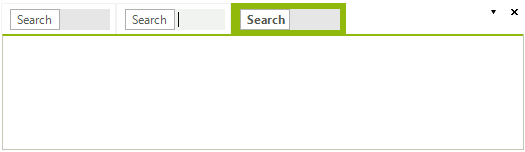
}Then you can just replace the default item:
void RadDockEvents_TabStripItemCreating(object sender, TabStripItemCreatingEventArgs args)
{
    args.TabItem = new MyTabStripItem(args.TabItem.TabPanel);
}The tabs will look like in the following image:
DocumentTabStrip Multi Line Row Layout with a Custom Tab Shape
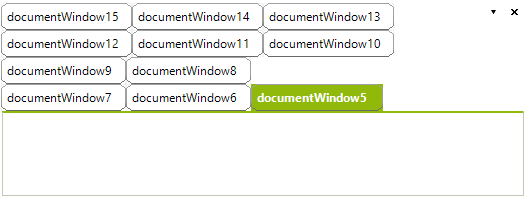
The tab items of the DocumentWindows in RadDock have a predefined shape applied (TabVsShape). The following example will demonstrate how the default layout can be modified so the tabs are displayed in a multi row layout and how a custom shape can be applied to the tab items. For the purpose we have to subscribe to the static TabStripItemCreating event (where we will change the Shape property) and access the DocumentTabStrip in order to set the desired StripViewItemFitMode.
Since the TabStripItemCreating event is static the event subscription have to be defined before the call to the InitializeComponent method.
public CustomizingTabStripItemsForm()
{
    RadDockEvents.TabStripItemCreating += RadDockEvents_TabStripItemCreating;
    InitializeComponent();

    DocumentContainer container = this.documentContainer1;
    DocumentTabStrip tabStrip = container.Controls[0] as DocumentTabStrip;
    if (tabStrip != null)
    {
        tabStrip.TabStripElement.ItemFitMode = StripViewItemFitMode.MultiLine;
    }
}

void RadDockEvents_TabStripItemCreating(object sender, TabStripItemCreatingEventArgs args)
{
    args.TabItem.Shape = new ChamferedRectShape();
    args.TabItem.Padding = new System.Windows.Forms.Padding(4, 4, 7, 4);
}Because we are subscribing to a static event, we need to take care of the unscibription as well. Otherwise the form would not be disposed properly.
protected override void OnClosed(EventArgs e)
{
    RadDockEvents.TabStripItemCreating -= RadDockEvents_TabStripItemCreating;
    base.OnClosed(e);
}Here is the outcome of the code above:
See Also
- AllowedDockStates
- Creating a RadDock at Runtime
- Creating ToolWindow and DocumentWindow at Runtime
- Customizing Floating Windows
- Accessing DockWindows
- Building an Advanced Layout at Runtime
- RadDock Properties and Methods
- Removing ToolWindow and DocumentWindow at Runtime
- Tabs and Captions
- ToolWindow and DocumentWindow Properties and Methods
- Tracking the ActiveWindow