Creating ToolWindow and DocumentWindow at Runtime
Creating ToolWindow at Runtime
To create a new ToolWindow, construct a ToolWindow instance, set properties and call the DockWindow() method, passing a reference to the ToolWindow and a DockPosition enumeration value.
Creating a ToolWindow
ToolWindow windowTop = new ToolWindow();
windowTop.Text = "Window Top";
this.radDock1.DockWindow(windowTop, DockPosition.Top);Creating DocumentWindow at Runtime
To create a DocumentWindow, construct an instance of DocumentWindow, assign properties and call the AddDocument method, passing the DocumentWindow instance.
Creating a DocumentWindow
DocumentWindow documentTop = new DocumentWindow();
documentTop.Text = "New Document";
this.radDock1.AddDocument(documentTop);Example: Creating Multiple ToolWindow and DocumentWindow at Runtime
The following example creates multiple panels and document panes at runtime.
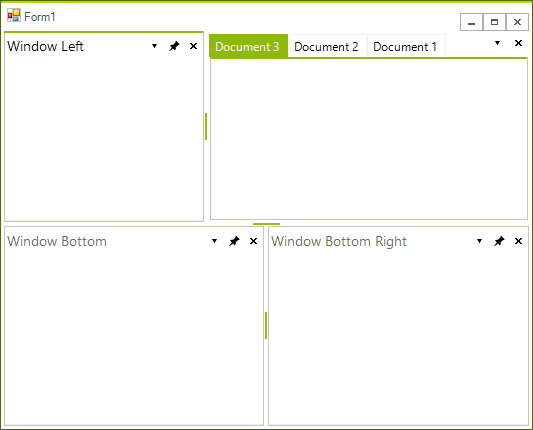
Creating ToolWindows and DocumentWindows
ToolWindow windowLeft = new ToolWindow();
windowLeft.Text = "Window Left";
this.radDock1.DockWindow(windowLeft, DockPosition.Left);
ToolWindow windowBottom = new ToolWindow();
windowBottom.Text = "Window Bottom";
this.radDock1.DockWindow(windowBottom, DockPosition.Bottom);
ToolWindow windowBottomRight = new ToolWindow();
windowBottomRight.Text = "Window Bottom Right";
this.radDock1.DockWindow(windowBottomRight, windowBottom, DockPosition.Right);
DocumentWindow document1 = new DocumentWindow();
document1.Text = "Document 1";
this.radDock1.AddDocument(document1);
DocumentWindow document2 = new DocumentWindow();
document2.Text = "Document 2";
this.radDock1.AddDocument(document2);
DocumentWindow document3 = new DocumentWindow();
document3.Text = "Document 3";
this.radDock1.AddDocument(document3);Creating and docking multiple windows in a single strip
There are cases in which you might prefer docking two or more windows to the right edge of RadDock only, so that these right-edged windows are tabbed in a single container. For example, let’s say that we have Team Explorer, Solution Explorer and Server Explorer windows and they are all initially closed. We also have a menu that allows us to open these windows, and after clicking all the corresponding menu items we want to get this picture:
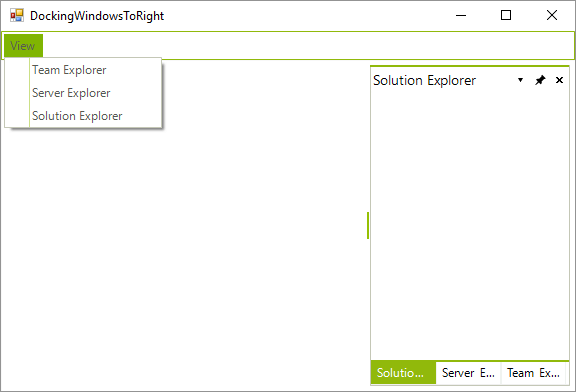
The bellow code shows how you can create each one of the windows:
private void menuItemTeamExplorer_Click1(object sender, EventArgs e)
{
    TeamExplorerUserControl teuc = new TeamExplorerUserControl();
    DockPosition dockTo = DockPosition.Right;
    HostWindow hw = this.radDock1.DockControl(teuc, dockTo);
    hw.Text = "Team Explorer";
}

private void menuItemServerExplorer_Click1(object sender, EventArgs e)
{
    ServerExplorerUserControl seuc = new ServerExplorerUserControl();
    DockPosition dockTo = DockPosition.Right;
    HostWindow hw = this.radDock1.DockControl(seuc, dockTo);
    hw.Text = "Server Explorer";
}

private void menuItemSolutionExplorer_Click1(object sender, EventArgs e)
{
    SolutionExplorerUserControl seuc = new SolutionExplorerUserControl();
    DockPosition dockTo = DockPosition.Right;
    HostWindow hw = this.radDock1.DockControl(seuc, dockTo);
    hw.Text = "Solution Explorer";
}However, this API docks the windows to right of RadDock, not taking into consideration other right-docked windows:
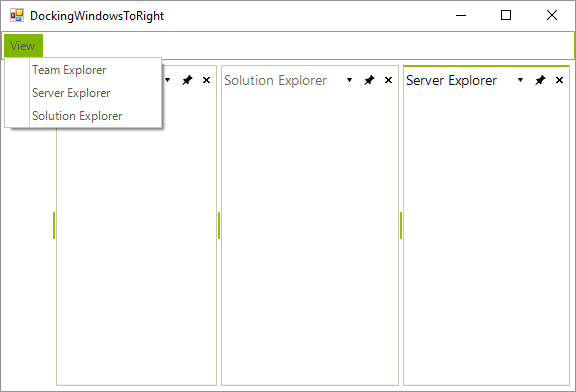
So, we need to follow another approach. What we need to do is to globally define a ToolTabStrip variable that would be set the first time a window is right-docked. Then, the next time we dock a window, we will do it in the context of the already created ToolTabStrip. Here is what should be done in code on click of the menu items:
ToolTabStrip rightHandStrip = null;

private void menuItemTeamExplorer_Click(object sender, EventArgs e)
{
    TeamExplorerUserControl teuc = new TeamExplorerUserControl();
    ToolWindow teucW = new ToolWindow();
    teucW.Controls.Add(teuc);
    teucW.Text = "Team Explorer";
    if (rightHandStrip == null)
    {
        this.radDock1.DockWindow(teucW, DockPosition.Right);
        rightHandStrip = (ToolTabStrip)teucW.Parent;
    }
    else
    {
        this.radDock1.DockWindow(teucW, rightHandStrip, DockPosition.Fill);
    }
}

private void menuItemServerExplorer_Click(object sender, EventArgs e)
{
    ServerExplorerUserControl seuc = new ServerExplorerUserControl();
    ToolWindow seucW = new ToolWindow();
    seucW.Controls.Add(seuc);
    seucW.Text = "Server Explorer";
    if (rightHandStrip == null)
    {
        this.radDock1.DockWindow(seucW, DockPosition.Right);
        rightHandStrip = (ToolTabStrip)seucW.Parent;
    }
    else
    {
        this.radDock1.DockWindow(seucW, rightHandStrip, DockPosition.Fill);
    }
}

private void menuItemSolutionExplorer_Click(object sender, EventArgs e)
{
    SolutionExplorerUserControl seuc = new SolutionExplorerUserControl();
    ToolWindow seucW = new ToolWindow();
    seucW.Controls.Add(seuc);
    seucW.Text = "Solution Explorer";
    if (rightHandStrip == null)
    {
        this.radDock1.DockWindow(seucW, DockPosition.Right);
        rightHandStrip = (ToolTabStrip)seucW.Parent;
    }
    else
    {
        this.radDock1.DockWindow(seucW, rightHandStrip, DockPosition.Fill);
    }
}See Also
- AllowedDockStates
- Creating a RadDock at Runtime
- Accessing DockWindows
- Customizing Floating Windows
- Customizing TabStrip Items
- Building an Advanced Layout at Runtime
- RadDock Properties and Methods
- Removing ToolWindow and DocumentWindow at Runtime
- Tabs and Captions
- ToolWindow and DocumentWindow Properties and Methods
- Tracking the ActiveWindow