New to Telerik UI for WinForms? Start a free 30-day trial
Footer
Updated on Aug 27, 2026
The Footer/Status bar area of RadCalendar is located below the main calendar content area.
Figure 1: The footer of RadCalendar.
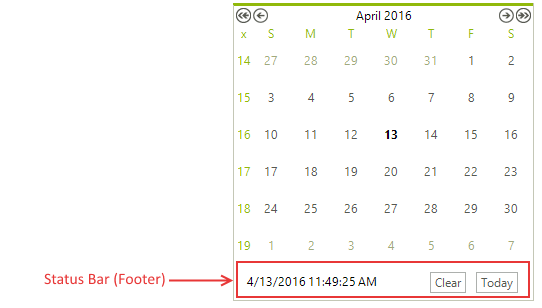
By default the footer contains a string showing the current date and time and two buttons - Clear button and Today button. The Clear button is used to clear all selected dates in RadCalendar and the Today button navigates to the current date. The following properties of RadCalendar are used to modify appearance and functionality of the footer:
-
ShowFooter: Gets or sets whether RadCalendar will display its footer/status bar.
-
TodayButton: Gets an instance of RadButtonElement representing the Today button in the footer.
Using the Today button
C#
radCalendar1.TodayButton.Text = "Go to Today";
radCalendar1.TodayButton.Image = imageList1.Images[0];- ClearButton: Gets an instance of RadButtonElement representing the Clear button in the footer.