Header
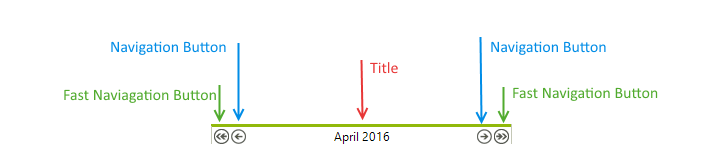
The Header area of RadCalendar is located above the calendar's content area. The header contains the calendar title and the navigation buttons.
Figure 1: The structure of RadCalendar header.
Use the following properties to modify title appearance and functionality:
-
TitleFormat: Gets or sets the format string that is applied to the calendar title.
-
TitleAlign: Gets or sets the horizontal alignment of calendar's title.
-
ShowHeader: Gets or sets whether the calendar will display the title.
-
ShowNavigationButtons: Gets or sets whether the navigation buttons should be visible.
-
ShowFastNavigationButtons: Gets or sets whether the fast navigation buttons should be visible.
-
FastNavigationNextImage: Gets or sets the image that is displayed for the fast next navigation control.
-
FastNavigationNextText: Gets or sets the text that is displayed for the fast next navigation control.
-
FastNavigationNextToolTip: Gets or sets the tool tip that is displayed for the fast next navigation control.
-
FastNavigationPrevImage: Gets or sets the image that is displayed for the fast previous navigation control.
-
FastNavigationPrevText: Gets or sets the text that is displayed for the fast previous navigation control.
-
FastNavigationPrevToolTip: Gets or sets the tool tip that is displayed for the fast previous navigation control.
-
NavigationNextImage: Gets or sets the image that is displayed for the navigation next control.
-
NavigationNextText: Gets or sets the text that is displayed for the navigation next control.
-
NavigationNextToolTip: Gets or sets the tool tip that is displayed for the navigation next control.
-
NavigationPrevImage: Gets or sets the image that is displayed for the navigation previous control.
-
NavigationPrevText: Gets or sets the text that is displayed for the navigation previous control.
-
NavigationPrevToolTip: Gets or sets the tool tip that is displayed for the navigation previous control.
-
FastNavigationStep: Gets or sets the number of views that will be scrolled when the user clicks on a fast navigation link.
Title Properties
You can customize the RadCalendar Title to define how and what information should be shown:
-
Control title alignment using the TitleAlign property.
-
Control title format using the TitleFormat property. For details about available format characters see the Date Format Pattern topic.
-
The separator string that is placed between the start and end dates in a MultiView title is controlled by the DateRangeSeparator property.
-
To allow navigation in the calendar, set the EnableNavigation property to true. Customize the fast navigation buttons using the following properties:
-
FastNavigationNextImage
-
FastNavigationNextText
-
FastNavigationNextToolTip
-
FastNavigationPrevImage
-
FastNavigationPrevText
-
FastNavigationPrevToolTip
-