New to Telerik Reporting? Start a free 30-day trial
Barcode Report Item Overview
Updated on Aug 28, 2026
The Barcode report item automatically generates barcodes directly from numeric or character data. The symbology is selected through the Encoder property, the encoded payload is supplied through the Value property as either a static string or a report expression, and the resulting symbol is rendered in supported output formats such as PDF, Image, HTML (rendered as SVG), XAML, DOCX, and RTF.
The MaxiCode 2D encoder was introduced in Telerik Reporting 2026 Q1 (20.0.26.424). For details, refer to Configuring the MaxiCode Barcode in Reports.
The Aztec Code 2D encoder was introduced in Telerik Reporting 2026 Q3 (20.2.26.812). For details, refer to Configuring the Aztec Code Barcode in Reports.
Key Features
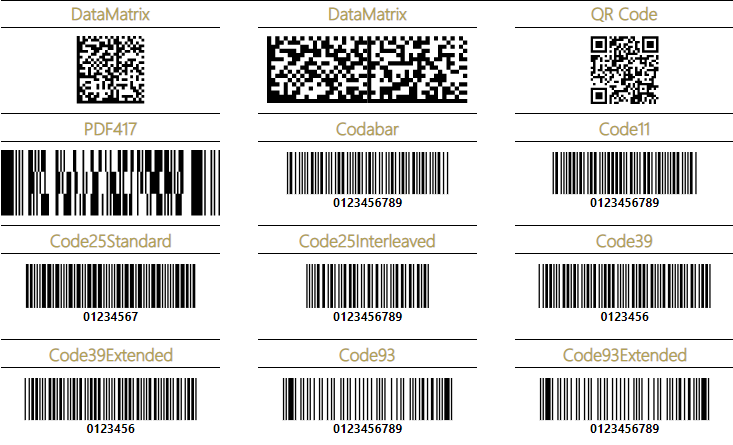
- Support for one-dimensional (1D) Barcodes—The Barcode report item supports linear barcode types such as EAN13, EAN8, UPC-A, UPC-E, and Code39.
- Support for two-dimensional (2D) Barcodes—The Barcode report item also supports matrix barcode types such as Data Matrix, QR Code, Swiss QR Code, PDF417, MaxiCode, and Aztec Code.
- Configurable size and layout—Set a fixed module width through the Module property, or let the symbol scale to the bounds of the item by setting the Stretch property to
true. WhenStretchisfalse, the BarAlign property aligns the symbol horizontally inside the item. - Rotation—Rotate the rendered symbol through the Angle property.
- Human-readable text and checksum—Toggle the printed text under 1D symbols with the ShowText property of the active Encoder1D instance, and append a checksum (where the symbology supports it) with the Checksum property.
Next Steps
- Getting Started with the Barcode Report Item
- One-Dimensional Barcodes Overview
- Two-Dimensional Barcodes Overview