Microsoft.Data.Sqlite doesn't work with the SqlDataSource component in .NET
Environment
| Product | Reporting |
Description
Telerik Reporting can use SQLite as a DataSource for reports: Using SQLite in Reporting.
Issues may arise depending on the SQLite ADO.NET provider used. For example, when using the Microsoft.Data.Sqlite provider, errors such as "The requested collection 'DataSourceInformation' is not defined" may occur. This issue arises because Microsoft.Data.Sqlite is a lightweight provider that omits the GetSchema metadata collections required by the Telerik Reporting SqlDataSource for parameter and command parsing.
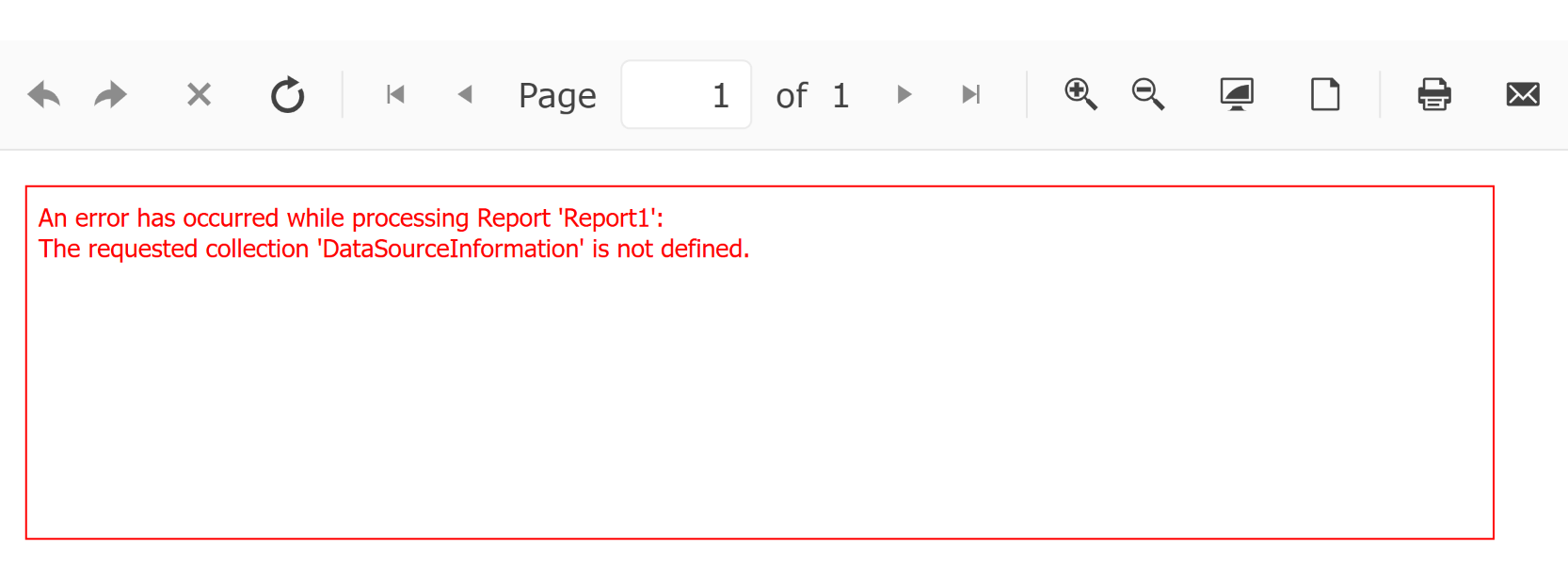 Here is the stack trace of the server-side error:
CSharp.Net8.Html5IntegrationDemo Error: 0 : An exception has occurred while processing 'Report1' item:
System.ArgumentException: The requested collection 'DataSourceInformation' is not defined.
   at Microsoft.Data.Sqlite.SqliteConnection.GetSchema(String collectionName, String[] restrictionValues)
   at Microsoft.Data.Sqlite.SqliteConnection.GetSchema(String collectionName)
   at Telerik.Reporting.Processing.Data.SqlProviderFactory.LoadSettings(IDbConnection connection, SqlCommandParser parser)
   at Telerik.Reporting.Processing.Data.SqlProviderFactory.CreateParser(IDbConnection connection)
   at Telerik.Reporting.Processing.Data.SqlProviderFactory.CreateResolver(IDbConnection connection)
   at Telerik.Reporting.Processing.Data.SqlCommandProvider.ResolveStatement(IDbCommand command, SqlDataSourceParameterCollection parameters)
   at Telerik.Reporting.Processing.Data.SqlCommandProvider.CreateParameters(IDbCommand command, SqlDataSourceParameterCollection parameters)
   at Telerik.Reporting.Processing.Data.SqlQueryProvider.CreateCommandCore(IDbConnection connection, Boolean evaluateParameters)
   at Telerik.Reporting.Processing.Data.SqlQueryProvider.CreateCommand(IDbConnection connection, Boolean evaluateParameters)
   at Telerik.Reporting.Processing.Data.SqlQueryProvider.CreateCommand(IDbConnection connection)
   at Telerik.Reporting.Processing.Data.SqlDataEnumerable.GetEnumerator()+MoveNext()
   at Telerik.Reporting.Processing.Data.LazyList`1.LazyListEnumerator.MoveNext()
   at System.Collections.Generic.LargeArrayBuilder`1.AddRange(IEnumerable`1 items)
   at System.Collections.Generic.EnumerableHelpers.ToArray[T](IEnumerable`1 source)
   at Telerik.Reporting.Processing.Data.SeedDataAdapter.Execute(IEnumerable`1 data)
   at Telerik.Reporting.Processing.Data.ResultSetAdapter.Execute(IEnumerable`1 data)
   at Telerik.Reporting.Processing.Data.MultidimentionalDataProvider.Execute(MultidimensionalQuery query)
   at Telerik.Reporting.Processing.DataItemResolveDataAlgorithm.GetDataCore(IDataSource dataSource, MultidimensionalQuery query, IServiceProvider serviceProvider, EvalObject expressionContext, IProcessingContext processingContext)
   at Telerik.Reporting.Processing.Report.GetDataCore(IDataSource dataSource, MultidimensionalQuery query)
   at Telerik.Reporting.Processing.Report.<>c__DisplayClass125_0.<ResolveData>b__0()
   at Telerik.Reporting.Processing.DataItemResolveDataAlgorithm.ResolveData(String processingId, InMemoryState inMemoryState, MultidimensionalQuery query, Func`1 getDataCore, EvalObject expressionContext)
   at Telerik.Reporting.Processing.Report.ResolveData()
   at Telerik.Reporting.Processing.Report.ProcessItemCore()
   at Telerik.Reporting.Processing.Report.ProcessItem()
   at Telerik.Reporting.Processing.ReportItemBase.ProcessElement()
   at Telerik.Reporting.Processing.Report.ProcessElement()
   at Telerik.Reporting.Processing.ProcessingElement.Process(IDataMember dataContext)
To avoid this issue, a provider with full ADO.NET implementation, such as System.Data.SQLite, must be used.
This knowledge base article also answers the following questions:
- How to use SQLite with Telerik Reporting?
- Why does Microsoft.Data.Sqlite not work with SqlDataSource?
- What are the steps to configure SQLite for Telerik Reporting?
Solution
To configure SQLite as a DataSource in Telerik Reporting, follow these steps:
-
Use the
System.Data.SQLiteprovider as it includes the full ADO.NET implementation required for SqlDataSource. -
Install the
System.Data.SQLiteNuGet package. Version 2.0.3 or later is recommended. -
Configure the connection string for your SQLite database. For example:
ConnectionStringData Source=your-database-file.db;Version=3; -
Use the connection string in the SqlDataSource component of your Telerik report.
-
If you encounter errors during runtime, enable tracing in the Reporting Engine to capture detailed logs. Refer to Troubleshooting Reporting Implementation in ASP.NET Core Application for guidance.
Additional Notes
- The
Microsoft.Data.Sqliteprovider is not recommended for use with Telerik Reporting due to its lack of support for schema metadata. - Telerik Reporting includes a predefined
DbProviderFactoriesentry forSystem.Data.SQLite.SQLiteFactory, but your application must still reference/install theSystem.Data.SQLitepackage so the provider type can be loaded. If you use a different invariant name or provider configuration, manual registration may still be required. For more information, see How to Register a DbProviderFactory in a .NET Core Project.