Troubleshooting Reporting Implementation in ASP.NET Core Application
Environment
| Product | Progress® Telerik® Reporting |
| Project Type | ASP.NET Core |
| Target Framework | .NET |
Description
Consider the following steps when experiencing problems while working with Telerik Reporting. For example, if you receive Errors in Reports, Report Viewers and Services; error messages in the browser console; unexpected slowdown in performance; incorrect fonts; etc.
Steps to Troubleshoot
-
Upgrade to the latest version of the product in case the reason for the crash has been fixed. Check for the fixes in the corresponding version in the Telerik Reporting Release History.
-
Try reproducing the crash on another machine to exclude machine-specific problems. For example:
- Corrupted Telerik Reporting installation on Windows;
- Missing basic functionality, for example, incomplete GDI+ or Skia graphics engines, or fonts on specific Windows Server or Linux distributions;
- Insufficient user permissions for machine resources, databases, etc.
-
Hard refresh the browser to ensure there are no cached Report Viewer resources with older versions. This would be the first step if you see an error message like
The version of the Report Viewer '19.3.26.121' does not match the version of the Reporting REST Service '20.0.26.211'. Please make sure both are running the same version.In this particular case, you may have upgraded the viewer and the service from19.3.26.121to20.0.26.211successfully. However, the browser may have cached the viewer resources from the runs before the upgrade. Refreshing the browser should load the new resources and update the cache. -
Record a server-side log file containing detailed information about the error:
-
Set the reporting engine trace verbosity to the most detailed value
Verboseas explained in the article processing Element:JSON"telerikReporting": { "processing": { "traceVerbosity": "Verbose" } } -
To create the log file, go to the project that hosts the Reporting REST Service, add the method below, and then call it from the startup point of the application, for example, the
Program.csfile:C#static void EnableTracing() { System.Diagnostics.Trace.Listeners.Add(new System.Diagnostics.TextWriterTraceListener(File.CreateText("aspnetcoredemo.log"))); System.Diagnostics.Trace.AutoFlush = true; }
Upon running the project and reproducing the error, it will generate an
aspnetcoredemo.logfile at the application root folder with the tracing information about the exceptions and performance. For example:- Server-side failures with stack traces, including refused or timed-out database connections, insufficient permissions to access local paths or resources, etc.
- Time to process and render reports;
- Font substitutions.
Here is a sample Trace Listener log from the Telerik Reporting REST Service that contains a warning about font substitution:
TEXTCSharp.Net10.Html5IntegrationDemo Information: 0 : Worker rendering threads count: 20 CSharp.Net10.Html5IntegrationDemo Information: 0 : License check for assembly Telerik.Reporting, Version=20.0.26.211, Culture=neutral, PublicKeyToken=a9d7983dfcc261be: True CSharp.Net10.Html5IntegrationDemo Information: 0 : Cache Cleanup (2/18/2026 3:11:26 PM): 'Delete expired cache assets' should be performed as of 2/18/2026 1:11:25 PM, as it is not performed since 2/18/2026 12:49:29 PM and the check period is 00:05:00 CSharp.Net10.Html5IntegrationDemo Information: 0 : Cache Cleanup (2/18/2026 3:11:26 PM): Starting to execute 'Delete expired cache assets' CSharp.Net10.Html5IntegrationDemo Information: 0 : Cache Cleanup (2/18/2026 3:11:26 PM): Starting to execute 'Delete expired clients' CSharp.Net10.Html5IntegrationDemo Information: 0 : Cache Cleanup (2/18/2026 3:11:26 PM): 2 clients survived expiration, namely: dd2716e7f63, 4eb029f2501 CSharp.Net10.Html5IntegrationDemo Information: 0 : Cache Cleanup (2/18/2026 3:11:26 PM): Finished executing 'Delete expired clients'; elapsed: 00:00:00.0347776 CSharp.Net10.Html5IntegrationDemo Information: 0 : Cache Cleanup (2/18/2026 3:11:26 PM): Starting to execute 'Delete expired refreshes & instances' CSharp.Net10.Html5IntegrationDemo Information: 0 : Cache Cleanup (2/18/2026 3:11:26 PM): Finished executing 'Delete expired refreshes & instances'; elapsed: 00:00:00.0022051 CSharp.Net10.Html5IntegrationDemo Information: 0 : Cache Cleanup (2/18/2026 3:11:26 PM): Finished executing 'Delete expired cache assets'; elapsed: 00:00:00.0513262 CSharp.Net10.Html5IntegrationDemo Information: 0 : Unit.DotsPerInch = 96 CSharp.Net10.Html5IntegrationDemo Information: 0 : Telerik Reporting Assembly Information CSharp.Net10.Html5IntegrationDemo Information: 0 : ====================================== CSharp.Net10.Html5IntegrationDemo Information: 0 : Name: Telerik.Reporting, Version=20.0.26.211, Culture=neutral, PublicKeyToken=a9d7983dfcc261be; Location: C:\Program Files (x86)\Progress\Telerik Reporting 2026 Q1\Examples\CSharp\.NET 10\Html5IntegrationDemo\bin\Debug\net10.0\Telerik.Reporting.dll; TargetFramework: .NETStandard,Version=v2.0 CSharp.Net10.Html5IntegrationDemo Warning: 0 : No AssemblyLoadContext is passed! Using Assembly.Load! CSharp.Net10.Html5IntegrationDemo Information: 0 : Assembly reference successfully loaded: SpeakerObjects, Culture=neutral CSharp.Net10.Html5IntegrationDemo Information: 0 : Rendering thread 17 starts work. CSharp.Net10.Html5IntegrationDemo Information: 0 : *** Render Report #0 "BarcodesReport" STARTED *** CSharp.Net10.Html5IntegrationDemo Information: 0 : ReportName: BarcodesReport; DocumentName: BarcodesReport; Extension: HTML5Interactive CSharp.Net10.Html5IntegrationDemo Information: 0 : DeviceInfo Contents CSharp.Net10.Html5IntegrationDemo Information: 0 : =================== CSharp.Net10.Html5IntegrationDemo Information: 0 : BasePath: "api/reports" CSharp.Net10.Html5IntegrationDemo Information: 0 : ContentOnly: "True" CSharp.Net10.Html5IntegrationDemo Information: 0 : contentTabIndex: "0" CSharp.Net10.Html5IntegrationDemo Information: 0 : CurrentCulture: "en-US" CSharp.Net10.Html5IntegrationDemo Information: 0 : CurrentUICulture: "en-US" CSharp.Net10.Html5IntegrationDemo Information: 0 : DocumentID: "e85430016329ee48abe359" CSharp.Net10.Html5IntegrationDemo Information: 0 : enableAccessibility: "False" CSharp.Net10.Html5IntegrationDemo Information: 0 : enableSearch: "True" CSharp.Net10.Html5IntegrationDemo Information: 0 : EndPage: "0" CSharp.Net10.Html5IntegrationDemo Information: 0 : ImmediatePrint: "False" CSharp.Net10.Html5IntegrationDemo Information: 0 : internal_format: "HTML5Interactive" CSharp.Net10.Html5IntegrationDemo Information: 0 : key: "en-US" CSharp.Net10.Html5IntegrationDemo Information: 0 : ProcessItemActions: "True" CSharp.Net10.Html5IntegrationDemo Information: 0 : ResourceFormat: "api/reports/clients/ec5fe8265c2/instances/11dd4843045/documents/e85430016329ee48abe359/resources/{0}/" CSharp.Net10.Html5IntegrationDemo Information: 0 : StartPage: "0" CSharp.Net10.Html5IntegrationDemo Information: 0 : SupportsMargins: "False" CSharp.Net10.Html5IntegrationDemo Information: 0 : SupportsVerticalTextAlignment: "False" CSharp.Net10.Html5IntegrationDemo Information: 0 : UseSVG: "True" CSharp.Net10.Html5IntegrationDemo Warning: 0 : Font 'My Custom Font' is substituted with font 'Microsoft Sans Serif'. CSharp.Net10.Html5IntegrationDemo Information: 0 : *** Render Report #0 "BarcodesReport" DONE in 00:00:00.1395173 *** CSharp.Net10.Html5IntegrationDemo Information: 0 : CSharp.Net10.Html5IntegrationDemo Information: 0 : Page generated: page1 CSharp.Net10.Html5IntegrationDemo Information: 0 : Rendering thread 17 finishes work. -
-
Use Fiddler Everywhere Reporter or another proxy tool to capture the web traffic and check the requests, responses, and statuses. In the captured traffic, check the failing requests from the Reporting REST Service endpoint. Usually, the Reporting service requests start with
{mainServiceUrl}/api/reports/. Here is a sample log of successfully passed requests between the HTML5 Report Viewer and the Service: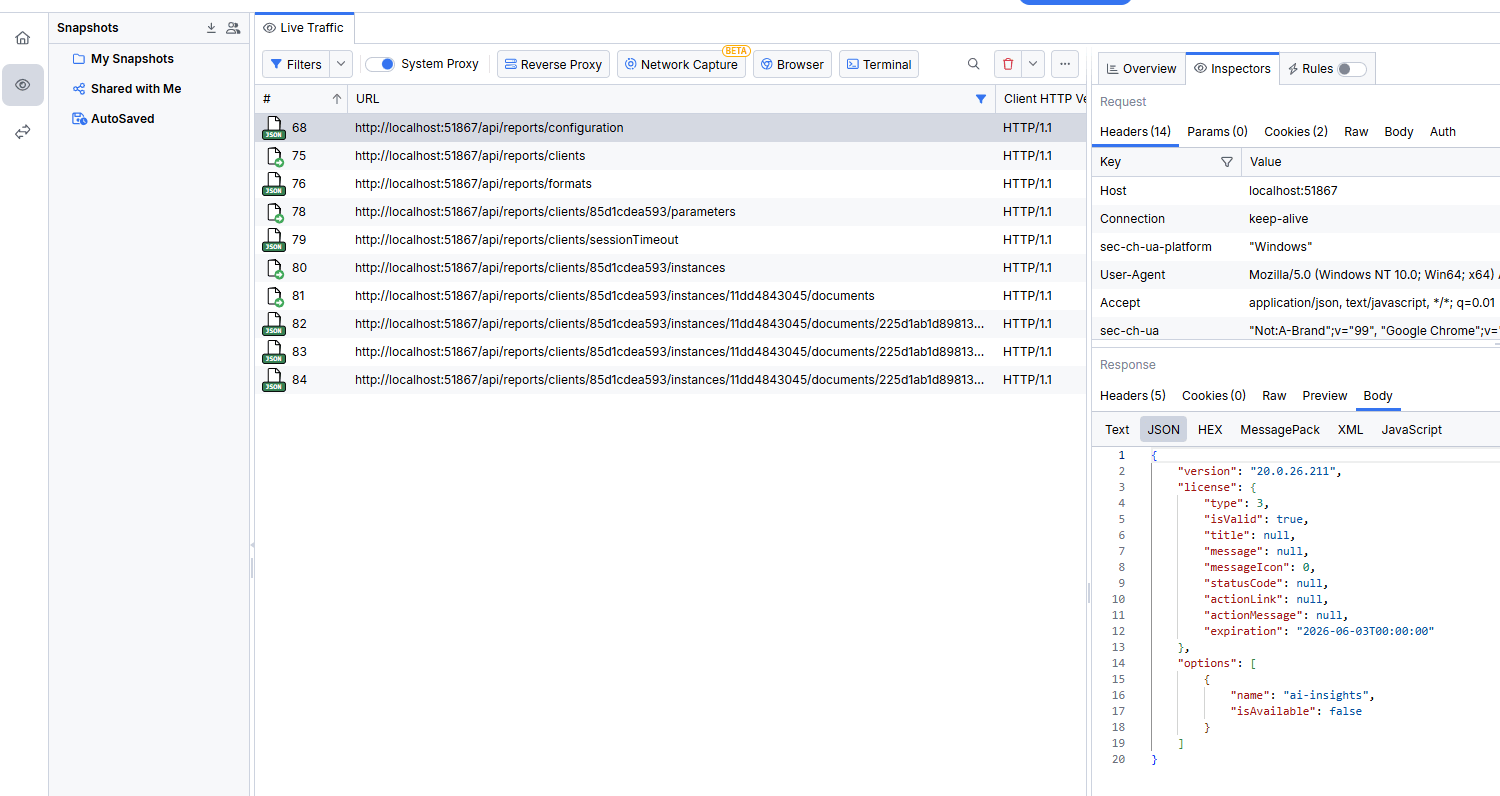
If you need help, please send us the generated SAZ file if you use Fiddler; a HAR file if you capture the traffic in the Chrome browser, etc.
After you generate the log files from the above steps, archive them and attach them to a support ticket. Include the steps to reproduce the issue, a sample report with data, or a runnable project.