Using Parameters with the WebServiceDataSource Component
The WebServiceDataSource component can request data in JSON format from a running web service. It requires the base URL of the service specified in the Service URL property. The WebServiceDataSource can take parameters. The supported data source parameter types are:
Inline Parameters
The values of this parameter type replace the corresponding part of the Service URL, and can be included in the body of a POST request.
The WebServiceDataSource's
Inline Parameternames should start with@to distinguish them from the other content in the Service URL or the body of the request.
Using Inline Parameters in Service Url
In the WebServiceDataSource configuration wizard, the Service URL can be provided as constantUrl, for example:
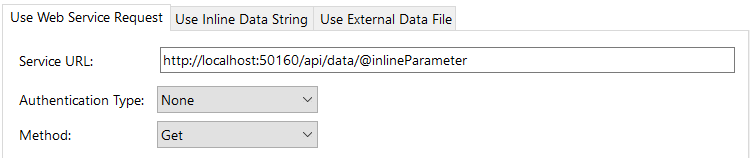
In the next step of the Wizard, it is necessary to set the run-time and the design-time values for the parameter:

The final request made by the WebServiceDataSource component to the web service with the design-time parameter value as captured by Fiddler will look like:

The entire Service URL can also be set to a WebServiceDataSource parameter, for example, to @serviceUrl. This allows for larger flexibility in using different endpoints of a Web Service, or even different Web Services for the same data item.
Using Inline Parameters in the Body of the POST request
The single-value parameter should be surrounded by quotation marks. The multi-value parameter is provided as it is. For example, in the next setup, @name is a single-value parameter and @surname is a multi-value parameter:
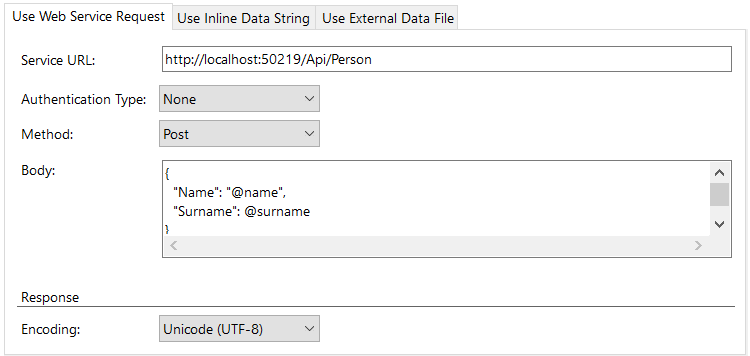
It is necessary to provide an additional Header "Content-Type" with the value "application/json". Generally, the Header Names are case-insensitive. The 'Content-Type' header that is needed for the POST requests is case-sensitive.
The multi-value parameter run-time and design-time values should be surrounded in square brackets to indicate an array:

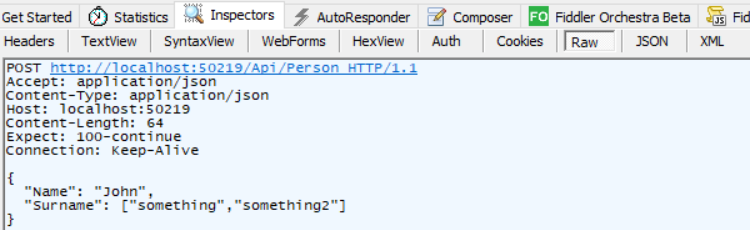
The final request performed by the WebServiceDataSource component with the design-time values as seen in Fiddler:
Query Parameters
The query type parameters will be automatically concatenated to the Service URL. The final URL will be in the format serviceUrl?queryParameterName1=value1&queryParameterName2=value2&....
For example, in a Web API project to call the Action GetWithQueryParameters(int id, string category), the default service URL will be http://localhost:50160/api/data/GetWithQueryParameters. The images display how to set the query parameters in the Web Service Data Source Wizard of the Report Designer:

The generated final URL for the design-time parameter values will look like this in Fiddler:

Header Parameters
The parameter will be included as a Header in the request with Header Name the name of the parameter, and Header Value the value of the parameter. A setup in the Web Service Data Source Wizard, like:

will result in a request with the Header named headerParameter and value MyHeader for its design-time values:

Cookie Parameters
The parameter will be included as a Header Cookie in the request. For example, when the parameter setup in the Web Service Data Source Wizard is:

Its design-time values will result in a request with a Cookie Header as captured by Fiddler:
