RadGrid and MasterTableView Difference
The RadGrid control has a MasterTableView property that represents the top table in the grid. The instances of RadGrid and MasterTableView are almost identical, although they are of different types (RadGrid and GridTableView, respectively).
The main difference between RadGrid and MasterTableView is that RadGrid properties specify defaults for every GridTableView in the grid, including the MasterTableView and any DetailTables. MasterTableView properties apply only to the top-level table. They are not inherited by nested DetailTables and instead override the defaults set on RadGrid.
For example, if you set a blue border on the RadGrid object, the MasterTableView and any DetailTables also use that border unless they override it. If you set the border on the MasterTableView, it appears only on the top-level table.
Example
The following examples illustrate this difference. They use the same page-level setup and three alternative RadGrid declarations.
-
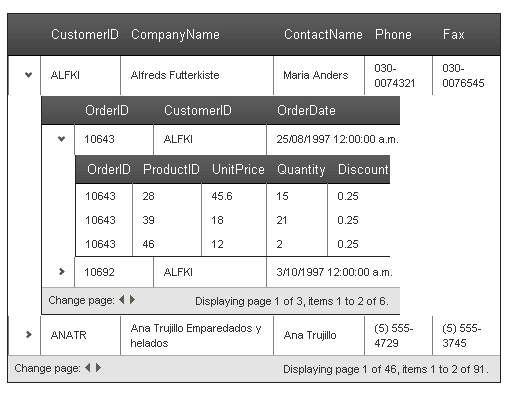
The first example shows a RadGrid control that enables paging with PageSize set to 2. All tables in the grid inherit paging and a page size of 2.
-
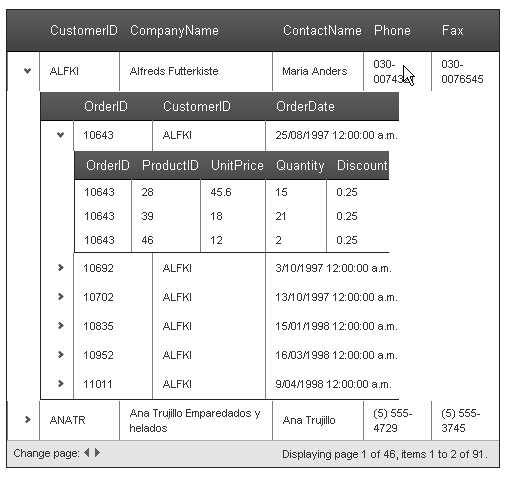
The second example shows the same declaration, except that AllowPaging and PageSize are set on the MasterTableView. Only the master table view uses paging.
-
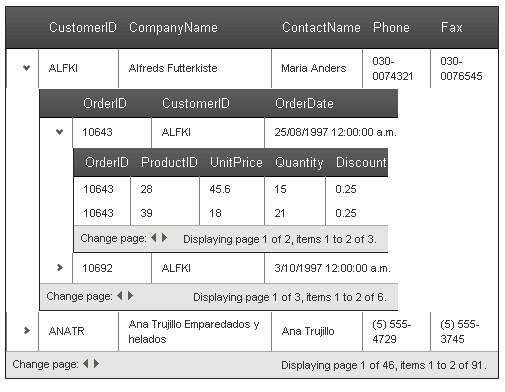
The third example shows a RadGrid control that enables paging with PageSize set to 2, while a detail table overrides the setting.
Page setup shared by the RadGrid and MasterTableView examples
<asp:ScriptManager ID="ScriptManager1" runat="server" />
<asp:AccessDataSource ID="AccessDataSource1" runat="server" DataFile="~/App_Data/Nwind.mdb"
  SelectCommand="SELECT * FROM [Customers]"></asp:AccessDataSource>
<asp:AccessDataSource ID="AccessDataSource2" runat="server" DataFile="~/App_Data/Nwind.mdb"
  SelectCommand="SELECT * FROM [Orders] WHERE ([CustomerID] = ?)">
  <SelectParameters>
    <asp:Parameter Name="CustomerID" Type="String" />
  </SelectParameters>
</asp:AccessDataSource>
<asp:AccessDataSource ID="AccessDataSource3" runat="server" DataFile="~/App_Data/Nwind.mdb"
  SelectCommand="SELECT * FROM [Order Details] WHERE ([OrderID] = ?)">
  <SelectParameters>
    <asp:Parameter Name="OrderID" Type="Int32" />
  </SelectParameters>
</asp:AccessDataSource>
Defaults set in RadGrid
Apply paging defaults to the RadGrid control
<telerik:RadGrid RenderMode="Lightweight" ID="RadGrid1" runat="server" DataSourceID="AccessDataSource1" AllowPaging="True"
  PageSize="2">
  <MasterTableView DataKeyNames="CustomerID" DataSourceID="AccessDataSource1" TableLayout="Auto">
    <DetailTables>
      <telerik:GridTableView runat="server" DataKeyNames="OrderID" DataSourceID="AccessDataSource2"
        TableLayout="Auto">
        <ParentTableRelation>
          <telerik:GridRelationFields DetailKeyField="CustomerID" MasterKeyField="CustomerID" />
        </ParentTableRelation>
        <DetailTables>
          <telerik:GridTableView runat="server" TableLayout="Auto" DataSourceID="AccessDataSource3">
            <ParentTableRelation>
              <telerik:GridRelationFields DetailKeyField="OrderID" MasterKeyField="OrderID" />
            </ParentTableRelation>
          </telerik:GridTableView>
        </DetailTables>
      </telerik:GridTableView>
    </DetailTables>
  </MasterTableView>
</telerik:RadGrid>
Figure 1: RadGrid with paging defaults inherited by the master and detail tables
Properties set in MasterTableView
Apply paging only to the master table view
<telerik:RadGrid RenderMode="Lightweight" ID="RadGrid1" runat="server" DataSourceID="AccessDataSource1">
  <MasterTableView DataKeyNames="CustomerID" DataSourceID="AccessDataSource1" TableLayout="Auto"
    AllowPaging="True" PageSize="2">
    <DetailTables>
      <telerik:GridTableView runat="server" DataKeyNames="OrderID" DataSourceID="AccessDataSource2"
        TableLayout="Auto">
        <ParentTableRelation>
          <telerik:GridRelationFields DetailKeyField="CustomerID" MasterKeyField="CustomerID" />
        </ParentTableRelation>
        <DetailTables>
          <telerik:GridTableView runat="server" TableLayout="Auto" DataSourceID="AccessDataSource3">
            <ParentTableRelation>
              <telerik:GridRelationFields DetailKeyField="OrderID" MasterKeyField="OrderID" />
            </ParentTableRelation>
          </telerik:GridTableView>
        </DetailTables>
      </telerik:GridTableView>
    </DetailTables>
  </MasterTableView>
</telerik:RadGrid>
Figure 2: RadGrid with paging configured only on the master table view
Defaults set in RadGrid with overrides by detail table
Override inherited paging settings on a detail table
<telerik:RadGrid RenderMode="Lightweight" ID="RadGrid1" runat="server" DataSourceID="AccessDataSource1" AllowPaging="True"
  PageSize="2">
  <MasterTableView DataKeyNames="CustomerID" DataSourceID="AccessDataSource1" TableLayout="Auto">
    <DetailTables>
      <telerik:GridTableView runat="server" DataKeyNames="OrderID" DataSourceID="AccessDataSource2"
        TableLayout="Auto">
        <ParentTableRelation>
          <telerik:GridRelationFields DetailKeyField="CustomerID" MasterKeyField="CustomerID" />
        </ParentTableRelation>
        <DetailTables>
          <telerik:GridTableView runat="server" TableLayout="Auto" DataSourceID="AccessDataSource3"
            AllowPaging="False">
            <ParentTableRelation>
              <telerik:GridRelationFields DetailKeyField="OrderID" MasterKeyField="OrderID" />
            </ParentTableRelation>
          </telerik:GridTableView>
        </DetailTables>
      </telerik:GridTableView>
    </DetailTables>
  </MasterTableView>
</telerik:RadGrid>
Figure 3: RadGrid with inherited paging and a detail table that disables paging