Filtering
Filter data in Mobile render mode
When RadGrid uses Mobile RenderMode, its filtering layout and interaction are adapted for mobile and tablet devices.
Default Filtering
In Mobile render mode, RadGrid replaces the standard auto-generated text boxes with a filter form. Set AllowFilteringByColumn to True on the corresponding GridTableView to enable filtering.
Figure 1: RadGrid filtering in Mobile render mode
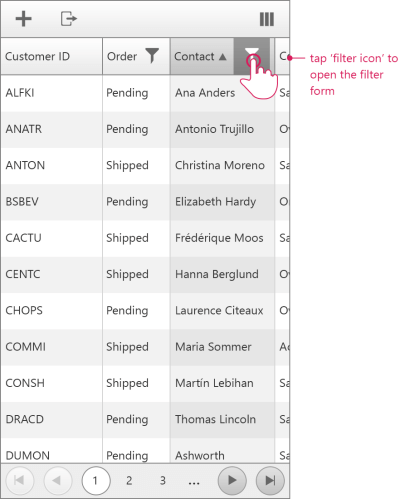
When the filter item is visible, use the generated buttons to open the filter form.
Figure 2: RadGrid mobile filter form

Enter the filtering criteria in the filter form.
Figure 3: Records filtered by the Order field

Open the context filter menu
You can also open the filter form from the context menu. Set AllowFilteringByColumn, EnableHeaderContextMenu, and EnableHeaderContextFilterMenu to True to show filtering in the context menu.