Data Editing
When using Mobile rendering, you can use all RadGrid edit modes: EditForms, InPlace, Batch, and PopUp.
Edit data in Mobile render mode
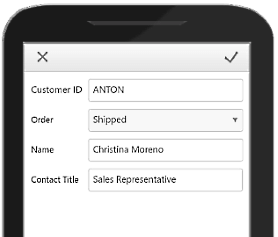
Although Mobile render mode uses a different HTML layout, editing works in the same way in most edit modes. The main difference is PopUp edit mode, which uses a separate mobile editing menu.
Figure 1: RadGrid mobile PopUp edit menu
Column editors with mobile rendering
When you set RenderMode to Mobile, RadGrid renders native controls by default. Native controls are HTML5 equivalents of Telerik controls. For example, RadNumericTextBox is replaced with <input type="number" />. This behavior affects how you access column editors, so implementations from other render modes may not apply.
If native controls do not meet your requirements, disable them in one of two ways. Set UseNativeEditorsInMobileMode to False on a GridEditableColumn to disable native editors for one column.
To disable native editors for the entire website, set UseGridNativeEditorsInMobileMode to False in web.config.