Value and Symbology in .NET MAUI Barcode
Barcode exposes a Value property that is used to set the barcode data presented by the control. The Value of the barcode is of type string and the allowed length depends on the symbology you choose.
To set the symbology that will be used to convert the Value of the control into a visual barcode representation, use its Symbology property.
The most common symbologies that are supported by Barcode are:
EAN13EAN8UPC-AUPC-ECode39QRCodePDF417
For more details on the available Telerik UI for .NET MAUI Barcode symbologies, refer to the articles on supported 1D and 2D Barcode types.
To apply the desired symbology to the Barcode:
1. Add the symbology you need to the Barcode, for example, the Code39 one.
<telerik:RadBarcode WidthRequest="200" HeightRequest="100"
    HorizontalOptions="Center" VerticalOptions="Center"
    Value="58000106">
    <telerik:RadBarcode.Symbology>
        <telerik:Code39 HorizontalTextAlignment="Center"
                      SizingMode="Stretch"
                      ShowText="True"
                      CodeTextSpacing="10"/>
    </telerik:RadBarcode.Symbology>
</telerik:RadBarcode>
2. Add the telerik namespace.
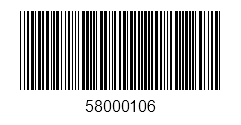
xmlns:telerik="http://schemas.telerik.com/2022/xaml/maui"The following image shows a barcode with an applied Code39 symbology.
Validation State
The Barcode exposes read-only properties that let you inspect whether the current Value is valid for the selected Symbology:
IsValid(bool)—Indicates whether the current barcode value can be encoded with the selected symbology.ErrorMessage(string)—Provides the validation error message when the current value is not valid.