or
3 answers
207 views
Quick Question: I've added filtering to a check box column during pre rendering of the grid as described in the "Applying default filter on initial load" artical at http://www.telerik.com/help/aspnet/grid/grdapplyingdefaultfilteroninitialload.html.
This adds the filtering option but doesn't apply the filter. How can I apply the programitic filter each time the grid is databound? This will also have to allow the user to specify filtering on the other columns.
Thanks in advance,
Steve

Rebecca Scully
Top achievements
 Rank 1
Rank 1
answered
on
16 Apr 2009
9 answers
359 views
I am trying to use the SessionDataSource.dll for a project where I do not want to store data. however, I am having difficulties trying to make this work. I can connect to the data source and insert data into the grid but I am not getting an ID to populate. This makes it impossible to reference the row for an update or delete function. Any idea what I am doing wrong? I have an access database which uses a field called ID with a data type auto-increment. The table is blank and has no data, the only thing it has is columns with headers.


1 answer
369 views
I want to be able to enter time in hour:minute format, just like RadTimePicker defaults to, except without AM/PM, without the clickable clock popup, and and without a limit of 24 hours. Basically, I want the user to be able to enter a duration in hours and minutes rather than entering a time of day.
So, I could enter:
37:13
For 37 hours and 13 minutes.
What is the best way to accomplish this?
Thanks.
So, I could enter:
37:13
For 37 hours and 13 minutes.
What is the best way to accomplish this?
Thanks.

Dimo
Telerik team

answered
on
16 Apr 2009
1 answer
145 views
The only problem I am having with the pages I am working on right now is that when the user performs a column sort, the grid goes to half height and stays that way. Is there a client-side event I can capture that happens after the sort so that I can fix the height of the grid?
I'm already dynamically sizing the grid in relation to the browser height and the toolbar height when the page loads or the browser window is resized.
My page code is:
I'm already dynamically sizing the grid in relation to the browser height and the toolbar height when the page loads or the browser window is resized.
My page code is:
| <%@ Page Language="VB" AutoEventWireup="false" CodeFile="findDriver.aspx.vb" Inherits="findDriver" %> |
| <%@ Register Assembly="Telerik.Web.UI" Namespace="Telerik.Web.UI" TagPrefix="telerik" %> |
| <%@ Register Src="previewDriver.ascx" TagName="driverDetails" TagPrefix="etherion" %> |
| <!DOCTYPE html PUBLIC "-//W3C//DTD XHTML 1.0 Transitional//EN" "http://www.w3.org/TR/xhtml1/DTD/xhtml1-transitional.dtd"> |
| <html xmlns="http://www.w3.org/1999/xhtml"> |
| <head runat="server"> |
| <title>Find driver</title> |
| <style type="text/css"> |
| body, html |
| { |
| margin: 0px; |
| height: 100%; |
| } |
| form |
| { |
| margin: 0px; |
| height: 100%; |
| } |
| </style> |
| </head> |
| <body onload="fixHeights()" onresize="fixHeights()"> |
| <form id="form1" runat="server"> |
| <asp:ScriptManager ID="ScriptManager1" runat="server"> |
| </asp:ScriptManager> |
| <telerik:RadToolTip ID="tipFind" runat="server" TargetControlID="btnFind" IsClientID="true" |
| ManualClose="True" RelativeTo="Element" ShowDelay="0" ShowEvent="OnClick" Position="BottomRight" |
| Title="Find driver"> |
| <fieldset style="border: none"> |
| <legend></legend> |
| <ul style="list-style: none"> |
| <li> |
| <label for="txtName"> |
| First name: |
| </label> |
| <telerik:RadTextBox ID="txtFirstName" runat="server"> |
| </telerik:RadTextBox> |
| </li> |
| <li> |
| <label for="txtName"> |
| Last name: |
| </label> |
| <telerik:RadTextBox ID="txtLastName" runat="server"> |
| </telerik:RadTextBox> |
| </li> |
| <li> |
| <label for="txtSSN"> |
| SSN: |
| </label> |
| <telerik:RadTextBox ID="txtSSN" runat="server"> |
| </telerik:RadTextBox> |
| </li> |
| <li> |
| <label for="cmbArea"> |
| Area: |
| </label> |
| <telerik:RadComboBox ID="cmbArea" runat="server" DataSourceID="sqlArea" DataTextField="Text" |
| DataValueField="ID" ZIndex="50002" MaxHeight="100px"> |
| <CollapseAnimation Duration="200" Type="OutQuint" /> |
| </telerik:RadComboBox> |
| </li> |
| <li> |
| <label for="cmbMarket"> |
| Market: |
| </label> |
| <telerik:RadComboBox ID="cmbMarket" runat="server" DataSourceID="sqlMarket" DataTextField="Text" |
| DataValueField="ID" ZIndex="50003" MaxHeight="100px"> |
| <CollapseAnimation Duration="200" Type="OutQuint" /> |
| </telerik:RadComboBox> |
| </li> |
| </ul> |
| </fieldset> |
| <asp:Button ID="cmdFind" runat="server" Text="OK" /> |
| </telerik:RadToolTip> |
| <telerik:RadToolBar ID="RadToolBar" runat="server"> |
| <CollapseAnimation Type="OutQuint" Duration="50"></CollapseAnimation> |
| <Items> |
| <telerik:RadToolBarButton runat="server" Text="New" ImageUrl="~/RadControls/Toolbar/Skins/office2007/Img/new.gif"> |
| </telerik:RadToolBarButton> |
| <telerik:RadToolBarButton runat="server" Text="Open" ImageUrl="~/RadControls/Toolbar/Skins/office2007/Img/open.gif"> |
| </telerik:RadToolBarButton> |
| <telerik:RadToolBarButton runat="server" IsSeparator="True" Text="Button 2"> |
| </telerik:RadToolBarButton> |
| <telerik:RadToolBarButton runat="server" Text="Print" ImageUrl="~/RadControls/Toolbar/Skins/office2007/Img/print.gif"> |
| </telerik:RadToolBarButton> |
| <telerik:RadToolBarButton runat="server" IsSeparator="True" Text="Button 4"> |
| </telerik:RadToolBarButton> |
| <telerik:RadToolBarButton runat="server" id="btnFind" ImageUrl="~/RadControls/Toolbar/Skins/office2007/Img/find.gif" |
| Text="Find"> |
| </telerik:RadToolBarButton> |
| </Items> |
| </telerik:RadToolBar> |
| <asp:UpdatePanel ID="UpdatePanel" runat="server" UpdateMode="Conditional"> |
| <ContentTemplate> |
| <telerik:RadToolTipManager ID="tipPreview" OffsetY="-1" ManualClose="true" Width="250" |
| Height="350" runat="server" OnAjaxUpdate="OnAjaxUpdate" RelativeTo="Element" |
| Position="MiddleRight"> |
| </telerik:RadToolTipManager> |
| <telerik:RadGrid ID="RadGrid" runat="server" AllowPaging="True" AllowSorting="True" |
| DataSourceID="sqlDrivers" GridLines="None" AutoGenerateColumns="False" Height="400px" |
| Width="100%"> |
| <HeaderContextMenu> |
| <CollapseAnimation Duration="200" Type="OutQuint" /> |
| </HeaderContextMenu> |
| <MasterTableView ClientDataKeyNames="ID" DataKeyNames="ID" DataSourceID="sqlDrivers" |
| TableLayout="Auto" PageSize="100"> |
| <RowIndicatorColumn> |
| <HeaderStyle Width="20px" /> |
| </RowIndicatorColumn> |
| <ExpandCollapseColumn> |
| <HeaderStyle Width="20px" /> |
| </ExpandCollapseColumn> |
| <NoRecordsTemplate> |
| no records to display |
| </NoRecordsTemplate> |
| <Columns> |
| <telerik:GridTemplateColumn HeaderText="Product" AllowFiltering="False"> |
| <ItemTemplate> |
| <asp:HyperLink ID="targetControl" runat="server" NavigateUrl="#" Text='<%# Eval("id") %>'></asp:HyperLink> |
| </ItemTemplate> |
| <HeaderStyle Width="25px" /> |
| <ItemStyle VerticalAlign="Top" Wrap="False" /> |
| </telerik:GridTemplateColumn> |
| <telerik:GridBoundColumn DataField="ID" DataType="System.Int32" HeaderText="ID" ReadOnly="True" |
| SortExpression="ID" UniqueName="ID" Display="false" AllowFiltering="False"> |
| <HeaderStyle Width="50px" /> |
| <ItemStyle VerticalAlign="Top" Wrap="False" /> |
| </telerik:GridBoundColumn> |
| <telerik:GridBoundColumn DataField="Date_Application" DataType="System.DateTime" |
| HeaderText="Applied" SortExpression="Date_Application" DataFormatString="{0:d}" |
| UniqueName="Date_Application" AllowFiltering="False"> |
| <HeaderStyle Width="60px" /> |
| <ItemStyle VerticalAlign="Top" Wrap="False" Width="60px" /> |
| </telerik:GridBoundColumn> |
| <telerik:GridBoundColumn DataField="FirstName" HeaderText="First" SortExpression="FirstName" |
| UniqueName="FirstName"> |
| <HeaderStyle Width="125px" /> |
| <ItemStyle VerticalAlign="Top" Wrap="False" Width="125px" /> |
| </telerik:GridBoundColumn> |
| <telerik:GridBoundColumn DataField="LastName" HeaderText="Last" SortExpression="LastName" |
| UniqueName="LastName"> |
| <HeaderStyle Width="125px" /> |
| <ItemStyle VerticalAlign="Top" Wrap="False" Width="125px" /> |
| </telerik:GridBoundColumn> |
| <telerik:GridBoundColumn DataField="City" HeaderText="City" SortExpression="City" |
| UniqueName="City"> |
| <HeaderStyle Width="125px" /> |
| <ItemStyle VerticalAlign="Top" Wrap="False" Width="125px" /> |
| </telerik:GridBoundColumn> |
| <telerik:GridBoundColumn DataField="Phone1" HeaderText="Phone1" SortExpression="Phone1" |
| UniqueName="Phone1" AllowFiltering="False"> |
| <HeaderStyle Width="60px" /> |
| <ItemStyle VerticalAlign="Top" Wrap="False" Width="60px" /> |
| </telerik:GridBoundColumn> |
| <telerik:GridBoundColumn DataField="Phone2" HeaderText="Phone2" SortExpression="Phone2" |
| UniqueName="Phone2" AllowFiltering="False"> |
| <HeaderStyle Width="60px" /> |
| <ItemStyle VerticalAlign="Top" Wrap="False" Width="60px" /> |
| </telerik:GridBoundColumn> |
| <telerik:GridBoundColumn DataField="Phone3" HeaderText="Phone3" SortExpression="Phone3" |
| UniqueName="Phone3" AllowFiltering="False"> |
| <HeaderStyle Width="60px" /> |
| <ItemStyle VerticalAlign="Top" Wrap="False" Width="60px" /> |
| </telerik:GridBoundColumn> |
| <telerik:GridBoundColumn DataField="ClassEndorsements" HeaderText="Endorsements" |
| SortExpression="ClassEndorsements" UniqueName="ClassEndorsements"> |
| <HeaderStyle Width="60px" /> |
| <ItemStyle VerticalAlign="Top" Wrap="False" Width="60px" /> |
| </telerik:GridBoundColumn> |
| <telerik:GridBoundColumn DataField="Experience" HeaderText="Experience" SortExpression="Experience" |
| UniqueName="Experience"> |
| <ItemStyle VerticalAlign="Top" Wrap="True" /> |
| </telerik:GridBoundColumn> |
| </Columns> |
| </MasterTableView> |
| <ClientSettings> |
| <Selecting AllowRowSelect="true" /> |
| <Scrolling AllowScroll="True" UseStaticHeaders="True" /> |
| </ClientSettings> |
| <FilterMenu> |
| <CollapseAnimation Duration="200" Type="OutQuint" /> |
| </FilterMenu> |
| </telerik:RadGrid> |
| </ContentTemplate> |
| </asp:UpdatePanel> |
| <asp:SqlDataSource ID="sqlDrivers" runat="server" ConnectionString="<%$ ConnectionStrings:DMS3 %>" |
| SelectCommand="dmsDriverFind" SelectCommandType="StoredProcedure"> |
| <SelectParameters> |
| <asp:ControlParameter ControlID="txtFirstName" DefaultValue="%" Name="fname" PropertyName="Text" |
| Type="String" /> |
| <asp:ControlParameter ControlID="txtLastName" DefaultValue="%" Name="lname" PropertyName="Text" |
| Type="String" /> |
| <asp:ControlParameter ControlID="txtSSN" DefaultValue="%" Name="ssn" PropertyName="Text" |
| Type="String" /> |
| <asp:ControlParameter ControlID="cmbArea" DefaultValue="0" Name="area" PropertyName="SelectedValue" |
| Type="String" /> |
| <asp:ControlParameter ControlID="cmbMarket" DefaultValue="1" Name="market" PropertyName="SelectedValue" |
| Type="String" /> |
| </SelectParameters> |
| </asp:SqlDataSource> |
| <telerik:RadSkinManager ID="RadSkinManager1" runat="server" Skin="Hay"> |
| </telerik:RadSkinManager> |
| <asp:SqlDataSource ID="sqlArea" runat="server" ConnectionString="<%$ ConnectionStrings:DMS3 %>" |
| SelectCommand="SELECT DISTINCT * FROM [dmsArea] ORDER BY [Text]"></asp:SqlDataSource> |
| <asp:SqlDataSource ID="sqlMarket" runat="server" ConnectionString="<%$ ConnectionStrings:DMS3 %>" |
| SelectCommand="SELECT DISTINCT * FROM [dmsMarket] ORDER BY [Text]"></asp:SqlDataSource> |
| <script type="text/javascript" language="javascript"> |
| function fixHeights() { |
| var grd = document.getElementById("<%=radgrid.ClientID %>"); |
| var tlb = document.getElementById("<%=radtoolbar.ClientID %>"); |
| grd.style.height = (document.documentElement.offsetHeight - (tlb.offsetHeight + 4)) + 'px'; |
| } |
| </script> |
| </form> |
| </body> |
| </html> |
Dimo
Telerik team
answered
on
16 Apr 2009
3 answers
145 views
Greetings,
Is there a way to add checkboxes to the file list in each explored folder?
We thought about using the RadFileExplorer also for selecting files that should be included in a corporate gallery.
Having checkboxes would help.
Any ideas?
Is there a way to add checkboxes to the file list in each explored folder?
We thought about using the RadFileExplorer also for selecting files that should be included in a corporate gallery.
Having checkboxes would help.
Any ideas?
Chanan Zass
Top achievements
Rank 1
Rank 1
answered
on
16 Apr 2009
1 answer
60 views
Hello,
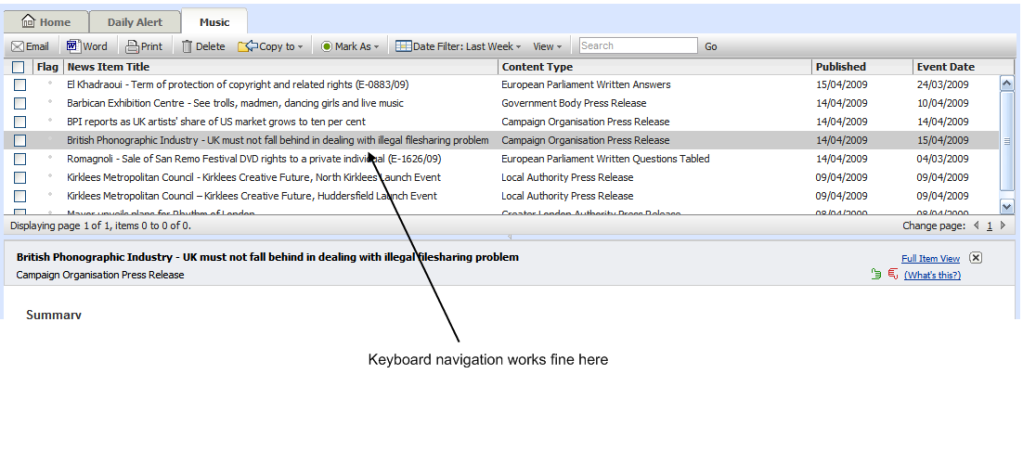
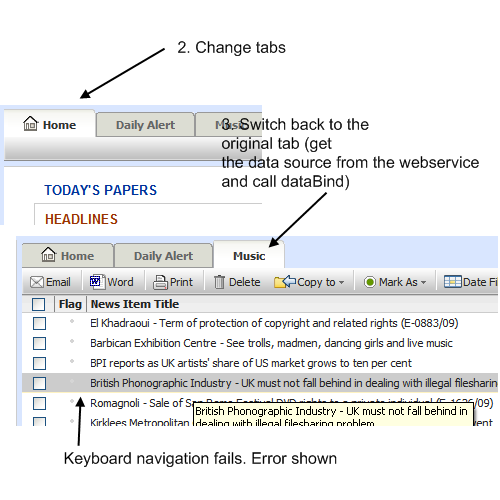
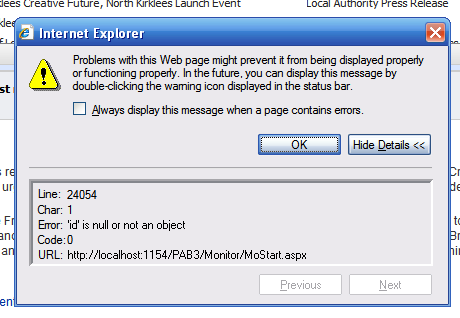
I'm having some trouble using the keyboard navigation feature of the grid. When the page first loads keyboard navigation works fine but when a new datasource is bound to the grid a javascript error is caught, "id is null or not an object".
Please see the following images (in order) for better clarification...
Image 1
Image 2
Image 3
Thanks,
Antony
I'm having some trouble using the keyboard navigation feature of the grid. When the page first loads keyboard navigation works fine but when a new datasource is bound to the grid a javascript error is caught, "id is null or not an object".
Please see the following images (in order) for better clarification...
Image 1
Image 2
Image 3
Thanks,
Antony
Pavlina
Telerik team
answered
on
16 Apr 2009
2 answers
275 views
This may be a simple one, but I can't seem to find how to do this in the docs:
Is there a setting to show a 'Expand/Collapse All' button on the header of the standard expand/collapse column on a grid? I am using a client-side standard expand/collapse structure (i.e. specified a nested view), and would like an option to expand/collapse all rows with a single click. Is there a setting, or do I need to write some js?
Thx
Is there a setting to show a 'Expand/Collapse All' button on the header of the standard expand/collapse column on a grid? I am using a client-side standard expand/collapse structure (i.e. specified a nested view), and would like an option to expand/collapse all rows with a single click. Is there a setting, or do I need to write some js?
Thx
Pavlina
Telerik team
answered
on
16 Apr 2009
1 answer
106 views
I am using Q3 2008 version of grid.
When I use grouping, first page of grid shows "displaying 1 to 10 of 16' which is correct. When I page to page 2, there are no rows displayed.
I have seen this on another forum post and telerik response was that this problem was going to be fixed in a Q2 2008 hotfix.
Can anyone confirm if this problem is supposed to have been fixed or not?
Thanks, Patrick
When I use grouping, first page of grid shows "displaying 1 to 10 of 16' which is correct. When I page to page 2, there are no rows displayed.
I have seen this on another forum post and telerik response was that this problem was going to be fixed in a Q2 2008 hotfix.
Can anyone confirm if this problem is supposed to have been fixed or not?
Thanks, Patrick
Pavlina
Telerik team
answered
on
16 Apr 2009
1 answer
123 views
actually i am a newbie and need some help
in radcombobox i am trying to do below things but not success
<script type="text/javascript">
function calc(sender,args)
{
var footer = sender._getFooterElement();
footer.innerHTML = args.get_item().get_text();
}
</script>
<radcombobox id=rcb1 .......... onclientselectedindexchanged=calc>
actually i want to display selected value of combo box in a label without loading whole page
i mean text1,text2,text3 are stored in combo box then when user changes combo box value to text3 then label's value should change to text3
as i am a newbie here
and sorry for bad english
in radcombobox i am trying to do below things but not success
<script type="text/javascript">
function calc(sender,args)
{
var footer = sender._getFooterElement();
footer.innerHTML = args.get_item().get_text();
}
</script>
<radcombobox id=rcb1 .......... onclientselectedindexchanged=calc>
actually i want to display selected value of combo box in a label without loading whole page
i mean text1,text2,text3 are stored in combo box then when user changes combo box value to text3 then label's value should change to text3
as i am a newbie here
and sorry for bad english

1 answer
125 views
I just want a folder browser so someone can select a folder, and I'll get the path sent back to me for what folder they selected
I'm looking around and I see talks and talks about files, but i don't want a person to be required to select a file in order to choose a folder.
I'm looking around and I see talks and talks about files, but i don't want a person to be required to select a file in order to choose a folder.

Fiko
Telerik team
answered
on
16 Apr 2009