or
3 answers
112 views
Hi, we have AllowScripts set to true in our radEditor, but no matter what we do, any attempts to insert a simple javascript function get stripped out. Is there a hidden trick to allowing this to happen? Thanks.

Rumen
Telerik team

answered
on
10 Dec 2009
1 answer
104 views
Hi,
I've been trying to figure out an issue that I'm experiencing when using the RadGrid Ajax functionality.
I've followed the implementation pretty similarly to this, using Q3 2009:
Basically, I have a flash object that is being embedded in my RadGrid and when I get a Page size (custom paging) of 50, it is rendering 50 of these flash objects onto my page. This is fine and works in all browsers without ajax. However, when I include the RadAjaxManager so that ajax is being used to go from page to page (with a page size of 50), IE will crash, citing FlDbg9f.ocx as the issue, which is normally associated at least in my searches as overloading the Adobe Flash Player.
If I do NOT use Ajax, this works fine. It also works fine in the latest version of FF and Google Chrome.
Anyway, so it seems to be on the edge functionality-wise, but to me it does not seem that using Ajax should add so much overhead that it would crash with ajax and be fine without it. I saw a post about Rebind possibly getting called multiple times and thought that could be an issue but I couldn't find any concrete information this.
Any help would be appreciated here since I would love to get this working for 50 items, but don't want to put up a warning that if they use IE, it's going to crash their browser.
Thanks,
Chris

Iana Tsolova
Telerik team
answered
on
10 Dec 2009
1 answer
131 views
I have a RadGrid which shows many columns. Selecting a row causes a client event that writes the record id of the selected row to a cookie. This works. Now, I would like to set up a master/details scenario such that below the grid are multiple tabs-- that is, the content displayed below the grid and tabstrip is dependent on both which row in the grid was selected, and also upon which tab is currently selected. Thus, if the tab selection changes, I would like to dynamically load a usercontrol which should render the content for that tab. These usercontrols can read the cookie, perform databinding and render themselves. If the row selection changes, I would similarly like the last loaded control to reload itself.
I have tried a number of things and can't seem to get things right with the page lifecycle and the order in which events fire. Any suggestions on a general approach?
I have tried a number of things and can't seem to get things right with the page lifecycle and the order in which events fire. Any suggestions on a general approach?
Yavor
Telerik team
answered
on
10 Dec 2009
1 answer
123 views
Hello,
I have a CardView grid and would like to use in-place editing. In this example nulls are returned to the database rather than the bound values. I can get this to work with editmode in popup or editform but in-place editing would be better. Any thoughts?
| <telerik:RadGridID="RadGrid1"runat="server"DataSourceID="SqlDataSource1" |
| GridLines="None"> |
| <ClientSettings> |
| <SelectingAllowRowSelect="true"/> |
| </ClientSettings> |
| <MasterTableViewAllowPaging="true"DataKeyNames="ID" |
| PageSize="1"ShowHeader="False"CommandItemDisplay="Top"TableLayout="Fixed" |
| AllowAutomaticInserts="true"AllowAutomaticUpdates="true"EditMode="InPlace"> |
| <PagerStyleMode="NumericPages"ShowPagerText="False"></PagerStyle> |
| <CommandItemTemplate> |
| <div> |
| <table> |
| <tr> |
| <td>Docket</td> |
| <td><asp:LinkButtonID="LinkButton2"runat="server"CommandName="EditSelected"CssClass="hide4print"><imgstyleimgstyle="border:0px;vertical-align:middle;"alt=""src="Images/editItem.gif"/>EditDocket</asp:LinkButton></td> |
| <td><asp:LinkButtonID="LinkButton1"runat="server"CommandName="InitInsert"CssClass="hide4print"><imgstyleimgstyle="border:0px;vertical-align:middle;"alt=""src="Images/newItem.gif"/>AddNewDocket</asp:LinkButton></td> |
| </tr> |
| </table> |
| </div> |
| </CommandItemTemplate> |
| <ItemTemplate> |
| <table> |
| <tr> |
| <td><asp:LabelID="Label1"runat="server"Text="ID"></asp:Label></td> |
| <td><asp:LabelID="Label2"runat="server"Text='<%#Eval("ID")%>'></asp:Label></td> |
| </tr> |
| <tr> |
| <td><asp:LabelID="Label3"runat="server"Text="ID"></asp:Label></td> |
| <td><asp:LabelID="Label4"runat="server"Text='<%#Eval("COMPANYNAME")%>'></asp:Label></td> |
| </tr> |
| <tr> |
| <td><asp:LabelID="Label5"runat="server"Text="ID"></asp:Label></td> |
| <td><asp:LabelID="Label6"runat="server"Text='<%#Eval("CONTACTNAME")%>'></asp:Label></td> |
| </tr> |
| </table> |
| </ItemTemplate> |
| <EditItemTemplate> |
| <table> |
| <tr> |
| <td><asp:LabelID="Label1"runat="server"Text="ID"></asp:Label></td> |
| <td><asp:LabelID="Label2"runat="server"Text='<%#Eval("ID")%>'></asp:Label></td> |
| </tr> |
| <tr> |
| <td><asp:LabelID="Label3"runat="server"Text="Company"></asp:Label></td> |
| <td><asp:TextBoxID="Textbox1"runat="server"Text='<%#Bind("COMPANYNAME")%>'/></td> |
| </tr> |
| <tr> |
| <td><asp:LabelID="Label5"runat="server"Text="Contact"></asp:Label></td> |
| <td><asp:TextBoxID="Textbox2"runat="server"Text='<%#Bind("CONTACTNAME")%>'/></td> |
| </tr> |
| <tr> |
| <td> |
| <asp:ButtonID="btnUpdate"Text='<%#IIf((TypeOf(Container)isGridEditFormInsertItem),"Insert","Update")%>' |
| runat="server"CommandName='<%#IIf((TypeOf(Container)isGridEditFormInsertItem),"PerformInsert","Update")%>'> |
| </asp:Button> |
| <asp:ButtonID="btnCancel"Text="Cancel"runat="server"CausesValidation="False" |
| CommandName="Cancel"> |
| </asp:Button> |
| </td> |
| </tr> |
| </table> |
| </EditItemTemplate> |
| </MasterTableView> |
| </telerik:RadGrid> |
Thank you.
Nikolay Rusev
Telerik team
answered
on
10 Dec 2009
4 answers
235 views
Hello,
sometime I'm creating trees based on very complex and timeconsumpting database-queries.
My question is, if it is possible to store the tree (after first creation in a file or database,
so it can be cached for other users.
Second question is: how to set the tree from that cache (usually a binary-text)?
Is there an easy way to do that?
Best regards.
sometime I'm creating trees based on very complex and timeconsumpting database-queries.
My question is, if it is possible to store the tree (after first creation in a file or database,
so it can be cached for other users.
Second question is: how to set the tree from that cache (usually a binary-text)?
Is there an easy way to do that?
Best regards.
Christian Sommer
Top achievements
 Rank 1
Rank 1
answered
on
10 Dec 2009
2 answers
230 views
Hi Telerik experts,
Can you say me how to get the value of a groupheader, actually i can get the text based on your sample, also i can get the groupindex, but i can't get the value set into FieldName="SubDiarioID"
Can you say me how to get the value of a groupheader, actually i can get the text based on your sample, also i can get the groupindex, but i can't get the value set into FieldName="SubDiarioID"
| protected void tk_Grid_PreRender(object sender, EventArgs e) |
| { |
| foreach (GridGroupHeaderItem groupHeader in tk_Grid.MasterTableView.GetItems(GridItemType.GroupHeader)) |
| { |
| string strtxt = groupHeader.DataCell.Text; // accessing the groupheader text |
| string strGroupIndex = groupHeader.GroupIndex; |
| LinkButton hyperlnk = new LinkButton(); // creting new link |
| hyperlnk.Text = strtxt.Substring(8,strtxt.Length-8); |
| hyperlnk.CssClass = "gridtextbold"; |
| hyperlnk.Attributes.Add("OnClick", "return AbreVentana('ConsolidadoDiarioAuxiliar.aspx','Consolidado');"); |
| groupHeader.DataCell.Controls.Clear(); |
| groupHeader.DataCell.Controls.Add(hyperlnk); // adding link to the groupheader |
| } |
| } |
| <GroupByExpressions > |
| <telerik:GridGroupByExpression > |
| <GroupByFields > |
| <telerik:GridGroupByField FieldName="SubDiarioID" FormatString="{0:g}" /> |
| </GroupByFields> |
| <SelectFields> |
| <telerik:GridGroupByField FieldName="BESubDiarios.NombreSubDiario" HeaderText="Cuenta" /> |
| </SelectFields> |
| </telerik:GridGroupByExpression> |
| </GroupByExpressions> |
| <GroupHeaderItemStyle HorizontalAlign="Left" CssClass="gridtext" /> |


1 answer
118 views
I have to questions about datimepicker here.
1. when updated the telerik from 2008 Q2 to 2009 Q3, the letters(I mean "AM" and "PM") in the popup control of datetimepicker became to lowcase letters( such as "am" and "pm") and also find the time columns are right-aligned.
can anyone tell me how to set the align and the upcase of the letter of "am" and "pm" in the popup control of datetimepicker.
2. I noticed that when I change the selection in time picker, the last selection is marked.
how can I get rid of the mark from the popup control of time picker? I mean each time I open the popup control of time picker, there should be no marked selection.
thanks
1. when updated the telerik from 2008 Q2 to 2009 Q3, the letters(I mean "AM" and "PM") in the popup control of datetimepicker became to lowcase letters( such as "am" and "pm") and also find the time columns are right-aligned.
can anyone tell me how to set the align and the upcase of the letter of "am" and "pm" in the popup control of datetimepicker.
2. I noticed that when I change the selection in time picker, the last selection is marked.
how can I get rid of the mark from the popup control of time picker? I mean each time I open the popup control of time picker, there should be no marked selection.
thanks

0 answers
1.7K+ views
You can find information about known issues and important changes for the entire UI for ASP.NET AJAX suite in the following pinned thread: Known Issues and Important Changes in UI for ASP.NET AJAX.
Q1 2014 (Version number: 2014.1.225)
Problem:
The recurrence editor layout is broken under IE7 browser.
Solution:
This issue will be resolved in the first internal build. If you are using CDN or for some reason you do not want to use an internal build the following css fix will resolve the issue.
div.RadScheduler .RadInput { *display: inline !important;}Please note that if you still decide to use the internal build or you update to Q1 2014 SP1 ( where the fix will be included) please remove this css fix to avoid any unexpected behavior.
Q2 2012 (Version number: 2012.2.607)
Problem:
JavaScript error is thrown when the advanced form is opened. The error is thrown only when a custom advanced form is used and therefore a custom AdvancedForm.js file.
Error in IE: Unable to set value of the property 'errorMessage': object is null or undefined.
(The error is caused by RadDatePicker/RadTimePicker not being located properly.)
Solution:
The _initializeAdvancedFormValidators and _initializeAllDayCheckbox methods in the AdvancedForm.js file should look like the following:
_initializeAdvancedFormValidators: function () { var toolTip = this._createValidatorToolTip(); if (typeof (Page_Validators) == "undefined") return; for (var validatorIndex in Page_Validators) { var validator = Page_Validators[validatorIndex]; if (this._validatorIsInTemplate(validator)) { var control = $("#" + validator.controltovalidate); if (control.length == 0) break; if (control.parent().is(".rsAdvDatePicker") || control.parent().is(".rsAdvTimePicker")) { $("#" + validator.controltovalidate + "_dateInput") .bind("focus", { "toolTip": toolTip }, this._showToolTip) .bind("blur", { "toolTip": toolTip }, this._hideToolTip) [0].errorMessage = validator.errormessage; } else { control.addClass("rsValidatedInput"); } control[0].errorMessage = validator.errormessage; this._updateValidator(validator, control); } } var advancedTemplate = this; var originalValidatorUpdateDisplay = ValidatorUpdateDisplay; ValidatorUpdateDisplay = function (validator) { if (advancedTemplate._validatorIsInTemplate(validator) && validator.controltovalidate) { advancedTemplate._updateValidator(validator); } else { originalValidatorUpdateDisplay(validator); } }; $(".rsValidatedInput", this._formElement) .bind("focus", { "toolTip": toolTip }, this._showToolTip) .bind("blur", { "toolTip": toolTip }, this._hideToolTip);},_initializeAllDayCheckbox: function () { var allDayCheckbox = $("#" + this._templateId + "_AllDayEvent"); var controlList = $(allDayCheckbox[0].parentNode.parentNode.parentNode); var timePickers = controlList.find('.rsAdvTimePicker'); // RadDateTimePicker-display-hackedy-hack if ($telerik.isIE6 || $telerik.isIE7) { $('.rsAdvTimePicker, .rsAdvDatePicker', this._formElement).css( { display: "inline", zoom: 1, width: "" }); } else { $('.rsAdvTimePicker, .rsAdvDatePicker', this._formElement).css( { display: "inline-block", width: "" }); } var timePickersWidth = $("#" + this._templateId + "_StartTime_dateInput").outerWidth(); timePickers.width(timePickersWidth); var initialPickersWidth = $(".rsTimePick", this._formElement).eq(0).outerWidth(); var allDayPickersWidth = initialPickersWidth - timePickersWidth; var startTimeValidator = $get(this._templateId + "_StartTimeValidator"); var endTimeValidator = $get(this._templateId + "_StartTimeValidator"); var advancedTemplate = this; // IE fix - the hidden input pushes down the other TimePicker elements during animation controlList.find('.rsAdvTimePicker > input').css("display", "none"); var clickHandler = function (allDay, animate) { var showTimePickers = function () { if ($telerik.isSafari || $telerik.isOpera) timePickers.css("display", "inline-block"); else timePickers.show(); }; if (!allDay) showTimePickers(); controlList.find('.rsTimePick').each(function () { if (animate) { $(this).stop(); if (allDay) $(this).animate({ width: allDayPickersWidth }, "fast", "linear", function () { timePickers.hide(); }); else $(this).animate({ width: initialPickersWidth }, "fast"); } else { if (allDay) { timePickers.hide(); $(this).width(allDayPickersWidth); } else { $(this).width(initialPickersWidth); } } }); if (typeof (ValidatorEnable) != "undefined") { ValidatorEnable(startTimeValidator, !allDay); ValidatorEnable(endTimeValidator, !allDay); } var startTimePicker = advancedTemplate._pickers.startTime; startTimePicker.set_enabled(!allDay); var endTimePicker = advancedTemplate._pickers.endTime; endTimePicker.set_enabled(!allDay); }; this._onAllDayCheckBoxClick = clickHandler; clickHandler(allDayCheckbox[0].checked, false); allDayCheckbox.click(function () { clickHandler(this.checked, true); });},Q1 2012 (Version number: 2012.1.215)
Problem:
When using the Advanced form user controls, opening the advanced form will throw -
Error: Unable to set value of the property 'errorMessage': object is null or undefined
In addition to this, the Advanced form will look distorted:
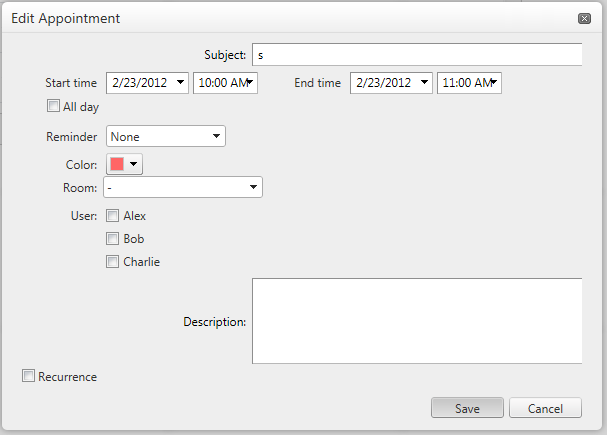
These problems are caused by a breaking change in RadInput/RadInputManager described in the release history - Improved: Single input rendering mode is enabled by default for all RadInput controls
Solution:
Set EnableSingleInputRendering="false" for all DateInput tags and RadTextBox controls in the AdvancedForm user control:
<DateInput ID="DateInput2" runat="server" EnableSingleInputRendering="false" ... />
* * *
<telerik:RadTextBox runat="server" ID="SubjectText" EnableSingleInputRendering="false" .. />
Q2 2011 SP1(Version number: 2011.2.915)
Probem:
Pressing ESC while dragging appointment in AJAX scenarios throws JavaScript exception
Solution
We have addressed the bug for the latest internal build (Starting from verson 2011.2.920). Alternatively, you can use the following approach, add this script before the RadScheduler's declaration:
<script type="text/javascript"> if (Telerik.Web.UI.RadScheduler.prototype._onKeyDownEvent) { var originalHandler = Telerik.Web.UI.RadScheduler.prototype._onKeyDownEvent; Telerik.Web.UI.RadScheduler.prototype._onKeyDownEvent = function (e) { if (this._resizingState) originalHandler.apply(this, [e]); } } </script>Q3 2010 SP2(Version number: 2010.3.1317)
Problem:
If the TimeLabelSpan property for Timeline view is set, the time slots will be misalligned with respect to the date headers in IE9.
* <TimelineView NumberOfSlots="24" TimeLabelSpan="4" /> *You RadScheduler will look something like this:
This is a browser issue with IE9 which can be observed with earlier versions of Telerik controls as well.
Solution:
.rsHidden { display: block!important; }Problem:
"Microsoft JScript runtime error: 'findItemByValue(...)' is null or not an object"
Reason:
The fix for 'Disable context menu items based on AllowInsert/Edit/Delete values' relies on that the appointment context menu has items with Value = CommandEdit or CommandDelete. If you have a custom context menu that does not have such items, you will get this error.
Solution:
We have already fixed the problem (a simple if(item !=null) check in the source code). Upgrading to the next internal build is the solution we recommend.
Apologies for the caused inconvenience!
Q3 2010
The visual appearance of the advanced form has been refreshed, if you use templates, you will need to update them with the following new elements (and the additional .rsAdvancedModal class) :
<div class="rsAdvancedEdit rsAdvancedModal" style="position: relative"> <div class="rsModalBgTopLeft"></div> <div class="rsModalBgTopRight"></div> <div class="rsModalBgBottomLeft"></div> <div class="rsModalBgBottomRight"></div> ..........</div>Be sure to place the four corner DIV elements first in the template as shown above.
Q2 2010
Problem: The recurrence editing controls will break if you're using custom advanced templates based on the examples from the 2010 Q1 release or earlier.
Reason: The recurrence editing part of the advanced form is now implemented as a separate control. It has separate skins and scripts from RadScheduler.
Solution: Update the advanced form template to use the RadSchedulerRecurrenceEditor control as in the example. You need to update AdvancedForm.js to the latest version as well.
Workaround:
Step 1: Register the RadSchedulerRecurrenceEditor skins manually:
<telerik:RadStyleSheetManager runat="server" ID="RadStyleSheetManager1"> <StyleSheets> <telerik:StyleSheetReference Assembly="Telerik.Web.UI" Name="Telerik.Web.UI.Skins.SchedulerRecurrenceEditor.css" /> <telerik:StyleSheetReference Assembly="Telerik.Web.UI" Name="Telerik.Web.UI.Skins.Vista.SchedulerRecurrenceEditor.Vista.css" /> </StyleSheets></telerik:RadStyleSheetManager>Step 2: In AdvancedFormVB/CS.ascx locate RecurrencePanel and add RecurrenceEditor CSS class:
<asp:Panel runat="server" ID="RecurrencePanel" Style="display: none;" CssClass="rsAdvRecurrencePanel RecurrenceEditor">Related forum post: Breaking change in 2010 Q2: Recurrence controls styling is broken in old advanced templates
Q1 SP2 2010 (Version number: 2010.1.519)
Clicking the date header in week view results in a server-side exception- "FormatException: String was not recognized as a valid DateTime".
Update: The initial fix in build 2010.1.525 lead to incorrect date calculations.
The issue is fixed in build 2010.1.526 and later. A workaround is to include the following script below the ScriptManager/RadScriptManager instance on the page:
<script type="text/javascript"> Telerik.Web.UI.RadScheduler.prototype._onDateHeaderClick = function (e) { $telerik.cancelRawEvent(e); var date = new Date(); // Date headers have an href in the format #yyyy-MM-dd var dateMatch = e.eventMapTarget.href.match(/#(\d{4}-\d{2}-\d{2})/); if (dateMatch && dateMatch.length == 2) { var parts = $telerik.$.map(dateMatch[1].split("-"), function (part) { return parseInt(part, 10); }); date = new Date(parts[0], parts[1] - 1, parts[2]); } return this._switchToSelectedDay(date); }; </script>Related forum post: FIX: Clicking the date header in week view results in a server-side exception
Q3 SP1 2009 (Version number: 2009.3.1208)
FIX: Problem in scheduler when bound to WebService or WCF service
Q3 2009 (Version number: 2009.3.1103)
Breaking change: removed obsolete RadScheduler members in Q3 2009

Telerik Admin
Top achievements
Rank 1
 Iron
Iron
Rank 1
Iron
asked
on
10 Dec 2009
3 answers
146 views
I have just started testing rad controls. I have an issue with callback on a combobox. I have a dnn module which I have put a radcombobox and enabled load on demand. when I click on it I get the following error. The target'dnn$ctrxxx$modulename$comboxx' for the callback could not be found or did not implement ICallbackEventHandler. HELP.
Peter
Telerik team
answered
on
10 Dec 2009
1 answer
104 views
Hi,
I am using radcontrols 2008 Q2, I managed to create a grid(statically) and added detail tables,
my grid binds initially at the server, whenever a user adds a new row, the grid is rebound on the client side using PageMethods,
when I rebind on the client side, my Expand/Collapse Button is replaced by 'undefined'
what is the quicked workaround on this?
I am using radcontrols 2008 Q2, I managed to create a grid(statically) and added detail tables,
my grid binds initially at the server, whenever a user adds a new row, the grid is rebound on the client side using PageMethods,
when I rebind on the client side, my Expand/Collapse Button is replaced by 'undefined'
what is the quicked workaround on this?
Yavor
Telerik team
answered
on
10 Dec 2009









