or
1 answer
178 views
Hi
I have looked for a while now but have not come accross the same situation.
I have a grid with one Static Column and then other columns are generated when laoding the Datasource.
I would like to create a Custom Edit Template acording to the data returned for each column as the number of columns can change.
Here is my RadGrid
I have 2 of these grids.
I have defined The dataSource as a Select Query from the database to simplify the Data Transfer to the table.
The one grid's Data is DBType.Bit valueTypes and the other a DBType.Time ValueType.
Here are the data returned by the query
I Would like to create a Yes No Radio Selection for the DBType.Bit grid and RadTimePiker for the DBType.Time Data.
I have found that when the data is in:
- a DBType.Date a datepicker is autogenerated.
- a DBType.Decimal a RadNumericTextbox is autogenerated.
- a DBType.varchar a RadTextbox is autogenerated.
But I need these custom controls.
Is there a way I can create these templates. I edit the items inline.
Thanks in advance
I have looked for a while now but have not come accross the same situation.
I have a grid with one Static Column and then other columns are generated when laoding the Datasource.
I would like to create a Custom Edit Template acording to the data returned for each column as the number of columns can change.
Here is my RadGrid
<telerik:RadGrid ID="rgTVMTimes" runat="server" GridLines="None" OnItemCreated="rgCoinBox_ItemCreated" AllowMultiRowEdit="True" OnPreRender="rgTVMTimes_PreRender" OnColumnCreated="rgTVMTimes_ColumnCreated" OnItemDataBound="rgCoinBox_ItemDataBound" OnItemCommand="rgCoinBox_ItemCommand"> <MasterTableView EditMode="InPlace" CommandItemDisplay="None" CommandItemStyle-HorizontalAlign="Right"> <Columns> <telerik:GridBoundColumn DataField="Heading" HeaderText="" ItemStyle-BackColor="LightGray" SortExpression="Heading" UniqueName="Heading1" ReadOnly="true"> <filtertemplate> <RadTimePiker ID="TVMTime"></RadTimePiker> </filtertemplate> <ItemStyle BackColor="LightGray" /> </telerik:GridBoundColumn> </Columns> <RowIndicatorColumn> <HeaderStyle Width="20px"></HeaderStyle> </RowIndicatorColumn> <ExpandCollapseColumn> <HeaderStyle Width="20px"></HeaderStyle> </ExpandCollapseColumn> <NoRecordsTemplate> <p> No TVM Machines found. </p> <p> Choose new Location and try again. </p> </NoRecordsTemplate> <commanditemstyle horizontalalign="Right" /> </MasterTableView> </telerik:RadGrid>I have defined The dataSource as a Select Query from the database to simplify the Data Transfer to the table.
rgTVMTimes.DataSource = new TVMCashUp().GetTvmMachineTimesGrid(_userInfo.StationID,"TVM Time"); rgTVMTimes.DataBind();rgTVMTimes.Rebind();rgLogCash.DataSource = new TVMCashUp().GetTvmMachineTimesGrid(_userInfo.StationID, "Log Cash Review"); rgLogCash.DataBind(); rgLogCash.Rebind();public DataTable GetTvmMachineTimesGrid(int inLocationid,string grid) { return DataMethods.ReturnMultipleRowResultSet("[HO].[GetTvmMachineTimesGrid]", inLocationid,grid); }Here are the data returned by the query
Heading TVM1 TVM2 TVM3 TVM4 TVM5 TVM6 TVM7TVM Time 16:10:10 16:10:10 16:10:10 16:10:10 16:10:10 16:10:10 16:10:10Heading TVM1 TVM2 TVM3 TVM4 TVM5 TVM6 TVM7Log Cash Review 0 0 0 0 0 0 0I Would like to create a Yes No Radio Selection for the DBType.Bit grid and RadTimePiker for the DBType.Time Data.
I have found that when the data is in:
- a DBType.Date a datepicker is autogenerated.
- a DBType.Decimal a RadNumericTextbox is autogenerated.
- a DBType.varchar a RadTextbox is autogenerated.
But I need these custom controls.
Is there a way I can create these templates. I edit the items inline.
Thanks in advance


1 answer
142 views
How do i add one more text box to "New Folder" dialog?

Dobromir
Telerik team

answered
on
13 Feb 2013
4 answers
123 views
For some reason the grouping text is not aligned properly and I can't figure out why. The text is shifting up. I attached an image of what is happening, and here is the grid definition for the first grid. Can someone please advise on what I can do? Thanks!
<telerik:RadGrid ID="rgSelections" runat="server" AllowPaging="False" AllowSorting="False" AllowMultiRowSelection="false" AutoGenerateColumns="False" HorizontalAlign="NotSet" AllowAutomaticDeletes="False" AllowAutomaticInserts="False" AllowAutomaticUpdates="false" AllowFilteringByColumn="false" ShowGroupPanel="False" Skin="Metro" Height="800"> <ClientSettings ReorderColumnsOnClient="false" AllowDragToGroup="false" AllowColumnsReorder="false" AllowRowsDragDrop="false"> <Scrolling AllowScroll="True" UseStaticHeaders="True" SaveScrollPosition="true" ScrollHeight="800px"> </Scrolling> <Selecting AllowRowSelect="true"></Selecting> <Resizing AllowRowResize="False" AllowColumnResize="False" EnableRealTimeResize="False"> </Resizing> <ClientEvents OnRowMouseOver="onRowMouseOver" /> </ClientSettings> <MasterTableView DataKeyNames="SlotCode" GridLines="None" AllowMultiColumnSorting="True" AutoGenerateColumns="False" HorizontalAlign="NotSet" CommandItemDisplay="Top" GroupLoadMode="Client"> <GroupByExpressions> <telerik:GridGroupByExpression> <SelectFields> <telerik:GridGroupByField FieldAlias="ClassDate" FieldName="ClassDate" FormatString="{0:dddd MMMM d}" HeaderText="Date"></telerik:GridGroupByField> </SelectFields> <GroupByFields> <telerik:GridGroupByField FieldName="ClassDate" SortOrder="Ascending"></telerik:GridGroupByField> </GroupByFields> </telerik:GridGroupByExpression> </GroupByExpressions> <Columns> <telerik:GridBoundColumn UniqueName="ClassDate" SortExpression="ClassDate" HeaderText="Date" DataField="ClassDate" DataFormatString="{0:M/dd}" Display="false"> </telerik:GridBoundColumn> <telerik:GridBoundColumn UniqueName="StartTime" SortExpression="StartTime" HeaderText="Start" DataField="StartTime" DataFormatString="{0:hh:mm tt}" ItemStyle-Width="60px" HeaderStyle-Width="60px" ItemStyle-Wrap="false"> </telerik:GridBoundColumn> <telerik:GridBoundColumn UniqueName="ClassTitleFull" SortExpression="ClassTitleFull" HeaderText="Class" DataField="ClassTitleFull" ItemStyle-Width="100%" HeaderStyle-Width="100%"> </telerik:GridBoundColumn> <telerik:GridBoundColumn UniqueName="Seg" SortExpression="Seg" HeaderText="Segment" DataField="Seg" ItemStyle-Width="60px" HeaderStyle-Width="60px"> </telerik:GridBoundColumn> <telerik:GridBoundColumn HeaderText="ClassSchedulingID" DataField="ClassSchedulingID" SortExpression="ClassSchedulingID" UniqueName="ClassSchedulingID" Display="False"> </telerik:GridBoundColumn> <telerik:GridBoundColumn UniqueName="SlotCode" SortExpression="SlotCode" HeaderText="SlotCode" DataField="SlotCode" Display="False"> </telerik:GridBoundColumn> <telerik:GridButtonColumn UniqueName="Remove" CommandName="Remove" ButtonType="ImageButton" ImageUrl="images/delete.gif" ItemStyle-Width="30px" HeaderStyle-Width="30px"> </telerik:GridButtonColumn> </Columns> <ExpandCollapseColumn Resizable="False" Visible="False"> <HeaderStyle Width="20px" /> </ExpandCollapseColumn> <RowIndicatorColumn ItemStyle-Width="0px" HeaderStyle-Width="0px" /> <CommandItemTemplate> </CommandItemTemplate> </MasterTableView> </telerik:RadGrid>
Kostadin
Telerik team
answered
on
13 Feb 2013
1 answer
136 views
How do I customize File Explorer's AsyncFileUpload to show only one Add button?
Also how do i add checkbox and combobox to it?
I am customizing it for giving permissions.
Also how do i add checkbox and combobox to it?
I am customizing it for giving permissions.
Dobromir
Telerik team
answered
on
13 Feb 2013
4 answers
287 views
I've got a problem with refers back to: "Chart is Disappearing" http://www.telerik.com/community/forums/aspnet-ajax/htmlchart/chart-is-disappearing.aspx
I'm no longer utilizing an UpdatePanel for the ajax. Instead, I'm utilizing the ajax manager on separate zones and radajaxpanels within the content templates of each dock.
Oddly, the RadHTMLChart vanishes (and can not be found through javascript) when it moves to the other of two zones. In the first zone it loads fine, but in the second it will not. If moved back to the first, it loads properly again.
Could this be a dom hierarchy issue?
I'm no longer utilizing an UpdatePanel for the ajax. Instead, I'm utilizing the ajax manager on separate zones and radajaxpanels within the content templates of each dock.
Oddly, the RadHTMLChart vanishes (and can not be found through javascript) when it moves to the other of two zones. In the first zone it loads fine, but in the second it will not. If moved back to the first, it loads properly again.
Could this be a dom hierarchy issue?
Marin Bratanov
Telerik team
answered
on
13 Feb 2013
1 answer
192 views
How do I prevent the overflow of the chart legend (see attached image)? It seems that if there is too many items, the HTMLChart just keeps rendering all the legend items instead of keeping all legend items within the plot area and maybe adding a 'More items...' legend at the end.
Is there a way to suppress the overflow of the items? Thanks!
PJ
Is there a way to suppress the overflow of the items? Thanks!
PJ
Danail Vasilev
Telerik team
answered
on
13 Feb 2013
1 answer
82 views
When i click on Days .. Its showing without header
i want disable this functionality ....so how can i do this....
please suggest me
thanks ,
Nakki Soni
i want disable this functionality ....so how can i do this....
please suggest me
thanks ,
Nakki Soni

1 answer
389 views
Hi
just check the below code
<telerik:GridEditCommandColumn UniqueName="EditColumn" HeaderText="Edieeeee">
</telerik:GridEditCommandColumn>
i have added the above code inside the colums to edit the data and after clicking the edit link ,all the cell values i wanted bind into external textbox in my form but problem is when i m clicking on this ,in grid itself inline editing option is coming , i wanted to hide that properties because after binding into text box i wanted update the data in "update" button click of the form not inside grid..
Thanks
San
just check the below code
<telerik:GridEditCommandColumn UniqueName="EditColumn" HeaderText="Edieeeee">
</telerik:GridEditCommandColumn>
i have added the above code inside the colums to edit the data and after clicking the edit link ,all the cell values i wanted bind into external textbox in my form but problem is when i m clicking on this ,in grid itself inline editing option is coming , i wanted to hide that properties because after binding into text box i wanted update the data in "update" button click of the form not inside grid..
Thanks
San
1 answer
405 views
I have a master table with its own server-side datasource. If you click edit the edit form comes up and display some textboxes to edit and a grid that has an edit column on it. the master also has a couple buttons for Update/Insert and a Cancel. These buttons work for the master datasource only. So the user clicks on the edit column for the row in the child grid and it has a edit form too that opens. This has its own Update/Insert and Cancel buttons. I need to disable the Master grid image buttons for Update/insert and Delete, then re-enable when the user is out of Edit mode on the child grid.
the two buttons "RadButtonUpdate..." and "RadButtonCancel..." should be disabled when...
...the grid (RadGridEventSub) above goes into edit mode. RadGridEventSub is part of the FormTemplate.
Can you explain how to achieve this? thanks!
<%-- Edit form master event template --%> <EditFormSettings EditFormType="Template"> <FormTemplate> <div class="data-container"> <fieldset id="FieldsetEventMasterEdit" runat="server" style="width: 97%; height: 110px; margin: 5px; background-color: #FFFFCC;" class="ui-widget ui-widget-content ui-corner-all"> <div style="float: left;"> <asp:Label runat="server"><b>* denotes required field</b></asp:Label> </div> <div style="float: right;"> <asp:Table runat="server"> <asp:TableRow> <asp:TableCell> <telerik:RadButton ID="RadButtonUpdateMasterEvent" Text='<%# IIf((TypeOf(Container) is GridEditFormInsertItem), "Insert", "Update") %>' runat="server" CommandName='<%# IIf((TypeOf(Container) is GridEditFormInsertItem), "PerformInsert", "Update")%>' UseSubmitBehavior="false" /> </asp:TableCell> <asp:TableCell> <telerik:RadButton ID="RadButtonCancelMasterEvent" Text="Close" runat="server" CausesValidation="False" CommandName="Cancel" UseSubmitBehavior="false" /> </asp:TableCell></asp:TableRow> </asp:Table>the two buttons "RadButtonUpdate..." and "RadButtonCancel..." should be disabled when...
<telerik:RadGrid runat="server" ID="RadGridEventSub" Height="100%" Width="100%" AllowMultiRowSelection="false" AutoGenerateColumns="false" OnItemCommand="RadGridEventSub_ItemCommand" OnDeleteCommand="RadGridEventSub_DeleteCommand" OnInsertCommand="RadGridEventSub_InsertCommand" OnUpdateCommand="RadGridEventSub_UpdateCommand" OnNeedDataSource="RadGridEventSub_NeedDataSource" OnItemDataBound="RadGridEventSub_ItemDataBound" OnItemCreated="RadGridEventSub_ItemCreated" AllowAutomaticUpdates="false" AllowAutomaticInserts="false"> <MasterTableView CommandItemDisplay="Top" NoMasterRecordsText="There are no events to display..." AllowAutomaticInserts="false" AllowAutomaticUpdates="false" DataKeyNames="EventMasterId, EventSubId, GroupId, Name, EventTypeId" EditMode="EditForms"> <CommandItemSettings AddNewRecordText="Add a new sub event" ShowRefreshButton="false" /> <Columns> <%-- this is the Pencil column for editing the record --%> <telerik:GridEditCommandColumn ButtonType="ImageButton" UniqueName="EditCommandColumn" ItemStyle-Width="5%" ItemStyle-HorizontalAlign="Center"> <ItemStyle CssClass="GridRecordButton" /> </telerik:GridEditCommandColumn>...the grid (RadGridEventSub) above goes into edit mode. RadGridEventSub is part of the FormTemplate.
Can you explain how to achieve this? thanks!
1 answer
125 views
Hello,
Does anyone know the CSS styling that will set the dynamic height so all of the weekdays to be displayed within the RadSchedulerRecurrenceEditor container?
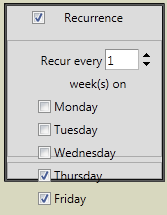
The following is the CSS applied to the RadSchedulerRecurrenceEditor control displayed above:
<style type="text/css">
.RecurrenceEditor .rsAdvPatternPanel
{
position:absolute;
margin-left: 0px !important;
padding: 0px 0px 0px 0px;
width: 120px !important;
}
.rsAdvWeekly_WeekDays li
{
margin-left: 0px;
width: auto !important;
}
</style>
Thank You!
Does anyone know the CSS styling that will set the dynamic height so all of the weekdays to be displayed within the RadSchedulerRecurrenceEditor container?
The following is the CSS applied to the RadSchedulerRecurrenceEditor control displayed above:
<style type="text/css">
.RecurrenceEditor .rsAdvPatternPanel
{
position:absolute;
margin-left: 0px !important;
padding: 0px 0px 0px 0px;
width: 120px !important;
}
.rsAdvWeekly_WeekDays li
{
margin-left: 0px;
width: auto !important;
}
</style>
Thank You!






