or
2 answers
121 views
Hello,
I´ve beein using PivotGrid since it's beta fase and I´ve localized it for portuguese and spanish.
You've been doind a realy good job and I want to proceed using it!
Users love the tool but now I want to update my app and don´t know how to translate the new features included, such as the filtering options. Is there any resx file (like radfilter)... or will i need to use jquery for that?
Thanks for any help on the subject!
I´ve beein using PivotGrid since it's beta fase and I´ve localized it for portuguese and spanish.
You've been doind a realy good job and I want to proceed using it!
Users love the tool but now I want to update my app and don´t know how to translate the new features included, such as the filtering options. Is there any resx file (like radfilter)... or will i need to use jquery for that?
Thanks for any help on the subject!
3 answers
245 views
Hi,
I have RadEditor control in my application. It had white background initially. I had used a directive @import to have default background of Telerik i.e. white. This is because Telerik ignored out styles of gray background. Now, I happened to switch over to the <link>. So it seems like the background is now gray instead.
Any idea on this?
I have RadEditor control in my application. It had white background initially. I had used a directive @import to have default background of Telerik i.e. white. This is because Telerik ignored out styles of gray background. Now, I happened to switch over to the <link>. So it seems like the background is now gray instead.
Any idea on this?

Rumen
Telerik team

answered
on
20 Mar 2013
5 answers
274 views
Hello,
I'm using the custom http handler method for AsyncUpload and I need to pass some values to my .ashx handler with query string. When I upload a 2048KB or smaller file everything works fine. But if I try to upload anything more than 2048KB, all query string variables become NULL but the UploadedFile content is fine. My application is setup to upload 2GB file and I have no problem with the standard method. What can possible cause the query string variables to become NULL?
Thanks.
I'm using the custom http handler method for AsyncUpload and I need to pass some values to my .ashx handler with query string. When I upload a 2048KB or smaller file everything works fine. But if I try to upload anything more than 2048KB, all query string variables become NULL but the UploadedFile content is fine. My application is setup to upload 2GB file and I have no problem with the standard method. What can possible cause the query string variables to become NULL?
Thanks.
<telerik:RadAsyncUpload ID="RadAsyncUpload1" runat="server" MultipleFileSelection="Automatic" OverwriteExistingFiles="True" OnClientFileUploaded="OnFileUploaded" DropZones="#FileContainerWrap" HttpHandlerUrl="~/File/RadUploadHandler.ashx" EnableInlineProgress="False" OnClientFileUploading="OnFileUploading" OnClientFilesSelected="OnFilesSelected" Width="100" OnClientValidationFailed="OnFileValidationFailed">

</telerik:RadAsyncUpload>


<script type="text/javascript">

	function OnFileUploading(sender, args) {

		var obj = { CustomerID: window.CustomerID };

                args.set_queryStringParams(obj);

	}

	.....

</script>


protected
override IAsyncUploadResult Process(UploadedFile file, HttpContext context, IAsyncUploadConfiguration configuration, string tempFileName){ try { var CustomerID = context.Request.QueryString["CustomerID"];
......
Plamen
Telerik team
answered
on
20 Mar 2013
2 answers
872 views
Hi, Im using the RadAutoCompleteBox on the right side of my page and when DropdDown appears, it is aligned with the left side of the textbox with width expanding to the right (and I miss some portion of the DropDown content if too wide). Is there a way to align the DropDown to the right of the input textbox and have the its width growing to the left? Im not sure if the DropDownPosition property is for that since it doesnt seem to be documented in control's documentation.
TIA
Martin
TIA
Martin

Martin Roussel
Top achievements
 Rank 1
Rank 1
answered
on
20 Mar 2013
2 answers
97 views
Hello all,
While handling controls in client side, some times I have to use $find("<%= txtSearch.ClientID %>") and some times $find("txtSearch").
So what is the difference between $find("<%= txtSearch.ClientID %>") and $find("txtSearch"). Also when I have to use $find("<%= txtSearch.ClientID %>") and $find("txtSearch"). Expecting a good explanation.
Thank you
Abhilash
While handling controls in client side, some times I have to use $find("<%= txtSearch.ClientID %>") and some times $find("txtSearch").
So what is the difference between $find("<%= txtSearch.ClientID %>") and $find("txtSearch"). Also when I have to use $find("<%= txtSearch.ClientID %>") and $find("txtSearch"). Expecting a good explanation.
Thank you
Abhilash
Abhilash
Top achievements
Rank 1
Rank 1
answered
on
20 Mar 2013
46 answers
494 views
I just updated to the latest telerik ajax controls (2011.2 915) and now the RadUpload control looks very strange in IE 8. No matter what skin I put on it, it just looks like a gray box with a top and right border and no browse button.
In Firefox it looks correct.
Any ideas?
Hristo Valyavicharski
Telerik team
answered
on
20 Mar 2013
2 answers
321 views
I return data to a RadGrid and would like to give the user the option to either export it to a CSV and/or Excel file. The CSV file would only provide them limited fields that they would need in order to import it into another application. The Excel version would contain all the columns displayed in the Grid.
I am currently able to give them the Excel file but is this possible to give them the CSV file using the same grid results only exporting preselected columns? If so, how would I go about doing this?
Also, is it possible to display the filters (using radFilter) that were applied on the exported file?
I am currently able to give them the Excel file but is this possible to give them the CSV file using the same grid results only exporting preselected columns? If so, how would I go about doing this?
Also, is it possible to display the filters (using radFilter) that were applied on the exported file?
Kurt Kluth
Top achievements
Rank 1
Rank 1
answered
on
20 Mar 2013
3 answers
70 views
I have a "Main" grid on the page which generates many reports based upon the user selection.
Here is the code of the Grid:
Some of the reports requires Hierarchy Grids within the MasterTableView which we create once the user clicks the "Generate Report Button". Here is the code to add the DetailsTables on Button Click:
We use the NeedDataSource event to re-populate the main grid when needed:
Expending the grids works well and the data is shown via DetailsTableDataBind:
Problem starts when you try to Sort or Page in the inner Grids. It simply doesn't work. No event gets fired, not "NeedDataSource" or "DetailsTableDataBind".
Your help is appreciated.
Here is the code of the Grid:
<telerik:RadGrid ID="gvMainControl" runat="server" AutoGenerateColumns="true" GridLines="None" CellPadding="0" CellSpacing="0" AllowPaging="False" Skin="WebBlue" AllowSorting="true" ShowFooter="True" EnableLinqExpressions="false" AllowCustomPaging="false" > <MasterTableView TableLayout="Auto" AllowFilteringByColumn="False" PageSize="20" CommandItemDisplay="Top" AllowCustomPaging="false" > </MasterTableView></telerik:RadGrid>Some of the reports requires Hierarchy Grids within the MasterTableView which we create once the user clicks the "Generate Report Button". Here is the code to add the DetailsTables on Button Click:
For i = 0 To intLevels Dim tableViewOrders As New Telerik.Web.UI.GridTableView() tableViewOrders.DataMember = dicTemp(i).GroupBy.GroupBy(0) gvMainControl.MasterTableView.DetailTables.Add(tableViewOrders) Next iWe use the NeedDataSource event to re-populate the main grid when needed:
Protected Sub gvMainControl_NeedDataSource(ByVal sender As Object, ByVal e As Telerik.Web.UI.GridNeedDataSourceEventArgs) Handles gvMainControl.NeedDataSource gvMainControl.DataSource = reporting_service.Run(Of Reporting.Item_DrillDown)() gvMainControl.MasterTableView.DataKeyNames = {"Category_Name"} gvMainControl.MasterTableView.ClientDataKeyNames = {"Category_Name"}End SubExpending the grids works well and the data is shown via DetailsTableDataBind:
Protected Sub gvMainControl_DetailTableDataBind(sender As Object, e As Telerik.Web.UI.GridDetailTableDataBindEventArgs) Handles gvMainControl.DetailTableDataBind If e.DetailTableView.DataMember = "Item_Name" Then Dim strCategory_Name As String = CType(e.DetailTableView.ParentItem, Telerik.Web.UI.GridDataItem).GetDataKeyValue("Category_Name") e.DetailTableView.DataSource = New Reporting_Service.Query(Global.Reporting_Service.Query.Report_Type.Items, New Dictionary(Of String, String) From {{"Category_Name", strCategory_Name}}, _ Nothing, New Reporting_Service.Query.Group(New List(Of String)({"Item_Name"}), New List(Of String)({"Quantity", "Total_Price"})), New List(Of String)({"Quantity"}), True, Nothing, Me.strUniqueID).Run(Of Reporting.Item_DrillDown)() End IfProblem starts when you try to Sort or Page in the inner Grids. It simply doesn't work. No event gets fired, not "NeedDataSource" or "DetailsTableDataBind".
Your help is appreciated.
Kostadin
Telerik team
answered
on
20 Mar 2013
3 answers
156 views
I have a problem in the RadAjaxloadPainel in the Browser Chrome Versão 25.0.1364.160 m, Only load one times. And generates the error in attachment.
Code:
Code Controls :
In others Browser with : IE9,Firefox, the page load the RadAjaxLoadingPanel correctly.
Code:
telerik:RadAjaxManagerProxy <telerik:RadAjaxManagerProxy ID="RadAjaxManagerProxy1" runat="server"> <AjaxSettings> <telerik:AjaxSetting AjaxControlID="ddlFamily"> <UpdatedControls> <telerik:AjaxUpdatedControl ControlID="ddlFamily" LoadingPanelID="RadAjaxLoadingPanel1" UpdatePanelCssClass="" /> <telerik:AjaxUpdatedControl ControlID="ddlGroup" LoadingPanelID="RadAjaxLoadingPanel1" UpdatePanelCssClass="" /> </UpdatedControls> </telerik:AjaxSetting> <telerik:AjaxSetting AjaxControlID="ddlGroup"> <UpdatedControls> <telerik:AjaxUpdatedControl ControlID="ddlGroup" UpdatePanelCssClass="" /> <telerik:AjaxUpdatedControl ControlID="ListViewPanel1" UpdatePanelCssClass="" /> </UpdatedControls> </telerik:AjaxSetting> <telerik:AjaxSetting AjaxControlID="ddlckcacessorios"> <UpdatedControls> <telerik:AjaxUpdatedControl ControlID="ListViewPanel1" UpdatePanelCssClass="" /> </UpdatedControls> </telerik:AjaxSetting> <telerik:AjaxSetting AjaxControlID="ddlformato"> <UpdatedControls> <telerik:AjaxUpdatedControl ControlID="ListViewPanel1" UpdatePanelCssClass="" /> </UpdatedControls> </telerik:AjaxSetting> <telerik:AjaxSetting AjaxControlID="ddltipo"> <UpdatedControls> <telerik:AjaxUpdatedControl ControlID="ListViewPanel1" UpdatePanelCssClass="" /> </UpdatedControls> </telerik:AjaxSetting> <telerik:AjaxSetting AjaxControlID="ddlcampanhas"> <UpdatedControls> <telerik:AjaxUpdatedControl ControlID="ListViewPanel1" UpdatePanelCssClass="" /> </UpdatedControls> </telerik:AjaxSetting> <telerik:AjaxSetting AjaxControlID="ddlFaixaPreco"> <UpdatedControls> <telerik:AjaxUpdatedControl ControlID="ListViewPanel1" UpdatePanelCssClass="" /> </UpdatedControls> </telerik:AjaxSetting> <telerik:AjaxSetting AjaxControlID="ddlfiltros"> <UpdatedControls> <telerik:AjaxUpdatedControl ControlID="ListViewPanel1" UpdatePanelCssClass="" /> </UpdatedControls> </telerik:AjaxSetting> <telerik:AjaxSetting AjaxControlID="btnSearch"> <UpdatedControls> <telerik:AjaxUpdatedControl ControlID="txtCodigo" LoadingPanelID="RadAjaxLoadingPanel1" UpdatePanelCssClass="" /> <telerik:AjaxUpdatedControl ControlID="btnSearch" LoadingPanelID="RadAjaxLoadingPanel1" UpdatePanelCssClass="" /> <telerik:AjaxUpdatedControl ControlID="ListViewPanel1" LoadingPanelID="RadAjaxLoadingPanel1" UpdatePanelCssClass="" /> <telerik:AjaxUpdatedControl ControlID="P13" UpdatePanelCssClass="" /> </UpdatedControls> </telerik:AjaxSetting> <telerik:AjaxSetting AjaxControlID="RadDataPager1"> <UpdatedControls> <telerik:AjaxUpdatedControl ControlID="ListViewPanel1" LoadingPanelID="RadAjaxLoadingPanel1" UpdatePanelCssClass="" /> </UpdatedControls> </telerik:AjaxSetting> </AjaxSettings> </telerik:RadAjaxManagerProxy> <telerik:RadAjaxLoadingPanel ID="RadAjaxLoadingPanel2" runat="server" EnableSkinTransparency="True" Skin="Vista" Transparency="30"/> <telerik:RadAjaxLoadingPanel ID="RadAjaxLoadingPanel1" runat="server" Skin="Metro" EnableSkinTransparency="True" Transparency="70"/>Code Controls :
<asp:Button ID="btnSearch" runat="server" Font-Names="Open Sans" style="margin-left:20px" CssClass="botaoNeutro" Visible="False" /> <div style="text-align: center; background-color:white; width: 99%;"> <asp:Panel ID="ListViewPanel1" runat="server" > <telerik:RadListView ID="RadListView1" runat="server" AllowPaging="True" DataSourceID="SqlDataSource" ItemPlaceholderID="ProductsContainer" DataKeyNames="cod_produto" OnPageIndexChanged="RadListView1_PageIndexChanged" AllowMultiItemSelection="True" Skin="Vista" Font-Names="Open Sans" ClientDataKeyNames="cod_produto" PageSize="12" > <%-- OnItemDataBound="Radlist1_ItemDataBound"--%> <LayoutTemplate> <div style="width: 940px; padding-left: 40px;"> <table> <tr> <td style="width: 930px" align="left"> <asp:PlaceHolder ID="ProductsContainer" runat="server"></asp:PlaceHolder> </td> </tr> </table> </div> </LayoutTemplate> <ItemTemplate> <div style="float: left; width: 150px; height: 145px; text-align: left;" align="left"> <table cellpadding="0" cellspacing="0" align="left"> <tr> <td> <asp:Image ID="ImageButton1" runat="server" width="140px" height="110px" Style="cursor:pointer;" onclick="ShowProduto(this)" ImageUrl='<%# "URL=" + Eval("cod_produto")%>' ToolTip='<%# Eval("cod_produto")%>' /> </td> </tr> </table> </div> </ItemTemplate> </telerik:RadListView> <table> <tr> <td align="center"> <fieldset style="width: 900px; padding-left: 40px; display: none;" id="FieldSet1" class="RadListView RadListView_Vista"> <table width="100%" class="RadListView RadListView_Vista" align="center"> <tr> <td> <telerik:RadDataPager ID="RadDataPager1" align="center" runat="server" PagedControlID="RadListView1" Font-Names="Open Sans" PageSize="12" BorderStyle="None" Skin="Vista" > <Fields> <%-- <telerik:RadDataPagerPageSizeField PageSizeText="<%$ Resources:Termos, QtdPagina %>" HorizontalPosition="LeftFloat" /> --%> <telerik:RadDataPagerTemplatePageField> <PagerTemplate> <div> <span style="vertical-align: middle; font-weight: bold; padding-left: 5px; font-family: 'Open Sans';"> <asp:Label ID="Label10" runat="server" Text="<%$ Resources:Termos, QtdPagina %>"></asp:Label> </span> <telerik:RadComboBox runat="server" Font-Names="Open Sans" ID="cmbPageSize" OnSelectedIndexChanged="cmbPageSize_SelectedIndexChanged" AutoPostBack="true" Width="40px" SelectedValue='<%# Container.Owner.PageSize %>' Skin="Vista"> <Items> <telerik:RadComboBoxItem Text="6" Value="6" /> <telerik:RadComboBoxItem Text="12" Value="12" /> <telerik:RadComboBoxItem Text="24" Value="24" /> <telerik:RadComboBoxItem Text="48" Value="48" /> <telerik:RadComboBoxItem Text="54" Value="54" /> <telerik:RadComboBoxItem Text="60" Value="60" /> </Items> </telerik:RadComboBox> </div> </PagerTemplate> </telerik:RadDataPagerTemplatePageField> <telerik:RadDataPagerButtonField FieldType="Numeric" /> </Fields> </telerik:RadDataPager> </td> </tr> </table> </fieldset> </td> </tr> </table> </asp:Panel></div>In others Browser with : IE9,Firefox, the page load the RadAjaxLoadingPanel correctly.
Maria Ilieva
Telerik team
answered
on
20 Mar 2013
1 answer
139 views
When I am validating a text box, I show a rad alert with error message, if i close the rad alert with mouse, it works perfectly, however
if I hit the 'Enter' key, the first time it behaves as expected, but after that it starts showing up the below message,
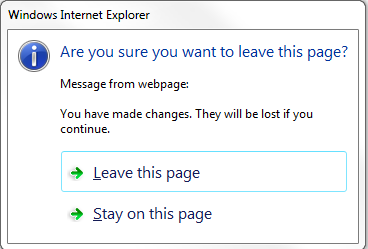
Why do i get this message only with 'Enter' key and is there a way to suppress this message?
Thanks,
Deepa
if I hit the 'Enter' key, the first time it behaves as expected, but after that it starts showing up the below message,
Why do i get this message only with 'Enter' key and is there a way to suppress this message?
Thanks,
Deepa
Marin Bratanov
Telerik team
answered
on
20 Mar 2013





