or
1 answer
106 views
Hello,
My scenario is that I need to refresh a RadChart's data on my page periodically with a timer (around one minute) and the radchart is created dianmically from code behind.
I have tried two different solutions but each of them has some memory/space issue:
1. Setting the Usession property of the radchart to true, the memory grows exponentially at every postback (each time the radchart refreshes); then, after short time (depending on how many users, number of radcharts on my page and refreshing time of each radchart) the iis instance's memory explodes and blockes everything. I understand that every time a chart refresh, its image is memorised in session, so that is the casue why memory grows. Is there any solution to that? use the same variable in session in order to stop memory from growing? is there any setting apropiate for that?
2. The other solution i tried: setting usession property to false, and use the temporary virtual path to store the images. This way is much better, and the application (iis process) does not have any memory problem, but i have to manage the space on the disk. Any suggestions here? is there a way to override files (not creating a new one each time with a different name)? or is there any other possible solution apart separately managing the cleaning of this directory?
Could you please indicate me wich of the 2 solutions is more suitable and answer the relative questions.
Any help qould be appreciated.
Thanks a lot in advance.
My scenario is that I need to refresh a RadChart's data on my page periodically with a timer (around one minute) and the radchart is created dianmically from code behind.
I have tried two different solutions but each of them has some memory/space issue:
1. Setting the Usession property of the radchart to true, the memory grows exponentially at every postback (each time the radchart refreshes); then, after short time (depending on how many users, number of radcharts on my page and refreshing time of each radchart) the iis instance's memory explodes and blockes everything. I understand that every time a chart refresh, its image is memorised in session, so that is the casue why memory grows. Is there any solution to that? use the same variable in session in order to stop memory from growing? is there any setting apropiate for that?
2. The other solution i tried: setting usession property to false, and use the temporary virtual path to store the images. This way is much better, and the application (iis process) does not have any memory problem, but i have to manage the space on the disk. Any suggestions here? is there a way to override files (not creating a new one each time with a different name)? or is there any other possible solution apart separately managing the cleaning of this directory?
Could you please indicate me wich of the 2 solutions is more suitable and answer the relative questions.
Any help qould be appreciated.
Thanks a lot in advance.

Petar Kirov
Telerik team

answered
on
18 Apr 2013
1 answer
131 views
Hi, I had a dynamic radmenu (using ArrayList) in my masterpage.
I want to get the DataFieldID when user click the menu item, so i put a OnItemClick event in the code behind, but the event cannot be fire.
How can I fire the event ?
Or is there any other method to get the DataFieldID when user click the item ? thanks.
My masterpage code as follow:
<%@ Master Language="VB" CodeFile="LRDB.master.vb" Inherits="LRDB" %><%@ Register TagPrefix="telerik" Namespace="Telerik.Web.UI" Assembly="Telerik.Web.UI" %><!DOCTYPE html PUBLIC "-//W3C//DTD XHTML 1.0 Transitional//EN" "http://www.w3.org/TR/xhtml1/DTD/xhtml1-transitional.dtd"><html xmlns="http://www.w3.org/1999/xhtml"><head id="Head1" runat="server"> <title></title> <asp:ContentPlaceHolder ID="head" runat="server"> </asp:ContentPlaceHolder> <link href="Style/StyleSheet.css" rel="stylesheet" type="text/css" /></head><body> <form id="form1" runat="server"> <telerik:RadScriptManager runat="server" ID="RadScriptManager1"/> <telerik:RadSkinManager ID="QsfSkinManager" runat="server" ShowChooser="false" /> <telerik:RadFormDecorator ID="QsfFromDecorator" runat="server" DecoratedControls="All" EnableRoundedCorners="true" /> <div class="div_menu"> <telerik:RadMenu ID="RadMenu1" runat="server" EnableRoundedCorners="True" EnableShadows="True" EnableTextHTMLEncoding="True" Skin="Windows7" DataSourceID="ObjectDataSource1" DataFieldID="Function_ID"DataFieldParentID="ParentID" DataTextField="Description" DataNavigateUrlField="Page" OnDataBound="RadMenu1_DataBound" OnItemDataBound="RadMenu1_ItemDataBound" Width="100%" OnItemClick="RadMenu1_ItemClick"> </telerik:RadMenu> <asp:ObjectDataSource ID="ObjectDataSource1" runat="server" SelectMethod="GetMenuByFunctionID" TypeName="LRDB"> <SelectParameters> <asp:SessionParameter DefaultValue="" Name="id" SessionField="FID" Type="String" /> </SelectParameters> </asp:ObjectDataSource> <hr class= "menu_hr" /> <asp:Label ID="lb_panel" runat="server" Font-Bold="true" ForeColor="#485C7F" Font-Names="Arial" Font-Size="20pt"></asp:Label> <div id="content_function" class="content_function"> <div id="content" class="content"><asp:ContentPlaceHolder ID="ContentPlaceHolder2" runat="server" ></asp:ContentPlaceHolder> </div> </div> </div> </form></body></html>VB code behind of the masterpage:
Imports SystemImports System.Collections.GenericImports Telerik.Web.UIPartial Class LRDB Inherits System.Web.UI.MasterPage Protected Sub Page_Load(ByVal sender As Object, ByVal e As System.EventArgs) Handles Me.Load If Not IsPostBack Then Dim UID As String = HttpContext.Current.Session("UserID") If Not IsNothing(UID) Then 'Generate Menu Bar By UserID, RoleTypeID Dim FID As String = GetFunctionIDByRoleTypeID(GetRoleTypeIDByUserID(UID)) HttpContext.Current.Session("FID") = FID Else Response.Redirect("~/Login.aspx") End If End If End Sub Protected Sub RadMenu1_ItemClick(ByVal sender As Object, ByVal e As Telerik.Web.UI.RadMenuEventArgs) Handles RadMenu1.ItemClick Dim SelectFunctionID As Integer = 0 SelectFunctionID = RadMenu1.SelectedValue End Sub Protected Sub RadMenu1_DataBound(ByVal sender As Object, ByVal e As EventArgs) Me.InsertSeparator(0, Me.RadMenu1) End Sub Public Sub RadMenu1_ItemDataBound(ByVal sender As Object, ByVal e As RadMenuEventArgs) If e.Item.Level = 0 Then Me.InsertSeparator(e.Item.Index + 1, Me.RadMenu1) End If End Sub Private Sub InsertSeparator(ByVal index As Integer, ByVal menu As RadMenu) Dim separator As New RadMenuItem() separator.IsSeparator = True separator.Text = "|" menu.Items.Insert(index, separator) End SubEnd ClassAnd the Common VB function:
Public Function GetFunctionIDByRoleTypeID(ByVal id As String) As String Dim FID As String = "" Dim rList = Split(id, ",") Dim dc As New dcLRDBDataContext Dim i As Integer = 0 'Get Dintinct Function ID Dim result = (From cs In dc.db_RoleType_AccessRights Where rList.Contains(cs.RoleTypeID) Select cs.FunctionID Order By FunctionID Ascending).Distinct().ToList If result.Count > 0 Then For i = 0 To result.Count - 1 FID += result.Item(i).ToString & "," Next Else FID = result.Item(0).ToString End If dc.Dispose() Return FIDEnd FunctionPublic Function GetRoleTypeIDByUserID(ByVal id As Integer) As String Dim RoleType_list As String = "" Dim dc As New dcLRDBDataContext Dim result = (From cs In dc.db_UserRoles Where cs.UserID = id Select cs.RoleTypeID).ToList Dim i As Integer = 0 If Not IsNothing(result) Then If result.Count > 0 Then For i = 0 To result.Count - 1 RoleType_list += result.Item(i).ToString & "," Next Else RoleType_list = result.Item(0).ToString End If End If dc.Dispose() Return RoleType_listEnd Function
Kate
Telerik team
answered
on
18 Apr 2013
10 answers
558 views
Hi,
My problem is that in the
i have
<assemblies>
<add assembly="Telerik.Web.Design, Version=2009.2.701.35, Culture=neutral, PublicKeyToken=121FAE78165BA3D4"/>
<add assembly="Telerik.Web.UI, Version=2009.2.701.35, Culture=neutral, PublicKeyToken=121FAE78165BA3D4"/>
....
</assemblies>
And each time i change the telerik version, it's a pain to change everything , the version etc.
and i have to do that in each page where i have the tag :
<%@ Register assembly="Telerik.Web.UI, Version=2009.2.701.35, Culture=neutral, PublicKeyToken=121fae78165ba3d4" namespace="Telerik.Web.UI" tagprefix="telerik" %>
Is there something to do, so it'll automatically take the DLL of the version of telerik installed ?
i'm on visual studio 2008.
How can i modifiy that, to have only the telerik's setup to run when i want to change for the last version, without having to change every parameters in each web project i have.
My problem is that in the
i have
<assemblies>
<add assembly="Telerik.Web.Design, Version=2009.2.701.35, Culture=neutral, PublicKeyToken=121FAE78165BA3D4"/>
<add assembly="Telerik.Web.UI, Version=2009.2.701.35, Culture=neutral, PublicKeyToken=121FAE78165BA3D4"/>
....
</assemblies>
And each time i change the telerik version, it's a pain to change everything , the version etc.
and i have to do that in each page where i have the tag :
<%@ Register assembly="Telerik.Web.UI, Version=2009.2.701.35, Culture=neutral, PublicKeyToken=121fae78165ba3d4" namespace="Telerik.Web.UI" tagprefix="telerik" %>
Is there something to do, so it'll automatically take the DLL of the version of telerik installed ?
i'm on visual studio 2008.
How can i modifiy that, to have only the telerik's setup to run when i want to change for the last version, without having to change every parameters in each web project i have.
Pavlina
Telerik team
answered
on
18 Apr 2013
1 answer
135 views
Hi guys!
No matter how hard I search, I found no examples on how to localize the "OK", "Today" and "Cancel" buttons on RadMonthYearPicker. How would I do that? From what I've read, it isn't possible to do it through a *.resx file, but then "FastNavigationSettings" doesn't exist in the component, so what should I do?
No matter how hard I search, I found no examples on how to localize the "OK", "Today" and "Cancel" buttons on RadMonthYearPicker. How would I do that? From what I've read, it isn't possible to do it through a *.resx file, but then "FastNavigationSettings" doesn't exist in the component, so what should I do?

Eyup
Telerik team
answered
on
18 Apr 2013
7 answers
787 views
I'm having a weird issue and i'm not sure where to look or how to debug.
I have a Master Page which has the RadAjaxManager , RadLoadingPanel, RadScriptManager
I have a Parent Page A which uses the Master Page. The Parent Page has a Combo box control with 7 provinces; Each Province has a User Control ( View ). By default , the selected index is province "SK" which loads in the same page a user control View dynamically.
I have a Master Page which has the RadAjaxManager , RadLoadingPanel, RadScriptManager
I have a Parent Page A which uses the Master Page. The Parent Page has a Combo box control with 7 provinces; Each Province has a User Control ( View ). By default , the selected index is province "SK" which loads in the same page a user control View dynamically.
Below is my HTML and Code behind for the Parent Page
<telerik:RadAjaxManagerProxy ID="RadAjaxManagerProxy1" runat="server"> <AjaxSettings> <telerik:AjaxSetting AjaxControlID="cmbProvince"> <UpdatedControls> <telerik:AjaxUpdatedControl ControlID="phPPSAControl" UpdatePanelHeight="100%" /> </UpdatedControls> </telerik:AjaxSetting> </AjaxSettings> </telerik:RadAjaxManagerProxy> <telerik:RadComboBox ID="cmbProvince" runat="server" OnSelectedIndexChanged="cmbProvince_SelectedIndexChanged" AutoPostBack="true"> <Items> <telerik:RadComboBoxItem runat="server" Text="Quebec" Value="QC" /> <telerik:RadComboBoxItem runat="server" Text="Ontario" Value="ON" /> <telerik:RadComboBoxItem runat="server" Text="Saskatchewan" Value="SK" /> <telerik:RadComboBoxItem runat="server" Text="Manitoba" Value="MB" /> <telerik:RadComboBoxItem runat="server" Text="Yukon" Value="YT" /> <telerik:RadComboBoxItem runat="server" Text="Nuvanut" Value="NU" /> </Items> </telerik:RadComboBox> <asp:PlaceHolder ID="phPPSAControl" runat="server"></asp:PlaceHolder> private string _currentProvince = ""; protected void Page_PreInit(object sender, EventArgs e) { MasterPage master = this.Master; _currentProvince = GetCurrentOperatingProvince(IsPostBack); cmbProvince.SelectedValue = _currentProvince; txtReferenceNo.Text = "TECHLOS" + DateTime.Now.ToString("MMddyyyy-HHMMss"); //Reload Dynamic Control on Every Page Creation LoadDetailControl(); } /// <summary> /// Handles the SelectedIndexChanged event of the cmbProvince control. /// </summary> /// <param name="sender">The source of the event.</param> /// <param name="e">The <see cref="Telerik.Web.UI.RadComboBoxSelectedIndexChangedEventArgs"/> instance containing the event data.</param> protected void cmbProvince_SelectedIndexChanged(object sender, RadComboBoxSelectedIndexChangedEventArgs e) { phPPSAControl.Controls.Clear(); _currentProvince = e.Value; LoadDetailControl(); } /// <summary> /// Loads the detail control based on _currentProvince /// </summary> private void LoadDetailControl() { UserControl ucPPSAControl = (UserControl)LoadControl(GetUserControlPath(_currentProvince)); IPPSAView provView = ucPPSAControl as IPPSAView; ApplicationContext.TargetProvince = _currentProvince; PPSAPresenter presenter = new PPSAPresenter(provView, ApplicationContext); provView.AttachPresenter(presenter, cmbProvince.SelectedValue, txtReferenceNo.Text); phPPSAControl.Controls.Add(ucPPSAControl); } <telerik:RadAjaxManagerProxy ID="RadAjaxManagerProxy1" runat="server"> <AjaxSettings> <telerik:AjaxSetting AjaxControlID="cmbProvince"> <UpdatedControls> <telerik:AjaxUpdatedControl ControlID="phPPSAControl" UpdatePanelHeight="100%" /> </UpdatedControls> </telerik:AjaxSetting> </AjaxSettings> </telerik:RadAjaxManagerProxy> <telerik:RadComboBox ID="cmbProvince" runat="server" OnSelectedIndexChanged="cmbProvince_SelectedIndexChanged"AutoPostBack="true"> <Items> <telerik:RadComboBoxItem runat="server" Text="Quebec" Value="QC" /> <telerik:RadComboBoxItem runat="server" Text="Ontario" Value="ON" /> <telerik:RadComboBoxItem runat="server" Text="Saskatchewan" Value="SK" /> <telerik:RadComboBoxItem runat="server" Text="Manitoba" Value="MB" /> <telerik:RadComboBoxItem runat="server" Text="Yukon" Value="YT" /> <telerik:RadComboBoxItem runat="server" Text="Nuvanut" Value="NU" /> </Items> </telerik:RadComboBox> <asp:PlaceHolder ID="phPPSAControl" runat="server"></asp:PlaceHolder> /// And the C# Code behind private string _currentProvince = ""; protected void Page_PreInit(object sender, EventArgs e) { MasterPage master = this.Master; _currentProvince = GetCurrentOperatingProvince(IsPostBack); cmbProvince.SelectedValue = _currentProvince; txtReferenceNo.Text = "TECHLOS" + DateTime.Now.ToString("MMddyyyy-HHMMss"); //Reload Dynamic Control on Every Page Creation LoadDetailControl(); } /// <summary> /// Handles the SelectedIndexChanged event of the cmbProvince control. /// </summary> /// <param name="sender">The source of the event.</param> /// <param name="e">The <see cref="Telerik.Web.UI.RadComboBoxSelectedIndexChangedEventArgs"/> instance containing the event data.</param> protected void cmbProvince_SelectedIndexChanged(object sender, RadComboBoxSelectedIndexChangedEventArgs e) { phPPSAControl.Controls.Clear(); _currentProvince = e.Value; LoadDetailControl(); } /// <summary> /// Loads the detail control based on _currentProvince /// </summary> private void LoadDetailControl() { UserControl ucPPSAControl = (UserControl)LoadControl(GetUserControlPath(_currentProvince)); IPPSAView provView = ucPPSAControl as IPPSAView; ApplicationContext.TargetProvince = _currentProvince; PPSAPresenter presenter = new PPSAPresenter(provView, ApplicationContext); provView.AttachPresenter(presenter, cmbProvince.SelectedValue, txtReferenceNo.Text); phPPSAControl.Controls.Add(ucPPSAControl); }In each UC by province, it has a Search button with an OnClick Event. The first time I land on the default province, the Search button works as expected and fires the OnClick and the Event Handler Search_Click is ran.
Below is that of a typical UC for each province
<telerik:RadButton ID="btnSearch" runat="server" Text="Search" OnClick="Search_OnClick"> </telerik:RadButton> /// <summary> /// Handles the OnClick event of the Search control. /// </summary> /// <param name="sender">The source of the event.</param> /// <param name="e">The <see cref="System.EventArgs"/> instance containing the event data.</param> protected void Search_OnClick(object sender, EventArgs e) { if (isValidSearchRequest()) { DisplayResultsFromResponse(presenter.Search()); } else { phResponse.Controls.Add(new LiteralControl(string.Format("<span style='color:red'>Invalid Search Request</span>"))); } } Now when I change the province to "ON" ( or any other province has the same behaviour), When I click on the Search Button on the newly generated UC , it only posts back without triggering the OnClick Event. Clicking Twice , does the same thing... and on the 3rd time, It does trigger the OnClick... and ran as normal!!!
The OnClick only occurs the first time I Load the first control and the minute I change the province, so a Post back to refresh the new View with a new Search Button, the latter when clicked doesn't trigger the Search_OnClick() but rather do a post back... Clicking again will post back again and finally a 3rd time, gets it to call this function ...
Maria Ilieva
Telerik team
answered
on
18 Apr 2013
9 answers
333 views
Dear Telerik team,
Can I change the marker size in RadHtmlChart? Now I do these:
$('circle').attr('r' , 10);
or
var circle = document.getElementByTagName('circle');
circle.setAttribute('r' , 10);
all of above didn't work. Is there any solution?
thanks!
Can I change the marker size in RadHtmlChart? Now I do these:
$('circle').attr('r' , 10);
or
var circle = document.getElementByTagName('circle');
circle.setAttribute('r' , 10);
all of above didn't work. Is there any solution?
thanks!
Jon
Top achievements
 Rank 1
Rank 1
answered
on
18 Apr 2013
1 answer
73 views
Dear Telerik Team,
I have requirement to show result set into RAD Grid with Hyperlink for all / few column with each colum has different navigate URL and each row has it's own value in the querysting.
since result set from database will not be same and reference column also not same.
In Design time I won't define anything.
could you provide code snipet that does everything on run time.
with Regards
Palanivelrajan
I have requirement to show result set into RAD Grid with Hyperlink for all / few column with each colum has different navigate URL and each row has it's own value in the querysting.
since result set from database will not be same and reference column also not same.
In Design time I won't define anything.
could you provide code snipet that does everything on run time.
with Regards
Palanivelrajan


3 answers
966 views
Have a scenario, where a form includes dropdown box and RadEditor.
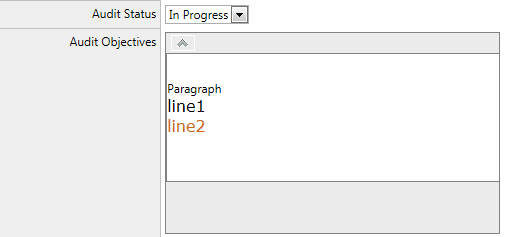
Once the user enters the Audit Status and Audit Objectives. The data is saved in the database. And from the database it is exported to the excel sheet. But since Audit Objectives field is a RadEditor control, the user enters the formatted data, which includes html tags like <p>, <span>, <br> etc.
When the data is exported to excel sheet, it does not store the entire data(audit objectives) in one cell, rather where it finds the <p>, <div> etc tags it breaks the data and copies the data in the new cell. Like the image below.
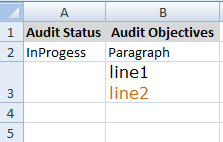
The cell B2 should store the entire text Paragraph line1 and line2 (as formatted in the Rad Editior).
The Html stored in the db is
<table>
<tr>
<td>
<p style="mso-data-placement: same-cell;">
Paragraph</p>
<span style="margin: 0px 0px 12px 0px; text-align: left; text-indent: 0pt; padding: 0px 0px 0px 0px;
mso-data-placement: same-cell;"><span style="font-family: 'Verdana'; font-style: Normal;
font-weight: normal; font-size: 16px; color: #000000;">line1</span></span>
<br style="mso-data-placement: same-cell;">/>
<span style="margin: 0px 0px 12px 0px; text-align: left; text-indent: 0pt; padding: 0px 0px 0px 0px;
mso-data-placement: same-cell;"><span style="font-family: 'Verdana'; font-style: Normal;
font-weight: normal; font-size: 16px; color: #CA6919;">line2</span> </span>
</td>
</tr>
</table>
Please Note : Am exporting the excel data using JAVASCRIPT.
Please suggest.
ASAP!!
Once the user enters the Audit Status and Audit Objectives. The data is saved in the database. And from the database it is exported to the excel sheet. But since Audit Objectives field is a RadEditor control, the user enters the formatted data, which includes html tags like <p>, <span>, <br> etc.
When the data is exported to excel sheet, it does not store the entire data(audit objectives) in one cell, rather where it finds the <p>, <div> etc tags it breaks the data and copies the data in the new cell. Like the image below.
The cell B2 should store the entire text Paragraph line1 and line2 (as formatted in the Rad Editior).
The Html stored in the db is
<table>
<tr>
<td>
<p style="mso-data-placement: same-cell;">
Paragraph</p>
<span style="margin: 0px 0px 12px 0px; text-align: left; text-indent: 0pt; padding: 0px 0px 0px 0px;
mso-data-placement: same-cell;"><span style="font-family: 'Verdana'; font-style: Normal;
font-weight: normal; font-size: 16px; color: #000000;">line1</span></span>
<br style="mso-data-placement: same-cell;">/>
<span style="margin: 0px 0px 12px 0px; text-align: left; text-indent: 0pt; padding: 0px 0px 0px 0px;
mso-data-placement: same-cell;"><span style="font-family: 'Verdana'; font-style: Normal;
font-weight: normal; font-size: 16px; color: #CA6919;">line2</span> </span>
</td>
</tr>
</table>
Please Note : Am exporting the excel data using JAVASCRIPT.
Please suggest.
ASAP!!
Slav
Telerik team
answered
on
18 Apr 2013
6 answers
102 views
I want to create a custom RadFilter
I want to show a dropdown(combo) but have the choices be IN or NotIN I would actually call them "In Order" and "Not In Order"
my data would look like the following.
orderID | OrderDate | ProductList
123456 04/01/2013 15,16,17,18,19
here is an image of what I am trying to do.
I want to show a dropdown(combo) but have the choices be IN or NotIN I would actually call them "In Order" and "Not In Order"
my data would look like the following.
orderID | OrderDate | ProductList
123456 04/01/2013 15,16,17,18,19
here is an image of what I am trying to do.
6 answers
112 views
When I set ContentScrolling="Auto" the left border of the tooltip is missing in opera, chrome and IE9. I tried tooltipBorderHack but it doesn't seem to work.
The screen shot is from the online demos right here.
Thanks, Marty
The screen shot is from the online demos right here.
Thanks, Marty





