or
9 answers
296 views
I have a gridview with auto generate columns and it shows several data what I need is when I edit a record it hows everything with textbox I need on a specific field to show a combobox instead and that combobox must have a datasiurce and changes must be saved on update
also other field need to show a label instead of textbox.
in design mode I went on edit template but there I cant field any fields to delete the textbox and put a combobox like with the default gridview of visual studio...
also other field need to show a label instead of textbox.
in design mode I went on edit template but there I cant field any fields to delete the textbox and put a combobox like with the default gridview of visual studio...

1 answer
186 views
Dear telerik-Support,
how can I remove a color from a predefined color palette (e.g. WebPalette) on server(c#) and client side (js)?
how can I translated (its shows the color code like #fffff) or hide the tooltip on color hoveing?
Thanks a lot for your help.
Regards,
Christian
how can I remove a color from a predefined color palette (e.g. WebPalette) on server(c#) and client side (js)?
how can I translated (its shows the color code like #fffff) or hide the tooltip on color hoveing?
Thanks a lot for your help.
Regards,
Christian

Slav
Telerik team

answered
on
02 Aug 2013
2 answers
84 views
I've been using the RadWindow.RadAlert as an error popup in a number of situations, usually in various RadGrid events.
Now I have an aspx that I'm calling from within a Radgrid using a window.radopen call. Once the window is open, it's closed by hitting a RadButton and generating a ClientScript.RegisterStartupScript(Page.GetType(), "", "CloseAndRebind();", true) in it's OnClick event. This is all pretty much based on your demos.
However in this event I have error trapping and what I want to do is when the code errors out is to instead generate an error popup. What I have within the catch statement is a RadWindowManager.RadAlert and a return. This is not working.
Suggestions?
Now I have an aspx that I'm calling from within a Radgrid using a window.radopen call. Once the window is open, it's closed by hitting a RadButton and generating a ClientScript.RegisterStartupScript(Page.GetType(), "", "CloseAndRebind();", true) in it's OnClick event. This is all pretty much based on your demos.
However in this event I have error trapping and what I want to do is when the code errors out is to instead generate an error popup. What I have within the catch statement is a RadWindowManager.RadAlert and a return. This is not working.
Suggestions?
1 answer
86 views
Is the RadDock Tag persitant after a postback?
Slav
Telerik team
answered
on
02 Aug 2013
0 answers
114 views
This works:
editor.CssFiles.Add("~/skins/D1041/EditorContentArea.css")
This doesn't
editor.CssFiles.Add("~/skins/d1041/EditorContentArea.css")
Had a blast figuring that out.
Regards,
-DJ-

6 answers
160 views
I could not find if this was logged yet or not. With the latest AJAX controls build (4.0.30319), the Async Upload SELECT button jumps up and gets cut off if the user clicks just to the right of the button. This only appears to happen in IE and not Chrome.
I tested this on the Telerik Demos site for Async Upload and it is repeatable.
I attached a screen shot.
I tested this on the Telerik Demos site for Async Upload and it is repeatable.
I attached a screen shot.

Michael H
Top achievements
 Rank 2
Rank 2
answered
on
02 Aug 2013
1 answer
78 views
Hi,
I'm using simple radwindow to open pdf doc .. below I mentioned the code in the same page we using ajax setting,Telerik.WebControls
the pdf not opening in ie but Firefox working I tried all solution in net I found error like page open twice or page open twice on first click or it not working ie , I put up sample project it working fine i incorporate same in project it is not working. My page have ajax setting .I dont know what happen . when click the button AjaxNs.Arwo(new webform_Postbackoption("").. seen the link???
<%@ Register Assembly="Telerik.Web.UI" Namespace="Telerik.Web.UI" TagPrefix="telerik" %>
<telerik:RadWindow runat="server" ID="RadWindow2" EnableAjaxSkinRendering="false" ></telerik:RadWindow>
RadWindow2.NavigateUrl = objFileManager.GetVirtualFilePath(objFileManager.GetFile(valTPContractUploadFile.CopiedFileFullPath));
RadWindow2.VisibleOnPageLoad = true;
I'm using simple radwindow to open pdf doc .. below I mentioned the code in the same page we using ajax setting,Telerik.WebControls
the pdf not opening in ie but Firefox working I tried all solution in net I found error like page open twice or page open twice on first click or it not working ie , I put up sample project it working fine i incorporate same in project it is not working. My page have ajax setting .I dont know what happen . when click the button AjaxNs.Arwo(new webform_Postbackoption("").. seen the link???
<%@ Register Assembly="Telerik.Web.UI" Namespace="Telerik.Web.UI" TagPrefix="telerik" %>
<telerik:RadWindow runat="server" ID="RadWindow2" EnableAjaxSkinRendering="false" ></telerik:RadWindow>
RadWindow2.NavigateUrl = objFileManager.GetVirtualFilePath(objFileManager.GetFile(valTPContractUploadFile.CopiedFileFullPath));
RadWindow2.VisibleOnPageLoad = true;
Danail Vasilev
Telerik team
answered
on
02 Aug 2013
1 answer
126 views
Hello,
I have tried and got success in hiding individual columns in Grid. But, my requirement is i want to hide multiple column header section also.
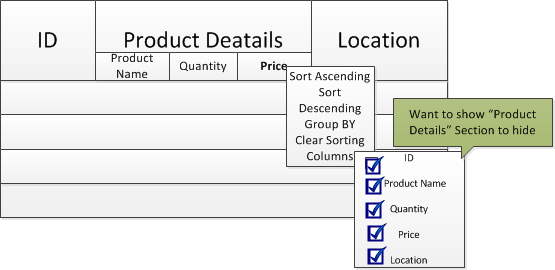
I want to hide "Product Details" Section also.
JS:
function ShowColumnHeaderMenu(ev, columnName) {
var grid = $find("<%=RadGrid1.ClientID %>");
var columns = grid.get_masterTableView().get_columns();
for (var i = 0; i < columns.length; i++) {
if (columns[i].get_uniqueName() == columnName) {
columns[i].showHeaderMenu(ev, 75, 20);
}
}
}
Can you give me suggestions how can i do this.
Thanks in advance,
Venkata.
I have tried and got success in hiding individual columns in Grid. But, my requirement is i want to hide multiple column header section also.
I want to hide "Product Details" Section also.
JS:
function ShowColumnHeaderMenu(ev, columnName) {
var grid = $find("<%=RadGrid1.ClientID %>");
var columns = grid.get_masterTableView().get_columns();
for (var i = 0; i < columns.length; i++) {
if (columns[i].get_uniqueName() == columnName) {
columns[i].showHeaderMenu(ev, 75, 20);
}
}
}
Can you give me suggestions how can i do this.
Thanks in advance,
Venkata.
Marin
Telerik team
answered
on
02 Aug 2013
1 answer
73 views
Hi ,
The radgrid is getting misaligned as in the attached screen shot.It occurring only in browser version: Internet Explorer 8 Version 8.0.7600.16385. Please let us know how to fix the issue.
Thanks
Gayathri
The radgrid is getting misaligned as in the attached screen shot.It occurring only in browser version: Internet Explorer 8 Version 8.0.7600.16385. Please let us know how to fix the issue.
<asp:UpdatePanel ID="UpdatePanel1" runat="server"> <ContentTemplate> <telerik:RadGrid ID="gridCCU" AllowPaging="true" AllowSorting="true" OnNeedDataSource="gridCCU_NeedDataSource" AutoGenerateColumns="false" AllowAutomaticInserts="true" GridLines="Horizontal" ClientSettings-EnableRowHoverStyle="true" EnableAjaxSkinRendering="false" MasterTableView-RowIndicatorColumn-ItemStyle-BorderColor="ActiveBorder" Height="220px" runat="server" OnItemCommand="getCCU"> <ClientSettings Scrolling-AllowScroll="true" EnablePostBackOnRowClick="true" Selecting-AllowRowSelect="true" Scrolling-UseStaticHeaders="true"> </ClientSettings> <MasterTableView AllowPaging="true" DataKeyNames="OBJID" Width="100%" TableLayout="Fixed" EnableViewState="true" HeaderStyle-HorizontalAlign="Center" ItemStyle-HorizontalAlign="Center" AlternatingItemStyle-HorizontalAlign="Center"> <Columns> <telerik:GridBoundColumn DataField="MODEL" HeaderText="MODEL" HeaderStyle-Font-Bold="true"> </telerik:GridBoundColumn> <telerik:GridBoundColumn DataField="Connections.connectionType" HeaderStyle-Font-Bold="true" HeaderText="COMMUNICATION TYPE" > </telerik:GridBoundColumn> <telerik:GridBoundColumn DataField="Connections.IPAddress" HeaderStyle-Font-Bold="true" HeaderText="ADDRESS" > </telerik:GridBoundColumn> <%--<telerik:GridBoundColumn DataField="STATUS" HeaderText="STATUS" HeaderStyle-Font-Bold="true" > </telerik:GridBoundColumn>--%> <telerik:GridTemplateColumn UniqueName="statusCCU" HeaderStyle-Font-Bold="true" HeaderText="STATUS"> <ItemTemplate> <asp:Label ID="lblStatus" runat="server" Text="OFFLINE"></asp:Label> </ItemTemplate> </telerik:GridTemplateColumn> </Columns> <HeaderStyle CssClass="GridHeader" /> </MasterTableView> <PagerStyle Mode="NextPrevAndNumeric" EnableSEOPaging="true" VerticalAlign="Bottom" Position="Bottom" AlwaysVisible="true" /> </telerik:RadGrid> </ContentTemplate> </asp:UpdatePanel>Thanks
Gayathri
Deyan Enchev
Telerik team
answered
on
02 Aug 2013
1 answer
137 views
i have used in my project telerik captcha in the login page,
In some times when i type the characters from the captcha image in to text box it is telling "The code you typed is in correct" even i typed correctly. when i restart IIS it works fine and the same patter appears again after few days.
So please can any one help me.
Markup
-----------------
<div class="captcha">
<telerik:RadCaptcha ID="RadCaptcha1" runat="server" CaptchaTextBoxLabel="Please type the code from the image"
IgnoreCase="true" CaptchaTextBoxLabelCssClass="captchaLabel" EnableRefreshImage="False"
CaptchaLinkButtonText="Refresh" ValidatedTextBoxID="txtCaptcha" CaptchaImage-RenderImageOnly="True">
<CaptchaImage BackgroundNoise="Medium" TextLength="5" LineNoise="Medium" TextChars="CustomCharSet"
CharSet="abcdefghijkmnpqrstuvwxyz123456789" />
</telerik:RadCaptcha>
<div class="captchatextBox">
<telerik:RadTextBox ID="txtCaptcha" runat="server" Width="180px" Height="30px" MaxLength="5">
</telerik:RadTextBox>
</div>
<div class="captchaLabel">
<asp:Label ID="Label1" runat="server" Text="Type code from the image" Width="230px"></asp:Label>
</div>
</div>
C# Code
-------------
if (!RadCaptcha1.IsValid)
{
auditClient.AddMessage("Captcha Validation", "False");
lblError.Text = "Please add text on image";
return;
}
auditClient.AddMessage("Captcha Validation", "True");
In some times when i type the characters from the captcha image in to text box it is telling "The code you typed is in correct" even i typed correctly. when i restart IIS it works fine and the same patter appears again after few days.
So please can any one help me.
Markup
-----------------
<div class="captcha">
<telerik:RadCaptcha ID="RadCaptcha1" runat="server" CaptchaTextBoxLabel="Please type the code from the image"
IgnoreCase="true" CaptchaTextBoxLabelCssClass="captchaLabel" EnableRefreshImage="False"
CaptchaLinkButtonText="Refresh" ValidatedTextBoxID="txtCaptcha" CaptchaImage-RenderImageOnly="True">
<CaptchaImage BackgroundNoise="Medium" TextLength="5" LineNoise="Medium" TextChars="CustomCharSet"
CharSet="abcdefghijkmnpqrstuvwxyz123456789" />
</telerik:RadCaptcha>
<div class="captchatextBox">
<telerik:RadTextBox ID="txtCaptcha" runat="server" Width="180px" Height="30px" MaxLength="5">
</telerik:RadTextBox>
</div>
<div class="captchaLabel">
<asp:Label ID="Label1" runat="server" Text="Type code from the image" Width="230px"></asp:Label>
</div>
</div>
C# Code
-------------
if (!RadCaptcha1.IsValid)
{
auditClient.AddMessage("Captcha Validation", "False");
lblError.Text = "Please add text on image";
return;
}
auditClient.AddMessage("Captcha Validation", "True");
Slav
Telerik team
answered
on
02 Aug 2013





