or
1 answer
94 views
Dear Team,
One of our clinet PC cannot see Grid page navigation buttons when he open with IE 10. May i know need to change any settiong on IE or need to change code. But i use IE 10 i didn't face that error. We used Telerik Version 2011.3.1407.40.
Best Regards,
Alex
One of our clinet PC cannot see Grid page navigation buttons when he open with IE 10. May i know need to change any settiong on IE or need to change code. But i use IE 10 i didn't face that error. We used Telerik Version 2011.3.1407.40.
Best Regards,
Alex

Konstantin Dikov
Telerik team

answered
on
05 Aug 2013
2 answers
1.0K+ views
Hi,
How to trigger double click event for RadGrid row. Is there any separate event for that?
I want to open a new page in radgrid row double click?
Kindly solve my issue as soon as possible. so that we can continue our production.
Thank you.
How to trigger double click event for RadGrid row. Is there any separate event for that?
I want to open a new page in radgrid row double click?
Kindly solve my issue as soon as possible. so that we can continue our production.
Thank you.
2 answers
117 views
Hello...
I have an odd situation (which of course my QA team found). Basically, I am setup using the RadAsyncUpload control in manual upload mode (triggered by an upload button).
What I have noticed is that if the user selects file "A", then file "A" is deleted prior to clicking submit, then the upload control misbehaves. In this case, it actually is NOT throwing any type of error (I have tried various client events & also the server side event), but actually uploads a 0kb file with the same name as the original file.
Is this expected behavior? Is the best way to work around this to simply validate the existence of the file in my own code prior to initiating the upload?
Thanks!
-Brian
I have an odd situation (which of course my QA team found). Basically, I am setup using the RadAsyncUpload control in manual upload mode (triggered by an upload button).
What I have noticed is that if the user selects file "A", then file "A" is deleted prior to clicking submit, then the upload control misbehaves. In this case, it actually is NOT throwing any type of error (I have tried various client events & also the server side event), but actually uploads a 0kb file with the same name as the original file.
Is this expected behavior? Is the best way to work around this to simply validate the existence of the file in my own code prior to initiating the upload?
Thanks!
-Brian

Plamen
Telerik team
answered
on
05 Aug 2013
3 answers
90 views
Hello,
I am using RadTabStrip with ScrollChild="true" but the last LI is always getting bumped to the bottom row. My tabs (.rtsLI) have a margin-right: 5px. I found out that if I remove that margin, it fixes the issue of the last tab getting bumped down. But, that is breaking the overall style. I have attached screen shots.
EDIT: I forgot to mention these tabs are dynamically generated.
Any help would be appreciated. Thank you.
Ryan
I am using RadTabStrip with ScrollChild="true" but the last LI is always getting bumped to the bottom row. My tabs (.rtsLI) have a margin-right: 5px. I found out that if I remove that margin, it fixes the issue of the last tab getting bumped down. But, that is breaking the overall style. I have attached screen shots.
EDIT: I forgot to mention these tabs are dynamically generated.
Any help would be appreciated. Thank you.
Ryan

Nencho
Telerik team
answered
on
05 Aug 2013
4 answers
117 views
Hey,
I cannot at all update my radGrid. Tried possibly everything.
Please help me find out why. I simplified the problem to the following code.
Its only a little table of two columns, the key is seasonID.
I even tried to write the UpdateCommand manually and add the updateParameters. Nothing works,
I've been spending hours on this little thing.
Thank you very much for your help!!
I cannot at all update my radGrid. Tried possibly everything.
Please help me find out why. I simplified the problem to the following code.
Its only a little table of two columns, the key is seasonID.
I even tried to write the UpdateCommand manually and add the updateParameters. Nothing works,
I've been spending hours on this little thing.
Thank you very much for your help!!
<html xmlns="http://www.w3.org/1999/xhtml"><head runat="server"> <title></title></head><body> <form id="form1" runat="server"> <telerik:RadScriptManager ID="RadScriptManager1" runat="server"> <Scripts> <asp:ScriptReference Assembly="Telerik.Web.UI" Name="Telerik.Web.UI.Common.Core.js"> </asp:ScriptReference> <asp:ScriptReference Assembly="Telerik.Web.UI" Name="Telerik.Web.UI.Common.jQuery.js"> </asp:ScriptReference> <asp:ScriptReference Assembly="Telerik.Web.UI" Name="Telerik.Web.UI.Common.jQueryInclude.js"> </asp:ScriptReference> </Scripts> </telerik:RadScriptManager> <telerik:RadAjaxManager ID="RadAjaxManager1" runat="server"> </telerik:RadAjaxManager> <div> <telerik:RadGrid ID="RadGrid1" runat="server" AllowFilteringByColumn="True" AllowPaging="True" AllowSorting="True" AutoGenerateDeleteColumn="True" AutoGenerateEditColumn="True" CellSpacing="0" DataSourceID="SqlDataSource1" GridLines="None"> <ClientSettings> <Scrolling AllowScroll="True" UseStaticHeaders="True" /> </ClientSettings><MasterTableView AutoGenerateColumns="False" DataKeyNames="seasonID" DataSourceID="SqlDataSource1"><CommandItemSettings ExportToPdfText="Export to PDF"></CommandItemSettings><RowIndicatorColumn Visible="True" FilterControlAltText="Filter RowIndicator column"><HeaderStyle Width="20px"></HeaderStyle></RowIndicatorColumn><ExpandCollapseColumn Visible="True" FilterControlAltText="Filter ExpandColumn column"><HeaderStyle Width="20px"></HeaderStyle></ExpandCollapseColumn> <Columns> <telerik:GridBoundColumn DataField="seasonID" DataType="System.Int32" FilterControlAltText="Filter seasonID column" HeaderText="seasonID" ReadOnly="True" SortExpression="seasonID" UniqueName="seasonID" ForceExtractValue="Always"> </telerik:GridBoundColumn> <telerik:GridBoundColumn DataField="seasonName" FilterControlAltText="Filter seasonName column" HeaderText="seasonName" SortExpression="seasonName" UniqueName="seasonName" ForceExtractValue="Always"> </telerik:GridBoundColumn> </Columns><EditFormSettings><EditColumn FilterControlAltText="Filter EditCommandColumn column"></EditColumn></EditFormSettings><PagerStyle PageSizeControlType="RadComboBox"></PagerStyle></MasterTableView><PagerStyle PageSizeControlType="RadComboBox"></PagerStyle><FilterMenu EnableImageSprites="False"></FilterMenu> </telerik:RadGrid> <asp:SqlDataSource ID="SqlDataSource1" runat="server" ConnectionString="<%$ ConnectionStrings:tm2013ConnectionString %>" UpdateCommand = "UPDATE [tblseasons] SET [seasonName]=@seasonName where [seasonID]=@seasonID" SelectCommand="SELECT * FROM [tblseasons]"> <UpdateParameters> <asp:Parameter Name="seasonName" Type="String" /> <asp:Parameter Name="seasonID" Type="Int32" /> </UpdateParameters> </asp:SqlDataSource> </div> </form></body></html>1 answer
145 views
Hi
How can I set a fixed height for the autocompletebox? Currently even if I set a fixed height on adding tokens height is automatically increasing.
Thanks
Lovella
How can I set a fixed height for the autocompletebox? Currently even if I set a fixed height on adding tokens height is automatically increasing.
Thanks
Lovella

Shinu
Top achievements
 Rank 2
Rank 2
answered
on
05 Aug 2013
3 answers
1.3K+ views
Hi all,
Recently we discovered that Visual Studio can sporadicaly display the "Error rendering control" message in design time.
This can occur in several specific error messages:
The screenshots below demonstrate sample occurrences of the error:
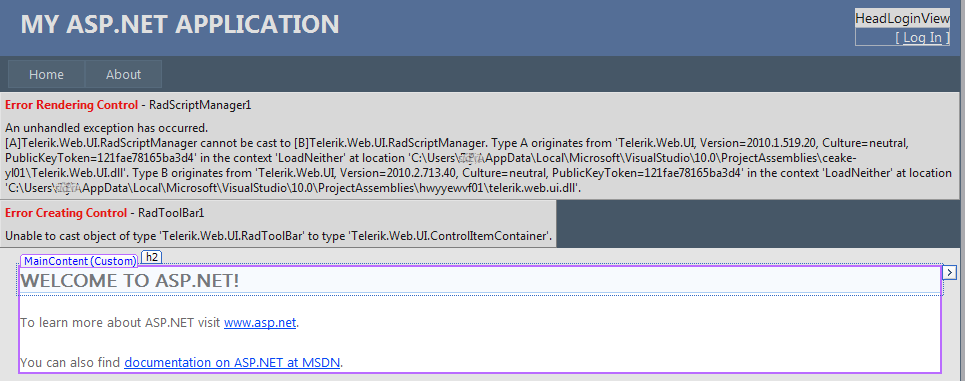
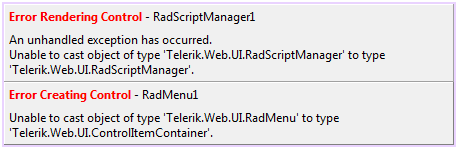
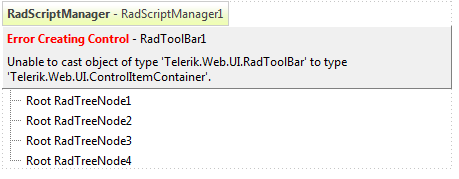
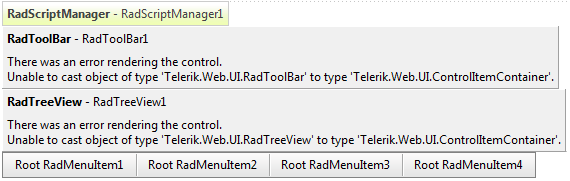
A subsequent close of the page in design time and a further reload usually might make it render correctly. A further close and reload can cause the error to reappear though.
Our research showed that some registry entries we use to enable Visual Studio display RadControls in the "Add Reference" and "Choose ToolBox Items" dialogs are the reason for the error. It seems that for some reason Visual Studio loads several instances of the Telerik.Web.UI assembly into its AppDomain, which results in the error above.
We decided to sacrifice the appearance of the Telerik.Web.UI assembly in the above mentioned dialogs, but prevent this annoying error from happening and we already removed the registry entries from the RadControls installers.
As a fix in the meantime, you could use the .reg files in the attached archives (one targets a 32-bit machine and the other targets a 64-bit one) and the .bat files (targeting Windows XP and Windows7/Vista respectively) to fix the problem. Here are the steps to follow:
Kind regards,
Erjan Gavalji
Telerik
Recently we discovered that Visual Studio can sporadicaly display the "Error rendering control" message in design time.
This can occur in several specific error messages:
- [A]Telerik.Web.UI.RadScriptManager cannot be cast to [B]Telerik.Web.UI.RadScriptManager. Type A originates from...
- Unable to cast object of type 'Telerik.Web.UI.RadScriptManager' to 'Telerik.Web.UI.RadScriptManager'
- Unable to cast object of type Telerik.Web.UI.[ControlName] to Telerik.Web.UI.ControlItemContainer
The screenshots below demonstrate sample occurrences of the error:
A subsequent close of the page in design time and a further reload usually might make it render correctly. A further close and reload can cause the error to reappear though.
Our research showed that some registry entries we use to enable Visual Studio display RadControls in the "Add Reference" and "Choose ToolBox Items" dialogs are the reason for the error. It seems that for some reason Visual Studio loads several instances of the Telerik.Web.UI assembly into its AppDomain, which results in the error above.
We decided to sacrifice the appearance of the Telerik.Web.UI assembly in the above mentioned dialogs, but prevent this annoying error from happening and we already removed the registry entries from the RadControls installers.
As a fix in the meantime, you could use the .reg files in the attached archives (one targets a 32-bit machine and the other targets a 64-bit one) and the .bat files (targeting Windows XP and Windows7/Vista respectively) to fix the problem. Here are the steps to follow:
- Download and extract the archive to a folder of your choice
- Close all Visual Studio instances
- Double-click the .reg file (use the Remove_AssemblyFoldersEx_32bitMachine.reg for 32-bit machines and the Remove_AssemblyFoldersEx_64bitMachine.reg one for 64-bit machines) and click the 'Yes' button when asked to confirm the registry entry merge
- Double-click the bat file, depending on the Windows system you're running (use the ClearProjectAssemblies_Win7_Vista.bat for Windows7/Vista and the ClearProjectAssemblies_WinXP.bat for Windows XP)
- Start Visual Studio and load your project
Kind regards,
Erjan Gavalji
Telerik
Nicklas
Top achievements
 Rank 1
Rank 1
answered
on
05 Aug 2013
1 answer
50 views
1 answer
101 views
Hi
I am using an autocompletebox in my form to enter tokens. After selecting four token I want to disable further token selection. But the user should be able to delete one and add another.
Thanks
Lovella
I am using an autocompletebox in my form to enter tokens. After selecting four token I want to disable further token selection. But the user should be able to delete one and add another.
Thanks
Lovella
Shinu
Top achievements
Rank 2
Rank 2
answered
on
05 Aug 2013
1 answer
88 views
Hi Dear,
I am using radpivotgrid for achieving a customized report that have
Row -> Customer Name (Retrieving from Data Source)
Main Column -> Carrier Name (Retrieving from Data Source)
2 Sub Columns under Main Column -> "Minimum" and "MarkUp" - These are headings of the column
2 Data Columns under it need to show the minimum and markup values, that retrieved from data source.
And this need to be exported to excel. (please see below attachments for further clarification). Please suggest me to solve this.
1) Customer Carrier Report.png--> this is the output I am getting with pivot rad grid
2) Expected OutPut.png --> This is what I need to achieve.
I am using radpivotgrid for achieving a customized report that have
Row -> Customer Name (Retrieving from Data Source)
Main Column -> Carrier Name (Retrieving from Data Source)
2 Sub Columns under Main Column -> "Minimum" and "MarkUp" - These are headings of the column
2 Data Columns under it need to show the minimum and markup values, that retrieved from data source.
And this need to be exported to excel. (please see below attachments for further clarification). Please suggest me to solve this.
1) Customer Carrier Report.png--> this is the output I am getting with pivot rad grid
2) Expected OutPut.png --> This is what I need to achieve.
Angel Petrov
Telerik team
answered
on
05 Aug 2013





