or
2 answers
160 views
I have the following code. When I expand the HydroTest panel bar it invokes the function HydroTestRadPanelBar_ItemExpand() , which collapses other panel bars which reside in other user controls (ASCX). This works, but after this, if I try to expand the collapsed panel bars using the UI, they will not expand. What am I missing?
<script type="text/javascript" id="telerikClientEvents1">//<![CDATA[ function HydroTestRadPanelBar_ItemExpand(sender,args) { var panelbar = $find(weld1UserControlWeldRadPanelBarClientID); for (var i = 0; i < panelbar.get_allItems().length; i++) { panelbar.get_allItems()[i].set_expanded(false); } var panelbar2 = $find(weld2UserControlWeldRadPanelBarClientID); for (var i = 0; i < panelbar2.get_allItems().length; i++) { panelbar2.get_allItems()[i].set_expanded(false); } var panelbar3 = $find(jointUserControlJointRadPanelBarClientID); for (var i = 0; i < panelbar3.get_allItems().length; i++) { panelbar3.get_allItems()[i].set_expanded(false); } }//]]></script>
Ivan Danchev
Telerik team

answered
on
23 Dec 2015
2 answers
106 views
Hello,
I have recently upgraded from using CuteEditor to RadEditor but am having an issue with the FileExplorer functionality.
There is one site (IIS 7.0) containing the Editor used for admin purposes, this points to a virtual directory to save images in the /uploads folder of the main site (also IIS 7.0).
Images can be saved, renamed and deleted perfectly however when they are saved none of them have the standard IUSR user and permissions (even though it is on the parent folder) resulting in a 401 error every time the main site tries to view the uploaded image.
Why are the files not being saved with the parent folders permissions and how can I set it to that it saves them in a way that is viewable by the main site?
I have recently upgraded from using CuteEditor to RadEditor but am having an issue with the FileExplorer functionality.
There is one site (IIS 7.0) containing the Editor used for admin purposes, this points to a virtual directory to save images in the /uploads folder of the main site (also IIS 7.0).
Images can be saved, renamed and deleted perfectly however when they are saved none of them have the standard IUSR user and permissions (even though it is on the parent folder) resulting in a 401 error every time the main site tries to view the uploaded image.
Why are the files not being saved with the parent folders permissions and how can I set it to that it saves them in a way that is viewable by the main site?

Sam
Top achievements
 Rank 1
Rank 1
answered
on
23 Dec 2015
2 answers
141 views
Why OnClientDropDownPopulated does not implemented? I want to process dataitems after data received from .asmx
I send additional data from server in data items attibutes and want to display it in other control. But I do not find the way to do that.
I send additional data from server in data items attibutes and want to display it in other control. But I do not find the way to do that.

Nencho
Telerik team
answered
on
23 Dec 2015
1 answer
116 views
Hi! It's possible customize the steps in the wizard for view in circles instead of buttons something like that http://www.jqueryscript.net/demo/Simple-Wizard-Modal-Plugin-with-jQuery-Bootstrap-Easy-Wizard/
Nencho
Telerik team
answered
on
23 Dec 2015
11 answers
926 views
Hi
I use a RadComboBox with checkboxes.
I really need to clear or customize it's text, but there is no property for it.
ChekedItemTexts propery has just two options and it has not an option such as none , ...
Below command is not work too:
RadComboox1.text = "";
How can I clear its text?
thanks.
I use a RadComboBox with checkboxes.
I really need to clear or customize it's text, but there is no property for it.
ChekedItemTexts propery has just two options and it has not an option such as none , ...
Below command is not work too:
RadComboox1.text = "";
How can I clear its text?
thanks.

Eyup
Telerik team
answered
on
23 Dec 2015
1 answer
168 views
I have apply grouping in main radgrid that also contained nested grid .when i drag a column its successfully group and sort but i drag another column its getting error.
i am working in DNN.
A critical error has occurred.
Specified argument was out of the range of valid values.
Parameter name: index
so please help me.
thanks
Mukul
Pavlina
Telerik team
answered
on
23 Dec 2015
1 answer
252 views
Hello,
I'm using scheduler timeline (http://demos.telerik.com/kendo-ui/scheduler/timeline).
When i try to add some dynamic data to scheduler datasource and resources, chrome console returns me error "Uncaught TypeError: Cannot read property '_continuousEvents' of undefined"
var s = $("#appointmentScheduler").data('kendoScheduler');var d = { AppointmentId: data.GetAppointmentsForContactsResult.AppointmentData[i].AppointmentId, title: data.GetAppointmentsForContactsResult.AppointmentData[i].Title, datas: data.GetAppointmentsForContactsResult.AppointmentData[i].Data, start: parseDateFromWCF(data.GetAppointmentsForContactsResult.AppointmentData[i].StartDate), end: parseDateFromWCF(data.GetAppointmentsForContactsResult.AppointmentData[i].EndDate), endTimezone: undefined, startTimezone: undefined, recurrenceException: undefined, recurrenceRule: undefined, description: undefined};s.dataSource.add(d);var tmp = [];tmp.push(self.contacts());tmp.push(selected);self.contacts(tmp);self.groupDataSourceUpdate();s.resources[0].dataSource.data(self.groupingDataSource());s.refresh();
Filled data looks like:
var d = { AppointmentId:10, title: "test", datas: [3], start: Tue Dec 22 2015 13:00:00 GMT+0100 (Central European Standard Time), end: Tue Dec 22 2015 14:00:00 GMT+0100 (Central European Standard Time), endTimezone: undefined, startTimezone: undefined, recurrenceException: undefined, recurrenceRule: undefined, description: undefined};s.dataSource.add(d);var tmp = [];tmp.push(self.contacts());tmp.push([{text: "test", value: 3}]);self.contacts(tmp);self.groupDataSourceUpdate();s.resources[0].dataSource.data(self.groupingDataSource());s.refresh();
Vladimir Iliev
Telerik team
answered
on
23 Dec 2015
8 answers
376 views
Hi,
Please look at the markup for the donut chart:
I then bind this in the page_load event to a datasource that is a collection of my custom entity.
When I look at the chart I see 3 slices. 1st Slice shows 63%, second 1% and the third 1%. As you can see that does not add up to 100%. I have debugged the code and verified that the collection has 65 items, with one portion containing 63, second 1, and last 1 item. It appears as if instead of showing % it is just displaying the totals.
How do I get it to display the %?
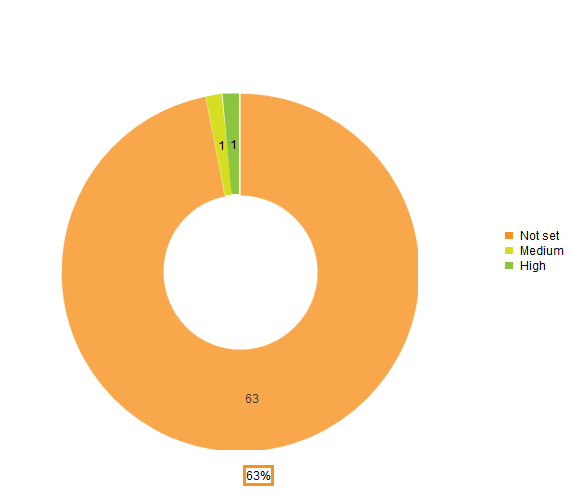
Please look at the markup for the donut chart:
<telerik:RadHtmlChart runat="server" ID="DonutChart1" Height="600px" Width="600px" OnClientSeriesClicked="OnClientSeriesClicked"> <ChartTitle Text="Deficiencies by Risk Rating" /> <PlotArea> <Series> <telerik:DonutSeries DataFieldY="Size" NameField="State" ExplodeField="IsExploded"> <TooltipsAppearance DataFormatString="{0}%"></TooltipsAppearance> </telerik:DonutSeries> </Series> </PlotArea> </telerik:RadHtmlChart>I then bind this in the page_load event to a datasource that is a collection of my custom entity.
protected void Page_Load(object sender, EventArgs e) { DonutChart1.DataSource = ReportingBLL.GetDepartmentPieChartDataByPriority(); DonutChart1.DataBind(); }When I look at the chart I see 3 slices. 1st Slice shows 63%, second 1% and the third 1%. As you can see that does not add up to 100%. I have debugged the code and verified that the collection has 65 items, with one portion containing 63, second 1, and last 1 item. It appears as if instead of showing % it is just displaying the totals.
How do I get it to display the %?

Ianko
Telerik team
answered
on
23 Dec 2015
2 answers
166 views
I have a lineseries chart which displays a number for each day of a specific month. I want to be able to see which dates are in a weekend by setting the background color for these dates.
Can I change the background of a lineseries chart between two major gridlines?
Mark
Top achievements
Rank 1
Rank 1
answered
on
23 Dec 2015
3 answers
161 views
Hello,
I am using the client object model. I have a page with 3 user controls. I have JavaScript in UserControl1 that needs a reference to a TreeView control which resides in UserControl2. Can I do that?
Secondly, I have the option of removing the User Controls and just using the page (aspx) would that save me compilcations later?
Updated** Attempt2 works:
I am using the client object model. I have a page with 3 user controls. I have JavaScript in UserControl1 that needs a reference to a TreeView control which resides in UserControl2. Can I do that?
Secondly, I have the option of removing the User Controls and just using the page (aspx) would that save me compilcations later?
Updated** Attempt2 works:
// attempt1: does not resolve at compile time var tree = $find("<%= RadTreeViewCommands.ClientID %>"); // attempt2: radTreeViewCommandsClientID is a global variable we set on the server var tree = $find(radTreeViewCommandsClientID);
Konstantin Dikov
Telerik team
answered
on
23 Dec 2015





