Composing Basic Authentication Requests
Environment
| Product | Fiddler Everywhere |
| Product Version | 1.0.1 and above |
Description
In the context of an HTTP transaction, Basic Access Authentication is a method for an HTTP user agent (for example, a web browser) to provide a user name and password when making a request. In Basic HTTP Authentication, a request contains a header field in the form of Authorization: Basic <base64 string** > ** where credentials are theBase64 encoding of username and password joined by a single colon (:).
How can I create a request for APIs that require authentication in Fiddler Everywhere?
Solution
Create a request for APIs that require authentication by using the Composer and check the complete example of the suggested approach.
Creating a Basic Authentication Request
The following steps provide an overview of the procedure for creating a basic authentication request:
- Select the Composer tab.
- Set the HTTP/HTTPS method to GET and add the URL in the URL field.
- Create an object in the request Body and the
userandpasswdvariables and their values. In this object,userandpasswdare the predefined variables for the Basic Authentication. - Add an
Authorizationkey to the header:- Encode the value of the
<username>:<password>string with a Base64 converter and note the encoded value. - In the Headers tab, set the Keyto
Authorizationand add the encoded<username** > **:<password** > **underValue. - Add a Description for the key. Click the tick to add the
Authorizationkey.
- Encode the value of the
Basic Authentication Request Example
- In the Composer tab, set the HTTP/HTTPS method to GET and add
https://httpbin.org/basic-auth/user1/pass1in the URL field. Thehttps://httpbin.org/basic-auth/user1/pass1URL includes the following fields.- The
httpbin.orgHTTP request and response service. - The authentication scheme basic-auth.
- The values of the
userandpasswdvariables:user1andpass1.
- The
- Create a JSON object in the Body tab:
The predefined variables for Basic Authentication are
userandpasswd. Set their values touser1andpass1, respectively.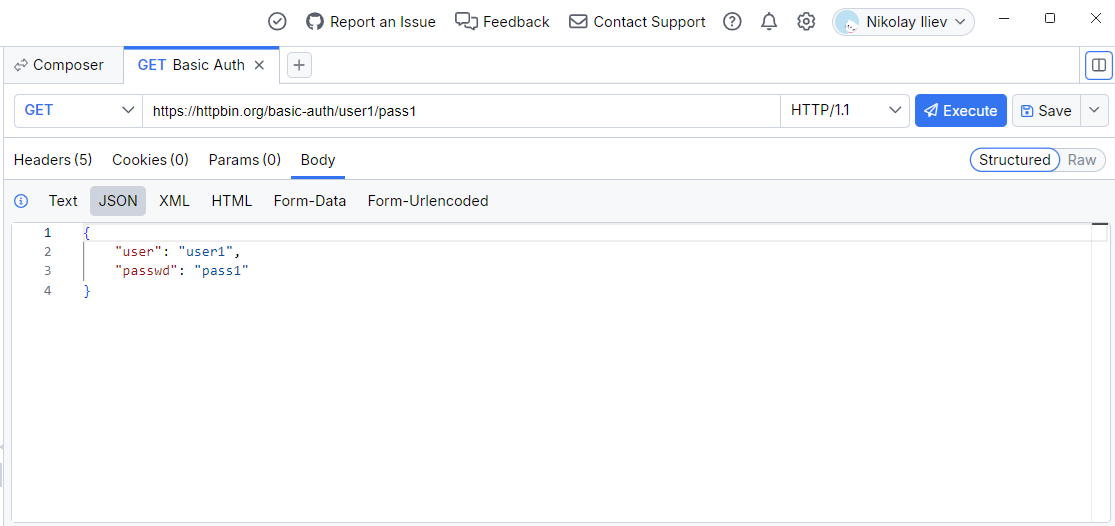
- Add the Authorization key in the Headers tab:
- Encode the value of the
<username>:<password>string with a Base64 converter. The resulting string from the encoding of user1:pass1 isdXNlcjE6cGFzczE=. - In Headers tab, set the Key to
Authorization. - Set the Value to
Basic dXNlcjE6cGFzczE=. - Add a Description for the key, and select the tick to add the Authorization key.
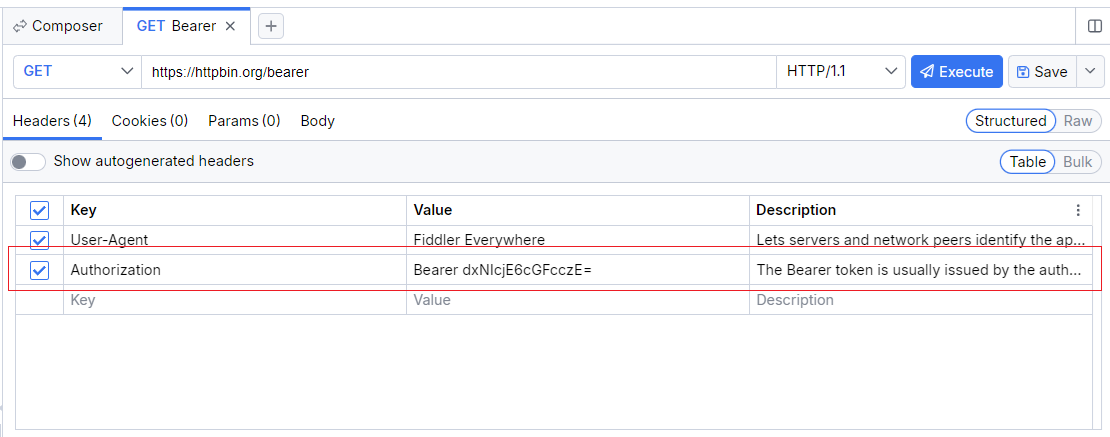
- Encode the value of the
After performing all the above steps, select Execute that is located at the right side of the URL field to send the request.
Following the above steps will create Basic Authentication with Fiddler Everywhere. To check, go through the Response Inspector section of the Composer. A successful request will return status 200 from the server along with the server-specific payload:
Contact Us
Suppose you have more questions or need assistance for testing authentication scenario through Fiddler Everywhere, then you can reach out to our support team through the Contact Support option.