Understanding the Modern AI Stack

Summarize with AI:
Grasp AI terminology with these helpful parallels from the full-stack development world.
AI engineering comes with a vocabulary hurdle. LLMs, embeddings, vector databases, RAG, agents, memory, orchestration, evaluation, observability: the terms tend to arrive all at once, and most explanations treat them as a glossary of disconnected definitions. That makes the field feel larger and stranger than it is.
In the first article of this AI Engineering Basics series, we made the case that the full-stack role is expanding rather than being replaced, and that the developers who adapt will treat AI as a new layer of the stack to master. This article builds the mental model for that layer. Every term above has a job; the jobs relate to each other the same way the pieces of a web application do, and once we see the structure, the terms fall into place.
We’ll organize the stack into five layers, and each one maps onto an instinct we already have:
| Layer | Components | Closest full-stack analogy |
|---|---|---|
| Model | LLMs | A runtime we call over an API |
| Knowledge | Embeddings, vector databases, RAG | The database and query layer |
| Action | Agents, tools, memory | Business logic and session state |
| Coordination | Orchestration | Backend workflows and job queues |
| Trust | Evaluation, observability | Testing and monitoring |
To keep things concrete, we’ll follow a single example throughout: a customer support assistant for TaskFlow, a fictional project management product. By the end, we’ll trace one user request through all five layers.
The Model Layer: LLMs
At the base of the stack sits the large language model (LLM), the component that understands and generates language. Models from providers like OpenAI, Anthropic and Google are available behind ordinary APIs, and calling one looks like calling any other web service. A minimal request for our TaskFlow assistant:
const response = await openai.responses.create({
  model: "gpt-5",
  instructions: "You are a support assistant for TaskFlow.",
  input: "How do I export my project data?",
});

console.log(response.output_text);
We send the user’s input along with instructions that set the assistant’s role, and we get generated text back. There’s no infrastructure to manage and no machine learning background required.
Two properties of this call shape everything else in the stack.
First, the model itself is stateless. It retains nothing between requests, so anything it should know (the conversation so far, the user’s plan, the relevant documentation) must be assembled into each request. Provider APIs can do some of that bookkeeping for us; the OpenAI Responses API, for example, can store conversation state server-side and chain turns with a previous_response_id parameter. The convenience leaves the underlying principle intact, since the full history still gets fed to the model (and billed as input tokens) on each call.
Second, the request has a size limit called the context window, measured in tokens, which caps how much we can include. A model’s knowledge is otherwise frozen at training time, which means our TaskFlow assistant, out of the box, knows nothing about TaskFlow.
The model, in other words, is a powerful runtime with no memory and no knowledge of our product, and the rest of the stack exists to work around those two gaps.
The Knowledge Layer: Embeddings, Vector Databases and RAG
Our assistant needs to answer questions about TaskFlow’s actual documentation, and stuffing every doc into each request would blow through the context window (and the budget). The knowledge layer solves this by finding the few passages that matter for a given question and supplying only those.
The mechanism underneath is the embedding, a representation of text as a vector of numbers. Think of it as a coordinate system for meaning: just as GPS coordinates position a location on a map, an embedding positions a piece of text in a high-dimensional space where distance reflects similarity of meaning. The embeddings for “How do I export my project data?” and “Downloading your projects as CSV” land close together in that space despite sharing almost no words, while a passage about billing lands far away.
Those vectors need a home, which is what a vector database provides. It stores the embeddings for every chunk of our documentation and can answer the question “which stored chunks are closest to this query?” across millions of entries in milliseconds.
Retrieval-Augmented Generation (RAG) is the pattern that ties these pieces to the model. When a user asks a question, the system retrieves the most relevant chunks from the vector database, augments the prompt with them and asks the model to generate an answer grounded in that material. The model still does the writing, but it works from our documentation rather than its training data, which keeps answers current and lets them cite sources. Platforms like Progress Agentic RAG package this whole layer (chunking, embeddings, indexing, retrieval) as a service, and we’ll dig into RAG in a dedicated article later in this series.
The Action Layer: Agents, Tools and Memory
Answering questions only gets our assistant so far. A user who asks “Can you move all my overdue tasks to next sprint?” wants something done, and doing things is the action layer’s job.
We covered the assistant-versus-agent distinction in the first article, so a short recap suffices here. An agent receives a goal rather than a question, plans the steps to reach it, acts, checks the results and adjusts until the task is done.
Tool use is what makes that possible. A tool is an operation we expose to the model with a name, a description, and typed parameters, like move_task(task_id, sprint_id) or get_overdue_tasks(project_id). The model doesn’t execute anything itself; it outputs which tool it wants to call and with what arguments, our code runs the call, and the result goes back into the conversation for the model’s next decision. The Model Context Protocol (MCP) is the emerging standard for wiring these connections consistently.
Memory rounds out the layer, and it splits into two kinds. Short-term memory is the running conversation, resent with each request so the model can follow references like “move those ones too.” Long-term memory persists across sessions in ordinary storage we control: when our assistant remembers that a user prefers two-week sprints, our application saved that fact and retrieved it into the context at the right moment. Memory patterns get their own article later in the series.
The Coordination Layer: Orchestration
A real support interaction rarely fits in one model call. Consider a TaskFlow user reporting a duplicate charge. A production-quality handling of that request might start by classifying the message as a billing issue, retrieving the refund policy and looking up the account’s payment history through a tool. From there, it drafts a response and routes the case to a human when the refund amount exceeds a threshold. Each step might involve a different model call, a different tool or no model at all.
Orchestration is the layer that coordinates these multi-step flows. It carries state from step to step and decides which branch to take based on intermediate results. It also handles the operational details: retrying transient failures, enforcing timeouts, and managing handoffs between models, tools and humans.
If the model layer is a runtime, orchestration is the backend workflow engine wrapped around it, and the discipline it demands is the same one we apply to any distributed system: clear steps, explicit state and predictable failure handling. Frameworks exist to help, though plenty of production systems orchestrate with plain application code.
The Trust Layer: Evaluation and Observability
Everything up to this point gets a system working. The trust layer is what lets us ship it and keep it running, and it’s the part of the stack that teams most often discover too late.
Evaluation answers the question “is this working?” for systems whose outputs aren’t deterministic. A traditional assertion like expect(output).toBe(expected) falls apart when the same input can produce different, equally valid responses. Instead, we build evaluation sets: collections of representative inputs paired with criteria for judging the outputs, whether that judgment comes from string checks, from rules or from another model acting as a grader. Evaluations run whenever we change a prompt, swap a model or adjust retrieval, serving the same role a regression suite serves in conventional software.
Observability answers “what is it doing in production?” For our TaskFlow assistant, that means tracing each request through every layer it touched: the documents retrieval returned, the tools the agent called and what each model call consumed and cost.
Token usage deserves particular attention because it’s both the cost model and an early warning signal. A prompt change that doubles token consumption shows up in the bill before it shows up anywhere else.
Traces also turn debugging from guesswork into inspection, since we can see when retrieval surfaced the wrong document or when a tool returned an error that the model papered over.
This layer is also where governance lives: knowing what our AI systems are doing, proving it and enforcing limits on agent behavior. The AI operations articles later in this series spend most of their time here.
One Request Through the Stack
To pull the layers together, we can follow a single message end to end. A TaskFlow user writes: “I was charged twice for my Pro subscription this month. Can I get a refund?”
- Orchestration receives the message and classifies it as a billing issue with a refund request.
- The knowledge layer retrieves TaskFlow’s refund policy and the duplicate-charge troubleshooting guide from the vector database.
- The action layer calls the
get_payment_historytool, confirms the duplicate charge and checks memory for prior billing issues on the account. - The model receives the policy, the payment data and the conversation, and drafts a response with a proposed refund.
- The refund amount falls under the auto-approval threshold, so orchestration executes the
create_refundtool call; had it been larger, the flow would have paused for human approval. - The trust layer records the full trace: documents retrieved, tools called, tokens spent and the outcome, ready for review and for the next evaluation run.
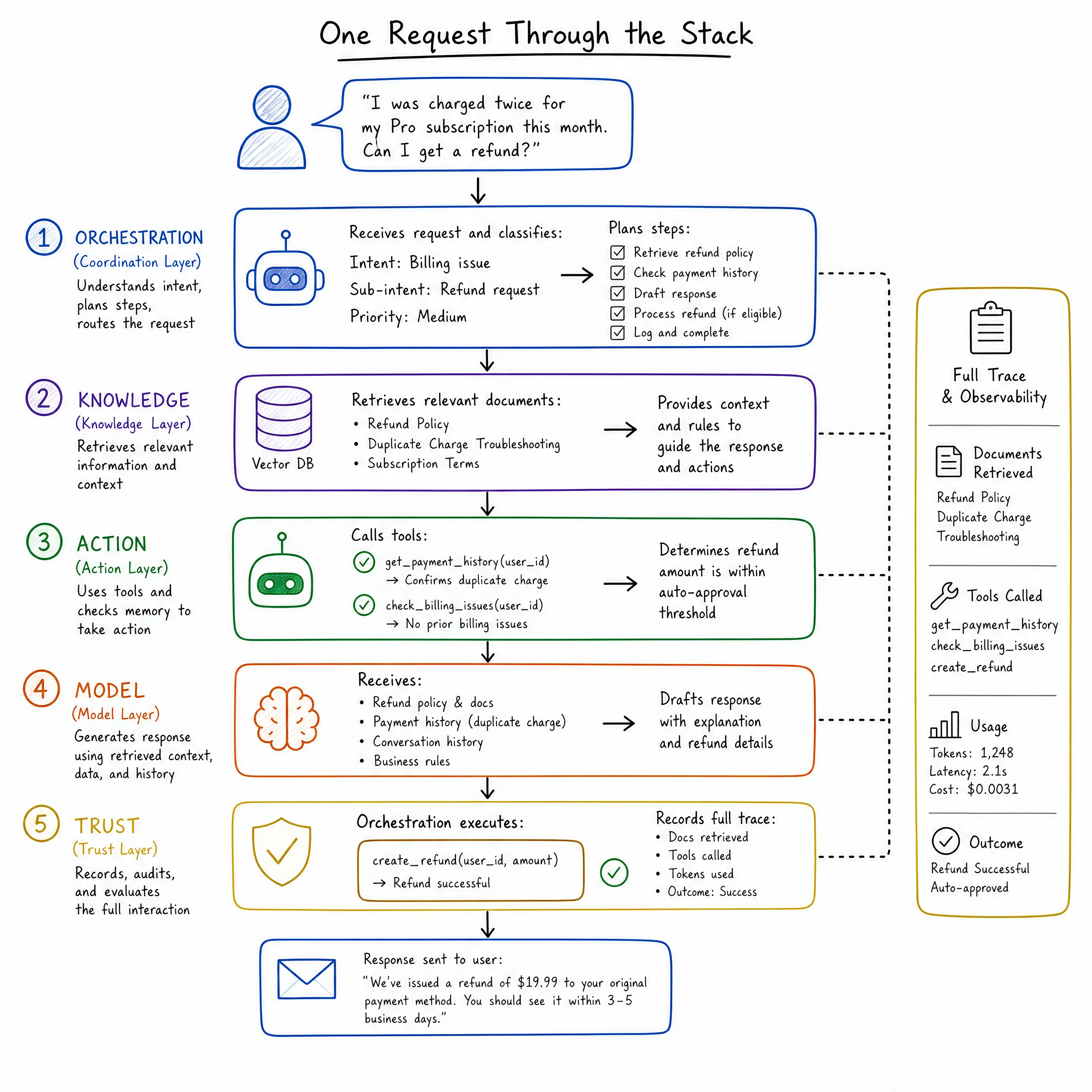
Notice that no single layer did anything magical. The model wrote text, retrieval found documents and tools touched real systems. Orchestration kept the steps in order while the trust layer recorded it all. The modern AI stack amounts to familiar engineering arranged around one unfamiliar component.
Wrap-up
The vocabulary of AI engineering describes a stack with real structure. Models generate, the knowledge layer grounds them in our data, the action layer lets them do things, orchestration coordinates the steps, and evaluation and observability make the whole thing trustworthy enough to operate.
Each layer maps onto skills full-stack developers already practice, and each one gets a deeper treatment as this series continues, starting with how these pieces are architected into real applications.
For more on the platforms and standards mentioned in this article, check out the following resources:

Hassan Djirdeh
Hassan is a senior frontend engineer and has helped build large production applications at-scale at organizations like Doordash, Instacart and Shopify. Hassan is also a published author and course instructor where he’s helped thousands of students learn in-depth frontend engineering skills like React, Vue, TypeScript and GraphQL.
Related Posts
Comments
All articles
Topics
Web MobileMobile
Desktop
Design
Productivity
People