React for Vue Developers, Part 2: State, Effects and Why React Re-renders Differently
 by Marina Mosti

Summarize with AI:
React 19 for Vue 3 Developers, Part 2: React reruns your component function to render; Vue tracks dependencies and updates in place.
In Part 1 of this series we reset the mental model: a React component is just a function, JSX is JavaScript with markup, props are the first argument and children is your default slot. I ended that piece with one sentence I asked you to carry forward, and now it is time to collect on it: React props are not reactive the way Vue props are, because the whole component function reruns to produce the next render.
That single fact is the key to this entire article. Almost every React quirk that annoys a Vue developer (state that seems to update “one step late,” values that are mysteriously frozen inside a callback, effects that fire more often than you expected) comes back to the same root cause. So before we touch a single hook, let’s really internalize how React decides to re-render, because it is genuinely different from Vue.
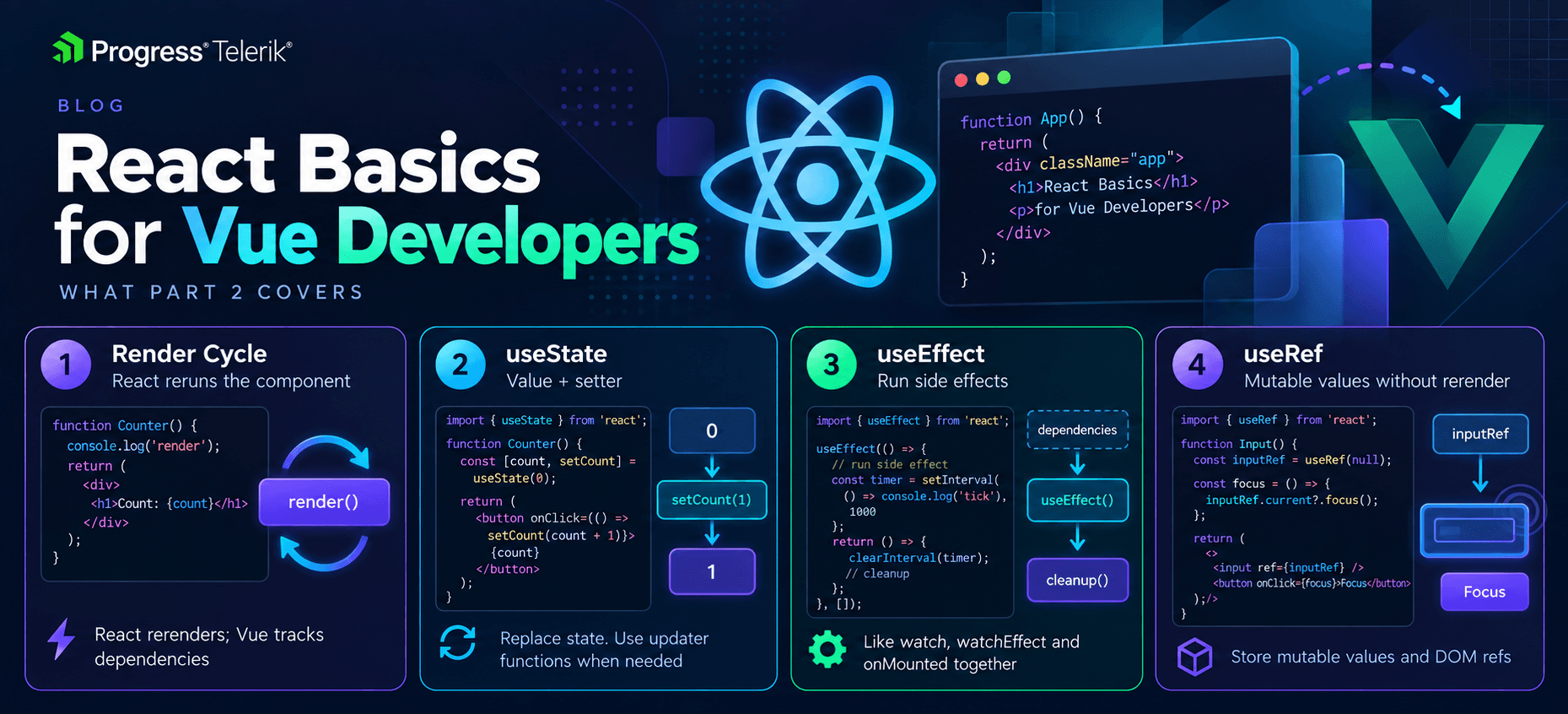
Image generated with AI
The Core Difference: Vue Tracks, React Reruns
In Vue, reactivity is fine-grained and automatic. When you create a ref and use it in your template, Vue quietly records that dependency. When you later change .value, Vue knows exactly which pieces of the DOM depend on it and updates only those. Your setup runs once. The reactive system does the ongoing work.
React does not track dependencies like this. When a piece of state changes, React reruns your entire component function from the top, produces a new description of the UI, compares it to the previous one and patches the differences into the DOM. Your component body is not a one-time setup; it is a render function that runs again and again.
Hold onto that mental image, because it explains everything below. In Vue, you write code that sets up reactive relationships once. In React, you write code that describes the UI for the current values, and it runs every render.
useState vs. ref
Let’s start with the most common thing you do: local component state. In Vue, you reach for ref (or reactive), read and write through .value, and Vue handles the rest.
Counter.vue
<script setup>
import { ref } from 'vue'

const count = ref(0)

const increment = () => {
  count.value++
}
</script>

<template>
  <button @click="increment">Count is {{ count }}</button>
</template>
In React, the equivalent is the useState hook. It returns a pair: the current value and a function to set it. The naming convention is [thing, setThing], and you almost always destructure it inline.
Counter.jsx
import { useState } from 'react'

function Counter() {
  const [count, setCount] = useState(0)

  const increment = () => {
    setCount(count + 1)
  }

  return <button onClick={increment}>Count is {count}</button>
}
Let’s break it down. useState(0) declares one piece of state with an initial value of 0. It hands back count (a plain number, not a wrapper object, so no .value) and setCount (the only sanctioned way to change it). Reading state is just reading the variable. Writing state means calling the setter.
That last point is the big behavioral difference. In Vue, you mutate: count.value++. In React, you do not mutate, you replace: you call setCount with the new value and React schedules a re-render. There is no count = count + 1 and there is no count.value. In fact, you cannot reassign count at all; it is a const, so that line just throws. And even if it were a plain let, changing it would not update the screen, because React only re-renders when the setter is called.
Notice there is also no deep reactivity here. count is a snapshot for this render (React’s own docs call this the “state as a snapshot” model, and it is worth reading that page once it clicks). When you call setCount, React does not surgically update the button text the way Vue would. It reruns Counter from scratch, useState hands back the new value and the returned JSX reflects it. Same visible result, completely different machinery.
State Updates Are a Snapshot, Not a Live Value
Here is the first place this bites people, and it is worth seeing early. Suppose you want to increment twice in one handler:
const incrementTwice = () => {
  setCount(count + 1)
  setCount(count + 1)
}
Coming from Vue, you would bet money this adds 2. Surprise, it adds 1!
The reason is that count is a constant captured for this particular render. Both calls read the same count, compute the same count + 1 and set the same value. React does not update count in place between the two lines, because count is just a number from this render’s snapshot.
The fix is the functional updater form of the setter, which hands you the latest pending value:
const incrementTwice = () => {
  setCount((c) => c + 1)
  setCount((c) => c + 1)
}
Now each call receives the most recent value and returns the next one, so this adds 2. My rule of thumb: the moment your new state depends on the previous state, reach for the function form. In Vue, you never think about this because count.value is always the live current value. In React, the value is frozen per render, so you ask React for the freshest one explicitly.
useEffect vs. watchEffect, watch and onMounted
Next up: running side effects. In Vue, you have a small family of tools. onMounted for “do this once after the component mounts,” watchEffect for “run this and rerun it whenever its reactive dependencies change” (tracked automatically), and watch for “run this when these specific sources change.” Cleanup happens via onUnmounted or the cleanup callback inside a watcher.
React folds most of that into a single hook, useEffect, with one crucial twist: it does not track dependencies for you. You list them yourself in an array, and that array is the manual version of Vue’s automatic tracking.
Let’s fetch a user when an id prop changes, side by side.
UserProfile.vue
<script setup>
import { ref, watch } from 'vue'

const props = defineProps({ id: Number })
const user = ref(null)

watch(
  () => props.id,
  async (id) => {
    const response = await fetch(`https://myapp.com/users/${id}`)
    if (!response.ok) {
      throw new Error('Failed to fetch user')
    }
    user.value = await response.json()
  },
  { immediate: true }
)
</script>

<template>
  <p v-if="user">{{ user.name }}</p>
</template>
UserProfile.jsx
import { useState, useEffect } from 'react'

function UserProfile({ id }) {
  const [user, setUser] = useState(null)

  useEffect(() => {
    const loadUser = async () => {
      const response = await fetch(`https://myapp.com/users/${id}`)
      if (!response.ok) {
        throw new Error('Failed to fetch user')
      }
      setUser(await response.json())
    }
    loadUser()
  }, [id])

  return user ? <p>{user.name}</p> : null
}
Let’s break it down, because there is a lot of mapping packed in here.
- The effect body is what runs, the same as your
watchcallback. Note thatuseEffect's callback cannot itself beasync(it may only return a cleanup function or nothing), so we define an innerasyncfunction and call it. That is a small React idiom you will repeat often. - The dependency array
[id]is the manualwatchsource. It tells React “rerun this effect wheneveridchanges between renders.” Vue figured out that dependency for you from the getter; in React, you name it. { immediate: true }in the Vue watcher has no separate switch in React. Effects always run after the first render, so “run on mount” is the default, not an option.
Here is the quick translation table for the dependency array (the bit with [id]), since it is the part that confuses everyone. I have led with the case a Vue developer cares about most:
- Empty array
[]: Runs once after the first render. This is youronMounted. - A populated array like
[id]: Runs after the first render and again on any render whereiddiffers from the last one. This is yourwatchon specific sources. - No array at all: Runs after every render. You almost never want this.
One honest footnote on that first case: Vue’s onMounted runs after the DOM is in place but before the browser paints, while useEffect runs after paint. For fetching or focusing an input, the difference is invisible. But if you need to measure layout before the user sees it, useLayoutEffect is the closer match to onMounted.
Cleanup works the way a Vue watcher’s cleanup callback does. Vue reruns that callback before the next run and on teardown, and React’s returned function is the same deal: it fires on the way to the next effect run and one last time as the component goes away. This is where you clear intervals, remove listeners or abort requests.
useEffect(() => {
  const timer = setInterval(() => {
    setCount((c) => c + 1)
  }, 1000)

  return () => clearInterval(timer)
}, [])
That returned arrow is your onUnmounted. Same idea as a watcher’s cleanup callback, same reason: don’t leave timers and listeners lying around.
Big disclaimer though! The dependency array is the single biggest source of bugs for people new to React, and the mistake is always the same, leaving something out. If your effect reads a value from props or state, that value belongs in the array. Omitting it does not make the effect "run less."Iit makes the effect run with a stale value, which brings us neatly to the trap that catches every Vue developer.
The Stale-Closure Trap
This is the one I want you to tattoo somewhere visible, because it does not exist in Vue and it will confuse you the first few times.
Remember that the component function reruns on every render, and that every function you define inside it (event handlers, effect callbacks, timeouts) closes over the variables from that specific render. Those variables are constants. They never change after that render. So if a callback outlives the render that created it, it is still looking at old values.
Here is the classic broken version:
Timer.jsx
function Timer() {
  const [count, setCount] = useState(0)

  useEffect(() => {
    const timer = setInterval(() => {
      setCount(count + 1)
    }, 1000)

    return () => clearInterval(timer)
  }, [])

  return <p>{count}</p>
}
You would expect this to count up forever. It goes 0, then 1 and then it sticks. The effect ran once (empty array), so the interval callback closed over count from the very first render, where count was 0. Every tick computes 0 + 1. The value is frozen in the closure. (In development with React’s StrictMode on, you may also see effects run an extra mount-then-cleanup cycle. That is intentional and not the bug we are chasing here.)
In Vue, this bug simply cannot happen, because count.value always reads through the ref to the current value. There is no snapshot to go stale. In React, you have two clean fixes:
- Use the functional updater, so you never read the stale
countat all:setCount((c) => c + 1). This is the right fix here. - Add the value to the dependency array (
[count]), so the effect tears down and resubscribes with a fresh closure each time it changes. Correct, but for an interval it means resetting the timer on every tick, so the updater form is better.
The lesson generalizes: whenever a value inside a long-lived callback looks “wrong” or “old” in React, you are almost certainly looking at a stale closure. Ninety percent of the time, the fix is either the functional updater or an honest dependency array.
useRef for Values That Should Not Re-render
Last piece. Sometimes you need a mutable value that persists across renders but should not trigger a re-render when it changes. Think of a reference to a DOM node, an interval id, or a “did this already run” flag. In Vue, template refs cover the DOM case, and for the non-reactive-value case you would just use a plain variable outside your reactive state (or a ref you deliberately never depend on).
React’s tool for both jobs is useRef. It returns an object with a single current property that you can read and mutate freely, and mutating it never causes a render.
TextInput.vue
<script setup>
import { ref, onMounted } from 'vue'

const inputRef = ref(null)

onMounted(() => {
  inputRef.value.focus()
})
</script>

<template>
  <input ref="inputRef" />
</template>
TextInput.jsx
import { useRef, useEffect } from 'react'

function TextInput() {
  const inputRef = useRef(null)

  useEffect(() => {
    inputRef.current.focus()
  }, [])

  return <input ref={inputRef} />
}
Notice how close these are. You create the ref, attach it to an element with the ref attribute and read it after mount. The only real difference is .value in Vue versus .current in React, and the fact that in React you reach for the DOM inside an effect (because the node does not exist until after render).
The part worth underlining is the second job of useRef. Think of a mutable box that survives renders without causing them. If you wrote let x = 0 directly in the component body, it would reset to 0 on every render, because the whole function reruns. If you used useState, changing it would trigger a render. useRef is the in-between: it keeps its value across renders like state, but writing to .current is silent like a plain variable. That is exactly what you want for things the user never sees directly, like storing a timer id or the previous value of a prop.
Wrapping Up
The one thing you absolutely need to take away from this read is that React reruns your component function to render, where Vue tracks dependencies and updates in place. Once that clicks, the rest follows.
useState gives you a value plus a setter. The value is a per-render snapshot, so you replace instead of mutate, and you use the functional updater when new state depends on old. useEffect is your watch, watchEffect and onMounted rolled together, except you list dependencies by hand and return a cleanup function. And useRef is your escape hatch for mutable values that should not trigger a render, DOM nodes included.
For the deeper details, the React docs on state and the “You Might Not Need an Effect” guide are both excellent, and that second one will save you from reaching for useEffect when you do not actually need it.
Next time we move up a level and look at Server Components, the new use API and Actions, framed against the Vue SSR and data-fetching mental model you already have.
Happy state-ing!
Marina Mosti
Marina Mosti is a frontend web developer with over 18 years of experience in the field. She enjoys mentoring other women on JavaScript and her favorite framework, Vue, as well as writing articles and tutorials for the community. In her spare time, she enjoys playing bass, drums and video games.
Related Posts
Comments
All articles
Topics
Web MobileMobile
Desktop
Design
Productivity
People