How AI-Powered Applications Work

Summarize with AI:
See how the modern AI stack connects to what developers already build and maintain. We’ll explore three patterns in this article: direct integration, retrieval-augmented and tool-using.
Consider a user asking an AI assistant to summarize a support case or update a project record. The interface may show only a text box and a response, but the request still passes through the rest of the application. The backend authenticates the user and assembles the right context. A model interprets the request, while existing APIs and data stores provide information or carry out approved actions.
This flow is what turns a model into an AI-powered application. In the previous article of this series, we organized the modern AI stack into five layers: model, knowledge, action, coordination and trust. In this article, we’ll show how those layers connect to the UI, backend, data sources and business systems that developers already build and maintain.
The Anatomy of an AI-Powered Application
An AI-powered application is still an application. It has a UI, a backend, databases and integrations, and the model is one component among many, slotting into that structure the way a payment processor or a search service does. In more detail, five kinds of components show up in nearly every production system:
| Component | What it does | Traditional counterpart |
|---|---|---|
| User interface | Collects input and renders streamed responses | The frontend we already build |
| Application backend | Assembles prompts and mediates every model interaction | API routes and business logic |
| AI services | Generate text and create embeddings | A third-party API like Stripe or Twilio |
| Knowledge sources | Ground the model in our documentation and data | The database and query layer |
| Tools and business systems | Let the model act on real records through defined operations | Internal APIs and service integrations |
Only one of these components is new. The other four are systems we’ve been building all along, and even the new one is consumed as an ordinary web service. What changes is the wiring between them, which is what we’ll talk about for the rest of this article.
The Gateway Rule: Models Sit Behind Your Backend
Before looking at any pattern, one rule applies to all of them: the UI should not talk to the model directly. Every model interaction should flow through our own backend. This boundary protects provider credentials and provides the application with a single place to authenticate requests, assemble context, enforce permissions and record usage.
The example below uses the OpenAI Responses API with gpt-5.6, the current GPT-5.6 model alias. A similar architecture works when the backend calls another hosted provider or a model deployed on infrastructure your team manages.
app.post("/api/assistant", async (req, res) => {
  const { message } = req.body;

  const response = await openai.responses.create({
    model: "gpt-5.6",
    instructions: SUPPORT_ASSISTANT_PROMPT,
    input: message,
  });

  res.json({ reply: response.output_text });
});
The browser posts the user’s message to our endpoint, and the server makes the call to the model provider. The system prompt stays in SUPPORT_ASSISTANT_PROMPT on the server, where users can’t read or override it. This server-side boundary is also where the application can apply rate limits and per-user budgets, then log each request for evaluation and observability.
With the gateway in place, the interesting question becomes what the backend does between receiving a message and calling the model. The answer defines the three patterns below, with each one building on the previous.
Pattern 1: Direct Model Integration
The simplest pattern is the one in the snippet above. The UI sends input, the backend wraps it in a prompt, the model generates and the result travels back. There is no retrieval step and no tool use involved, just a request and a response.
Plenty of valuable features need nothing more. In a project management app, this pattern can power summarizing a long comment thread or drafting a status update from a sprint’s recent activity. In both cases, the model works from whatever the backend puts in the prompt, so these features suit content the application already has on hand.
One implementation detail matters more here than anywhere else: streaming. Models generate text token by token, and a full response can take many seconds. Waiting for the whole thing before showing anything makes the feature feel broken, so production interfaces stream tokens to the UI as they’re generated, the same way ChatGPT renders its answers. Provider APIs support this out of the box, and our gateway passes the stream through to the browser using server-sent events or a similar mechanism.
The limitation of this pattern is the one we identified in the last article: the model only knows its training data plus whatever fits in the prompt. Ask an assistant built this way how our own product’s data export works, and it will guess, confidently and often wrongly. Fixing that requires the second pattern.
Pattern 2: Retrieval-Augmented Architecture
The second pattern is a retrieval-augmented architecture, built around the Retrieval-Augmented Generation (RAG) technique we introduced in the knowledge layer of the previous article. It adds a knowledge path in front of generation.
When a request arrives, the backend first searches an indexed copy of our content (documentation and past support tickets, for example) for the passages relevant to the question, then includes those passages in the prompt so the model answers from our material instead of its training data.
Viewed architecturally, RAG adds two pieces of infrastructure:
- An ingestion pipeline that runs ahead of any user request. It splits our source content into chunks and converts each chunk into an embedding, storing the results in a vector database. It reruns when the content changes, because retrieval is only as current as the index behind it.
- A retrieval step in the request path. The backend embeds the incoming question, asks the vector database for the closest chunks and assembles them into the prompt alongside the user’s message.
The model API call itself barely changes. The prompt just gets richer, carrying the retrieved passages as context. This is the pattern behind a support assistant answering “How do I export my project data?” with the actual steps from the actual docs, citing the page they came from. Showing those sources in the UI is worth the extra effort, since users trust an answer more when they can check where it came from.
Teams can build this infrastructure themselves or adopt it as a service. Platforms like Progress Agentic RAG handle the chunking, embedding, indexing and retrieval side so the application only needs to wire the results into its prompts.
Pattern 3: Tool-Using Architecture
The third pattern adds an action path, which is how an assistant moves beyond answering questions and starts completing work on the user’s behalf. A tool is an operation our backend exposes to the model with a name and typed parameters, plus a description that tells the model what the operation does and when it applies. Two tools for a task management assistant might be defined like this:
const tools = [
  {
    type: "function",
    name: "get_overdue_tasks",
    description: "List the overdue tasks in a project. Read-only.",
    parameters: {
      type: "object",
      properties: {
        project_id: { type: "string", description: "The project to check" },
      },
      required: ["project_id"],
    },
  },
  {
    type: "function",
    name: "move_task",
    description:
      "Move a task to a different sprint. Requires user confirmation before executing.",
    parameters: {
      type: "object",
      properties: {
        task_id: { type: "string", description: "The task to move" },
        sprint_id: { type: "string", description: "The destination sprint" },
      },
      required: ["task_id", "sprint_id"],
    },
  },
];
Each definition spells out the operation’s arguments and its boundaries. The description on move_task encodes a rule (user confirmation required) that the backend enforces, since descriptions guide the model but our code holds the actual authority.
The runtime flow is a loop between our backend and the model. The backend sends the user’s message along with the tool definitions. Instead of replying with text, the model can reply with a request to call a tool, naming the tool and supplying arguments. Our backend validates the request and executes the real operation against our business systems, then sends the result back to the model, which either requests another call or produces its final answer. The model never touches our database or our APIs. It only ever produces structured requests that our code chooses whether to honor.
This mediation keeps the pattern workable in production. The backend checks permissions so the assistant acts with the requesting user’s access rather than an admin’s, and it pauses for human approval before consequential operations run. Every validated call gets logged along the way, which is where the audit trail comes from. The Model Context Protocol (MCP) standardizes how these tool connections are described and discovered, and it gets a dedicated article later in this series.
The three patterns stack rather than compete. A production assistant typically runs all of them at once, choosing per request how much machinery to engage:
| Pattern | What the model works from | What the model can do | Example feature |
|---|---|---|---|
| Direct integration | The prompt alone | Generate, summarize, classify and extract | Summarize a comment thread |
| Retrieval-augmented | The prompt plus retrieved knowledge | Answer from our content and cite sources | Answer questions from the docs |
| Tool-using | The prompt, knowledge and tool results | Read and change real records | Move overdue tasks to next sprint |
Where Your Existing Systems Fit
A common worry when teams plan their first AI feature is that the architecture diagram will need to be redrawn from scratch. In practice, the CRM, the billing service, the internal APIs and the databases all stay exactly where they are. What changes is that they gain a second kind of consumer.
Our knowledge sources (documentation, policies, past tickets and specs) get indexed so the model can draw on them. Our operations (issuing refunds or moving tasks) get wrapped as tools so the model can request them. In both cases, the backend remains the gatekeeper, and in both cases the work involved is work we already know how to do, like writing integration code and enforcing access control.
We made this point in the first article of this AI Engineering Basics series, when we talked about structured actions and the tool definitions above are that idea in practice. Designing a good tool is the same discipline as designing a good API endpoint, applied to a new consumer.
One Feature End to End
To make the components concrete, we can trace a single request through a project management app’s support assistant. A user opens the assistant panel and types: “Which of my tasks are overdue? Move anything low priority to next sprint.”
- The UI posts the message to
/api/assistantand opens a stream for the response. - The backend authenticates the user and loads the conversation history, then retrieves relevant passages about sprint policies from the vector database.
- The backend calls the model with the message and the retrieved context, along with the tool definitions.
- The model requests
get_overdue_tasks. The backend verifies the user can access that project, then runs the query against the application database and returns the results. - The model identifies the low-priority tasks and requests
move_taskfor each one. Because that tool requires confirmation, the backend pauses and the UI renders the proposed changes with a confirm button. - The user confirms. The backend executes the moves through the existing project service API and feeds the outcomes back to the model, then streams its final summary to the UI.
- Along the way, the backend logged every retrieval and tool call, along with token counts, for the observability tooling we covered in the trust layer.
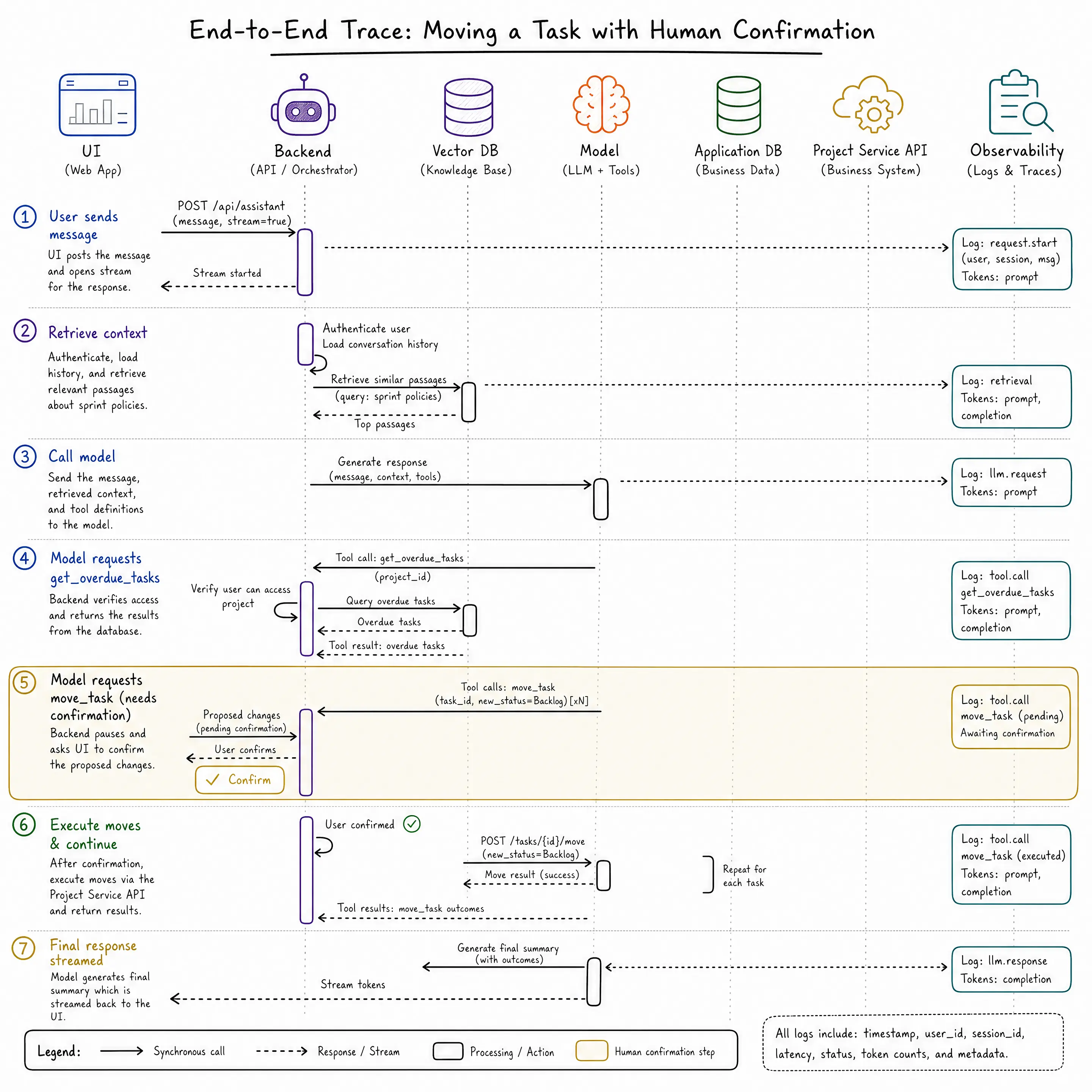
Step 5 is worth pausing on, because the confirmation is an architectural decision, encoded in a tool definition and enforced by the backend. Deciding which operations run free and which wait for a human is one of the most consequential design choices in an AI-powered application, and it belongs to us rather than to the model.
Wrap-up
An AI-powered application is a familiar architecture with one new class of component wired in carefully. The UI streams instead of waiting, the backend gains prompt assembly and a tool-execution loop, our content gains an index and our operations gain schemas. The model generates responses and chooses when to use tools, but the information it receives comes through retrieval we control, and every action still executes through our own backend.
The three patterns in this article (direct integration, retrieval-augmented, tool-using) form a progression, and most teams walk it in order: ship a summarization feature, ground an assistant in real documentation, then extend it with carefully scoped actions. Later articles in this series dig into the hard parts of each step, from designing agent-ready interfaces to evaluating systems whose outputs change from run to run.
For more on building AI-powered applications with Progress, check out the following resources:

Hassan Djirdeh
Hassan is a senior frontend engineer and has helped build large production applications at-scale at organizations like Doordash, Instacart and Shopify. Hassan is also a published author and course instructor where he’s helped thousands of students learn in-depth frontend engineering skills like React, Vue, TypeScript and GraphQL.
Related Posts
Comments
All articles
Topics
Web MobileMobile
Desktop
Design
Productivity
People