Exploring Marshal Methods in .NET MAUI

Summarize with AI:
Marshal methods are key for interacting with native features in .NET MAUI. Here’s what’s new for them in .NET 10, especially for Android.
Picture this: You finally arrive in the country of your dreams, but most people there speak a language you don’t understand. Maybe at the shopping malls you’ll find someone who speaks your language and helps you have a smooth experience … but you still want to interact with everyone else, because they’re essential to enjoy the full adventure you imagined.
So, what do you do? Leave? No way! 😌
You simply need a translator—someone who understands your language, converts it into the local one, interacts on your behalf and then brings the response back to you. Problem solved!
Well… that’s exactly what marshal methods do. ✨ They act as translators between .NET and the operating system’s native integrations. In this article, we’ll explore what they are, why they matter and what’s new in .NET 10 for .NET MAUI.
What Exactly Are Marshal Methods? 👀
Marshal methods are special features in .NET that act as a bridge, allowing two different worlds to communicate: the managed programming model and the unmanaged one.
In simpler terms, they enable data exchange between the code running inside .NET (C#, managed) and the native code of the operating system (C/C++, system APIs, third-party native libraries).
You can think of them as a translator that makes it possible to integrate and use native capabilities inside our app—sending information and receiving results back. Practically speaking, without them, we wouldn’t be able to interact with many of the built-in features provided by each operating system.
Managed vs. Unmanaged Code—What’s the Difference? 🤔
Managed Code
Imagine you’re building an app using C# in .NET MAUI: The managed environment allows you to work more comfortably because .NET handles many internal tasks for you. You don’t have to manually free memory or worry about dangerous memory-related errors.
In short, this type of code provides:
- Garbage Collection: Automatically cleans up memory that is no longer in use.
- Type Safety: .NET verifies that variables and objects are used correctly, helping prevent critical errors.
- Automatic Memory Management: The runtime can reorganize, move and optimize objects in the heap without requiring manual intervention.
All of this runs inside the .NET runtime, meaning it operates in a secure environment separate from the operating system. This improves security, stability and portability across platforms.
Unmanaged Code
On the opposite side of managed code, we have unmanaged code. This is code that does not run under the control of the .NET runtime. Instead, it belongs directly to the operating system.
This includes native device features such as the microphone, location/GPS and others. And unlike what we get with managed code—like garbage collection, type safety and automatic memory management—none of those protections apply here.
Let’s Talk More Specifically About Marshal Methods in .NET MAUI
When we build an application with .NET MAUI, all the code we write in C# runs as managed code. However, sooner or later we need to access device features such as the camera, sensors, Bluetooth and so on.
And all of that doesn’t belong to the .NET world. Those capabilities are provided by the operating system itself, implemented using native technologies—which means they are considered unmanaged code.
That’s where marshal methods come into play. They take what we request in C#, translate it into the corresponding native language, wait for the response and bring it back so we can continue handling it as a normal C# object—completely seamless to us.
Let’s look at a simple example: accessing the camera. Even though the intention is exactly the same—“I want to take a picture”—each platform implements that functionality differently:
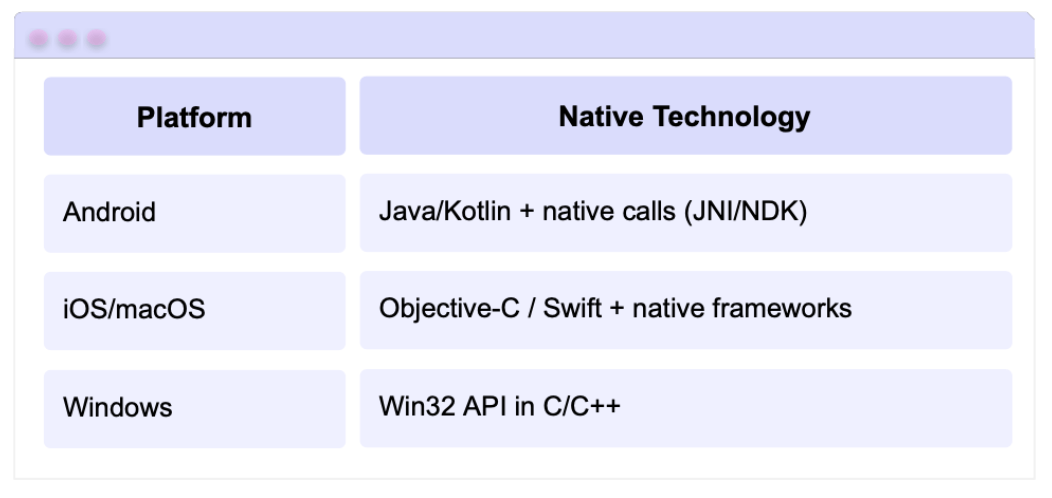
Meanwhile, in your .NET code you can simply write:
var photo = await MediaPicker.CapturePhotoAsync();
And “under the hood,” .NET MAUI takes care of detecting the platform, calling the correct native API, converting the response and giving it back to you as a C# object.
What’s New in .NET 10 About Marshal Methods for .NET MAUI? 🤔
Marshal Methods Enabled by Default
In .NET 9, a new mechanism for generating marshal methods was introduced, improving Android app startup performance. However, this feature was not enabled by default, and developers had to turn it on manually.
Starting with .NET 10, these optimized marshal methods are enabled by default, which results in faster app startup.
But in some cases, this change may cause the application to freeze or take too long to launch when running on Android. If you notice this behavior in .NET 10 previews—and it didn’t happen on .NET 9—you can temporarily disable this feature by adding the following MSBuild property to your project’s .csproj file:
<PropertyGroup>
  <AndroidEnableMarshalMethods>false</AndroidEnableMarshalMethods>
<PropertyGroup>
📦 ArtifactFilename Metadata for @(AndroidMavenLibrary) Item
Since .NET 9, there has been an MSBuild item called @(AndroidMavenLibrary) that allows .NET to automatically download a Java/Android library from Maven and include it in your Android project.
The expected naming convention for the file inside Maven usually follows something like:
{artifact.Id}-{artifact.Version}.[jar|aar].
However, many libraries do not follow a standard naming format. Some add custom names, extra suffixes, alternate build tags, etc.
For example:
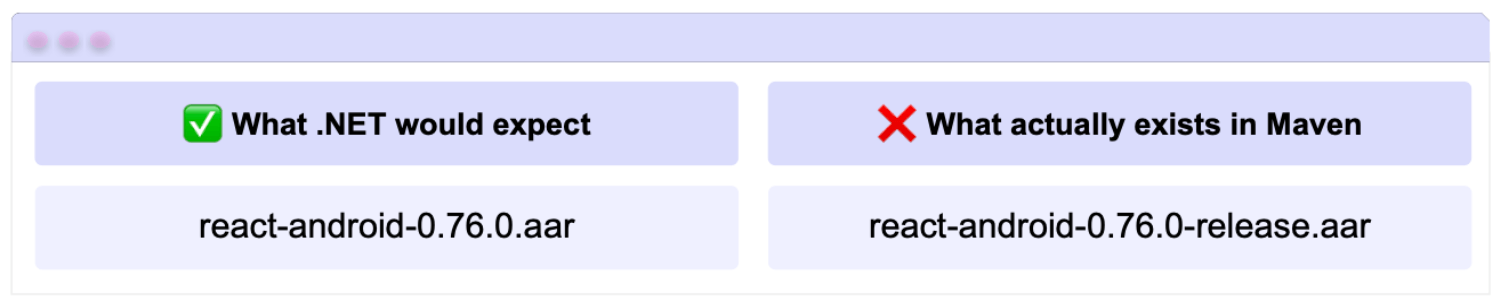
As a result, the download could fail. 😬
With .NET 10, this is no longer a problem. You can now manually specify the exact filename of the library. This allows .NET to know precisely which file to look for and avoids unexpected failures when binding Maven dependencies.
You can do this by adding the ArtifactFilename metadata to the @(AndroidMavenLibrary) MSBuild item, allowing an alternative filename to be provided.
For example:
<ItemGroup>
    <AndroidMavenLibrary
	    Include="com.facebook.react:react-android"
	    Version="0.76.0"
    ArtifactFilename="react-android-0.76.0-release.aar" />
</ItemGroup>
In case you are not familiar with Maven …
Maven is a dependency management and build tool, meaning that it allows projects to automatically download libraries from online repositories. It is mainly used in the Java and Android ecosystems.
Conclusion
And that 's it! 🎉 Now you know what marshal methods are, why they are key for interacting with native features in .NET MAUI and what’s new in .NET 10 for them—especially for Android performance. 🚀
I hope this guide helps you better understand what’s happening “behind the scenes” and gives you more confidence when working with native device features in your MAUI apps.
If you have any questions or want me to cover more related topics, feel free to leave a comment—I’d be happy to help you! 💚
See you in the next article! 🙋♀️✨
References
The explanation was based on the official documentation:

Leomaris Reyes
Leomaris Reyes is a software engineer from the Dominican Republic specializing in mobile development. She is a 7-time Microsoft MVP and actively builds mobile applications while sharing practical knowledge through technical articles and developer-focused content.
Through her work, she explains programming concepts, developer tools and real-world development practices to help developers grow in their careers.
You can follow her on Instagram and TikTok at @leomarisreyes.dev, read her articles on AskXammy, and connect with her on LinkedIn, where she shares tutorials, insights and resources for developers.
Related Posts
Comments
All articles
Topics
Web MobileMobile
Desktop
Design
Productivity
People