Building Trustworthy AI Experiences

Summarize with AI:
Providing source attribution, explanations and transparency can help bolster user trust in an AI-powered application.
An AI feature can produce a useful answer and still leave the user unsure whether to trust it.
A support assistant may recommend a refund without showing the policy behind that recommendation, while a project assistant may summarize a status without making clear which records it relied on. In both cases, the output may be correct, but the user has little basis for judging it.
Trustworthy AI experiences give users enough information to judge an output before relying on it. They show where important information came from, explain consequential recommendations in useful terms and help make uncertainty visible when it affects the next decision. They also give users a way to inspect, correct or stop the system when something looks wrong.
In this article, we’ll look at how transparency, source attribution, explanations and confidence signals can help users develop an appropriate level of trust in an AI-powered application.
Trust Comes from What the Application Shows
We should not treat trust as a message we add beside an AI feature. A label that says “AI-generated” tells users what produced an output, but it doesn’t tell them whether the output is grounded in the right information or whether an action has already taken place.
Trust comes from behavior users can inspect. That means giving users the information they need to understand where an output came from, why it appeared and what the system has done with it.
Different UI patterns answer different questions:
| Pattern | Question it helps answer |
|---|---|
| Source attribution | Where did this information come from? |
| Explanation | Why is the application recommending this? |
| Status and activity | What has the AI already done? |
| Confidence or uncertainty | How much weight should we place on this result? |
| User controls | What can we inspect, change or stop? |
These patterns become more important as an AI feature gains authority. A generated summary may only need source links and an edit control, while an agent proposing a refund needs stronger evidence because the output could lead to a real change in a customer’s account.
Show Where Information Came From
Source attribution is one of the clearest ways to make an AI response inspectable. When an application answers from documentation, policy or business data, the interface can show the sources used to support the answer.
This is especially useful in retrieval-augmented (i.e., RAG) applications. The retrieval step already identifies the passages supplied to the model, so the response can preserve references to those documents and expose them in the UI.
Suppose an internal support assistant answers:
Enterprise customers can request a refund within 30 days when a duplicate charge is confirmed.
A link to the current refund policy lets the support engineer verify that statement without searching the knowledge base separately. If the policy changed recently, the source also gives the engineer a way to check whether the response reflects the latest version.
A citation still does not prove that the model interpreted a source correctly. Evaluations and production monitoring remain responsible for measuring answer quality. Source attribution gives the user something different: a direct path to verify the response when verification matters.
Explain the Output at the Point of Decision
Not every AI output needs a detailed explanation. A generated email subject or reformatted paragraph may be easy to inspect directly. Explanations matter more when an output is surprising, difficult to verify or likely to influence an important decision. The explanation should focus on information that helps with that decision.
If an agent proposes a refund (for example), we don’t need to expose every internal step that led to the proposal. We can show the evidence that matters:
- Two charges with the same amount and billing period were found.
- The account has no matching second purchase.
- The current refund policy allows duplicate charges to be refunded.
- The proposed refund is $129.
This gives the reviewer a useful explanation without turning the interface into a transcript of the model’s internal reasoning.
Treat Confidence Scores Carefully
Confidence scoring sounds like a direct way to communicate uncertainty. If a system is 92% confident, we might show 92% beside the result and let the user decide how much to trust it. With that said, a confidence score is only helpful when we know what it represents.
Some predictive models produce probabilities that teams can evaluate and calibrate against real outcomes. In those cases, a confidence value may be useful. A model simply stating that it is “95% confident,” however, does not make that number a calibrated probability. A precise percentage can make an answer look more certain without giving the user useful evidence.
For many generative AI features, concrete signals are easier to act on:
- Did retrieval find an authoritative source?
- Is required account data available?
- Did structured validation pass?
- Does the proposed action match application policy?
We can represent those signals in application state:
type TrustSignals = {
  authoritativeSourceFound: boolean;
  requiredDataPresent: boolean;
  validationPassed: boolean;
  policyMatched: boolean;
}
The UI doesn’t need to expose an object like this directly. If required data is missing, the application can say what it could not verify. If the current policy was retrieved and validation passed, it can show that supporting evidence beside the result.
In summary, when a confidence score improves a user’s decision, we can show it and explain what the value represents. When it doesn’t, evidence and clear uncertainty are usually more useful than a percentage.
Make Limits and Actions Visible
An AI experience also builds trust by being clear when it cannot complete a task reliably. Suppose a support assistant is asked whether a customer qualifies for a refund, but the payment service is unavailable. The application should not fill the gap with a plausible answer. It can explain that it found the relevant policy but could not verify the payment history:
I found the refund policy, but I could not verify the payment history for this account. No refund has been issued.
The last sentence is key. When an AI system can take actions, users need to know whether it only prepared a recommendation or already changed something.
The same principle applies to agents working across several steps. The interface can show when an agent is working, waiting for approval, completed or stopped because required information is missing. Where possible, the experience should also provide a path forward, such as retrying a failed lookup, supplying missing information or escalating the task.
Clear limits help users learn where the system can be relied on and where human judgment still belongs.
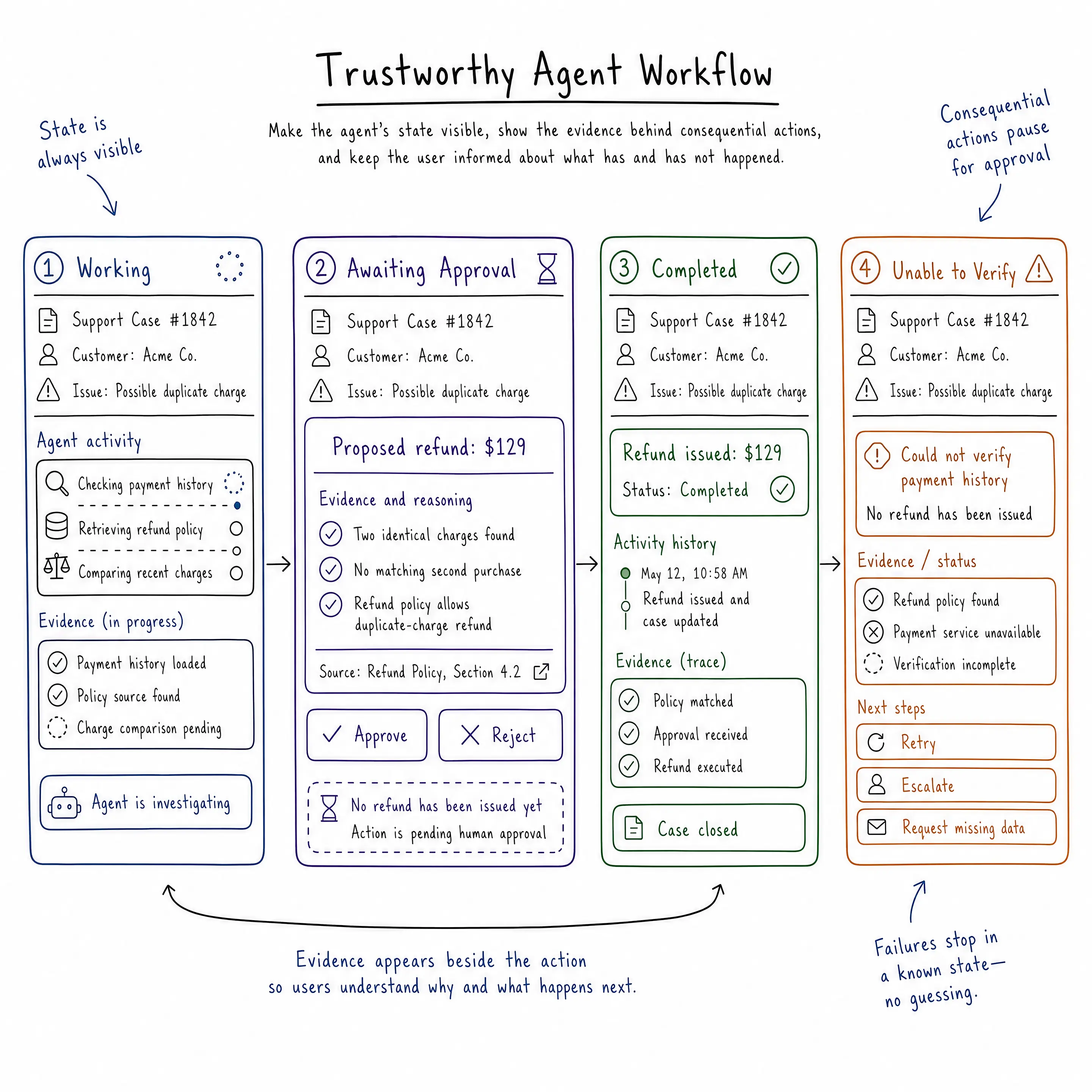
One Trustworthy Experience, Beginning to End
A customer writes that they were charged twice for a Pro subscription and asks for a refund. A trustworthy workflow might look like this:
- The backend retrieves the current duplicate-charge policy and preserves its source reference.
- The agent checks the customer’s payment history and finds two matching charges.
- The UI shows the proposed $129 refund, the matching payment records and the policy that supports it.
- Because the amount requires approval, the application makes clear that no refund has been issued yet.
- The support engineer reviews the evidence and approves the proposal.
- The backend validates the request again, executes the refund and records the result.
- The UI updates the case to show that the refund completed.
At each point, the support engineer can tell what information the application used, what the agent concluded, and what state the workflow is in.
This is the central idea of our topic: Trust is not created by one disclosure or one confidence label. It’s created by maintaining a visible, inspectable chain from evidence to recommendation to action.
If payment history could not be loaded, the workflow would stop before proposing the refund. If relevant sources conflicted, the application could surface the conflict and escalate the case rather than hiding the uncertainty behind a confidence score.
Wrap-up
Building a trustworthy AI experience doesn’t mean convincing users that the system is always right. It means giving them enough information to understand when they can rely on it and when they should inspect the result more closely.
Source attribution makes generated answers easier to verify. Explanations connect recommendations to relevant evidence for the current task.
Confidence signals can communicate uncertainty when they have a clear meaning, though missing data, validation results and policy checks often provide more useful signals in generative applications.
The same principles apply when an AI system can act. Users should be able to see what an agent is doing, whether an action is still proposed or already complete, and where human approval is required.
As AI takes on a larger role inside our applications, trust becomes part of the interface and the application architecture around it. We earn it by making behavior inspectable, limits visible and consequential actions clear.
For more on building AI-powered applications and agents with Progress, check out the following resources:
- Progress Agent Engineering observability platform
- Progress Software: AI-Powered Applications
- Progress Agentic RAG Solution

Hassan Djirdeh
Hassan is a senior frontend engineer and has helped build large production applications at-scale at organizations like Doordash, Instacart and Shopify. Hassan is also a published author and course instructor where he’s helped thousands of students learn in-depth frontend engineering skills like React, Vue, TypeScript and GraphQL.
Related Posts
Comments
All articles
Topics
Web MobileMobile
Desktop
Design
Productivity
People