Building Resilient APIs with the Retry Pattern
 by
by 
Summarize with AI:
Sending and receiving data is the essence of any web API. But what happens when something goes wrong and communication fails? To avoid unexpected issues and enable greater resilience, we can use the Retry Pattern. Learn how to implement this pattern in ASP.NET Core to make your APIs more reliable.
The Retry Pattern helps developers create APIs that are prepared for adverse situations when communicating with external services, such as databases and even other APIs.
In this post, we’ll explore the main challenges faced when working with distributed applications that communicate with each other and discover how the Retry Pattern can be used as a resilience strategy to deal with common failures in these scenarios.
We’ll also see how to implement the Retry Pattern in an ASP.NET Core application using a retry pipeline through the Polly library.
Common Integration Issues
Any application that communicates with APIs or external services is susceptible to the risk of communication failures, including timeouts, temporary unavailability, network errors or request limits. While often underestimated, these issues are common and can compromise the user experience and system reliability.
In this context, we can highlight the following issues that modern systems face when handling integrations:
Temporary Network Errors
When accessing the network, 100% availability is not always guaranteed. Packets can be lost, connections can drop and providers can experience momentary instability. For example, a payment API takes longer than expected to respond, and its call times out (TimeoutException). In practice, the transaction may have been processed, but the application did not receive confirmation.
Temporary Unavailability of External Services
Services may undergo maintenance, experience overload or be offline for a few minutes. For example, an ecommerce website queries a pricing API to update a product’s price. If the API is unavailable, the system may fail and display the outdated price to the customer, causing harm and stress for both the consumer and the company selling the product.
Inconsistent or Invalid Data
There is always a risk that external APIs may return incomplete data, in an unexpected format or with business errors. For example, a registration API returns addresses without a ZIP code or with invalid characters, breaking the system’s internal validations.
These are just some of the many scenarios in which an API can fail to perform its intended task, resulting in significant problems and losses for the development team and the company. Fortunately, some solutions help mitigate these and other risks by automatically retrying a failed operation in the hope that it will succeed on a second attempt. Next, we’ll explore the Retry Pattern, which stands out as a solution for dealing with these temporary failures.
Understanding the Retry Pattern
The Retry Pattern is a resilience pattern whose central idea is to retry a failed operation, rather than simply giving up on the first attempt. This is useful and, in many cases, indispensable, as distributed systems tend to experience temporary problems, such as momentary network instability or even server overload. Therefore, when a communication or processing failure occurs between two services, it is advisable to at least try again.
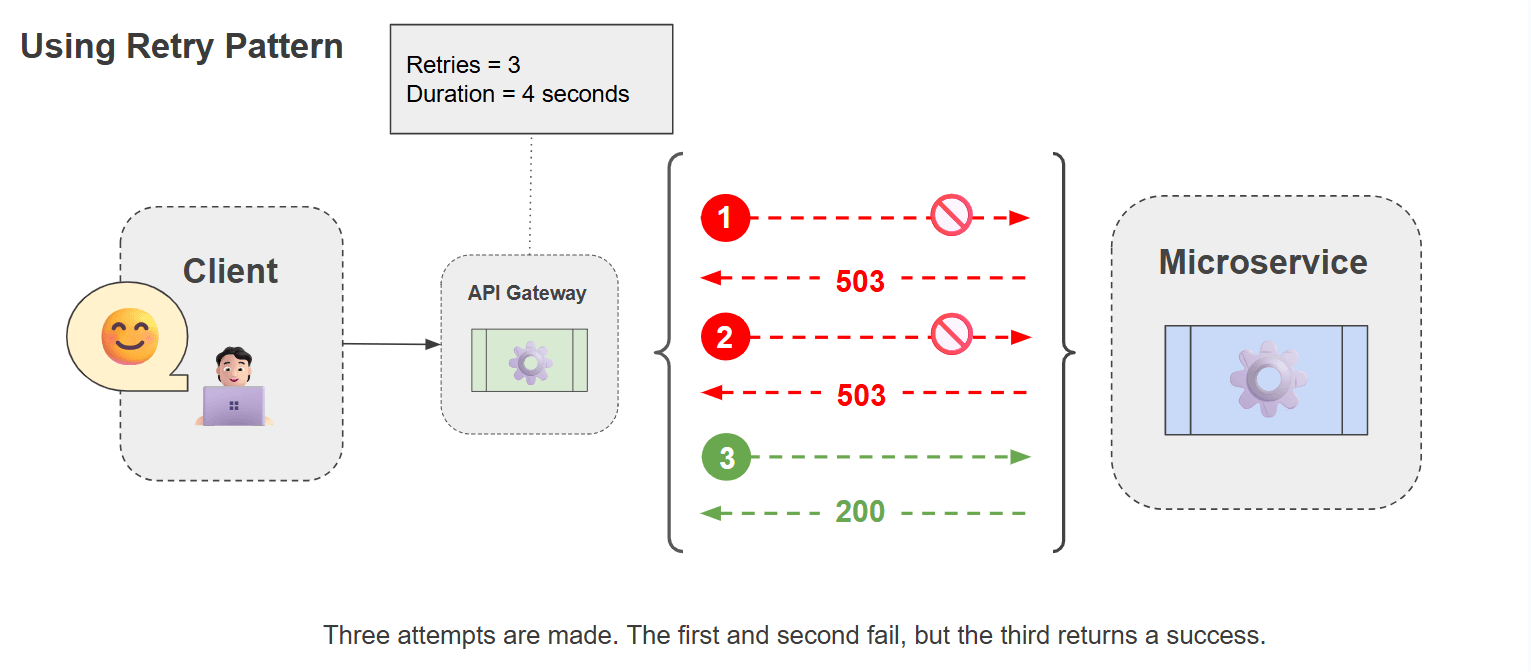
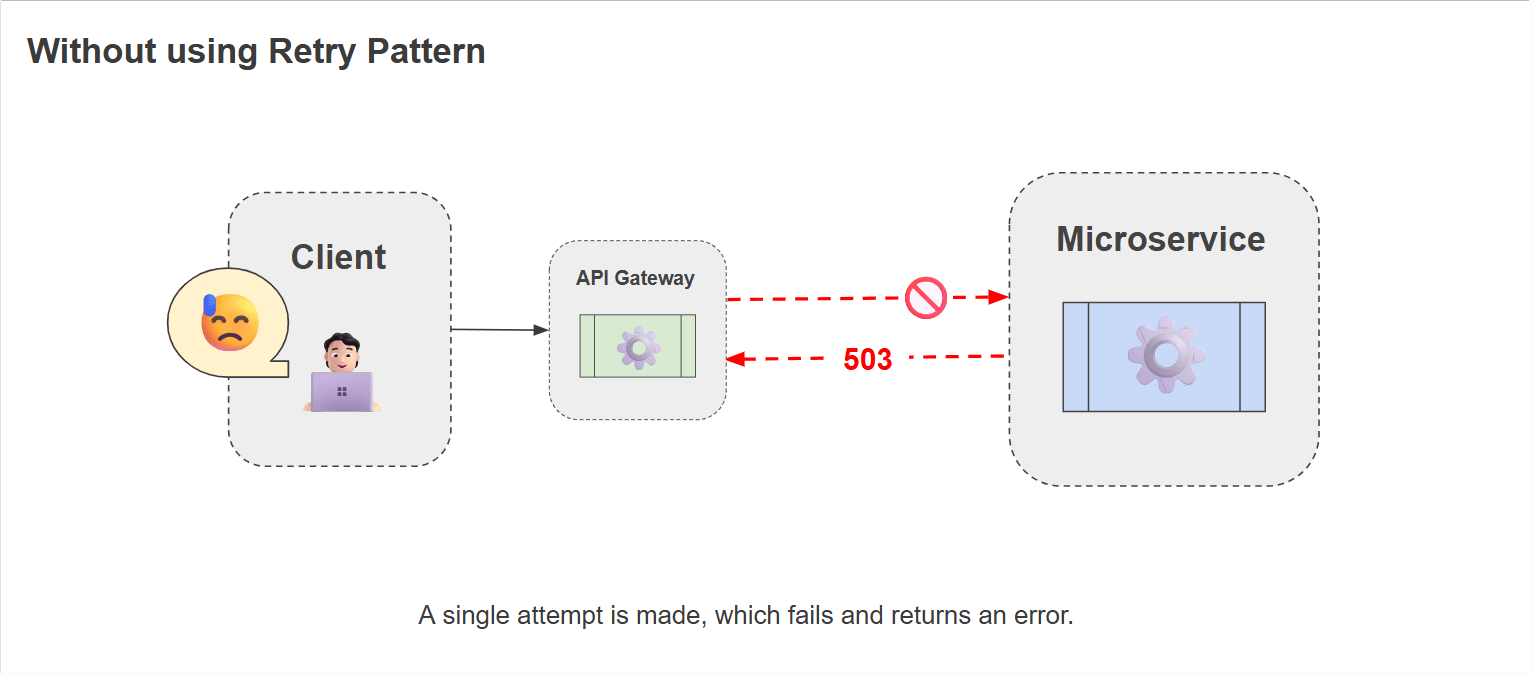
These failures are usually corrected after a period of time. If the action that triggered the failure is retried after a reasonable delay, it is very likely to be successful. For example, imagine a payment service is momentarily overloaded and returns a “Service Unavailable (503)” error. In this case, it does not mean that the service is permanently down, but rather that it was unable to process the request at that time. If the application retries after a few seconds, it is very likely that the payment will be completed successfully.
Scenarios like this show that the Retry Pattern can be extremely useful, as it helps prevent temporary glitches from resulting in significant losses, maintaining a stable user experience and reducing the need for potential manual intervention.
The image below demonstrates two scenarios, with and without the use of the Retry Pattern.
Implementing Retry Pattern in ASP.NET Core
To implement the Retry Pattern, we’ll consider a scenario where a product catalog API needs to access another API to retrieve product image data. The premise is that we can’t leave the client without the product image. So, even if the first request fails, we have to try again.
So, first, we’ll create a simple product catalog API and implement a retry policy and a secondary API to return product images. Finally, we’ll force an error on the first two attempts and a success on the third, to validate that the policy is working.
You can access the complete source code in this GitHub repository: PollyProducts source code.
🦜 Polly for Resilience
Polly is a library focused on resilience and fault tolerance for .NET applications.
It is widely known and helps systems handle temporary failures when calling external APIs, databases, network services and more, allowing developers to implement resilience policies to anticipate temporary unavailability scenarios.
In addition to basic features like automatic operation retry, Polly offers advanced features like circuit breaker, which temporarily stops new calls after a consecutive number of failures, avoiding overloading unavailable services. Another important feature is fallback, which defines an alternative action when the main operation fails, for example, returning cached data if the API is down.
Creating the Product Catalog API
So, first, let’s create the API that will make requests to the secondary API to return data from the product catalog. This is where we’ll create a pipeline with a retry policy.
To create the base application, you can run the following commands in your terminal:
dotnet new web -o PollyProducts
Then, run the following commands to download and install the Polly NuGet Packages:
dotnet add package Polly

dotnet add package Microsoft.Extensions.Http.Polly
Next, let’s create the retry policy class. For that, create a new folder called “Policies” and, inside it, create the following class:
using Polly;
using Polly.Extensions.Http;
using Polly.Retry;
using System.Net;

namespace PollyProducts.Policies;

public static class ContextRetryPolicy
{
    public static ResiliencePipeline<HttpResponseMessage> CreatePipeline()
    {
        var builder = new ResiliencePipelineBuilder<HttpResponseMessage>();

        builder.AddRetry(new RetryStrategyOptions<HttpResponseMessage>
        {
            MaxRetryAttempts = 3,

            DelayGenerator = args =>
            {
                var delay = TimeSpan.FromSeconds(Math.Pow(4, args.AttemptNumber));
                return new ValueTask<TimeSpan?>(delay);
            },

            ShouldHandle = new PredicateBuilder<HttpResponseMessage>()
                .Handle<HttpRequestException>()
                .HandleResult(response =>
                    (int)response.StatusCode >= 500 ||
                    response.StatusCode == HttpStatusCode.RequestTimeout
                ),

            OnRetry = args =>
            {
                var reason = args.Outcome.Exception?.Message
                             ?? args.Outcome.Result?.StatusCode.ToString()
                             ?? "Unknown reason";

                Console.ForegroundColor = ConsoleColor.Yellow;
                Console.WriteLine($"[Retry {args.AttemptNumber}] Retrying in {args.RetryDelay.TotalSeconds}s due to {reason}");
                Console.ResetColor();

                return default;
            }
        });

        return builder.Build();
    }
}
Let’s analyze the code above. In it, we use ResiliencePipelineBuilder<HttpResponseMessage> to implement the pipeline concept available in Polly 8. This allows the creation of configurable flows that can seamlessly combine multiple strategies such as retry, circuit breaker, fallback and timeout. In this case, the pipeline specializes in working with HTTP responses.
The AddRetry() configuration adds a retry policy. We define three attempts (MaxRetryAttempts = 3) and an exponential interval between them, where: first attempt: 4¹ = 4s, second attempt: 4² = 16s, and third attempt: 4³ = 64s. This avoids bombarding the service with requests in succession and gives it time to recover.
Furthermore, we use the ShouldHandle to define when the retry should occur, covering two scenarios: network exceptions (HttpRequestException) and server errors (5xx)/timeouts (408). This avoids unnecessary retries on client errors (4xx), which are usually not temporary.
Finally, every time the retry occurs, we print a colored message to the console, which we will use later to verify the retry behavior in action.
The next step is to configure the Program class and create the endpoint to request, so in the Program class, add the following code:
using PollyProducts.Policies;

var builder = WebApplication.CreateBuilder(args);

builder.Services.AddHttpClient("LocalProductImageClient", client =>
{
    client.BaseAddress = new Uri("http://localhost:5005/");
});

var retryPipeline = ContextRetryPolicy.CreatePipeline();

var app = builder.Build();

app.MapGet("/products/{id}/", async (int id, IHttpClientFactory httpClientFactory) =>
{
    var client = httpClientFactory.CreateClient("LocalProductImageClient");
    int attempt = 0;

    HttpResponseMessage response = await retryPipeline.ExecuteAsync(async token =>
    {
        attempt++;

        Console.ForegroundColor = ConsoleColor.Cyan;
        Console.WriteLine($"[Attempt {attempt}] Requesting /photos/{id}");
        Console.ResetColor();

        var resp = await client.GetAsync($"/photos/{id}", token);

        Console.WriteLine($"[Attempt {attempt}] Response: {(int)resp.StatusCode} {resp.StatusCode}");

        return resp;
    });

    if (!response.IsSuccessStatusCode)
    {
        return Results.Problem("Image service is temporarily unavailable.");
    }

    var content = await response.Content.ReadAsStringAsync();

    return Results.Ok(new
    {
        ProductId = id,
        ImageInfo = content.Substring(0, Math.Min(content.Length, 120)) + "...",
        RetrievedAt = DateTime.UtcNow,
        Attempts = attempt
    });
});

app.Run();
In the ContextRetryPolicy class, we created a pipeline with a retry policy using Polly. Now, let’s see this policy in action.
In the code above, we use the API to consume another local HTTP service and retrieve product images, which we will create later.
First, we register the HttpClient (LocalProductImageClient) pointing to the base URL of the image service. Then, the application creates the pipeline using ContextRetryPolicy.CreatePipeline(). Within the pipeline, the retry policy is created, which will be used to encapsulate the call to the external service, so that if something fails, the system will retry before giving up.
Thus, whenever the /products/{id}/images endpoint is called, the application obtains an HttpClient from the factory and initiates the request to /photos/{id} on the external service.
With each retry attempt, the attempt number, the requested route and the response result are printed to the console. This will be useful for understanding real-time retry behavior, allowing us to see when Polly intervenes when testing the application.
If, after all attempts, the response is still unsuccessful, the API will return an error indicating that the image service is temporarily unavailable. Otherwise, it reads the response content, extracts a snippet for display, and returns a JSON object containing the product ID, a summary of the response, the time of the request and the number of attempts made.
Creating the Product Image API
The Product Image API will simulate the return of product image data. We’ll use it to test the retry policy in the Catalog API. So, to create the base application, run the command below:
dotnet new web -o BaseImages
Then, in the Program class, add the following code:
var builder = WebApplication.CreateBuilder(args);
var app = builder.Build();

app.MapGet("/photos/{id}", (int id) =>
{
    return Results.Ok(new
    {
        Id = id,
        Url = $"https://samplepics.photos/id/{id}/200/200",
        Title = $"Photo {id}"
    });
});

app.Run("http://localhost:5005");
In the code above, we define a minimal API that acts as a local image service.
First, we define a GET route (/photos/{id}) that receives an image identifier and returns a mock response in JSON format. Finally, the application runs on a fixed port (http://localhost:5005). Setting the port is important in this context because it keeps the base address used in the main API’s HttpClient stable.
So, everything we needed to implement the retry policy is ready. Now let’s run both APIs and test the possible scenarios.
🧪 Simulating Retries
To simulate retries, first run the Catalog API and make a request to the route: https://localhost:PORT/products/1 and observe the logs in the console. The first and second attempts will appear in the console:
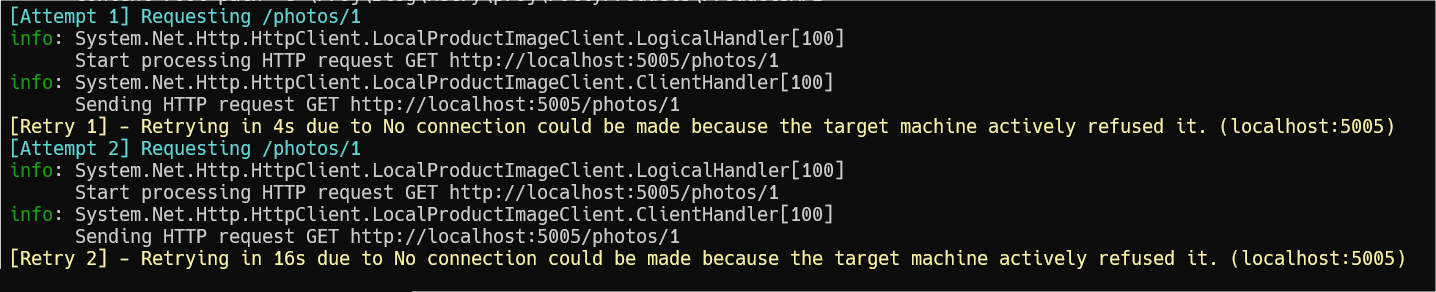
The attempt error occurred because the images API is not enabled. Then run the second API (BaseImage), so now the Catalog API will be able to connect to the Images API, and the third attempt will be successful, as shown in the image below:
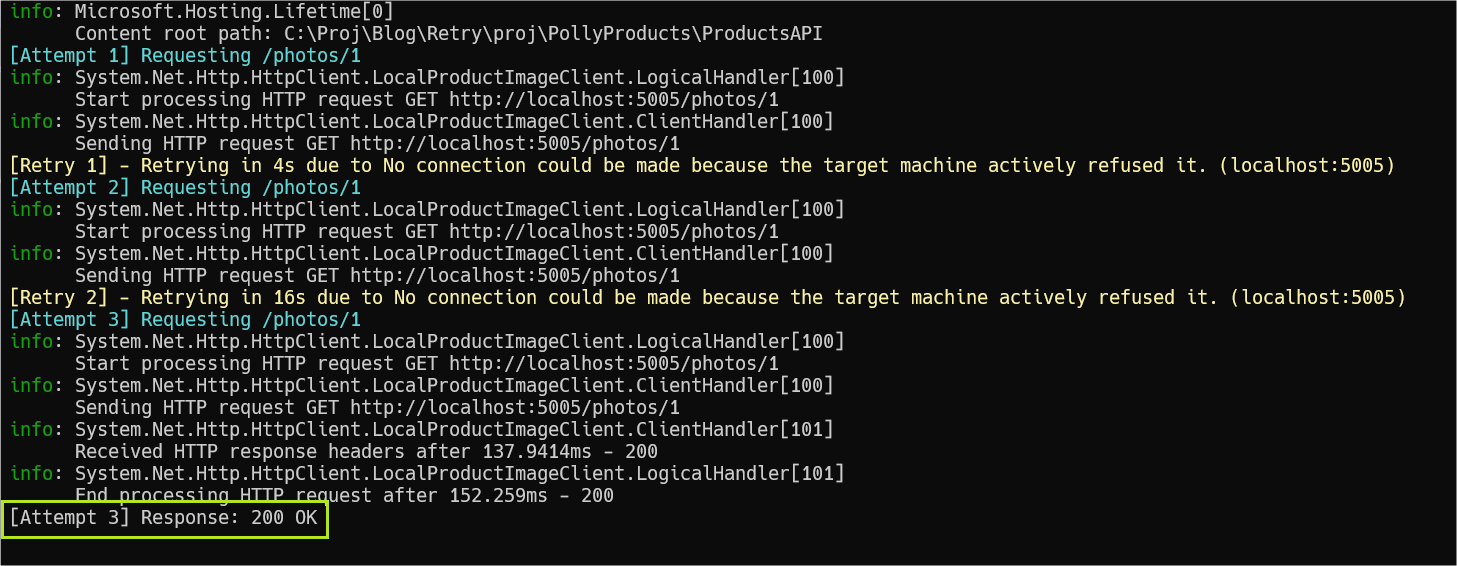
Note that the first attempts resulted in an error, but the third managed to connect to the image API and returned the requested data.
🌱 Conclusion and Next Steps
Scenarios where applications communicate with each other, receiving and sending data, are common in distributed systems. Therefore, it’s essential to design a system that verifies this communication actually occurs. This is where the Retry Pattern shines, for the construction of web APIs that are resistant to unexpected failures.
In this post, we covered the main problems that can occur in distributed applications and how to deal with them by implementing a retry policy with the open-source Polly library for ASP.NET Core.
And it doesn’t end there. Polly has many other powerful features you can explore, such as fallback, which lets you do something else when a request fails, or hedging, which allows you to send multiple requests at once and use the fastest response.
Related Posts
Comments
All articles
Topics
Web MobileMobile
Desktop
Design
Productivity
People