Designing Microservices: An Architectural and Practical Approach
 by Assis Zang

Summarize with AI:
Microservices provide flexibility, scalability and independence when managing systems that require decentralized resources. But how do these qualities translate into practice? Let’s explore microservices from an architectural perspective and build a feedback microservice from scratch in ASP.NET Core.
In a technology-driven and highly consumer-oriented world, using classic approaches like monoliths isn’t always the best choice. In these cases, microservices stand out as a flexible and viable option for creating and deploying independent services.
In this post, we’ll explore how microservices fit together architecturally, their advantages and disadvantages, and how to build a backend microservice in ASP.NET Core to manage customer feedback.
🏛️ Microservices in Architecture
If you’ve worked or even studied programming in recent years, you’ve probably seen the word “microservice” somewhere. This is because microservices have never been so popular. Large technology companies have made this term almost synonymous with scalability, resilience and innovation.
However, it’s important to understand that microservices are not a ready-made formula for any project. They are, first and foremost, an architectural choice, and like any architectural decision, they should be based on the system’s needs, not simply on the desire to adopt the most popular approach.
In practice, microservices present themselves as an alternative to the monolithic model. In a monolith, all business logic coexists within a single application. However, in microservices, the application is divided into smaller, independent services, each responsible for a specific context.
The choice of microservices directly impacts the architecture and has proven to be an excellent choice in many scenarios. Let’s consider a scenario in which a microservice would be a recommended approach.
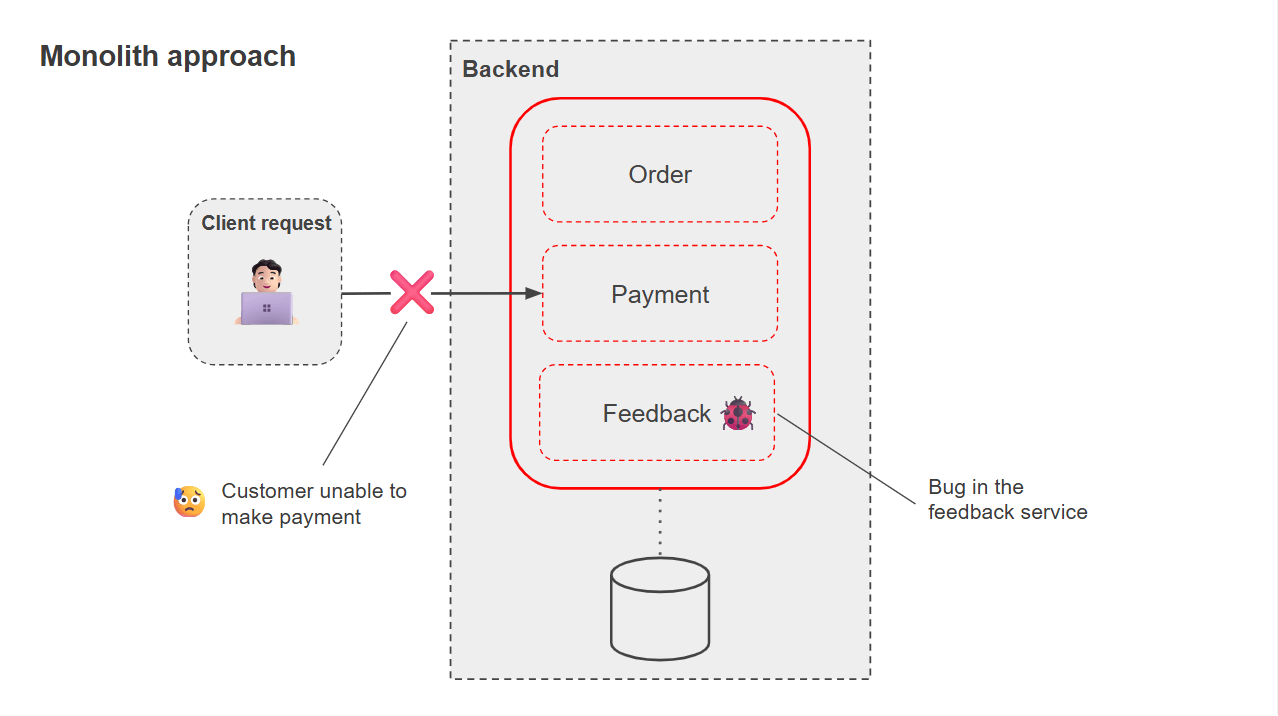
Imagine a scenario where we have three main services: Order, Payment and Feedback. In an ecommerce business, for example, Order and Payment are fundamental to the business’s operation, while Feedback, although important, plays a more secondary role. Now, consider the following situation: a bug occurs in the Feedback service. How would this impact the application if it were structured as a monolith vs. as a set of microservices?
In the monolithic model, all services are grouped in a single system, sharing the same codebase and running in the same process. This means that, even if the problem is limited to the Feedback functionality alone, there is a risk of compromising the stability of the entire system.
Furthermore, fixing Function requires a complete redeployment, including Order and Payment, even if these services were not affected. In other words, a small detail in a secondary area can become a bottleneck for the entire business, as demonstrated in the image below:
In the microservices model, each part of the system is isolated in its own process, with independent deployment, scalability and database. In this scenario, a bug in Feedback only impacts that specific service, and since it’s not essential to the purchasing process, it can be offline for a while without major complications.
Meanwhile, Order and Payment continue to function normally, without compromising the purchasing flow or payment processing, which are the heart of the business. Fixes are also faster, as only the problematic service needs to be updated.
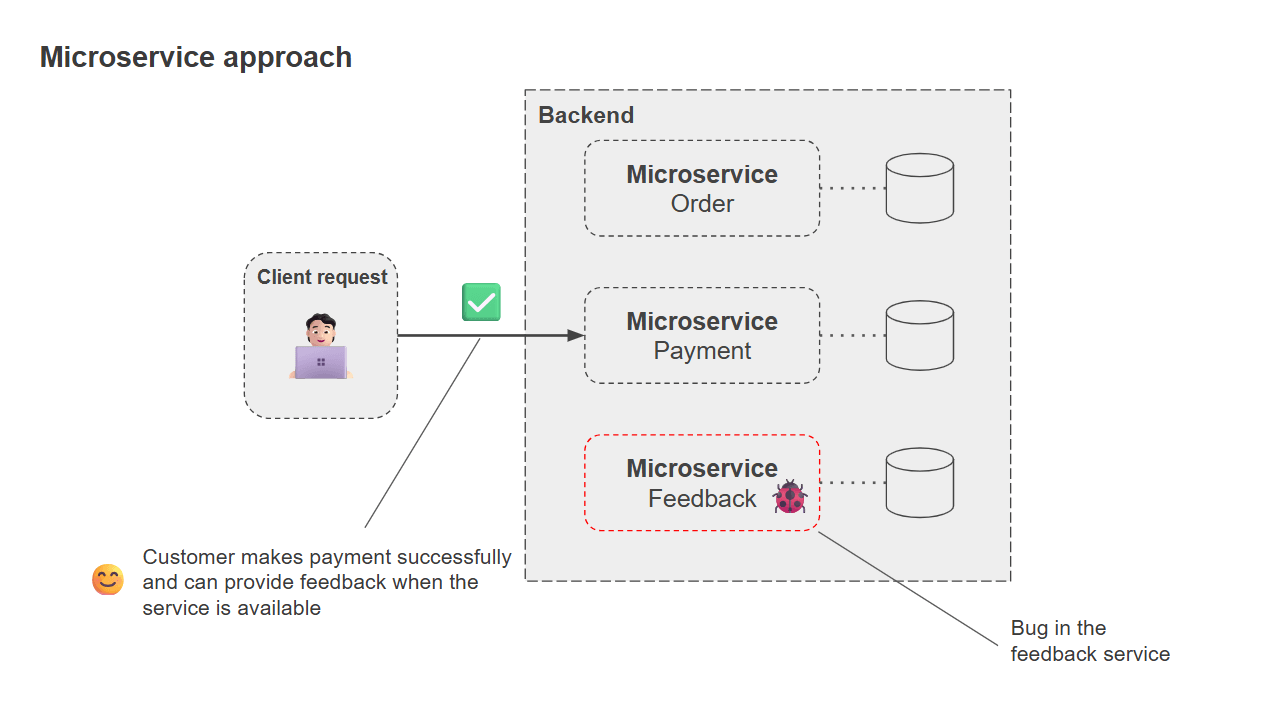
It’s important to emphasize that, in this hypothetical scenario, we’re considering a worst-case scenario without going into too much detail. In this sense, while in a monolith, a seemingly harmless bug can cause instability throughout the system, the impact in microservices is much more localized and controlled. This is why, in scenarios where certain services are business-critical, such as Order and Payment, the microservices architecture offers significant advantages in terms of resilience and operational continuity.
📉 Disadvantages of Microservices
While they offer benefits such as scalability, resilience and separation of responsibilities, microservices also have disadvantages that must be considered.
One of the main ones is architectural complexity. Dividing a system into dozens or hundreds of independent services requires significantly more orchestration, monitoring, deployment and communication between components. Furthermore, network traffic increases significantly, as calls that were previously internal to a monolithic process are now distributed among different services, potentially becoming a long-term risk.
Another challenge faced when choosing to use microservices is related to data management and transactional consistency. Each microservice tends to have its own database, which makes it difficult to maintain consistency between them and often requires the adoption of more sophisticated strategies, such as sagas or event sourcing. This complexity increases the team’s learning curve, demands greater maturity in DevOps practices and can increase infrastructure and operational costs.
Therefore, for organizations that do not have a solid foundation in these aspects, adopting microservices can result in a more fragile and expensive system than a well-structured monolith.
🛠️ Building a Microservice
Now that we understand the software architecture aspects of microservices, let’s build a microservice with ASP.NET Core that uses SQL Server as a database and runs it in a Docker container.
First, let’s think about domain design. We need to clearly define the microservice’s responsibilities. It should solve a specific problem within the larger context of the system, without accumulating functions that don’t belong there. This clear boundary is what prevents a microservice from becoming a “mini-monolith.”
In this sense, the microservice we’re going to create will be responsible for managing customer feedback. It should receive basic customer data such as the customer’s name, the product or service they’re referring to, their rating (using a scale of 1-5, where 1 is very bad and 5 is very good), and an optional description. It should then insert this data into a database. Furthermore, it should make the entered data available for future evaluation.
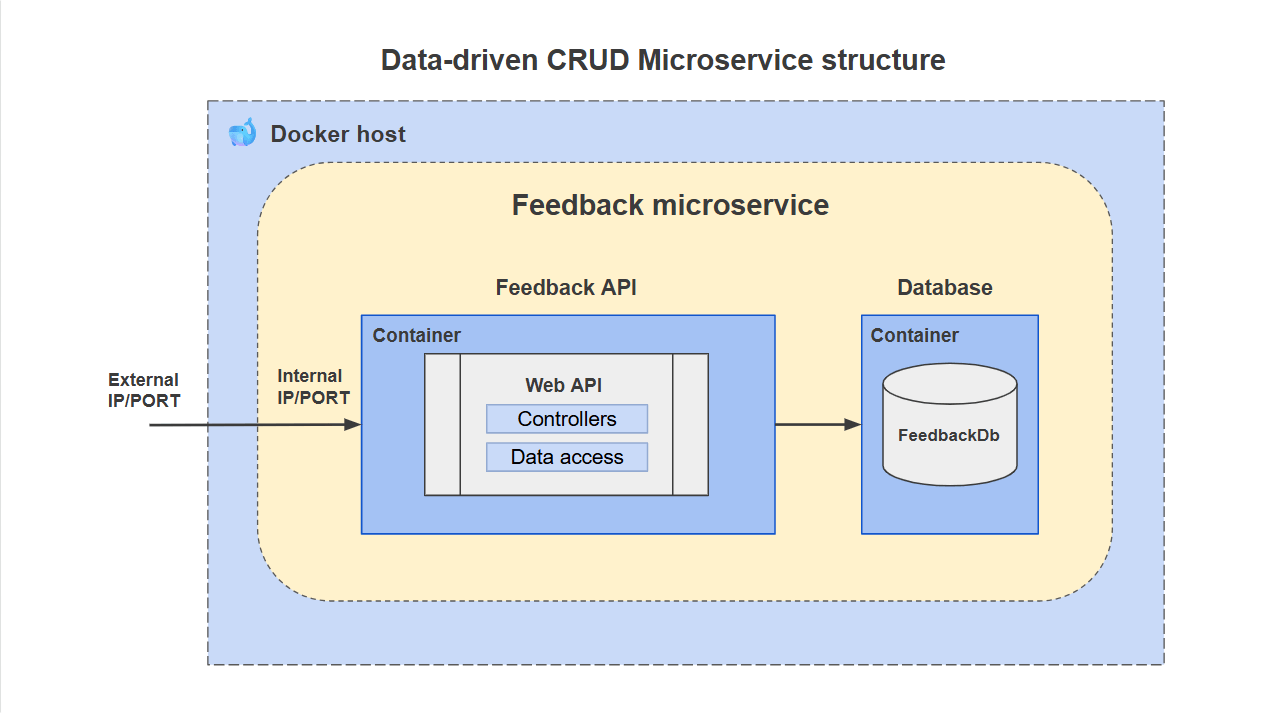
From a design perspective, this microservice refers to a simple data-driven CRUD, where modeling and implementation are guided by the data and the database. CRUD (Create, Read, Update, Delete) refers to the fact that the microservice exposes simple endpoints that allow creating, querying, updating and deleting records, as shown in the image below.
Creating the Project and Downloading the Dependencies
You can access the complete application code in this GitHub repository: Customer Insights Source Code.
To create the project and solution, you can use the .NET commands below:
dotnet new sln -n CustomerInsights

dotnet new webapi -n CustomerInsights

dotnet sln CustomerInsights.sln add CustomerInsights/CustomerInsights.csproj
Then run the following commands to add the NuGet packages to the project:
cd CustomerInsights

dotnet add package Microsoft.EntityFrameworkCore.SqlServer

dotnet add package Microsoft.EntityFrameworkCore.Tools

dotnet add package Microsoft.EntityFrameworkCore.Design
Creating the Entity Class
Now, let’s define the entity that will represent the microservice responsible for receiving, storing and providing customer feedback. In this case, we’ll have a class called Feedback.
So, within the project, create a new folder called “Entities” and add the following class to it:
namespace CustomerInsights.Entities;
public class Feedback
{
    public int Id { get; set; }
    public string CustomerName { get; private set; }
    public string Product { get; private set; }
    public int Rating { get; private set; }
    public string? Description { get; private set; }

    public Feedback() { }

    public Feedback(string customerName, string product, int rating, string? description = null)
    {
        if (string.IsNullOrWhiteSpace(customerName))
            throw new ArgumentException("Customer name is required.", nameof(customerName));

        if (string.IsNullOrWhiteSpace(product))
            throw new ArgumentException("Product or service is required.", nameof(product));

        if (rating < 1 || rating > 5)
            throw new ArgumentOutOfRangeException(nameof(rating), "Rating must be between 1 and 5.");

        CustomerName = customerName;
        Product = product;
        Rating = rating;
        Description = description;
    }
}
Here we have a simple entity that represents customer feedback. Despite its simplicity, it follows best practices by keeping its properties private. Furthermore, creating a new record undergoes validations within the class itself, so that the domain is expressive and reveals its intent through the behavior it contains.
Creating the Data Layer
The data layer will contain the class that will communicate with the database. Since we’re using Entity Framework Core as the ORM (Object Relational Mapping), we need to set the DbContext class.
So, create a new folder called “Data” and add the following class inside it:
using CustomerInsights.Entities;
using Microsoft.EntityFrameworkCore;

namespace CustomerInsights.Data;

public class AppDbContext : DbContext
{
    public DbSet<Feedback> Feedbacks { get; set; } = null!;

    public AppDbContext(DbContextOptions<AppDbContext> options)
        : base(options)
    {
    }

    protected override void OnModelCreating(ModelBuilder modelBuilder)
    {
        base.OnModelCreating(modelBuilder);

        modelBuilder.Entity<Feedback>(entity =>
        {
            entity.ToTable("Feedbacks");

            entity.HasKey(f => f.Id);

            entity.Property(f => f.CustomerName)
                .IsRequired()
                .HasMaxLength(100);

            entity.Property(f => f.Product)
                .IsRequired()
                .HasMaxLength(100);

            entity.Property(f => f.Rating)
                .IsRequired();

            entity.Property(f => f.Description)
                .HasMaxLength(500);
        });
    }
}
The AppDbContext class will map the database entities, in this case, Feedback, in addition to making some properties, such as CustomerName, are mandatory when generating database migrations.
Creating the DTOs
To insert and recover data, we’ll create a DTO (Data Transfer Object) that will be received in the request. So, create a new folder called “Dtos” and within it, create the following record and class:
namespace CustomerInsights.Dtos;

public record CreateCustomerFeedbackDto(string CustomerName, string Product, int Rating, string? Description);
namespace CustomerInsights.Dtos;

public class FeedbackResponseDto
{
    public int Id { get; set; }
    public string CustomerName { get; set; } = string.Empty;
    public string Product { get; set; } = string.Empty;
    public int Rating { get; set; }
    public string? Description { get; set; }
}
Creating the Mappings
Mapping classes is necessary to avoid exposing entity classes outside the API, nor bringing in data from outside without proper treatment. So, create a new folder called “Mappings” and, inside it, add the following class:
using CustomerInsights.Dtos;
using CustomerInsights.Entities;

namespace CustomerInsights.Mappings;

public static class FeedbackMappings
{
    public static FeedbackResponseDto ToDto(this Feedback feedback)
    {
        return new FeedbackResponseDto
        {
            Id = feedback.Id,
            CustomerName = feedback.CustomerName,
            Product = feedback.Product,
            Rating = feedback.Rating,
            Description = feedback.Description
        };
    }

    public static IEnumerable<FeedbackResponseDto> ToDtoList(this IEnumerable<Feedback> feedbacks) =>
        feedbacks.Select(f => f.ToDto());

    public static Feedback ToEntity(this CreateCustomerFeedbackDto dto)
    {
        return new Feedback(
            dto.CustomerName,
            dto.Product,
            dto.Rating,
            dto.Description
        );
    }
}
Creating the Controller Class
The next step is to create a controller class to receive API calls and perform actions on the database. Create a new folder called “Controllers” and add the following controller class inside it:
using CustomerInsights.Data;
using CustomerInsights.Dtos;
using CustomerInsights.Entities;
using CustomerInsights.Mappings;
using Microsoft.AspNetCore.Mvc;
using Microsoft.EntityFrameworkCore;

namespace CustomerInsights.Controllers;

[ApiController]
[Route("api/v1/[controller]")]
public class FeedbackController : ControllerBase
{
    private readonly AppDbContext _dbContext;

    public FeedbackController(AppDbContext dbContext)
    {
        _dbContext = dbContext;
    }

    // POST api/v1/feedback
    [HttpPost]
    [ProducesResponseType(typeof(Feedback), StatusCodes.Status201Created)]
    [ProducesResponseType(StatusCodes.Status400BadRequest)]
    public async Task<IActionResult> Create([FromBody] CreateCustomerFeedbackDto feedbackDto)
    {
        try
        {
            var feedback = feedbackDto.ToEntity();

            _dbContext.Feedbacks.Add(feedback);
            await _dbContext.SaveChangesAsync();

            return CreatedAtAction(nameof(GetById), new { id = feedback.Id }, feedback);
        }
        catch (ArgumentOutOfRangeException ex)
        {
            return BadRequest(new { error = ex.Message });
        }
        catch (ArgumentException ex)
        {
            return BadRequest(new { error = ex.Message });
        }
    }

    // GET api/v1/feedback?pageNumber=1&pageSize=10
    [HttpGet]
    public async Task<IActionResult> GetAll([FromQuery] int pageNumber = 1, [FromQuery] int pageSize = 10)
    {
        var feedbacks = await _dbContext.Feedbacks
            .AsNoTracking()
            .OrderBy(f => f.Id)
            .Skip((pageNumber - 1) * pageSize)
            .Take(pageSize)
            .ToListAsync();

        return Ok(feedbacks.ToDtoList());
    }

    // GET api/v1/feedback/product/{product}?pageNumber=1&pageSize=10
    [HttpGet("product/{product}")]
    public async Task<IActionResult> GetByProduct(string product, [FromQuery] int pageNumber = 1, [FromQuery] int pageSize = 10)
    {
        var feedbacks = await _dbContext.Feedbacks
            .AsNoTracking()
            .Where(f => f.Product == product)
            .OrderBy(f => f.Id)
            .Skip((pageNumber - 1) * pageSize)
            .Take(pageSize)
            .ToListAsync();

        return Ok(feedbacks.ToDtoList());
    }

    // GET api/v1/feedback/{id}
    [HttpGet("{id}")]
    public async Task<IActionResult> GetById(int id)
    {
        var feedback = await _dbContext.Feedbacks
            .AsNoTracking()
            .FirstOrDefaultAsync(f => f.Id == id);

        if (feedback is null)
            return NotFound();

        return Ok(feedback.ToDto());
    }
}
Configuring the Program Class
Now, let’s configure the Program class, adding dependency injections and database initialization (DatabaseInit.MigrationInitialization). Add the following code to the Program class:
using CustomerInsights.Data;
using Microsoft.EntityFrameworkCore;

var builder = WebApplication.CreateBuilder(args);

// Add services to the container.
builder.Services.AddControllers();

// Learn more about configuring OpenAPI at https://aka.ms/aspnet/openapi
builder.Services.AddOpenApi();

builder.Services.AddDbContext<AppDbContext>(options =>
    options.UseSqlServer(builder.Configuration.GetConnectionString("DefaultConnection")));

var app = builder.Build();

// Configure the HTTP request pipeline.
if (app.Environment.IsDevelopment())
{
    app.MapOpenApi();
}

app.UseHttpsRedirection();

app.UseAuthorization();

app.MapControllers();

DatabaseInit.MigrationInitialization(app);

app.Run();
Then, in the appsettings.json file, add the SQL Server connection string:
"ConnectionStrings": {
    "DefaultConnection": "Server=mssql-server,1433;Initial Catalog=FeedbackDb;User ID=SA;Password=8/geTo'7l0f4;TrustServerCertificate=true"
  }
Applying Migrations
You can use the commands below to apply EF Core database migrations.
# Create the migrations
dotnet ef migrations add InitialCreate

# If you don't already have the EF Core Tools CLI installed globally
dotnet tool install --global dotnet-ef
Running the Microservice and Database in a Docker Container
Our microservice is ready to run. For that, we’ll use Docker. If you’re unfamiliar with Docker, I suggest these two posts that demonstrate how to deploy an ASP.NET Core application from scratch:
- Deploying ASP.NET Core Applications with Docker—Part 1.
- Deploying ASP.NET Core Applications with Docker—Part 2.
For educational purposes, we will run SQL Server in a Docker container, but in production environments, it is recommended to use cloud resources to maintain the database.
So, add the following Docker Compose file and Dockerfile to the application root:
- docker-compose.yml
version: "3.9"

services:
  customer-insights:
    build:
      context: .
      dockerfile: Dockerfile
    container_name: customer-insights
    ports:
      - "5050:8080"
    depends_on:
      - mssql-server
    environment:
      - ASPNETCORE_ENVIRONMENT=Development
      - ConnectionStrings__DefaultConnection=Server=mssql-server,1433;Initial Catalog=FeedbackDb;User ID=SA;Password=8/geTo'7l0f4;TrustServerCertificate=true

  mssql-server:
    image: mcr.microsoft.com/mssql/server:2022-latest
    container_name: mssql-server
    ports:
      - "1433:1433"
    environment:
      - ACCEPT_EULA=Y
      - MSSQL_SA_PASSWORD=8/geTo'7l0f4
    volumes:
      - mssqldata:/var/opt/mssql

volumes:
  mssqldata:
- Dockerfile
FROM mcr.microsoft.com/dotnet/sdk:9.0 AS build
WORKDIR /src

COPY *.csproj ./
RUN dotnet restore

COPY . .
RUN dotnet publish -c Release -o /app

FROM mcr.microsoft.com/dotnet/aspnet:9.0 AS runtime
WORKDIR /app
COPY --from=build /app ./

EXPOSE 8080
ENTRYPOINT ["dotnet", "CustomerInsights.dll"]
Then run the Docker commands in a terminal:
docker-compose up -d
After execution, you should have two Docker containers, one for the microservice and one for SQL Server:
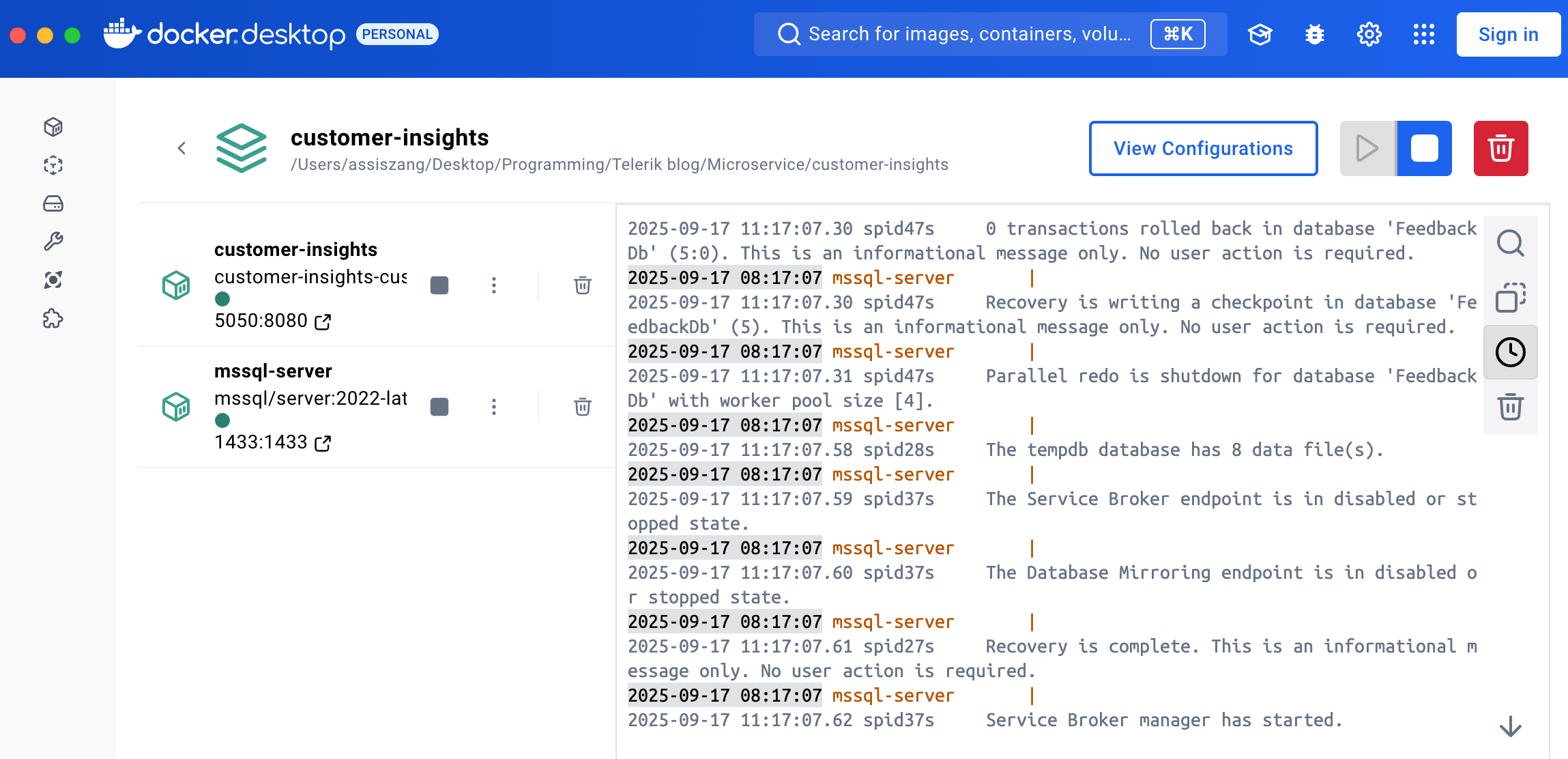
Now, if you make a POST request to the API using the route: http://localhost:5050/api/v1/feedback/1 and pass the following JSON in the body:
{
  "customerName": "John Smith",
  "product": "helloPhone 10 Pro",
  "rating": 5,
  "description": "Excellent phone! Super fast, great camera, and battery lasts all day. Worth the upgrade."
}
A new record will be inserted into the database.
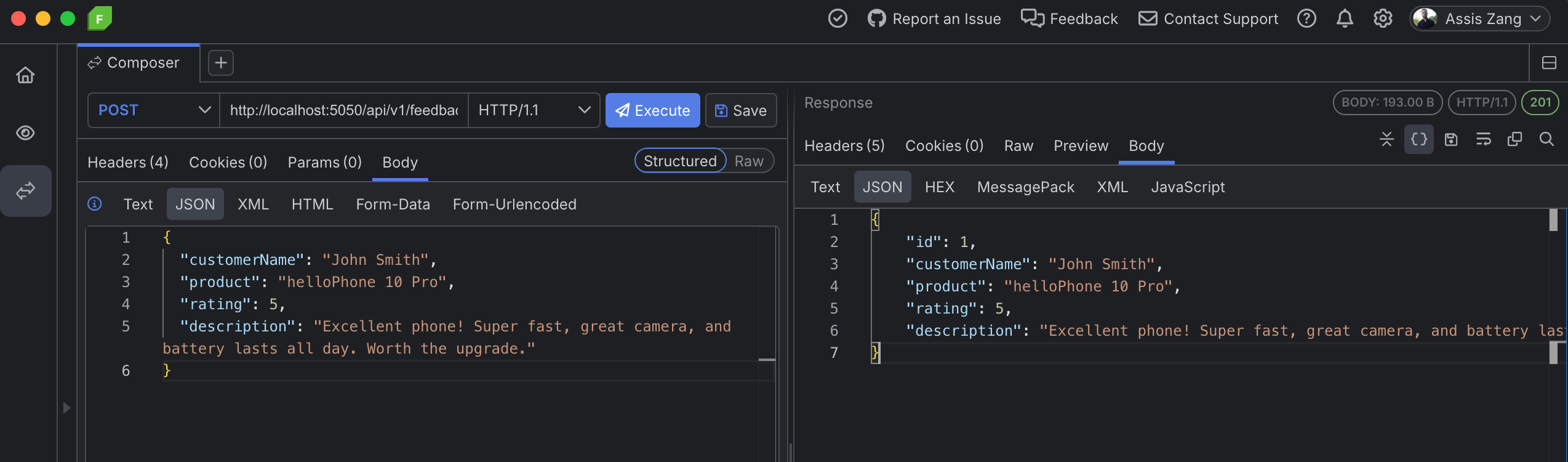
And if you make a GET request, the record will be returned:
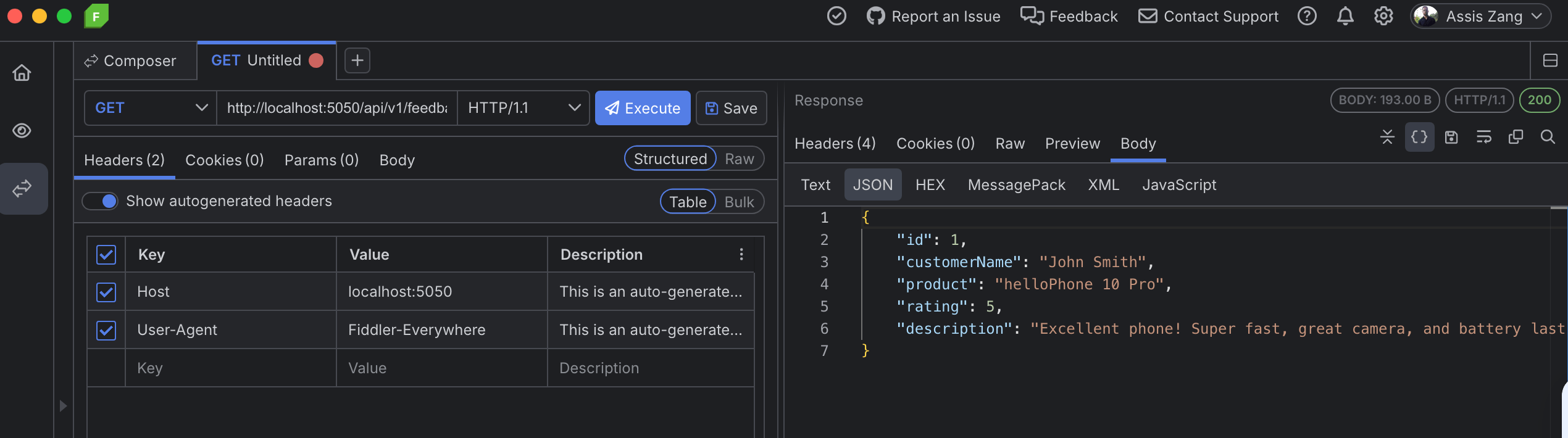
So, we have a complete data-driven microservice running in a Docker container.
🌱 Conclusion and Next Steps
Microservices emerged as an alternative to monolithic systems, reducing the tight coupling between functionalities. Their main advantages include:
- Independent deployment, which allows each service to be updated without impacting the rest of the system
- Selective scalability, where only the most resource-intensive services can be expanded
- Resilience, since failures in one service do not compromise the entire application
In this post, we built a data-driven CRUD microservice to record and query customer feedback and deployed it in a Docker container.
I hope the examples demonstrated help you understand how microservices are represented within a modern architecture. Several important features can be explored, such as authentication, monitoring, automated testing, versioning and observability, which make the microservices ecosystem even more robust.
Related Posts
Comments
All articles
Topics
Web MobileMobile
Desktop
Design
Productivity
People